One Change at a Time: Test Fixes Without Guessing
You want to test fixes without guessing, and the simplest rule is this: make one change at a time. It sounds slow. It is usually the fastest way to find out what actually works. This post explains the rule, shows how to follow it step by step, and walks through a slow laptop as a worked example.
Why changing several things at once makes problems harder to solve
When something breaks, the urge is to fix everything you can think of. You restart, update, clear the cache, and change a setting, all in ten minutes. Then the problem goes away.
Great. But which step fixed it? You do not know. Maybe one step did the work and the other three did nothing. Maybe two of them together did it. Maybe one made things worse and another covered it up.
This matters the next time the problem returns. If you cannot say what fixed it, you have to repeat all four steps and hope. And if the problem does not go away, you have learned very little, because you cannot tell which changes were useless.
Changing several things at once also adds new problems. A fix can break something else, and when five things changed, you cannot trace the new fault back to its source.
What one change at a time actually means
It means that between two tests, only one thing is different. Then if the result changes, you know what caused it.
A few details make this practical:
- One change is one idea, not one click. Updating a driver might take several clicks. It is still one change.
- You test after each change. A change you did not test teaches you nothing.
- You can undo it. If a change does not help, put things back before you try the next one. Otherwise leftovers pile up and you are back to changing several things at once.
This is close to the idea behind set-based thinking, where you keep several fixes open before you commit. You can hold many candidate fixes in mind. You just try them in order, not all together.
How to test a fix step by step
- Define the symptom so you can check it. "The laptop is slow" is vague. "It takes about two minutes from power on to a usable desktop" is something you can measure again.
- List the possible causes. Do not filter yet. Write down every idea, even weak ones.
- Pick one. Start with the cheapest and the easiest to undo, or the most likely. Either order is fine, as long as you choose on purpose.
- Make the change. Just that one.
- Run the same check. Use the same test you used to define the symptom.
- Record the outcome. Did it fix the problem, help partly, or do nothing?
- Undo it if it did not help. Then go back to step 3.
Step 5 is where people cut corners. If you test differently each time, you cannot compare results. Decide how you will check before you start.
Write down what you changed and what happened
Memory is a poor tool for this. After three or four attempts you will mix up what you tried and what happened. Writing it down fixes that.
Each entry needs only three parts: the change, the check you ran, and the result. A plain note is enough. The useful habit is to record failures as carefully as successes. A failed attempt tells you where the cause is not, and that stops you from trying it again in a week.
Problem Graph is built around this habit. You write the problem down in one line, then attach each solution you try and mark the outcome as worked, partly, or failed. The graph keeps the record, so you do not have to hold it in your head. Its own wording on this is direct: a solution that failed stays on the map as a failed solution, which is exactly what you need to know later. If you fix your own devices a lot, the post on keeping a log of tech problems and fixes shows how that looks in practice.
When a fix seems to work: confirm it was the real cause
A problem that disappears is not the same as a problem that is solved. Some faults come and go by themselves. A restart can hide a fault for days.
Before you close the case, confirm it three ways:
- Repeat the check more than once. One good result can be luck.
- Reverse the fix if it is safe to. If the problem comes back when you undo the change, and goes away when you redo it, you have found the cause.
- Wait. If the fault was intermittent, give it enough time to show up again.
If you cannot reverse the fix, mark it honestly as "partly" or "seems to work" and keep watching. That is better than a false "solved". A note that says "worked, not confirmed" is useful. A false certainty is not.
The same care applies to bugs in code. A classic example is a value that wraps around only on large inputs. Testing one change at a time, with the same input, is how you find it, as in this short piece on integer overflow with one example.
Common mistakes that bring the guessing back
- Bundling "small" changes. Two quick tweaks feel harmless. They are the start of the problem.
- Not undoing failed attempts. A failed change that stays in place can interfere with the next test.
- Changing the check. If you measure differently each time, the results mean nothing.
- Trusting a single result. One good run is a hint, not proof.
- Skipping the record. Without notes, you repeat failed ideas.
- Testing in a group without agreement. If several people change a shared setup, you lose track of who did what. Getting everyone to agree first helps, which is the point of nemawashi, getting agreement before you change something.
Example: fixing a slow laptop one change at a time
Say your laptop takes about two minutes to become usable after you switch it on. You write the problem in one line: "Laptop takes about 2 minutes to start." Your check is simple: time it from power on to a usable desktop.
You list the possible causes:
- Too many programs start at login.
- The disk is almost full.
- A pending system update.
- A background program using too much memory.
Now you go one at a time.
- Change 1: turn off one startup program you rarely use. Restart and time it. Result: about the same. Mark it failed, turn the program back on.
- Change 2: free up disk space. Restart and time it. Result: a little faster. Mark it partly. You keep this one, because it did no harm, and you note that the baseline has moved.
- Change 3: install the pending update. Restart and time it. Result: no change. Mark it failed.
- Change 4: turn off the heavy startup program that was using a lot of memory. Restart and time it. Result: well under a minute. Mark it worked.
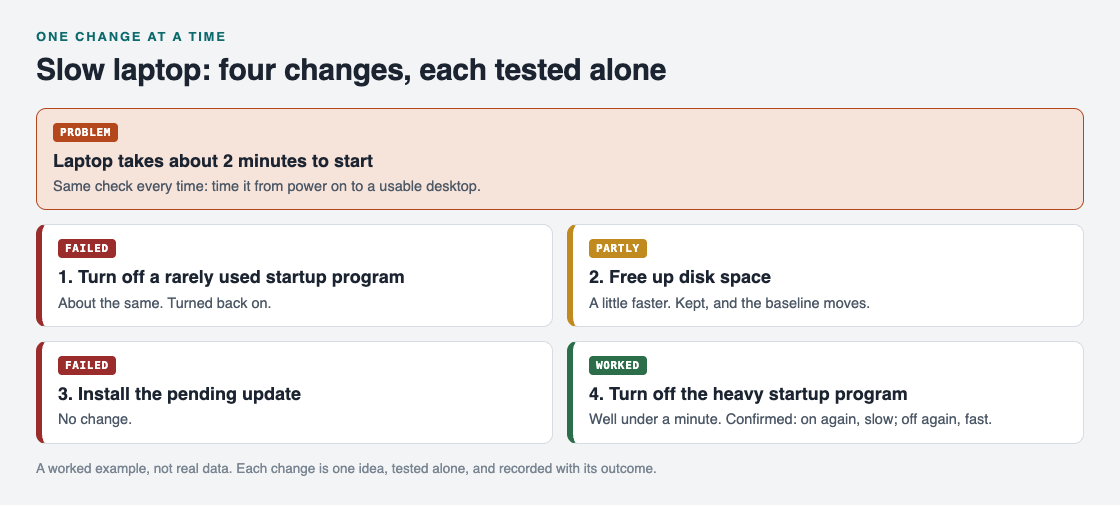
The slow laptop example as problem and solution nodes, each with its outcome.
To confirm, you turn that program back on and restart. The slow start returns. You turn it off again, and the start is fast. Now you know the cause, and you also know what to skip next time.
On the graph, this is one problem node with four solution nodes under it, each with its outcome. If a second problem shows up later, such as the battery draining fast, you can link it to the first. Linking problems that belong together, even across lanes, is how patterns show up on the map that never show up in a list. Here, both problems might trace back to the same program.
Frequently asked questions
Is changing one thing at a time always the best way?
Not always. If each test takes days, or if the problem is urgent, you may have to try a few things together. Do it knowingly, and then narrow it down afterward by undoing changes one at a time.
What if I do not know what to change first?
Start with the change that is cheapest and easiest to undo. Or start with the most likely cause. Either way, write down your reason, so the order is a decision and not a guess.
How do I know a fix really worked and was not luck?
Repeat the same check several times, and if it is safe, undo the fix to see whether the problem returns. If it does and then goes away again when you redo the fix, you have found the cause.
Should I record fixes that failed?
Yes. A failed attempt shows where the cause is not, and it stops you from repeating it later. In Problem Graph you mark each attempt as worked, partly, or failed.
Get started
Pick one problem you have right now. Write it in one line, list three possible fixes, and try the first one alone. Record what happened before you move on.
Try Problem Graph: it is free, and you can look around the public network without an account. Write one problem down in a line and attach the first thing you will try.
Comments
No comments yet.
Sign in or make an account to comment.