Open redirect testing: check every redirect link
An open redirect lets a link that starts with your trusted domain send users somewhere you never intended. Open redirect testing means checking every redirect link in your app, looking past the obvious login flow, because the risky ones often sit in places nobody reviews. This guide shows you how to find redirect points, test them safely, recognize weak fixes, and close the gap for good.
What an open redirect is and why it matters
Your app redirects users constantly. After sign in, it returns them to the page they asked for. After checkout, it sends them to a confirmation page. Often the destination comes from the URL, like /login?next=/dashboard.
An open redirect is when the app forwards to any destination in that value without checking it. The link still shows your domain, so people and email filters trust it. That trust is the whole problem. A destination that points off your site, chosen by someone else, defeats the reason the link looked safe.
On its own this reads as low severity. The real concern is what it enables when combined with sign in flows, server side fetches, or script handling. The OWASP Unvalidated Redirects and Forwards Cheat Sheet puts the first risk plainly: phishing. Because the link shows your site's name, the phishing attempt looks more trustworthy. OWASP adds a second: a crafted URL can pass an access control check and then forward to a privileged function, so test redirects alongside broken access control.
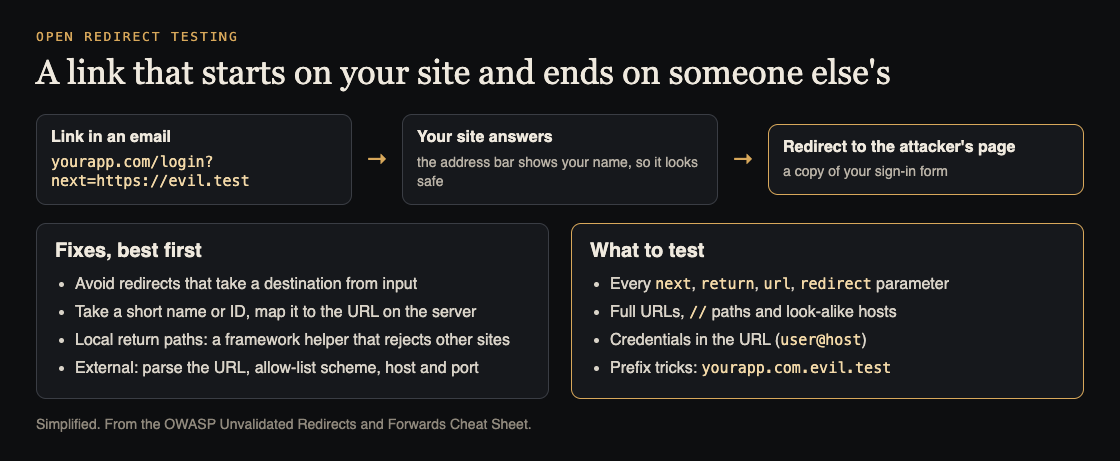
How an open redirect is used, and what to fix and test. Simplified from the OWASP Unvalidated Redirects and Forwards Cheat Sheet.
Find every redirect link: parameters, headers, and hidden flows
You cannot test what you have not found. Start with an inventory. Click through the app with a proxy recording traffic, then look for the common signals:
- Query parameters with names like
next,url,return,returnTo,redirect,redirect_uri,dest,continue,callback, andgoto. - Response headers. Any
Locationheader on a 301 or 302 that reflects a value you supplied. - Login and logout flows. Where does the app send you after you authenticate, and does that come from the URL?
- OAuth and SSO. The
redirect_urivalue in an authorization request is a redirect destination with tokens attached. - Meta refresh and client side routing. Single page apps sometimes redirect in JavaScript based on a query value, which server logs never show.
Write down each spot: the URL, the parameter, and what the app does with it. That list is your test plan.
Open redirect testing step by step with safe payloads
Test against your own staging environment or a site you own. Use a destination you control so nothing leaves your hands.
Step one: baseline. Send a normal, expected value and confirm the app redirects where it should. For /login?next=/dashboard, you should land on the dashboard.
Step two: point off site. Change the value to a domain you own, such as /login?next=https://your-test-domain.example/ok. Watch the response. If the Location header or the browser sends you to your test domain, the redirect is open.
Step three: protocol relative. Try //your-test-domain.example with two leading slashes and no scheme. Browsers treat this as an absolute URL, and naive checks that only block http:// miss it.
Step four: encoded variants. Try values that url encode the slashes or the scheme. Some apps decode the value after they check it, so the check runs on one string and the redirect uses another.
Step five: record each result. Note whether the destination was blocked, allowed, or partly handled. Keep the payloads: they become your regression tests.
A redirect that only ever moves within your own site, built from a fixed server side map, does not need any of these tests to pass. It needs no user controlled destination at all.
Bypass tricks that break weak allowlists
Many teams add a check, see it block one payload, and call it done. Weak checks fail against small variations. When you test a fix, try these to prove it holds:
- Substring checks. Code that allows any URL containing
yourdomain.comcan be fooled by a destination that puts your name in a subdomain or path it does not control. Matching a substring is not matching a host. - Prefix checks. Code that allows anything starting with
https://yourdomain.comcan be tricked by a lookalike host that begins the same way. Check the parsed host, not the raw string. - Scheme gaps. Blocking
httpandhttpswhile leaving other schemes handled by the browser is an incomplete block. - Decode order. If the app validates before it decodes, an encoded value sails past the check and decodes into a live destination at redirect time. Validate the final value, after all decoding.
- Backslashes and whitespace. Some parsers treat a backslash like a slash, or trim leading characters differently than your check does. Mismatched parsing is where bypasses live.
The lesson across all of these: validate the destination the way the browser will actually read it, using a real URL parser, not string matching.
When an open redirect becomes worse: OAuth token theft, SSRF chains, and XSS
Severity depends on context. Three contexts turn a minor redirect into a real incident.
OAuth token theft. If the authorization server accepts a redirect_uri that is not tightly registered, an attacker can redirect the flow and capture the code or token meant for your app. Treat every OAuth redirect destination as an exact match allowlist, never a pattern.
Server side request forcing. When the redirect is followed by your server rather than the browser, a user controlled destination becomes a way to make your backend fetch internal addresses. That crosses into server side request forgery territory. Our guide on SSRF testing to stop your app fetching internal URLs covers how to test the server side case.
Script execution. If a redirect target is written into a page or a link without being treated strictly as a navigation URL, certain destinations can lead to script running in the user's session. Validate the scheme so only ordinary web navigation is ever allowed.
How to fix open redirects for good
OWASP's fixes, best first. You do not need user controlled external destinations in most apps, so fix the class, not one payload:
- Avoid the redirect. If a flow does not need a destination from the request, do not take one.
- Prefer indirect references. Store allowed destinations server side and pass a key, like
next=dashboard, that maps to a known path. The user never supplies a URL. OWASP notes one catch: make sure people cannot cycle through the IDs to list every target. - Use your framework's local-redirect helper for return paths, one that rejects any destination off your site.
- Allow only relative paths. If you must accept a destination, reject anything that is not a path on your own site. Parse it, confirm there is no host, and confirm it starts with a single slash and not two.
- Use an exact allowlist for the rare case where you forward to a known partner. Parse the URL with a maintained parser, compare scheme, host and port against a fixed list, reject URLs with a user name in them, and redirect to the validated URL itself. Optionally, send people through a notice page that shows where they are going.
- Lock down OAuth redirect URIs to exact registered values.
- Add a regression test. Keep the bypass payloads you tried and run them in your test suite so a future change cannot quietly reopen the hole.
No single fix makes an app immune, and testing never finds every weakness. The goal is to remove user controlled destinations wherever you can and to validate the few that remain the way the browser reads them.
Frequently asked questions
Is an open redirect a real vulnerability or just low risk?
By itself it is usually rated low, because it moves users rather than exposing data directly. It becomes serious when chained with OAuth token flows, server side fetching, or script handling, so judge it by its context, not its default rating.
Which URL parameters most often cause open redirects?
The usual names are next, url, return, returnTo, redirect, redirect_uri, dest, continue, and callback. Any value that ends up in a Location header or a client side navigation is worth testing.
Can automated scanners find all open redirects?
No. Scanners catch obvious reflected parameters but miss client side routing, encoded bypasses, and OAuth specific cases. Pair automated passes with manual testing and a human who understands your flows.
How do open redirects relate to SSRF?
When your server, not the browser, follows the redirect, a user controlled destination can reach internal addresses, which is the SSRF case. Test both together.
Get started
Open redirects are easy to miss because each one looks harmless until it is chained. The fix is routine: inventory every redirect point, test it with destinations you control, and remove user controlled URLs wherever you can. whitehatstoic does web app and API review that covers checks like this, with a written report, the fixes, and a retest after you apply them. Scope is set after a short call, and work is priced per hour, per feature, or per project.
Testing is scoped after a short call: book a meeting about security testing.
Building something that has to be safe? Book a meeting with whitehatstoic: tell us the product, the deadline and your biggest worry, and we reply with a plan and a price.
Comments
No comments yet.
Sign in or make an account to comment.