Outdoor walking game for families with kids: an easy plan
An outdoor walking game for families with kids works when every child has a reason to keep going: a place to reach, something to spot and a job to do. This guide shows you how to set one up with Cat Go, a game that plays in your web browser, where you walk to treat stops on a map and photograph real cats you meet. You will get four jobs to share on one phone, one family rule for real cats, and a one-hour walk plan you can copy this weekend.
Why children need a game, not just a walk
Most children do not object to walking. They object to walking with no point. "Just round the block" sounds like a chore. "Let's reach the treat stop by the park" sounds like a mission.
The NHS physical activity guidelines for children and young people say those aged 5 to 18 should aim for an average of at least 60 minutes of moderate or vigorous activity a day across the week. Walking to school counts as an example. So does walking the dog. The same page asks for a variety of activities, and for long spells of sitting to be broken up.
A walking game will not cover all of that. But a family walk that everyone wants to take is one of the easiest pieces to add, and it can happen on any ordinary street.
What makes an outdoor walking game for families with kids work
A good family walking game has three parts. Look for all three before you pick one.
- A goal you can see. A target gives the walk a direction, and a point on a map is easy for a child to follow.
- A job for each child. Two children with one phone can argue for an hour. Two children with two clear jobs tend not to.
- A reason to walk on. The game should end each goal by pointing at the next one, so the walk does not stall at the first stop.
The NHS walking for health page backs the habit side of this. It suggests making walking a habit, going for a stroll with family after dinner, and adding variety through parks, riverside paths and nature reserves.
How Cat Go turns a street into a game board
Cat Go describes itself in one line: "Walk anywhere, photograph a real cat, lure it with food and catch it. Every catch keeps its breed and where you found it." Here are the parts a family will use:
- Treat stops. The home screen is a map with treat stops on it. Walk close enough and the card says "You're here. Grab what's in the bowl." You collect kibble, and sometimes tuna. That food is only in the game.
- The photo. When you meet a real cat, you catch it by taking its photo. The camera screen says "Fit the whole cat in the frame".
- The breed. The game asks "Which breed is it?" and you pick from a list. If no one is sure, the screen says "Mixed breed is always a safe pick."
- The lure. You choose how much kibble and tuna to bring, then toss in-game treats to win the cat over. The game's tip: "Tuna works much better on wary cats. Food you don't use comes back."
- The Catdex. A caught cat is "Saved to your Catdex with its breed and the place you found it." You can name it.
When the bag runs dry, the game says "Out of food - visit a treat stop to lure cats." That is the reason to walk on, built in.
Four jobs to share on one phone
One phone is enough. Give it to an adult and give each child a job. Swap the jobs at every treat stop so everyone gets a turn at each.
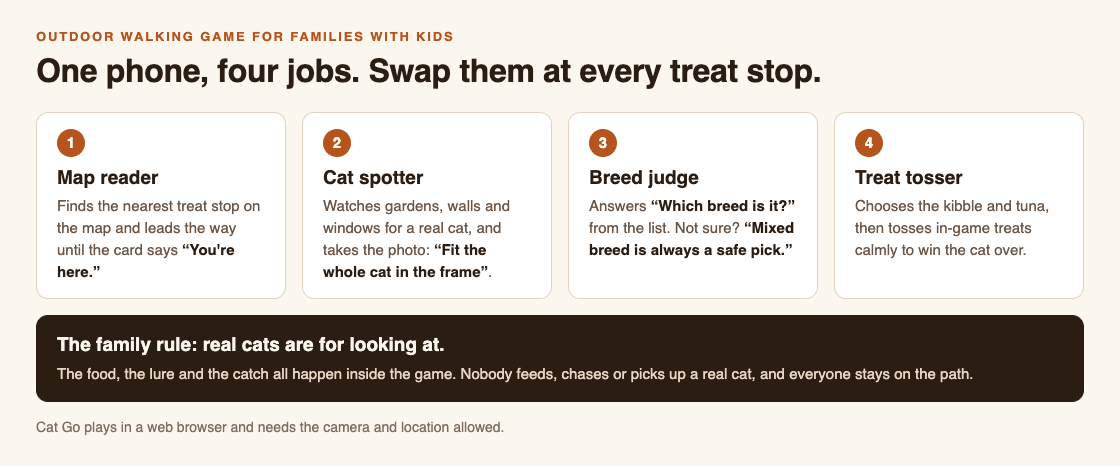
One phone, four jobs, swapped at every treat stop.
- Map reader. Finds the nearest treat stop and leads the way until the card says "You're here."
- Cat spotter. Watches gardens, walls, porches and windows for a real cat, then lines up the photo.
- Breed judge. Answers "Which breed is it?" Rarer breeds are warier, so a good judge looks closely before picking.
- Treat tosser. Decides how much kibble and tuna to bring and tosses calmly. If a cat runs, the game says "It got away" and advises: "Stay calm with your tosses, and bring tuna for wary ones."
With two children, give each two jobs. With one child, let them pick a favourite and take the rest yourself.
The family rule for real cats
Say this before you leave, and say it again at the first cat: real cats are for looking at. In Cat Go, the food, the lure and the catch all happen inside the game. Nobody feeds, chases, corners or picks up a real cat, and everyone stays on the pavement, never in someone's garden.
Children often want to get close. International Cat Care's guide How to greet a cat treats any greeting as an invitation the cat can turn down by walking away. It suggests making yourself small, not leaning over or cornering a cat, and looking past it rather than staring, because staring creates distance. Turn that into a game too: who can stand stillest while the photo is taken?
If the cat leaves before the photo, that is fine. It is part of the game, and there will be another cat.
A worked example: a one-hour family walk
Here is a plan for a Saturday morning with two children. Copy it, then change it to fit your street.
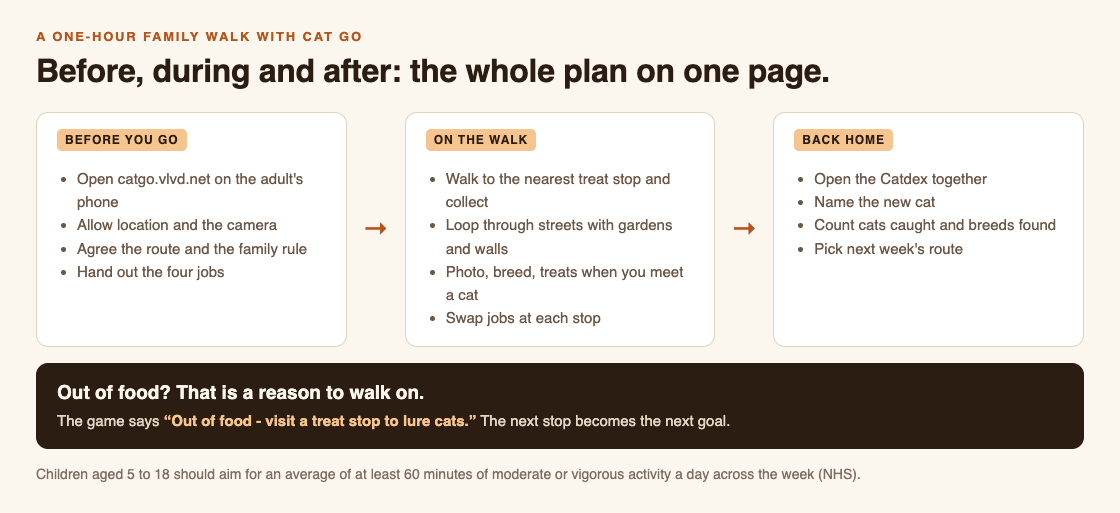
Before, during and after: the whole plan on one page.
- Before you go (5 minutes). Open catgo.vlvd.net on the adult's phone and allow location and the camera. The site says location is used "to find treat stops and to record where each cat was caught. Nothing else is shared." Agree the route, say the family rule, and hand out the first jobs.
- Walk to the first treat stop (10 to 15 minutes). The map reader leads. At the stop, tap Collect treats. Swap jobs.
- The cat loop (30 minutes). Take streets with front gardens and low walls, so there is plenty to look at. When the cat spotter sees one, everyone stops on the pavement. Photo, breed, treats. If the photo shows no cat, the game says "No catch this time" and "Scanning is free - no food was used", so just try again later.
- Second treat stop (10 minutes). If you ran out of food, this is your next goal. Swap jobs again.
- Back home (5 minutes). Open the Catdex together. Name the new cat, and check the counts for cats caught and breeds found.
Keep the pace brisk between stops. The NHS describes moderate activity as raising your heart rate and making you breathe faster, while you can still talk but not sing. Children chatting about which cat comes next is about right.
If you want more ways to keep the walking habit going, our guide How to make a daily walk more fun, and keep doing it has a week of walks you can build on.
Frequently asked questions
What age is this walking game good for?
The four jobs work best for children old enough to read a map and wait quietly near a cat. Younger children can share a job with an adult, such as cat spotter.
Do the kids need their own phones?
No. Cat Go plays in a web browser, so one phone is enough, and the family shares it by taking turns at the four jobs.
Do we feed or touch the cats we find?
No. The kibble, tuna and catch are all inside the game. Real cats are only looked at and photographed from the pavement.
What do we need before we start?
A phone with a web browser, and the camera and location allowed for catgo.vlvd.net. With location off, the screen says "Location is off" until you allow it.
Get started
Pick a route, choose who takes each job first, and say the family rule before you step outside. Then play Cat Go in your browser: walk anywhere, photograph a real cat, lure it with food and catch it, and keep its breed and the place you found it in your Catdex.
Comments
No comments yet.
Sign in or make an account to comment.