Page turn sounds for a book review video: what Wavecrate has
If you are looking for page turn sounds for a book review video, here is the plain answer first: Wavecrate had no page turn sound when this was written on 14 October 2026. A search for "page" found nothing, and a search for "paper" found a photo and a track, not a sound. What it does have is a small set of Foley, transition and ambience sounds that cover the moments around the page, and this guide shows where each one goes and which license it needs.
Wavecrate licenses royalty-free sound effects, including Foley, transition and ambience sounds for videos, and every download comes with a license certificate and a code anyone can check on its verify page.

What a book review video needs from sound
A book review is mostly a person talking, with shots of a cover, a spine and a few pages. Sound makes those shots feel like a real object in a real room. You do not need many sounds, and you do not need a library of paper noise.
Think of four jobs, in this order of importance:
- The page itself: the soft flick or rustle when a page moves on screen.
- The cut: a short whoosh that carries the viewer from one chapter or point to the next.
- The room: a quiet bed under the opening so the first line is not said into silence.
- The detail: one sound tied to something the book is about, used once.
Your voice is the lead. If a viewer notices a sound, it is probably too loud.
Page turn sounds for a book review video: what Wavecrate has
On 14 October 2026 a search for "page turn" on Wavecrate returned 0 results. So did "page", "book" and "rustle". A search for "paper" returned two: the Warm Paper Texture photo and a music track called Paper Lanterns. Neither is a page sound.
The Foley category held ten sounds that day: Heartbeat Pulse, Typewriter Keys, and variants of Mouse Clicks, Mechanical Keyboard Typing, Robot Servo and Cooling Fan Spin. They are desk, computer and body sounds. The catalog changes, so press / on any Wavecrate page and search for "page" before you rely on this.
For the page turn itself, the honest route today is to record your own. Hold your phone about a hand's width from the book in a quiet room and turn ten pages at different speeds. You get the exact paper in your video, and the sound always matches the book on screen. Then use Wavecrate for the sounds around it.
Three Wavecrate sounds that fit a book review
Each of these was read on its own page on 14 October 2026.
- Air Cut Whoosh is a 0:01 transition sound from Wavecrate Foley Lab, marked Free. Its page describes it as a clean, ready-to-drop sound for transition and swipe moments, tagged energetic and fast. A short whoosh across a cut is a common stand-in for a quick page flip between chapters.
- Typewriter Keys is a 0:03 Foley sound, tagged nostalgic, typing, keys and office. It is Premium, so it has no Free license: Standard is listed at $3 and Extended at $9. It suits the moment you read a line as if the author is writing it.
- Rain on Window is an 0:08 ambience sound, marked Free and tagged calm, rain, weather and background. It is a quiet bed for a "reading on a wet evening" opening. It is only 8 seconds, so it covers an intro, not a whole video.
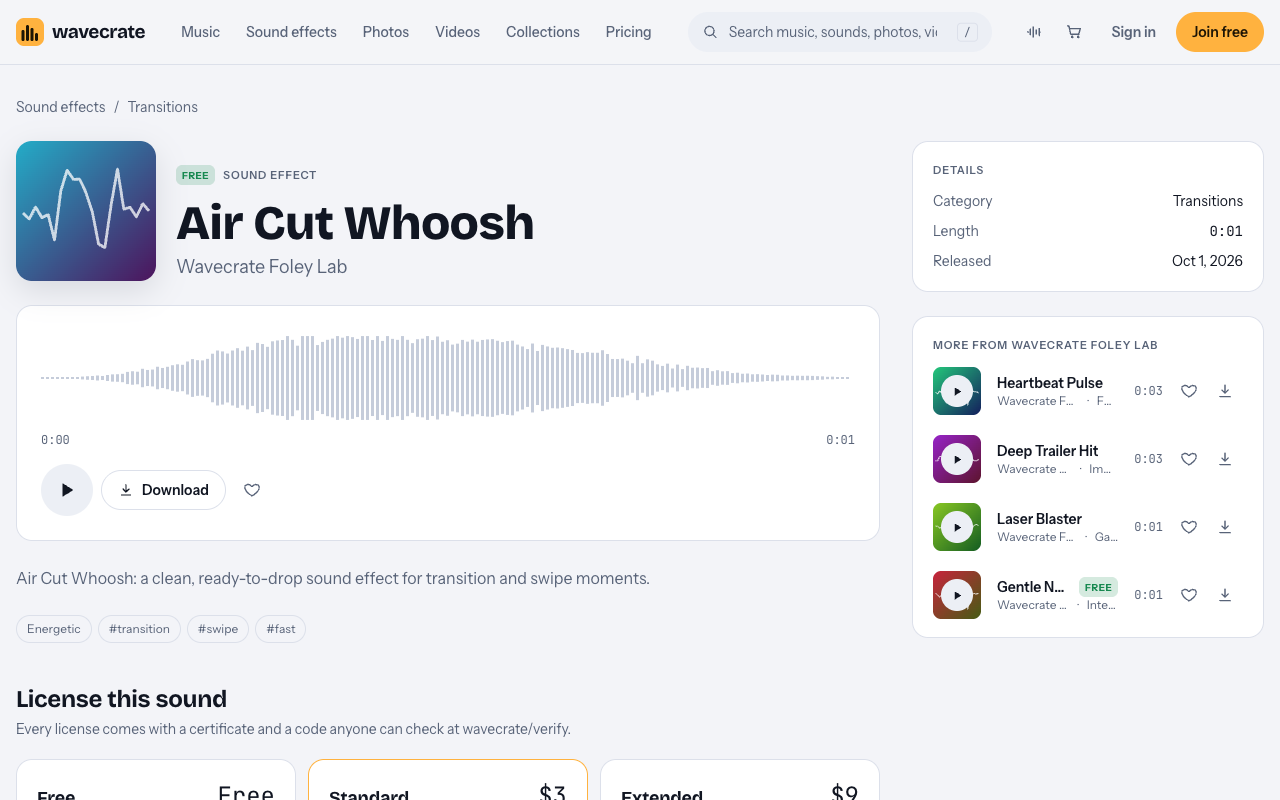
The Air Cut Whoosh page: marked Free, one second long, with Standard and Extended below.
Press Space on a sound's page to play or pause it, so you can audition a handful in a minute.
A worked example: 60 seconds of a review
Lay your voiceover down first. Then add sounds on top, never the other way round. Here is one stretch of a review, built from the three sounds above.
- 0:00 to 0:08. You open with "I read this one during a week of rain." Rain on Window sits low under the line and fades out as you move on.
- 0:25. You say "Then the story jumps ten years" and cut to the next chapter's page. Place Air Cut Whoosh so it starts two or three frames before the cut. The ear expects the sound slightly early.
- 0:25 to 0:48. You read a short quote. Add nothing under it. Silence makes the quote land.
- 0:48. You say "He wrote the first draft in a month" and read a line from it. Typewriter Keys plays once, under the line.
- Your own page turns. On each shot where a page visibly moves, use one of the page turns you recorded.
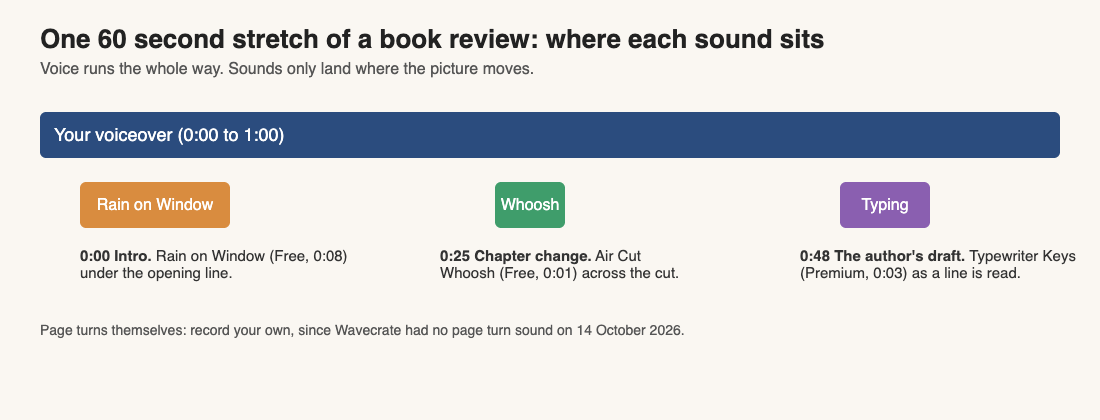
One 60 second stretch: the voice runs all the way, and each sound sits where the picture moves.
If your editor shows the waveform, line up the loudest point of each sound with the moment on screen, not the start of the file. A whoosh has a quiet lead-in and a sharper peak, and aligning the peak looks right.
Which license each use needs
The same sound can need a different license depending on what your video is for. Wavecrate's sound pages show three cards: Free, Standard and Extended. Take Air Cut Whoosh, which shows all three. Paid licenses are not on sale yet (Wavecrate says purchases open soon), so the prices below are the listed prices for when sales open, while sounds marked Free, like Air Cut Whoosh, can already be downloaded with a free account.
- Your own review channel, with credit. The Free card reads "Online videos and podcasts, with credit", and lists YouTube, TikTok, Instagram, Twitch and podcasts and monetized channels. It also says "Credit text required in the description" and "3 free downloads a month on a free account".
- A channel that is your business. The Free card does not tick your own business and brand content. Standard does: "Your own business and brand videos", "No credit required", listed at $3 on this page. If a bookshop runs the review channel, Standard is the row to read.
- A review someone pays you to make, or an ad for a book. Extended lists "Paid advertising and TV or radio broadcast" and "Client work and unlimited impressions", listed at $9 on this page. A sponsored review made for a publisher is client work, and a boosted post is a paid ad, so read Extended. Wavecrate's pages do not define paid advertising further.
Typewriter Keys is Premium, so there is no Free card at all: its page lists Standard at $3 and Extended at $9. Items can change between Free and Premium, so read the page on the day you download.
Pro is listed at $99 a year or $12 month to month, is not on sale yet, and gives Standard licenses on the whole catalog, never Extended. Wavecrate's pages say nothing about a sound played live in a room, so treat a live reading event as not covered.
Mix the sounds under your voice
- Set your voiceover level first and leave it alone.
- Bring each effect in until you can just hear it while you talk, then lower it a little more.
- Use a gentle high-pass filter on the whoosh so low rumble does not muddy the voice.
- Use two or three variations of your own page turns and shuffle them, so no two in a row are identical.
- Skip a sound when nothing on screen moves. A page sound over a still cover feels wrong.
Check the mix on headphones and on a phone speaker. If a sound disappears on the phone, it was too quiet.
Put the credit and the certificate to work
If you use a Free sound, paste the credit text into the video description before you publish. Wavecrate's pages say credit text is required in the description but give no fixed wording, so copy whatever text the site gives you exactly as written.
Every download also comes with a license certificate and a code. Anyone can enter the code on the verify page, with no account, to see who holds the license and what it covers. Keep the code with your project files so you can find it later.
Frequently asked questions
Does Wavecrate have page turn sounds?
Not on 14 October 2026: searches for "page turn", "page", "book" and "rustle" each returned 0 results. Search again with / before you rely on that, since the catalog changes.
Can I use a Free sound in a monetized book review?
The Free card on Air Cut Whoosh lists monetized channels and says "Credit text required in the description". The Free license covers online videos and podcasts, so a review on your own channel with credit is the use it names.
Do I need Extended for a sponsored review?
Extended is the row that names paid advertising and client work. A review a publisher pays you to make is client work, so read Extended for it.
Is Typewriter Keys free?
No. It is marked Premium, and its page lists Standard at $3 and Extended at $9, with no Free card.
How do I show I licensed a sound?
Each download comes with a certificate and a code. Anyone can check the code on the verify page without an account.
Get started
Browse Wavecrate: you can join free and download items marked Free now, paid licenses are not on sale yet (purchases open soon), and every download comes with a license certificate and a code anyone can check on its verify page.
Browse the Foley sounds, read the pricing page to compare the three licenses, and join free for 3 free downloads a month. Start with Air Cut Whoosh, which is marked Free today.


Comments
No comments yet.
Sign in or make an account to comment.