Parent group problems: one list for school parents
Many school parent groups run on a chat thread, and that is where parent group problems go to disappear. Someone mentions the broken gate latch, twenty people react, and two weeks later nobody remembers who said they would call the office. This post shows you how to keep one list for school parents: what goes on it, how to write each problem so anyone can pick it up, and how to bring it to a PTA or class parent meeting without starting yet another group chat.
Why parent group problems get lost in chat threads
A chat thread is good at one thing: telling people something right now. It is bad at remembering. A problem raised on Monday is buried under bake sale photos by Wednesday. The parent who offered to help is not sure anyone saw the offer. The next parent who hits the same problem asks again, and the thread starts over.
There is a second cost. Nobody records what was already tried. If three parents emailed the office about the car park queue last term and nothing changed, that matters. It tells you emailing is not the fix. In a chat thread, that history is gone.
A shared list fixes both. Each problem gets one line, and everything tried on it stays attached to that line.
What belongs on a shared list for school parents
Put things on the list that the parent group can actually do something about. Good examples:
- The pickup queue backs onto the main road at 3:15.
- Lost property is not labelled, and the box overflows by October.
- Year 4 parents did not hear about the swimming kit change until the morning of.
- The class fund has no clear way for parents to see what has been spent.
- Not enough volunteers for the spring fair setup.
Leave out complaints about a named teacher, disputes between two families, and anything about a specific child. Those need a private conversation, not a shared list. More on that in the FAQ below.
If you are not sure, ask: could any parent in the group help with this if they read it cold? If yes, it belongs.
How to write a parent group problem so anyone can act on it
In Problem Graph, a problem is one line. You type it, press Enter, and it lands on the graph. One line forces you to be specific, which is the point.
Compare these:
- Weak: Communication issues.
- Better: Year 4 parents hear about kit changes too late to buy anything.
The second version names who is affected and what goes wrong. A parent reading it on their phone at pickup knows exactly what it means.
Each problem also sits in a lane: personal, work, expert or scientific. For a school parent group, most problems fit the personal lane. Pick one lane and stick with it so filtering stays simple.
Give every problem an owner and a next step
A problem with no owner is just a worry. Put the owner's name in plain words where people will see it. The simplest place is in the solution you attach.
Under each problem you add solutions. They start as ideas. When someone takes one on, you mark it as one you are trying. When it is done, you record the outcome: worked, partly, or failed.
Here is a worked example for the pickup queue:
- Problem: Pickup queue backs onto the main road at 3:15.
- Solution (idea): Ask the school to stagger Reception pickup by ten minutes.
- Solution (trying): Priya asks the office about a staggered pickup trial before half term.
- Solution (failed): Emailed the office asking parents to park further away. No change after three weeks.
The failed one stays on the map. That is useful. The next parent who thinks "we should email the office" can see it was already tried. As the Problem Graph home page puts it, a solution that failed stays on the map as a failed solution, and that is exactly what the next person needs to know.
Keep each "trying" solution to one next step with a name in it. "Priya asks the office" is a next step. "Look into it" is not.
Sort the list before each PTA or class parent meeting
Before a meeting, open the app and switch to the List view beside the map. Filter by lane, and by Mine, Network or All shared, so you are looking only at what the parent group shared.
Then go through it with three questions:
- Which problems have a solution marked as trying? Ask the owner for an update.
- Which problems have only ideas? Find an owner at the meeting.
- Which problems have a solution marked as worked? Celebrate briefly, then move on.
If the list is long, sort it on paper by urgent and important before you walk in. The Eisenhower matrix works well for this: the fair setup is urgent and important, the lost property labels are important but can wait a month. Deciding the order is your call, so do it before the meeting starts.
Spot repeat problems across classes, grades, and years
This is where a graph beats a list. You can link problems that belong together. When Year 2 parents write "found out about the trip deadline the night before" and Year 4 parents write "heard about kit changes too late", link them. On the map, they sit next to each other, and you can see the real problem: notices reach parents late, across the whole school.
That changes what you ask the school for. Instead of two separate complaints, you bring one pattern with two examples.
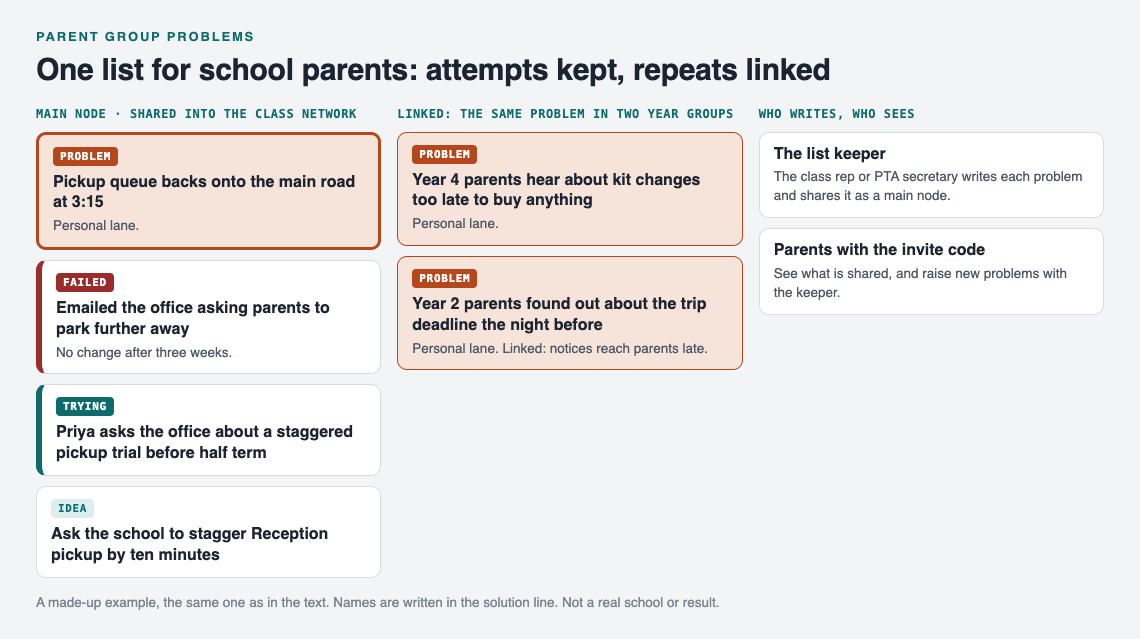
The made-up parent list from this post.
Once a fix works for one class, try it on every linked problem. The idea of yokoten, applying one fix to every similar problem, fits school groups well. If a weekly summary from the class rep solved late notices in Year 4, the linked Year 2 problem is the obvious next place to try it.
Some of this can carry across years too. When new class reps join the network with the invite code, they see the main nodes already shared into it, along with their solutions and outcomes. So on those problems they can see what was tried and what failed. They do not see the rest of anyone's graph, so if something matters for next year, make sure it is shared as a main node before you step down.
Keep parents informed without another group chat
Here is how sharing works. Everything starts private. Only you see it, and it follows your account to any phone or computer you log in on.
To share with the parent group:
- Create a private network for your class or PTA.
- Give the invite code to the parents you want in it.
- Mark a problem as a main node and share it into the network.
Only a main node can be shared. When you share it, its solutions, their outcomes, and the requirements they need go with it. A problem you have only linked to it stays home, like the rest of your graph. So you can keep rough notes at home and share the clean version.
Two honest notes. First, the app says anyone with the invite code can join, so treat the code like a key. Share it in the class channel, not on a public page. Second, the pages describe sharing, linking and borrowing, not notifications or comments. Parents see the list when they open it. The habit that works: the class rep posts one line in the existing chat before each meeting, "list is updated, three items need owners", and people go look.
Frequently asked questions
How do we get busy parents to actually use one list?
Make it the place decisions get recorded, not another place to chat. If the meeting agenda comes from the list, the list becomes the way to get a problem discussed. It works on a phone in the browser, so nobody needs to install anything.
Should problems about specific children go on a shared parent list?
No. Anyone with the invite code can join a private network, so keep names of children, health details and family matters off it. Write the general problem ("allergy information is not visible at the fair food stall") and handle individual cases directly with the school.
Who should manage the list for a PTA or class parent group?
Pick one person per network, usually the class rep or PTA secretary, to write problems up, record who takes each next step, and share them as main nodes. Other members see what is shared, so they raise new problems at the meeting or in the existing chat, and the list keeper adds them.
How is this different from a volunteer group or neighbourhood list?
The method is the same, but parent groups can turn over every year and deal with one institution, the school. That makes linking across classes, and sharing the problems that matter into a network next year's reps can join, more important. See volunteer group problems and neighbourhood problems for those versions.
Get started
Open the app and press "Load example set" if you want to see how a filled graph looks first. You can browse the public network without an account. To add problems or create a network for your class, make an account with a username and a password.
Then write the one problem your parent group raised most this term. Attach the first thing someone will try, with their name in it. Create a network, share that problem as a main node, and send the invite code to your class reps.
Try Problem Graph: it is free, and you can look around the public network without an account. Write one problem down in a line and attach the first thing you will try.
Comments
No comments yet.
Sign in or make an account to comment.