Particle plexus loops for a tech conference opener: a guide
The first thing a conference crowd sees is the big screen. It glows behind the stage while people find their seats, and it is still there when the first speaker walks on. If you are picking particle plexus loops for a tech conference opener, you want slow motion that says "technology" without getting in the way of your title. This guide looks at one plexus loop on Wavecrate, a few loops to compare it with, and the license each kind of opener needs.
Wavecrate licenses royalty-free music, sound effects, photos and videos, and every download comes with a license certificate and a code anyone can check on its verify page.

Why particle plexus loops for a tech conference opener work
A plexus is a field of points joined by thin lines. The lines form and break as the points drift. It hints at networks, data and connection without showing any one product.
That makes it a calm choice for most tech events. It is mostly dark space, so a title on top stays easy to read. The motion is slow, so people can look at it for a long time without getting tired of it.
It also fits a room. A screen at the front of a hall is seen from far away. Fine lines and points of light read as texture from the back rows and as detail from the front.
What the Particle plexus Loop page shows
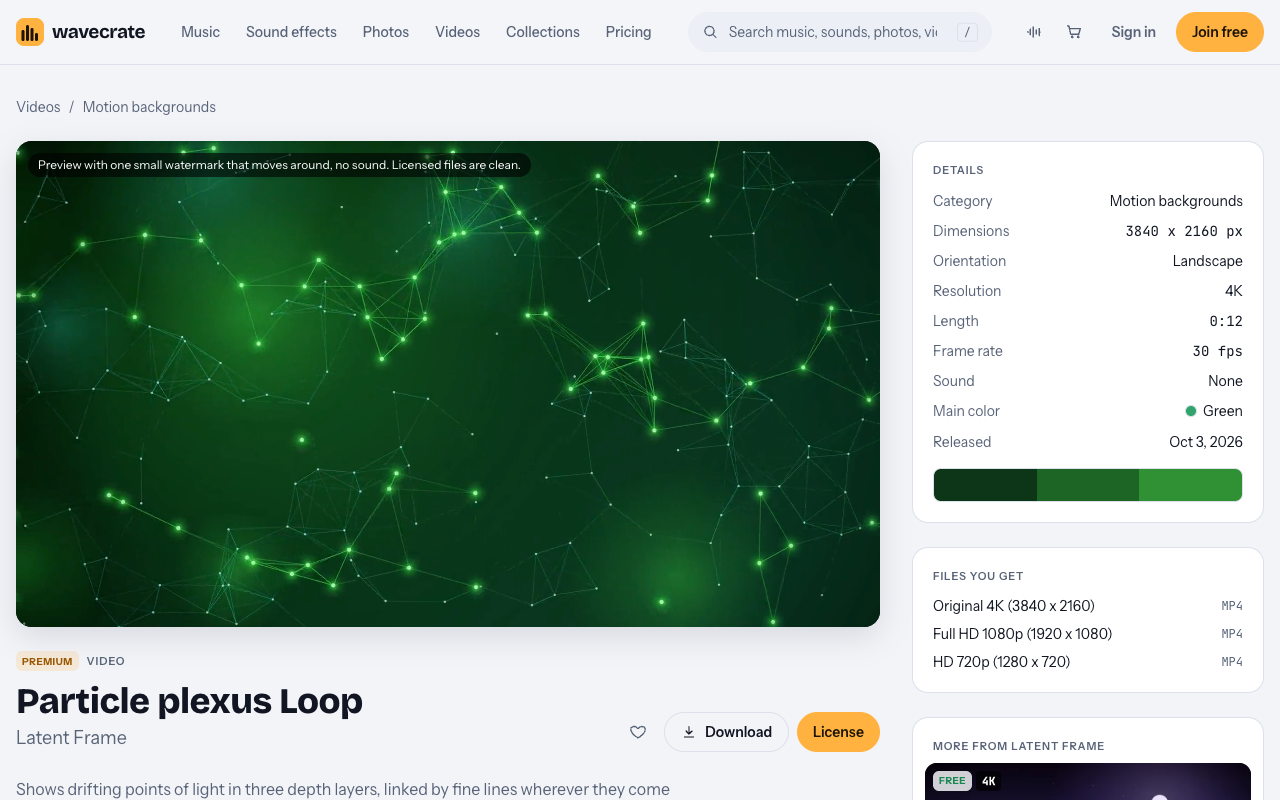
The Particle plexus Loop sits in Videos, under Motion backgrounds. It is a Premium item by Latent Frame. Its page says it "Shows drifting points of light in three depth layers, linked by fine lines wherever they come close." It also calls it "A seamless 12-second 4K loop."
Here is what the page listed on 11 October 2026:
- Size: 3840 x 2160, landscape, 4K.
- Length: 0:12 at 30 fps.
- Sound: None. The page calls it "Silent."
- Main color: Green.
- Released: 3 October 2026.
- Files: Original 4K mp4, Full HD 1080p mp4 and HD 720p mp4.
The preview plays with one small moving watermark and no sound. The licensed files are clean. The tags include calm, dreamy, particles, plexus, network, data, abstract, loop and seamless.
Because the loop is silent, any music or sound you add is a separate item with its own license.
4K is a good starting point for a big screen. If your playback needs Full HD, the 1080p file is already there, and 4K scales down to 1080p cleanly.
Other motion backgrounds to compare
The Motion backgrounds category held more than the plexus when it was read. You will find Neural Network Loop, Hex Mesh Loop in blue and teal, Wave Interference Loop, 4K Emerald Gradient Flow and Retro Neon Grid, which is Premium.
Slow Gradient Flow was marked Free on the day of writing. Its page describes it as "Blue and violet gradients drifting slowly, for titles and presentations." It is Full HD and 10 seconds long. A soft gradient like this makes a quiet title card before or after the plexus.
Items can change between Free and Premium. Read each page again on the day you download.
How the licenses map to an opener
Wavecrate lists three video licenses. The plexus page offers two of them. Paid licenses are not on sale yet (Wavecrate says purchases open soon), so the prices below are the listed prices for when sales open; items marked Free can already be downloaded with a free account.
- Free (only on items marked Free): online and social posts, with credit. That covers websites, blogs, social media posts and monetized channels. Credit text is required next to the photo or in the description. You get 3 free downloads a month.
- Standard, listed at $29 on the plexus page: "Your own websites, social, presentations and marketing, no credit needed." It also covers print up to 500,000 copies. It is included with Pro.
- Extended, listed at $99 on the plexus page: "Paid ads, broadcast, products for resale and client work." That includes paid advertising and TV broadcast, and unlimited print runs and client work.
The plexus has no Free license. The pricing page shows that "Apps, presentations and your own marketing" starts at Standard. So the Free license does not include presentations, even on an item marked Free.
Pro is listed at $99 a year (shown as $8.25 a month billed yearly) or $12 month to month, and it is not on sale yet. It gives Standard on everything, and content you publish while subscribed stays covered. Pro never covers Extended.
One more thing to know. The license table does not name live events or screenings. A loop played on a big screen in front of a crowd is not named. Treat that as not covered by the wording, rather than assuming it is.
Worked example: one 30 second opener, three uses
Say you build a 30 second opener. It starts with a title card on Slow Gradient Flow, which was marked Free on the day of writing. Then the Particle plexus Loop runs behind your event name. Here is how the licenses play out for three uses.
- A teaser on your own channel. You post the opener as a social post to announce your event. Slow Gradient Flow can use the Free license, with credit text next to the post or in the description. The plexus has no Free license, so it needs Standard ($29 listed) or Pro.
- Your own company's conference or talk. The opener runs at the start of your own presentation. That is presentations and your own marketing, which starts at Standard. So both items need Standard or Pro, including Slow Gradient Flow.
- A client's event, or an ad. You make the opener for a client, or as part of an event agency job. That is client work, which is Extended for both items. The same is true if a recording of the opener later runs as a paid ad, or on TV. For the plexus, Extended is listed at $99. Pro does not cover any of this.
Keep in mind that the table does not name a live screening at all, for any of these cases. The wording covers your presentation and your own marketing. It does not name the act of showing a loop to a crowd in a hall.
Once an item is licensed, anyone can check its certificate code on the verify page.
Editing tips for a clean opener
These are general habits, not Wavecrate features.
- Use the seamless loop as it is. A seamless loop is made so its last frame meets its first. Place it end to end twice in your editor and watch the join. If you trim it, you can break that join.
- Time your title text. Give each line of text enough time to read twice. Bring it in after the motion has settled, not on the first frame.
- Keep contrast high. Light text on a dark plexus reads well. If a bright cluster of points sits behind a word, move the text or add a soft dark band.
- Match the gradient to the plexus. A short cross fade from the gradient card into the plexus feels smoother than a hard cut.
- Keep it short. A 30 second opener holds attention. A long walk-in can repeat the loop on its own.
- Watch it full size. Check your export at full size before the day. Fine lines are the first thing to blur if a file is scaled up.
Frequently asked questions
Does Standard cover a plexus loop in my own conference opener?
Standard covers your own presentations and marketing, so an opener for your own company fits that wording. The table does not name live screenings, so read the cards yourself before the event.
Can I use Slow Gradient Flow free on my slides?
No. The Free license covers online and social posts with credit, and presentations start at Standard.
What if I make the opener for a client?
That is client work, which needs Extended for every item in it. Pro does not include Extended.
Is the 4K file needed for a projector?
The plexus page offers 4K, Full HD and 720p files in the same license. Start from 4K for a big screen, since it scales down to 1080p cleanly.
Get started
Browse Wavecrate: you can join free and download items marked Free now, paid licenses are not on sale yet (purchases open soon), and every download comes with a license certificate and a code anyone can check on its verify page.
Open the plexus page, watch the preview, and check the license cards against how you will use the opener. You can join Wavecrate and get 3 free downloads a month on items marked Free.


Comments
No comments yet.
Sign in or make an account to comment.