Password storage: check how your app hashes passwords
Many teams never look at their password column after launch. The sign-up form works, people can log in, and the table quietly fills with whatever the first developer chose years ago. This guide shows you how to run a password storage review yourself. You will learn what a safe stored hash looks like, how to spot weak ones in a few minutes, and how to move users to a modern algorithm without forcing every one of them to reset.
Why password storage still breaks apps in 2026
Databases leak. A backup ends up in the wrong bucket, a SQL injection bug exposes a table, or an old admin account gets reused. When that happens, the only thing between an attacker and your users' real passwords is the way you stored them.
Fast hashes fall quickly. Attackers hash candidate passwords from breach lists, wordlists and brute force, and compare. OWASP notes that with graphics cards and rented cloud servers, that costs them little when hashing best practices are skipped. And because people reuse passwords, a cracked password from your app often opens their email, their bank, or their work account too.
Hashing vs encryption: what your database should actually hold
Encryption is reversible. If you encrypt passwords, anyone who gets the key gets every password. OWASP keeps encryption for rare edge cases, such as logging in to an old system that offers no better way.
Hashing is one way. You never need the original password back. At login, you hash what the user typed and compare the result to the stored value.
But not every hash is right for passwords. Your database should hold the output of a password hashing function: one that is deliberately slow, uses a unique random salt per password, and ideally uses a lot of memory so guessing on graphics cards gets expensive. The OWASP Password Storage Cheat Sheet is the reference this guide follows. Most libraries create and store the salt for you.
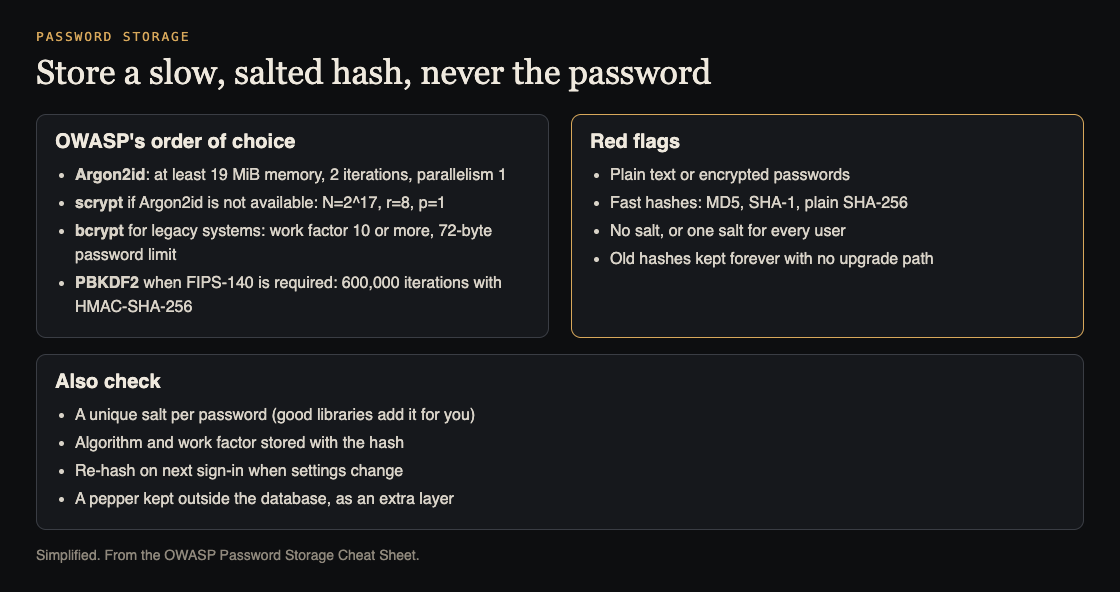
OWASP's choices, in order, and the red flags. Simplified from the OWASP Password Storage Cheat Sheet.
A good stored value looks something like $argon2id$v=19$m=19456,t=2,p=1$ followed by the salt and the hash. The algorithm and its settings travel with the hash, in what OWASP calls the PHC string format. That matters later, when you upgrade.
Password storage: check how your app hashes passwords, step by step
A first pass takes under an hour.
- Find the code. Search your codebase for
password,hash,md5,sha1,sha256,createHash,bcryptandargon2. Look at the sign-up handler, the login handler, the password reset handler and any admin "create user" script. These four places often disagree. - Look at the data. Run a read-only query that groups hashes by their prefix and length, without printing full values. For Postgres:
SELECT left(password_hash, 7) AS prefix, length(password_hash) AS len, count(*) FROM users GROUP BY 1, 2; - Read the results. One row with a
$argon2or$2b$prefix is a good sign. Several rows mean you have mixed formats, usually from an earlier migration that never finished. - Check the settings. For bcrypt, the number after the prefix is the cost, as in
$2b$12$. For Argon2id, read them,tandpvalues in the string. - Check the side doors. Make sure passwords never show up in logs, error trackers, analytics events or request dumps. A perfect hash does not help if the plain password sits in a log file.
Write down what you find, such as "sign-up uses bcrypt cost 10, legacy users are unsalted SHA-1".
Red flags: MD5, SHA-1, unsalted SHA-256 and homegrown schemes
Stop and plan a fix if you see any of these.
- MD5 or SHA-1. A 32 character hex string is usually MD5. A 40 character one is usually SHA-1. Both are far too fast for passwords.
- Unsalted SHA-256. A 64 character hex string with no salt column nearby. Two users with the same password get the same hash, so one crack reveals both, and precomputed tables work against you.
- Salted but fast.
sha256(salt + password)is better than nothing, but it is still one fast operation per guess. - Homegrown schemes. Hashing ten times, mixing in the username, reversing the string, or "encrypting then hashing". These feel clever and add little. Use a well tested library instead.
- Reversible storage. If your support team can tell a user their password, it is stored wrong.
- Comparison with
==. Use the library's own verify function, which reads the stored salt and settings for you.
Choosing a modern algorithm: Argon2id, scrypt and bcrypt settings
OWASP's current guidance points to three good choices, in this order of preference:
- Argon2id. The first choice for new systems. OWASP lists a minimum of 19 MiB of memory, 2 iterations and a parallelism of 1.
- scrypt. A good option when Argon2id is not available. OWASP's minimum is a cost of 2^17, a block size of 8 and parallelism of 1.
- bcrypt. For legacy systems where the other two are not available. Use a work factor of at least 10, and higher if login stays fast enough. Most bcrypt versions read only the first 72 bytes of a password, so OWASP says to enforce a 72-byte maximum.
If FIPS-140 compliance is required, OWASP prefers PBKDF2 with HMAC-SHA-256 at 600,000 iterations or more.
Here is a simple way to tune. Benchmark the hash on your real production hardware. OWASP's general rule is that one hash should take less than one second. Then check your server can handle your peak login rate at that setting: OWASP warns that a work factor set too high lets attackers exhaust your CPU with login attempts. Add rate limiting on the login route either way.
Migrating old hashes without forcing every user to reset
You do not need a mass password reset. OWASP describes re-hashing at login plus two ways to deal with accounts that never log in.
Rehash on login
When a user logs in, you briefly have their plain password. Verify it against the old hash. If it matches, hash it again with Argon2id and save the new value. Because the settings are stored in the hash, the same code can also upgrade users when you raise the work factor later.
Wrap the old hashes now
Rehash on login only fixes active users. Dormant accounts keep their weak hashes. OWASP's second method is a one-time job: hash each old hash, for example the MD5 value, with a modern algorithm, and mark it with a hash_version column. At login, check argon2id(md5(password)) for those users, and on success replace it with a direct Argon2id hash. OWASP warns that layered hashes can be easier to crack, so treat them as a bridge.
OWASP's first method is stricter: expire the hashes of accounts inactive for a long time and require a reset to log in. It is safer, but users and support staff may read it as a sign of a breach.
Once the job finishes, delete the old column. Then add a test that fails if any new code writes a hash without the current prefix.
Check the rest of sign-in too
Password hashing is one piece of sign-in. A strong hash does not help much if the token you issue after login can be forged. Check how your app validates tokens too; our guide on testing how your app checks JWTs walks through it.
The flows around login deserve the same look. A reset flow can hand out an account without ever touching a hash, so read how to test your reset flow. Slow hashing helps against stolen data, not against guessing on your live login form, so also check login rate limiting.
Auditing sign-in and payments is one of the things whitehatstoic does. A security test covers web app and API review, comes with a written report and fixes, and includes a retest after you apply them. No test can promise to find every weakness, but a second set of eyes on your auth code catches things that are easy to miss from the inside.
Frequently asked questions
Is SHA-256 with a salt good enough for passwords?
No. A salt stops identical passwords from sharing a hash, but SHA-256 is still very fast to compute, so attackers can test huge numbers of guesses. Use Argon2id, scrypt or bcrypt instead.
What work factor should I use for bcrypt or Argon2id?
Start from OWASP's minimums: bcrypt cost 10, or Argon2id with 19 MiB memory, 2 iterations and parallelism 1. Then benchmark on your production hardware and raise the setting as far as your login load allows.
Do I need a pepper as well as a salt?
A pepper is one secret shared by all hashes and kept outside the database, in a secrets vault or hardware module. It helps if only the database leaks, but OWASP says it adds nothing alone, and changing it means every user it protects must reset. Get the hashing algorithm right first.
How can I tell which hashing algorithm a stored hash uses?
Look at the prefix and length. $argon2id$ is Argon2id, $2a$, $2b$ or $2y$ is bcrypt, and plain hex strings of 32, 40 or 64 characters usually mean MD5, SHA-1 or SHA-256.
Get started
Run the prefix query today. If every row shows a modern algorithm with sensible settings, write that down and move on to your token checks. If you see mixed formats or bare hex strings, plan the wrap and rehash migration this sprint.
If you would rather have someone review it with you, whitehatstoic tests web apps and their sign-in flows, then writes up what it found and how to fix it. Security testing is scoped after a short call, and there are no published prices; you get a custom quote. If you are building a new app, whitehatstoic's full-stack development builds accounts, payments and admin from database to deploy, tested and documented.

Building something that has to be safe? Book a meeting with whitehatstoic: tell us the product, the deadline and your biggest worry, and we reply with a plan and a price.
Comments
No comments yet.
Sign in or make an account to comment.