Podcast episode description: a template and a sample
A good podcast episode description does three jobs in a few lines: it tells a stranger what they will get, tells your regulars which episode this is, and gives the listing app something worth showing. This post gives you a plain structure, a fill-in template and a before and after sample. If you want the longer, transcript-driven version for full show notes, the post on writing podcast show notes from a transcript walks through it. It helps anyone who has a recording and a blank box, and the thing worth taking from it is that the timed lines of a transcript already hold your summary, timestamps and quotes.
If you record in Chrome, Cheap Recorder saves your voice, and the other side of a call, as a file on your own computer along with a transcript, so the raw material for the description exists the moment you stop.
What a podcast episode description has to do
A description is not a summary of everything you said. It is a short pitch with some useful extras attached.
Think of three readers. The first is someone scrolling a list of episodes who has never heard of you. The second is a listener deciding whether this episode is the one about the topic they remember. The third is someone who found the episode through search and wants to know if the page matches what they typed.
One description can serve all three if you order it well. Put the pitch first, the detail second and the links last. Anything that matters to only a few people, such as sponsor lines or credits, goes at the bottom.
Write the first two lines for the listing apps
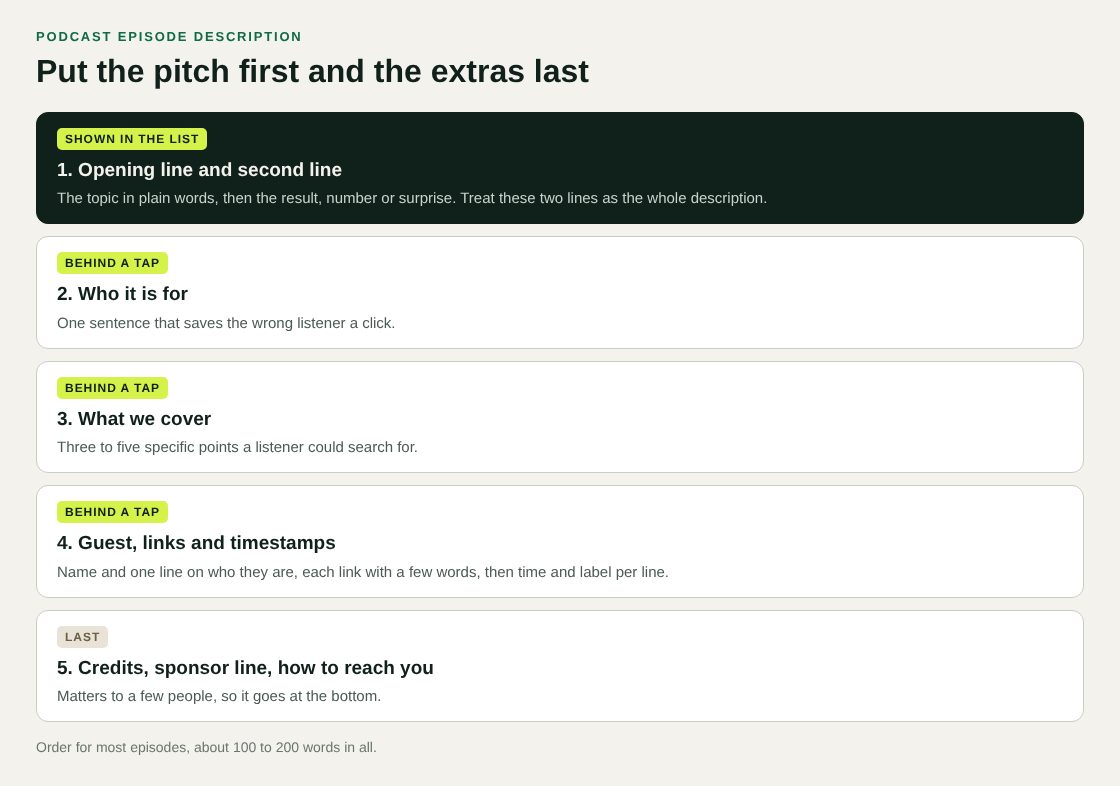
Many listing apps show only the start of a description and hide the rest behind a tap. Treat the first two lines as the whole description, and make the rest a bonus.
Those two lines should carry the topic and the payoff. Name the subject in plain words, then say what changes for the listener. Skip your show name and the episode number, since the app already shows them.
- Weak: "In this episode we sit down with a special guest to talk about a range of topics."
- Better: "How a two-person team cut their onboarding emails from nine to three, and what happened to sign-ups."
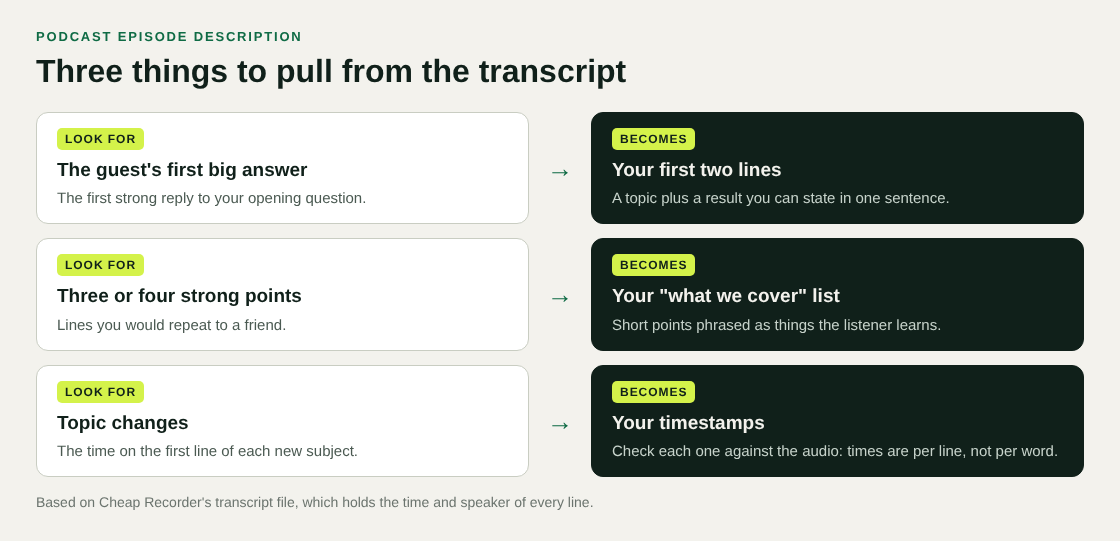
The better version has a number, a change and an outcome. You can find that kind of line in your transcript by looking for the moment the guest answers your first big question.
Say who the episode is for and what it covers
After the opening, add one sentence on who should listen. It saves the wrong people a click and helps the right ones commit.
Then list what the episode covers in three to five short points. Write them as things the listener will learn or hear, not as chapter titles. "Why the first email should ask for nothing" beats "Email strategy".
Keep the points specific enough that someone searching for one of them could land here. That is also where your search phrase and its neighbours belong, used naturally and not stuffed in.
Add the guest, links and timestamps
Now the practical extras. Give the guest's name and one line on who they are, then the links you mention in the episode, then timestamps.
Timestamps are the part people skip because they are tedious. The easy way is to mark them as you record. In Cheap Recorder you press M or Add marker at the start of each new section, and a short note confirms the time. One thing to know: markers are written to files (a markers list and a chapters file) only when Also save every source separately is ticked under Options. With the default single MP4 the notes show while recording but are not saved, so jot the times down yourself if you need them.
If you forgot to mark anything, the transcript has a time on every line. Scan it for topic changes and copy those times. Chrome gives a time for each line, not each word, so a timestamp can sit a few seconds off. Check it against the audio before you publish.
A fill-in template for a podcast episode description
Copy this structure and replace the brackets. It runs to about 100 to 200 words for most episodes.
- Opening line: [Topic in plain words], and [what the listener gets or what changed].
- Second line: [One sentence that adds the stake, the surprise or the number].
- Who it is for: This one is for [kind of listener] who [situation].
- What we cover: three to five short points, each a specific thing.
- Guest: [Name], [one line on who they are and why they know this].
- Links mentioned: each link with a few words on what it is.
- Timestamps: time and label, one per line, starting at the beginning.
- Housekeeping: credits, sponsor line, how to reach you.
Write it in that order, but fill in the middle first. The points and the guest line are easy to pull from the episode, and once you have them the opening line almost writes itself.
A sample description, before and after
This is an invented example for a made-up show, so you can see the change. Here is a first draft most of us would write in a hurry:
Episode 42. This week we talk to Dana Okafor about onboarding, emails, and lots of other stuff. We had a great chat and cover a lot of ground. Hope you enjoy it!
It says nothing a listener can act on. Here is the same episode after one pass with the template:
How a two-person team cut their onboarding emails from nine to three, and what happened to sign-ups. Dana Okafor explains which emails she deleted first and why the welcome message now asks for nothing. This one is for founders who send automated emails and suspect most of them go unread. What we cover:
- Why the first email should ask for nothing
- How to decide which emails to cut
- What to measure for the first two weeks
Guest: Dana Okafor runs growth at a small software company. Timestamps: 00:00 Intro, 03:10 Why nine emails felt normal, 12:45 The cut list, 24:30 What to measure.
The second version leads with a result, says who it is for and lets someone jump to the part they want. It is also longer, but only the first two lines need to earn the click.
Draft it faster from the episode transcript
You do not have to write the description from memory. If the live transcript was on, you already have the episode in text.
Here is a workflow that fits the template above:
- Before you record, leave Live transcript ticked under Options and check the language menu beside it. It goes back to its default each time the page opens. The transcript only exists if Live transcript was on while you recorded.
- Type the episode name in Name this recording. It becomes the file and folder name, so a numbered name keeps episodes in order.
- After Stop and finish, rename the Speaker boxes above the transcript to real names (labelling by voice is on plans that include speaker detection) and press Save captions. Lines then start with the name, for example "Priya: Welcome to the weekly update."
- Open the plain-text transcript in the recording's folder. It is named after the recording, such as
Weekly demo - transcript.txt, and holds the time and speaker of every line. - Paste it into your notes and pick out the opening answer, three or four strong points and the topic changes. Those become your first two lines, your bullet points and your timestamps.
The transcript is made from what Chrome hears on your microphone, so a headset or desk microphone close to your mouth gives cleaner text than a laptop's built-in one. There is more on how it works in the live transcript and captions guide. If you record a remote guest, the podcast guide to separate tracks explains how to pick the call tab and keep each voice in its own file.
A privacy note: while the live transcript is on, Chrome sends your microphone audio to Google to turn it into text. Cheap Recorder also has an AI button, which sends the transcript only when you press it. If the recording must not leave your computer in any form, untick Live transcript before you start.
Frequently asked questions
How long should a podcast episode description be?
Most work well at about 100 to 200 words, with the pitch in the first two lines. Go longer only if you are adding timestamps or a list of links.
Should the description repeat the episode title?
No. The title and description appear together in most listings, so repeating the title wastes your best lines. Use the opening to add a result, a number or a reason to listen.
Do I need timestamps in every description?
No. They help most on long or multi-topic episodes where people want to jump to one part. For a short single-topic episode, a good opening and a few points are enough.
Can I reuse the same description on every platform?
You can reuse the content, but check how each place displays it. Keep the strongest sentences at the top, and put links and credits at the bottom so a cut-off view does not hide the pitch.
Get started
Record your next episode in Chrome with Live transcript ticked, rename the speakers, and use the transcript file as your source for the description. The free plan includes recording, live transcript and captions, with 12 hours of recording a month and no card needed. Try Cheap Recorder, and your recordings stay on your own disk. For the longer version of this workflow, read how to write podcast show notes from a transcript.
Screen recording that is cheap and easy.
Visit cheaprecorder.com↗
Comments
No comments yet.