Prototype pollution: protect your JavaScript objects
Prototype pollution is a JavaScript flaw that lets an attacker add properties to every ordinary object in your app at once, often through nothing more than a crafted key in a query string or JSON body. MDN describes the usual results as logic errors or follow-on attacks such as cross-site scripting, and the OWASP Prototype Pollution Prevention Cheat Sheet adds unauthorized data access, privilege escalation and even remote code execution. This guide explains how it works, where it gets in and how to protect your objects, in browser code and in Node.js.
Prototype pollution starts with the prototype chain
JavaScript objects inherit through prototypes. Each object points to a prototype, which points to its own prototype, until the chain reaches Object.prototype, whose prototype is null. When you read a property an object does not have, the runtime walks up that chain looking for it.
JavaScript also lets code change prototypes while the app runs. If anything sets Object.prototype.extra, every ordinary object suddenly has an extra property, including objects the attacker never touched. That is the whole attack: change one shared prototype, and the change shows up everywhere.
How an attack works: pollution, then exploitation
MDN splits the attack into two phases. In the pollution phase, the attacker gets the app to add or change a property on a prototype. In the exploitation phase, ordinary app code reads that property and behaves differently.
The attacker usually needs no access to your code. It is a data-only attack: they send a payload, and your own code does the polluting. The two routes to a prototype are the __proto__ property and constructor.prototype. The code pattern that opens them is a write with keys that came from outside:
obj[key1][key2] = value
If key1 is "__proto__" and key2 is any name, the write lands on Object.prototype. If the __proto__ route is blocked, "constructor" then "prototype" reaches the same place with one more level of keys.
Where it gets in: dynamic keys, merges and parsers
MDN's examples point to three common sources:
- Loops that build objects from request data. An endpoint that builds
result[name][field]from query parameters can be called with?names=__proto__&fields=age, which addsageto every object. - Query string libraries. Parsers that turn
?__proto__[test]=testor?__proto__.test=testinto deep objects are particularly exposed. MDN notes that libraries in general are more at risk than app code, because they cannot allowlist keys. - Merging parsed JSON. In JSON,
__proto__is just a key, so parsing it is harmless. Merging that object into another withObject.assign()or afor...inloop triggers the setter and changes the target's prototype. Spread syntax does not, because it does not call setters.
Checking what your API accepts is the first line here; see input validation.
What a polluted prototype can change
Once a prototype is polluted, any code that reads a missing property can be steered. MDN gives three examples:
- Request options. If
methodandbodyare added toObject.prototype, afetch()call that was meant to be a plain GET becomes a POST carrying the attacker's body. - Page content. A polluted
srcdoccan change what an iframe shows, which may let the attacker run script. That links prototype pollution to cross-site scripting. - Access checks. If your code checks
user.isAdminand leaves the property out for normal users, a pollutedisAdmin: truemakes everyone an admin.
MDN calls configuration objects, such as fetch options, iframe settings and sanitizer settings, some of the most sensitive targets.
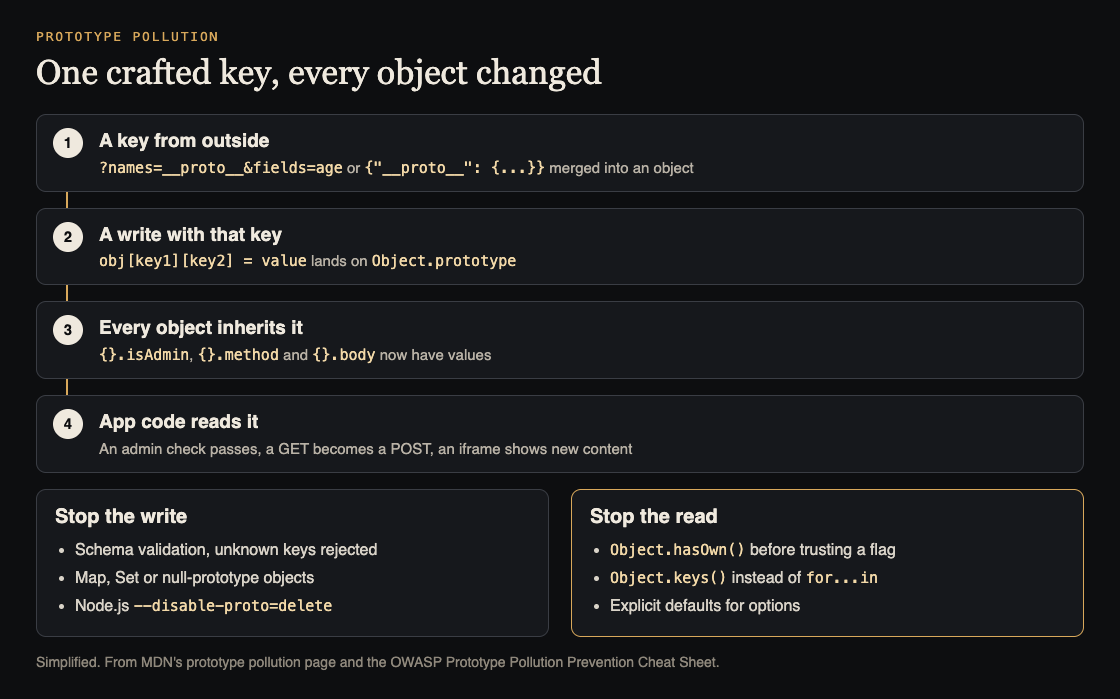
How one key reaches every object, and where to stop it. Simplified from MDN and the OWASP Prototype Pollution Prevention Cheat Sheet.
Defenses: stop the write, then stop the read
MDN groups the defenses in two lines: avoid code that can write to a prototype, and avoid reading properties that might come from one.
- Validate input with a schema. Use a validator such as ajv or Zod, reject unknown properties (in a JSON schema,
additionalProperties: false) and set defaults for missing ones. If you must write with outside keys, refuse__proto__,constructorandprototype. - Use Map and Set for key-value data. Both OWASP and MDN recommend them over plain objects;
Map.get()only returns what is in the map. - Use null-prototype objects.
Object.create(null)or{ __proto__: null }creates an object with no prototype, so there is nothing to pollute and nothing inherited to read. Use them for objects you fill with outside keys and for options you pass to APIs likefetch(). - Read only own properties. Check
Object.hasOwn(user, "isAdmin")before trusting a flag, preferfor...ofwithObject.keys()overfor...in, and give function options explicit defaults. - Freeze built-in prototypes.
Object.freeze(Object.prototype)blocks new properties. Both sources add caveats: freezing is shallow, polyfills must run first, and some libraries break, so test before you ship.Object.seal()is weaker and does not stop values changing. - In Node.js, remove
__proto__. Start Node with--disable-proto=delete. OWASP calls it defense in depth, becauseconstructor.prototypestill works.
Worked example: fixing one vulnerable endpoint
Take MDN's example: an API that receives names and fields in the query string, starts with const result = {}, and fills it with result[name][field] = userInfo[field]. Here is how to test and fix it.
- Test. In a test environment, call the endpoint with
?names=__proto__&fields=age. Then, in the same process, check whether a fresh empty object has anageproperty. If it does, the endpoint pollutes. - Validate. Add a schema for the query:
namesandfieldsare lists of strings,fieldsonly from a fixed allowlist, and any key named__proto__,constructororprototypeis rejected. - Change the container. Create the result with
{ __proto__: null }, and each user's entry the same way, so even a stray key writes to the result and not toObject.prototype. Or use aMapand convert it at the end. - Harden the reads. Search the codebase for checks like
if (!user.isAdmin)andfor...inloops over request data, and switch them toObject.hasOwn()andObject.keys(). - Add the runtime flag. Run Node with
--disable-proto=deletein test first, then in production. - Retest. Repeat step 1, plus the
constructor[prototype]form, and keep both as automated tests.
Then check your dependencies. Query string parsers and deep-merge helpers are where MDN says the risk is highest, and keeping them patched is part of dependency updates.
Frequently asked questions
Does prototype pollution affect browser code or only Node.js?
Both. Any JavaScript that builds objects from outside data can be polluted; MDN's examples include a browser fetch() call and an iframe, and the --disable-proto flag is the Node.js-specific defense.
Is parsing JSON with a __proto__ key dangerous?
Not by itself. MDN explains that JSON.parse treats __proto__ as a normal key; the danger comes when that object is merged into another with Object.assign() or a for...in loop.
Is Object.freeze on Object.prototype enough?
It helps, but it is shallow and can break polyfills or libraries that change built-ins. Pair it with schema validation, null-prototype objects and own-property checks.
Get started
Run the two test URLs from the worked example against your own endpoints today. If you want an outside review, whitehatstoic's cybersecurity and AI safety testing covers web app and API review, with a written report, fixes and a retest after fixes. whitehatstoic's full-stack development builds on Next.js, Node and Postgres. No test can promise to find every weakness; the work is scoped after a short call.

Building something that has to be safe? Book a meeting with whitehatstoic: tell us the product, the deadline and your biggest worry, and we reply with a plan and a price.
Comments
No comments yet.
Sign in or make an account to comment.