Quantum computing loops for a physics lecture video: a guide
There is no clip on Wavecrate named for this subject, and a search for "quantum" on 13 October 2026 found no looping video about it. So if you want quantum computing loops for a physics lecture video, the honest plan is to use calm abstract loops as backdrops and put the physics on top in your own slides. This guide shows which loops fit, how to pace them under your voice, and which license a lecture needs.
What the catalog has for a quantum topic
The search for "quantum" gave seven results. Four are videos, and only one of those has quantum in its name: a 2 second Premium crossfade from a self-driving car to a quantum computer, which is a stinger between sections and not a loop. There is also a Premium portrait photo called Team around a hologram, Qubit. The rest are two audio items and three clips about other subjects.
That is useful to know before you plan. Do not build a lecture around a shot you have not seen. Search the video catalog yourself on the day you edit, because items change.

Quantum computing loops for a physics lecture video: three backdrops that fit
Three loops by Latent Frame suit a lecture. All three are silent, 4K and seamless, and each page says so.
- Flow field Loop: hundreds of luminous streamlines flowing through an invisible field, 8 seconds, calm and dreamy. It was marked Free on 13 October 2026.
- Particle plexus Loop in Purple: drifting points of light in three depth layers, linked by fine lines where they come close, 12 seconds. It was marked Free on 13 October 2026.
- Wave interference Loop: rings of light spreading from two sources and crossing into an interference pattern, 8 seconds. It is Premium, and its page tags it physics.
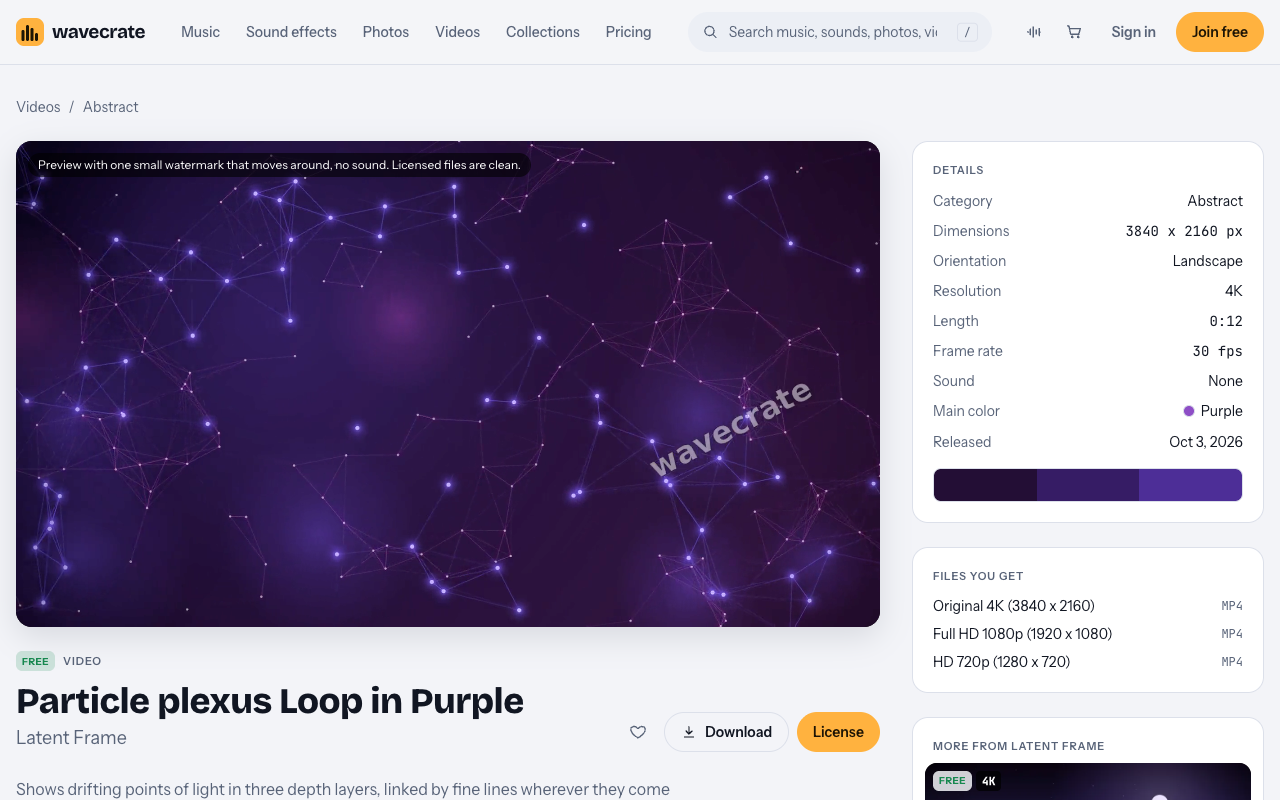
Each one is a mood, not a diagram. A network of linked points can sit behind a sentence about many qubits. A flow of lines can sit behind a sentence about a state changing. None of them shows a qubit, and you should say so out loud when it matters.
Keep the analogy honest
The U.S. Department of Energy's explainer says quantum computers use quantum bits, or qubits, which play a similar role to the bits in today's digital computers, and that the laws of quantum mechanics allow qubits to encode exponentially more information than bits. Use plain statements like that for the facts, and keep the backdrop for the feeling.
Interference is the clearest case. Rings crossing from two sources is a classical wave picture. It is a fair analogy for how amplitudes can reinforce or cancel, but it is an analogy. Put a line on screen that says "analogy: water-wave interference" while the loop plays. The Bloch sphere, the gate circuit and the equations still come from your own slides.
Entanglement is harder. Avoid a backdrop that looks like two things sending signals to each other. Use a still, neutral loop and a plain two-node diagram of your own.
A worked example: a 92 second segment
Say you are recording a short segment on how a quantum algorithm works. Plan the backdrops against the script, and give each one a whole number of repeats so every change lands on a loop point.
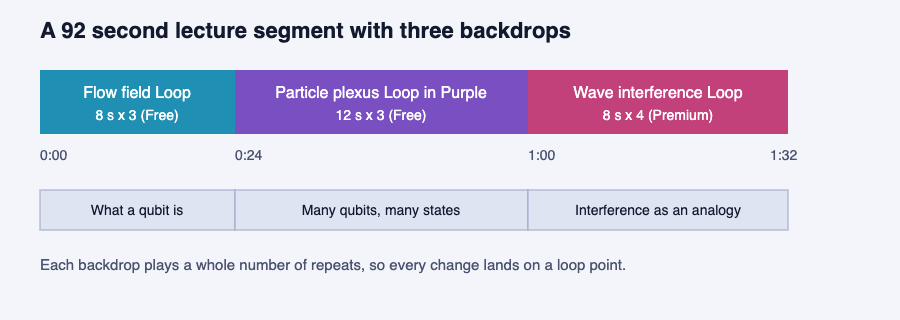
- 0:00 to 0:24, what a qubit is. Flow field Loop, 8 seconds, three repeats. You say what a qubit is and how it differs from a bit.
- 0:24 to 1:00, many qubits, many states. Particle plexus Loop in Purple, 12 seconds, three repeats. You explain that adding qubits grows the space of states fast.
- 1:00 to 1:32, interference as an analogy. Wave interference Loop, 8 seconds, four repeats, with the "analogy" label on screen. You say that algorithms arrange things so wrong answers cancel.
The backdrop changes only twice, and each change follows a change of idea. If it shifts in the middle of a sentence, viewers wonder what the change means.
How to pace a loop under narration
These loops run 8 to 12 seconds, and the pages list files in 4K, Full HD and 720p, so you can match your export size.
- Do not leave one short loop running for minutes. An 8 second clip repeated forty times becomes a metronome. About 30 to 60 seconds per backdrop is a sensible cap; that is a habit of mine, not a rule from the site.
- Pick slow motion. Movement competes with your words. All three clips above are drifting or flowing, not pulsing.
- Dim the loop for equations. When a formula appears, put it on a solid panel so nobody reads through moving lights.
- The clips are silent. Their pages say Sound: None, so your voice, and any music you license separately, is all the audio.
Which license a lecture needs
The license card differs by item, so read the one on the page. On the three video pages above, the cards read the same way. Paid licenses are not on sale yet (Wavecrate says purchases open soon), so the prices below are the listed prices for when sales open, while items marked Free can already be downloaded with a free account.
- Free, only on items marked Free: online and social posts, websites, blogs and monetized channels, with credit text next to the photo or in the description. A free account gets 3 free downloads a month. For a video, the description is the place.
- Standard, listed at $29: your own websites, social, presentations and marketing, no credit needed. It is also included with Pro.
- Extended, listed at $99: paid ads, TV broadcast, products for resale and client work.
Here is one item across three uses, using Particle plexus Loop in Purple on the day it was marked Free. A lecture you post on your own YouTube channel can use the Free license with a credit line in the description. The same lecture played as slides in a talk is a presentation, which starts at Standard. A lecture you make for a client is client work, which is Extended, and the Free license does not cover it.
The pages name no schools, courses or lectures. A university's course page and a paid online course are not named anywhere, so treat them as not covered by Free, and take the cautious reading for a paid course: Extended, because it is a product you sell. The Wave interference Loop is Premium and has no Free card, so it needs Standard or Extended for any use. Every license comes with a certificate and a code anyone can check on the verify page. The pricing page has the full table.
Frequently asked questions
Does Wavecrate have a qubit or Bloch sphere animation?
Not in the pages read on 13 October 2026. A search for "quantum" found no looping video about it. Build the sphere or circuit yourself and use a loop only as a backdrop.
Can I use a Free loop in a lecture on YouTube?
If the item is marked Free, yes for an online video on your own channel, with credit text in the description. Check that the item still reads Free on the day you download, because items have moved between Free and Premium.
Is a lecture slide deck covered by the Free license?
No. The Free card lists online and social posts, websites, blogs and monetized channels. Presentations start at Standard.
Do the loops carry sound?
No. The three loops above list Sound: None.
Get started
Browse Wavecrate: you can join free and download items marked Free now, paid licenses are not on sale yet (purchases open soon), and every download comes with a license certificate and a code anyone can check on its verify page.
Open the Abstract videos, preview a few slow loops against your script, and pick one backdrop for each idea. Join Wavecrate free to download the items marked Free.


Comments
No comments yet.
Sign in or make an account to comment.