Rain sounds for a sleep video: how to pick, loop and mix
If you want to make rain sounds for a sleep video, finding rain is the easy part. The hard part is making eight or ten hours of it that nobody notices. A good sleep video sounds like nothing is happening, and that takes care. This guide covers what to listen for, how to loop a short clip into hours without audible seams, how to mix it so it stays soft, and which license covers each place the video ends up.
Wavecrate licenses royalty-free sound effects and music, including a rain sound marked Free and calm ambient tracks, and every download comes with a license certificate and a code anyone can check on its verify page.

Why rain works for a long video
Rain is steady noise with small, random detail. It has no melody and no beat, so a listener cannot catch a repeat the way they would with a song. That is what makes a short clip workable for a very long video, as long as you loop it with care.
It also forgives the edit. With music, every cut has to land on a beat. With rain, a soft crossfade almost anywhere sounds natural, which is why this whole guide is about hiding joins rather than timing them.
What to listen for before you download
Play the clip a few times and listen for three things:
- Steady level. The loudness should stay flat from start to end. If the rain swells and fades, the ear follows it, and the swell becomes the thing people hear repeat.
- Soft top end. Hard, bright splashes turn into hiss after an hour. Rain that sounds slightly muffled, as if heard from inside, wears better.
- No single events. No big drip, no car, no bird. One odd sound repeated every few seconds is the fastest way to ruin a loop.
A useful test: put the clip on repeat at low volume, close your eyes, and count how long it takes you to notice the restart. If you notice it within a minute, the loop needs more work.
Rain sounds for a sleep video on Wavecrate: what the catalog has
On Wavecrate, rain lives in the Ambience sound effects category. When it was read on 11 October 2026, that category held ten sounds and one of them was rain: Rain on Window, an 8 second clip by Wavecrate Foley Lab, marked Free, described as "a clean, ready-to-drop sound effect for rain and weather moments." The rest were room tone, control room and server room sounds, with no thunder or wind.
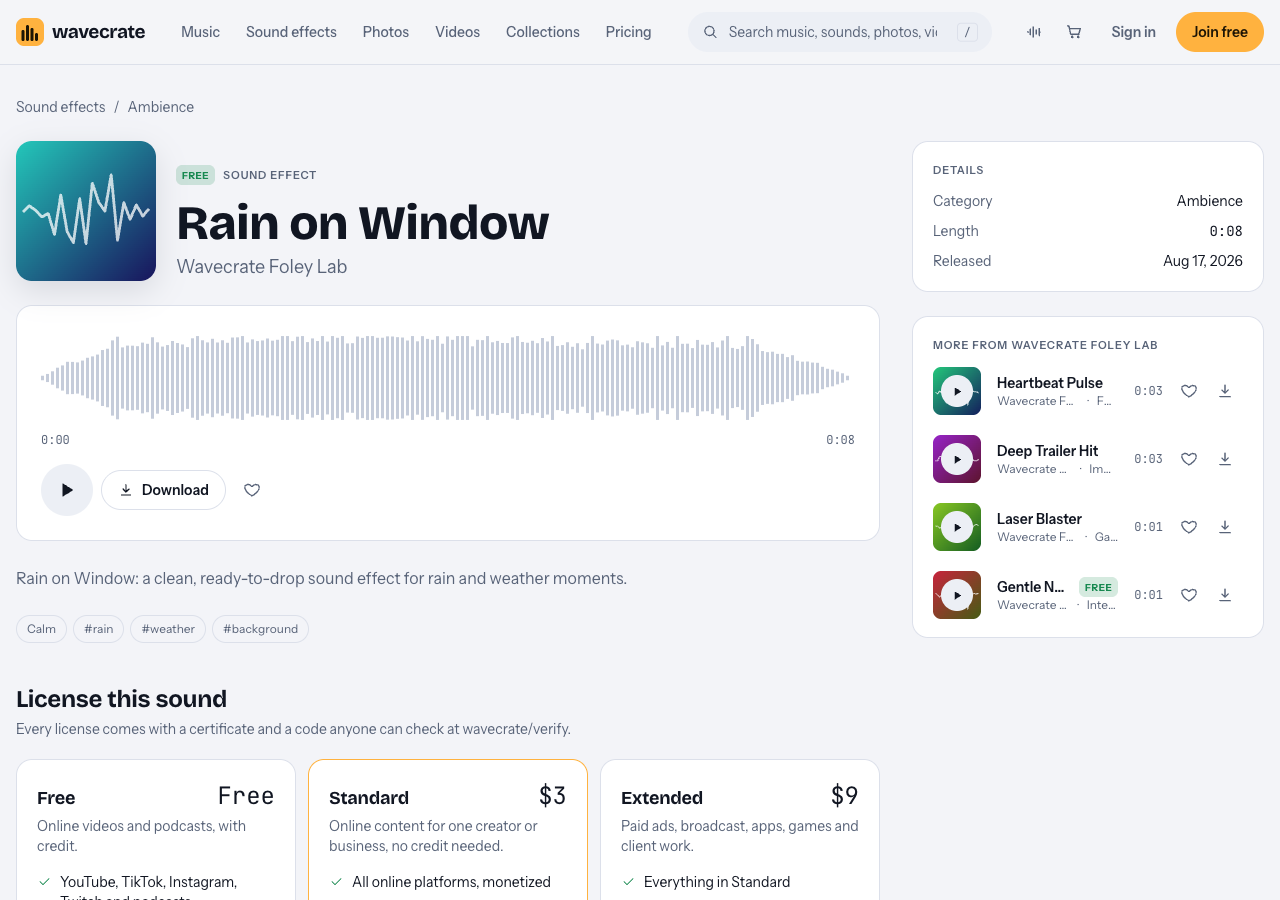
Rain on Window, read on 11 October 2026: 8 seconds, marked Free, with Standard and Extended cards below.
So be honest with yourself about the job. You will be building hours of rain from one short clip, which is exactly what the next section is for. Items can change between Free and Premium, so read the page again on the day you download.
How to loop rain audio for hours without seams
Played straight, an 8 second clip repeats 450 times an hour and shows its pattern. Here is a worked example that turns it into a long track that does not. It works in any audio editor with several tracks.
- Find a clean loop point. Trim the start and end so both sit at a similar level with no tap right at the edge. Add a short crossfade, around half a second to a second, where the end meets the start.
- Make a second version. Duplicate the clip, trim the copy to a different length (say 7 seconds instead of 8), and crossfade its loop point too. If your editor allows it, lower the copy's pitch a little so it does not sound like a twin.
- Layer them. Put version A on track 1 and version B on track 2. Because their lengths differ, they line up the same way only every 56 seconds instead of every 8. A third copy at 9 seconds stretches the full pattern much further.
- Offset the starts. Start track 2 a few seconds after track 1 so the loop points never land together.
- Build one hour, then repeat it. Export one hour of the layered mix, then place that hour back to back to reach eight or ten hours. Your project stays small and every join is already hidden inside the mix.
- Fade in and out. A fade of 10 to 30 seconds at the very start and end keeps the first and last moments gentle.
Then run the listening test again at the level your viewers will use. If one tap still stands out every cycle, lower it with a small volume dip in the source clip.
Mixing tips: level, tone and a quiet music bed
Level. People listening at night turn the volume down, not up. Mix quieter than a normal video and keep the level even. Light compression flattens the small peaks from louder drops.
Tone. Two moves do most of the work. Roll off the deepest rumble that small speakers cannot play anyway, then gently cut the highest frequencies to take the hiss off. You are aiming for rain heard through a closed window.
A music bed. Some sleep videos put a soft pad under the rain. On the music browse page you can filter by mood calm, Energy Calm or Relaxed, and Tempo Slow (under 90 BPM). The Study and focus collection includes Slow Tide, an Ambient track at 60 BPM marked Free. A track is a separate item with its own license, so check its page the same way. Keep it far below the rain, or the rain stops doing its job.
Other layers. If you add thunder or wind from somewhere else, check that its license covers monetized video, and keep it rare, distant and low so it rumbles instead of cracks.
Which license your rain video needs: one sound, three uses
The trap here is assuming "marked Free" means free for every use. Take Rain on Window through three places the same mix could go, using the cards on its page and the table on the pricing page.
- Your own sleep channel. The Free license covers YouTube, TikTok, Instagram, Twitch and podcasts, monetized channels included, with credit text required in the description. A free account gets 3 free downloads a month. If you would rather not carry a credit line, the Standard card (listed at $3 on this page) needs none and prints your registered channels on the certificate.
- A video for your own business. A spa, hotel or mattress shop posting a rain video on its own channel is "your own business and brand content." The Free license does not tick that row, so this needs Standard, even though the sound is marked Free.
- A client, an ad or an app. Making the video for a client, running it as a paid ad, or putting your rain mix inside a sleep app all need Extended (listed at $9 on this page): its card reads "Paid ads, broadcast, apps, games and client work."
If you publish a lot, Pro is listed at $8.25 a month billed yearly ($99 a year) or $12 month to month, and gives Standard licenses on the whole catalog. Videos you publish while subscribed stay covered after it ends. Pro never includes Extended, so the app and client cases above still need it. Pro and the paid licenses are not on sale yet (Wavecrate says purchases open soon), so the prices here are the listed prices for when sales open, while sounds marked Free, like Rain on Window, can already be downloaded with a free account.
Every download comes with a license certificate and a code. Paste the code in your description. On the verify page, anyone can enter it and see the licensee, the item, the license type and your registered channels, without contacting Wavecrate. A license is permission to use the sound; Wavecrate keeps the copyright.
Frequently asked questions
Can I use a free rain sound in a monetized sleep video?
On Wavecrate, a sound marked Free comes with a Free license that covers monetized channels on YouTube and other platforms, as long as the credit text is in your description. The Standard license removes the credit requirement.
How long should a rain sleep video be?
Long enough to last the night you are making it for; eight to ten hours covers most. Build one seamless hour first, then repeat it, which keeps the project small and the loop clean.
Can I put the rain mix in my sleep app?
Not on the Free or Standard license. Apps, games and software are Extended only in the table on Wavecrate's pricing page, and Pro does not include Extended.
What file should I edit from?
The highest quality file the page offers. Some Wavecrate items come as a 24-bit WAV master and a 320 kbps MP3, but not every item does, so read the versions listed on the page you download from.
Get started
Open the Ambience sounds, run the loop test above on Rain on Window, and build your first hour. Joining free gives you 3 free downloads a month and a license for everything you download.
Browse Wavecrate: you can join free and download items marked Free now, paid licenses are not on sale yet (purchases open soon), and every download comes with a license certificate and a code anyone can check on its verify page.


Comments
No comments yet.
Sign in or make an account to comment.