Record on two computers at once with one recorder plan
You can record on two computers at once with one Cheap Recorder account only if your plan allows more than one device at the same time. On Free and Creator it allows one, and signing in on a second computer signs the first one out. If the first computer was recording, that recording is stopped and saved the moment the second one signs in. This post shows what each plan allows, what you see when it happens, and how to set up two laptops so nothing ends early.
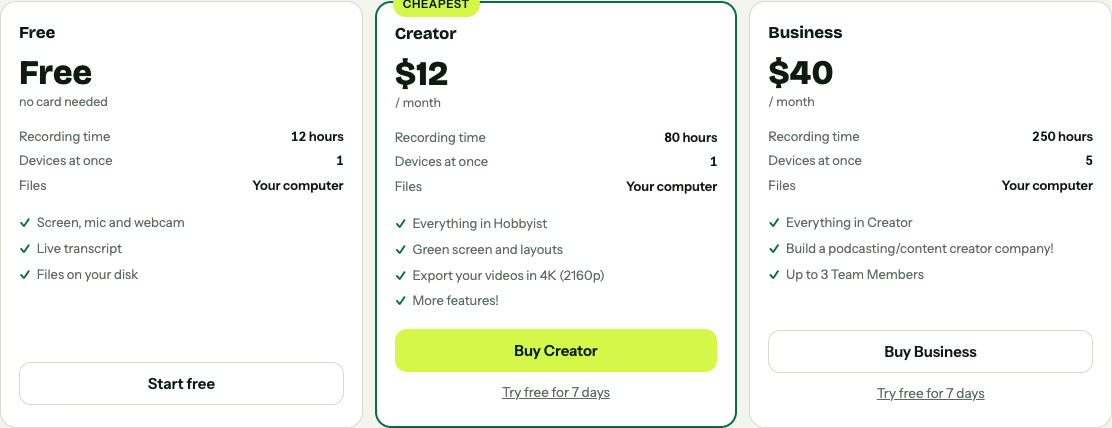
The plan cards on cheaprecorder.com: the Devices at once line is the one that matters here.
Can you record on two computers at once with one plan?
Look at the Devices at once line on the plan cards on cheaprecorder.com. It is the number of computers that can be signed in to one account at the same time, and you need to be signed in to record.
- Free: 12 hours of recording a month, 1 device at once, no card needed.
- Creator: $12 a month billed monthly, or $4.99 a month billed yearly, with 80 hours a month and 1 device at once.
- Business: $40 a month billed monthly, or $19.99 a month billed yearly, with 250 hours a month, 5 devices at once and up to 3 team members.
So on Free and Creator the answer is no: one account records on one computer at a time. On Business, up to five computers can be signed in and recording together.
To see where you stand, open your name in the top right of the recorder. On a plan that counts devices, the menu shows a line such as Signed in on 1 of 5 devices at once.
What happens when a second computer signs in
On a one-device plan, the newest sign-in wins. When you sign in on laptop B, laptop A is signed out and shows this note:
Signed out because your account was used on another device. Your plan works on one device at a time, so signing in somewhere else ends it here. Signing in here will end it there.
Three things happen on laptop A at that moment:
- If it was recording, the recording is stopped and saved first, and the note adds Your recording was saved. The file is in laptop A's folder up to that second, and nothing after it is recorded.
- The screen share, the camera and the microphone are let go, so Chrome's sharing bar and the camera light turn off.
- The sign-in box opens. Signing in again turns the camera and the microphone back on, but you pick the screen again by hand. And on a one-device plan, signing in again on A ends the sign-in on B.
This is the trap. Two people on two laptops sharing one Creator login will keep stopping each other's recordings, and each stop looks like the recorder ended by itself. The post on recordings that stop by themselves covers the other reasons a take ends early.
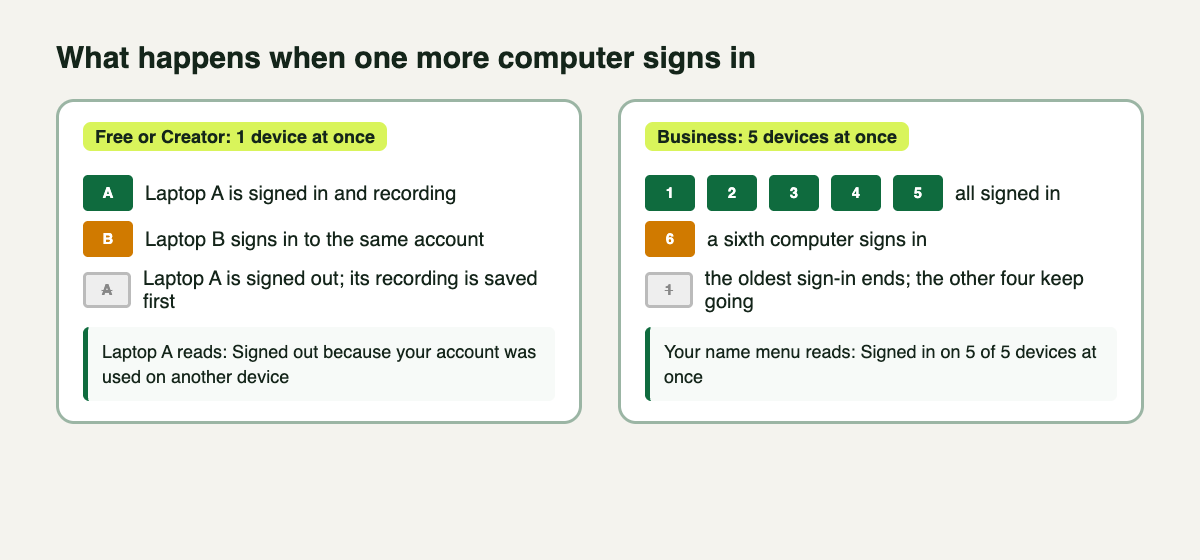
One device at once: the newest sign-in wins. Five at once: a sixth sign-in ends the oldest.
Business: five devices, and the oldest one gives way
On Business, up to five computers stay signed in together, and each records on its own. If a sixth computer signs in, the oldest sign-in ends, and that computer reads:
Your plan allows 5 devices at once, and signing in on one more ended the oldest, which was this one. Signing in here will end the oldest of the others.
The same rules apply as on one device: a recording running on the computer that gives way is stopped and saved first. So count your computers before a session, and check the Signed in on line under your name if you are not sure which ones are still signed in.
The other sign-out to know about: 15 quiet minutes
A second computer that sits idle is signed out after 15 minutes without activity, with the note Signed out after 15 minutes without activity. A running recording counts as activity, so a computer that is recording is not signed out this way. A computer you set up early and then left alone may be, so sign in on each one shortly before you start, not half an hour before.
Each computer also needs an internet connection to start a recording. Your plan comes from the Cheap Recorder server, so there is no offline start; the note beside Start recording says Can't reach Cheap Recorder until the connection is back.
Worked example: a lesson on two laptops with a Business plan
Say you teach a short lesson. Laptop A records your slides; laptop B points its webcam at you, so you have a separate camera file for a close-up. Here is how to run it.
- On laptop A, open the recorder in Google Chrome and sign in. Under Where to save, press Choose folder... and allow Chrome to edit files there. Under What to capture, pick A window and choose the slides window. Type Lesson 04 slides in Name this recording.
- On laptop B, sign in with the same account. Open your name in the top right: it should read Signed in on 2 of 5 devices at once. If laptop A now shows the signed-out note, your plan allows one device, and you stop here.
- On laptop B, choose a folder, pick Webcam only under What to capture, and name it Lesson 04 camera.
- Make a 30-second test on both laptops. Say your name, stop, and play each file to check the right microphone was used.
- Press Start recording on both, within a few seconds of each other. Clap once where both microphones can hear it, so you can line the two files up later.
- Press Stop and finish on both when you are done.
Each laptop writes its recording to its own folder, named with the name you typed and the date and time on that laptop's own clock, for example Lesson 04 slides - 2026-10-11 14.00. The two files never land in the same folder. Copy one laptop's folder to the other when you are done. The guide to where recordings are saved lists what each folder holds, and the screen and webcam guide covers Webcam only.
Minutes come out of one plan
After each recording, the recorder reports the minutes it used to your account. Two computers recording the same hour use two hours of the plan's monthly time, not one. Before a long session on several machines, open your name in the top right to see how many minutes are left.
If you only need two microphones, not two computers, you may not need a second laptop at all. One computer can record several microphones in one take. For a remote podcast, though, a second computer will not split the guests: everyone on the far end of a call comes from one Chrome tab and shares one track, as the separate tracks guide explains.
Whatever you record, tell everyone in the room and on the call that they are being recorded.
Frequently asked questions
Can I use the Free plan on two computers?
You can sign in on either one, but only one at a time. Signing in on the second computer signs the first one out, and stops and saves any recording running there.
Does Creator allow two devices at once?
No. The Creator card shows Devices at once: 1, the same as Free. Business shows 5.
Is my recording lost when another computer signs me out?
No. The recording is stopped and saved to your folder first, and the note says Your recording was saved. Nothing after that moment is recorded.
Do both computers save to the same folder?
No. Each computer saves to a folder you choose on its own disk. Copy one folder to the other computer when you are done.
Get started
Try the setup on one computer first: make a free account, choose a folder and record a 30-second test. If you need several computers recording at the same time, check the Devices at once line on the plan cards before the real session.
Comments
No comments yet.
Sign in or make an account to comment.