Remote team issues: an async log of fixes
Remote team issues have a way of coming back. Someone notices handoffs are getting dropped, the team agrees on a fix in a call, and six weeks later the problem is back and nobody remembers what was tried. This post shows you how to keep an async log of fixes that records the problem, the cause, the fix, and whether it worked. With that record, the next person starts from what you already learned instead of starting over.
Why remote team issues keep coming back
Remote work spreads memory thin. A fix gets agreed in a video call, mentioned once in chat, and then scrolls away. The people who were in the call remember it. The people asleep in another time zone never saw it.
Three things make problems return:
- The fix lived in someone's head. When that person goes on leave or moves teams, the fix goes with them.
- Nobody wrote down the result. The team tried something and it half worked. Without a note, the next attempt repeats the same half measure.
- Failed fixes vanish. If only the wins get written up, a new team member can suggest the same failed idea with full confidence.
An async log fixes all three.
The most common remote team issues and their root causes
Here are common examples, each with a possible cause. When you name the cause, you can tell whether two problems that look different are really the same one.
- Dropped handoffs. Cause: work passes between time zones with no written state of where it stands.
- Stalled reviews and approvals. Cause: the only person who can approve is offline for the next eight hours.
- Decisions nobody can find. Cause: they were made in private messages or in a call with no notes.
- Meeting fatigue in one region. Cause: the meeting time always suits the same part of the team.
- Slow onboarding. Cause: knowledge is tribal, so new people have to ask, and the answer is a few hours away.
Notice that "decisions nobody can find" and "dropped handoffs" share a root: things that matter are not written where others can see them. A list hides that. A map where you can link related problems shows it.
Remote team issues need a fix log, not only a decision log
An async log of fixes is a running record of problems your team hit and every fix you tried for each one, with the outcome.
It is close to a decision log, but the focus is different. A decision log records why you chose a solution at a point in time. A fix log records what happened after. One problem might have four fix attempts: two failed, one partly worked, one stuck. The fix log keeps all four, because the failed attempts are what stop the team from repeating them.
How to write a fix entry: problem, cause, fix, result
Keep each entry short. Four parts are enough.
- Problem, in one line. Write what happened, not a theory. "Pull requests from the Manila team wait over a day for review" is better than "review process is broken."
- Cause, as you understand it now. Mark it as a guess if it is one.
- Fix you tried. One fix per entry. If you try two things at once, you will not know which one helped.
- Result: worked, partly, or failed. Add one sentence of evidence. "Median wait dropped from 26 hours to 9" or "Nobody used the new channel after week two."
Problem Graph holds this structure on a map. The cause can be its own problem, linked to the problems it explains. You write a problem in one line and put it in a lane. For team issues that is the work lane. It lands on the graph as soon as you press Enter. You then attach solutions as ideas, mark the ones you are trying, and record the outcome as worked, partly, or failed. The map key also has a requirement node, which is a good place to note what a fix depends on, such as "needs a reviewer in each time zone."
A worked example. You open the app and type:
Handoffs between Berlin and Austin get dropped
Press Enter. Attach a solution: End-of-day handoff note in the team doc. Mark it as trying. Two weeks later, mark it worked or failed. If it failed, leave it there. The page puts it plainly: "A solution that failed three times stays on the map as a failed solution, and that is exactly what the next person needs to know."
Running the log across time zones without extra meetings
The point of an async log is that it replaces a meeting, not that it adds one. Give it one keeper, such as the team lead, who writes the entries and shares them; everyone else reports friction to the keeper and reads the log. A few habits keep it that way.
- Log at the moment of friction. When a handoff drops, the person who noticed sends the keeper one line, and the keeper adds it the same day.
- Update results on a fixed rhythm. Pick a day each fortnight when the keeper asks each fix's owner how it went and marks the outcome.
- Read before you propose. Before suggesting a fix in chat, check whether it is already on the map as failed.
- Link related problems. If "reviews stall" and "handoffs drop" share a cause, link them. In Problem Graph you can link problems that belong together, even across lanes. Patterns show up on a map that never show up in a list.
For sharing, Problem Graph uses a private network. The keeper creates a network, gives teammates the invite code, and shares a main node into it. Members see it and nobody else does. The app notes that anyone with the invite code can join, so treat the code like a key and hand it only to the team.
One detail matters here. Only a problem you mark as a main node can be shared. When you share it, its solutions, their outcomes, and the requirements they need go along. A problem you only link to it stays private, like the rest of your graph. That lets you keep personal notes ("I am behind because of the handoff gaps") separate from the team record. Private is the default: your problems are saved to your account, follow you to any phone or computer you log in on, and nobody else sees them.
Example log: five remote team issues and what worked
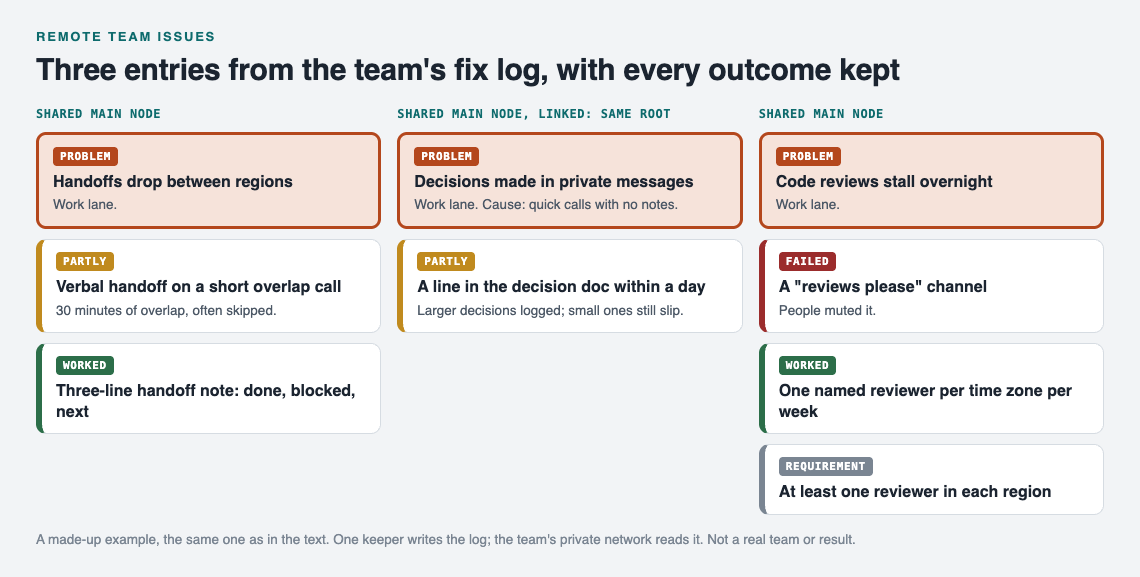
Three entries from the example log as a map, kept by one person and shared into the team's private network.
These are illustrative entries showing the format, not results from a specific team.
1. Handoffs drop between regions
Cause: no written state at end of day. Fix 1: verbal handoff on a short overlap call. Partly, because the overlap was 30 minutes and often skipped. Fix 2: a three-line handoff note (done, blocked, next) in the shared doc. Worked.
2. Code reviews stall overnight
Cause: all senior reviewers in one time zone. Fix 1: a "reviews please" channel. Failed, as people muted it. Fix 2: one named reviewer per time zone per week. Worked. Requirement: at least one reviewer in each region.
3. Decisions made in private messages
Cause: quick calls with no notes. Shared as its own main node. Fix: any decision affecting more than one person gets a line in the shared decision doc within a day. Partly. Larger decisions got logged; small ones still slipped. Linked to issue 1, same root.
4. One region always takes the late meeting
Cause: meeting time set once and never revisited. Fix: rotate the weekly sync time monthly. Partly. Fairer, but attendance dropped. Next idea: replace half the syncs with written updates.
5. New hires take weeks to get unblocked
Cause: setup knowledge lives in two people's heads. Fix 1: recorded walkthrough videos. Failed, as the videos went stale within two months. Fix 2: a written setup checklist owned by the most recent hire, who updates it as they go. Worked.
Read entries 1, 3 and 5 together and the pattern is clear: written, owned, and updated beats recorded once. That is the kind of thing you only see when failures stay on the record.
Frequently asked questions
What tools work best for an async fix log?
Any place your team can read at any hour, where each entry has a problem, fixes, and outcomes. Problem Graph records worked, partly, or failed for each solution and links related problems.
How do you get a remote team to actually use the log?
Make reporting cheaper than complaining: one line to the keeper when friction happens, an outcome update on a fixed day. Point to the log whenever someone proposes a fix that already failed, so checking it first becomes the habit.
How detailed should each entry be?
One line for the problem, one for the cause, one for the fix, and one sentence of evidence for the result. If an entry needs a page, it is probably two problems and should be split and linked.
How is a fix log different from a retrospective?
A retrospective is a meeting at a point in time. A fix log is a running record that carries fixes and their outcomes across many retrospectives, so you can see that the same idea failed in March and again in June.
Get started
Start with the issue your team has already fixed twice. Open the app, put it in the work lane, and attach every fix you remember trying with its outcome, including the failed ones. If you want to see how a graph looks first, an empty graph offers a "Load example set" button, and you can switch between the map and a List view. When the entry is solid, mark it as a main node, create a private network, and share the invite code with your team.
Try Problem Graph: it is free, and you can look around the public network without an account. Write one problem down in a line and attach the first thing you will try.
Comments
No comments yet.
Sign in or make an account to comment.