Retro neon grid backgrounds for a music video: edit and license
Retro neon grid backgrounds for a music video give you a glowing floor of lines rolling toward a sunset, the classic synthwave look. This guide shows you how to fit one to your song, keep your lyrics readable on top of it, and pick the right license for where the video goes. We use one real clip as the worked example: Retro Neon Grid, a motion background on Wavecrate.
What a retro neon grid background is
A retro neon grid is a flat plane of bright lines drawn in perspective. The lines run toward a horizon. Above it you usually get a dark sky, a few stars and a big striped sun. In motion, the grid rolls toward you, so it feels like you are moving forward without end.
Wavecrate's Retro Neon Grid page describes it as "An endless neon grid rolling toward a striped retro sun under the stars." It sits in the Motion backgrounds category, by Loop & Lumen. Its tags are nostalgic, energetic, synthwave, retro, 80s, neon, grid, sunset and loop. The main color is purple.

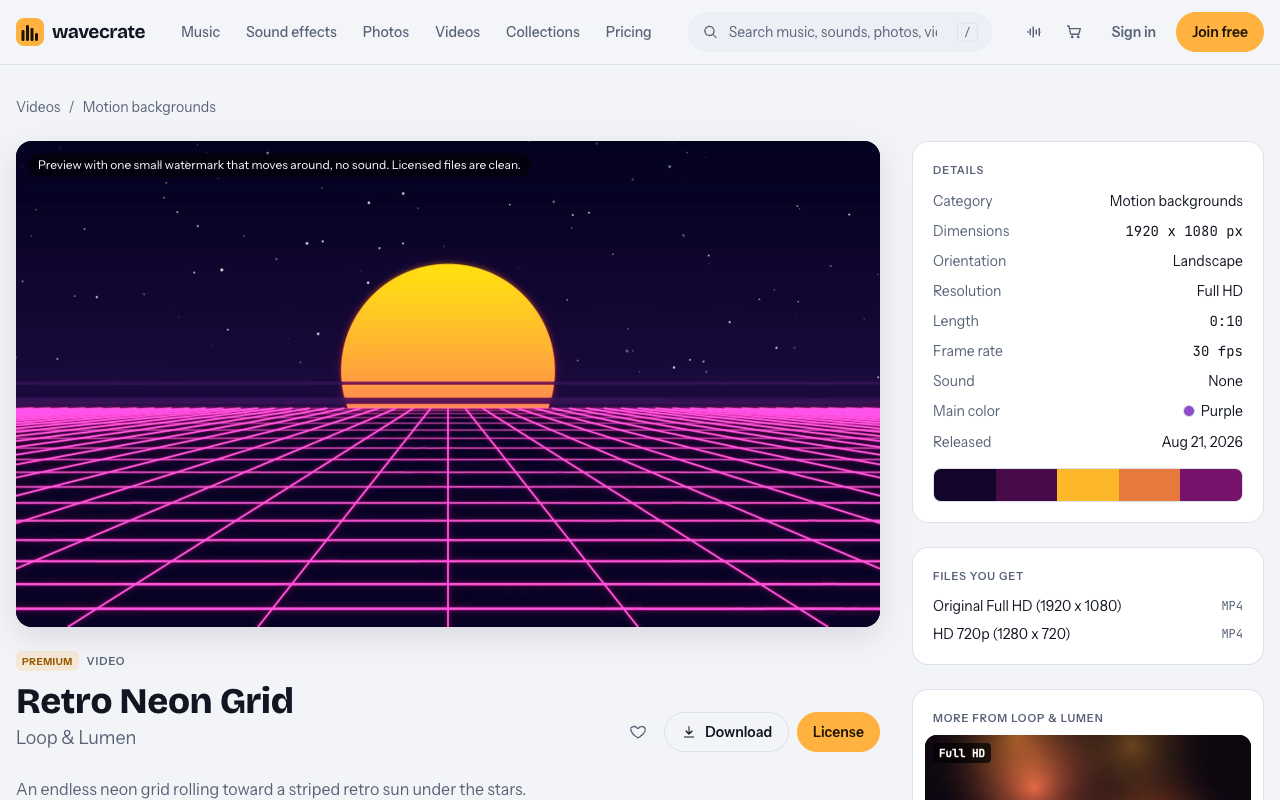
What the Retro Neon Grid clip gives you
Here is what the page listed when we read it on 11 October 2026:
- 1920 x 1080, landscape, Full HD.
- Length 0:10, at 30 fps.
- Sound: None.
- Files: Original Full HD (1920 x 1080) mp4 and HD 720p mp4.
- Marked Premium, so there is no Free license on it.
The preview carries one small watermark that moves around, and it has no sound. The licensed files are clean.
Two things follow from this list. First, the clip is silent, so your song is a separate item with its own license. Second, the clip is landscape, which matters for where you post it.
Landscape or vertical: pick the right frame
A standard 16:9 music video fits Retro Neon Grid as it is. No crop, no scaling, full sharpness.
A vertical 9:16 video is a different story. To fill a vertical frame from a 1920 x 1080 clip, you keep only a slice about 608 x 1080 pixels wide. Then you stretch that slice to fill the screen. The result looks soft, and you lose most of the grid's width.
So plan your main cut in 16:9. If you also want a vertical teaser, expect it to look softer, or build the teaser from a clip made for vertical.
How to edit with a retro neon grid background
These are general editing habits, not features of any one app.
Loop the 10 second clip cleanly
The clip runs 10 seconds and is tagged loop. A song runs much longer, so you will repeat it. Place copies end to end and watch each join at full speed. If you see a jump, trim a few frames at the join or hide it under a cut or a flash on a strong beat.
Cut to the beat
A rolling grid already has a steady pulse. Line up your edits with the kick or snare. Cut to a close-up, a lyric line or a color change on the downbeat. Hold longer shots in quiet verses and cut faster in the chorus.
Keep lyrics readable over the grid
Bright lines behind text make words hard to read. Place lyrics in the darker sky above the horizon, not over the busy floor. Use a bold font, a light color and a soft shadow or dark band behind the words. Keep each line on screen long enough to read it twice.
Mix in a calmer background
A full song on one moving grid can tire the eye. Switch to a slower background for a verse or a bridge, then return to the grid for the chorus. The Motion backgrounds category also holds Slow Gradient Flow, a Full HD 10 second loop of blue and violet gradients, plus Drifting Golden Bokeh, Particle Plexus Loop, Hex Mesh Loop and others.
Worked example: one lyric video, three uses
Say you build one lyric video for your new synthwave song. The chorus runs over Retro Neon Grid. The verses run over Slow Gradient Flow. Here is what each use needs.
Retro Neon Grid is Premium. Slow Gradient Flow was marked Free on the day of writing. Items on Wavecrate have changed between Free and Premium before, so re-read each page on the day you download. Paid licenses are not on sale yet: Wavecrate says purchases open soon, so the prices here are the listed prices for when sales open, while items marked Free, like Slow Gradient Flow, can already be downloaded with a free account.
Use 1: on your own channel
You post the video on your own channel as online content.
- Slow Gradient Flow: the Free license covers "Websites, blogs and social media posts" and "Monetized channels". It requires credit text "next to the photo or in the description".
- Retro Neon Grid: no Free license, so it needs Standard (listed at $29) or Pro.
Use 2: to promote your own release or brand
Now the same video promotes your own single, your artist name or your brand. That is your own marketing.
- Both clips need Standard. The Standard card lists "Your own marketing and brand content". The Free video license does not include your own marketing, so Slow Gradient Flow needs Standard here too.
- Standard also says "No credit required".
Use 3: for another artist, a paid ad or broadcast
You make the video for another artist, run it as a paid ad, or it goes to TV broadcast.
- Both clips need Extended. Extended covers "Paid advertising and TV broadcast" and "Unlimited print runs and client work". Retro Neon Grid's Extended license is listed at $99.
- The same goes for a loop sold as part of a template or VJ pack. Extended lists "Products for resale: merchandise, templates, prints and packaging".
- Pro does not cover any of this. Pro gives Standard licenses only.
Wavecrate's pages do not define "paid advertising" further. If you pay a platform to promote the video, treat it as a paid ad.
What the licenses for retro neon grid backgrounds for a music video cover
Here is how Retro Neon Grid's license cards read on 11 October 2026:
- Standard, listed at $29: "Your own websites, social, presentations and marketing, no credit needed." It lists websites, social media, apps and presentations, your own marketing and brand content, print up to 500,000 copies, no credit required, or included with Pro.
- Extended, listed at $99: "Paid ads, broadcast, products for resale and client work." It lists paid advertising and TV broadcast, products for resale, and unlimited print runs and client work.
The pricing page lists Pro at $8.25 a month billed yearly ($99 a year) or $12 month to month, with a Standard license on everything; Pro is not on sale yet. "Content you publish while subscribed stays covered." The license is tied to the date you publish, so what counts is publishing while subscribed.
The pricing table and item pages are the whole license today. If a use is not named there, treat it as not covered.
License the music separately
Retro Neon Grid has no sound. Your track needs its own license. If you use a track from Wavecrate's synthwave music, music has its own cards: Free with credit on Free tracks, and Standard listed at $15 and Extended at $49 on track pages. The same three uses apply, so check the music card for each one.
Frequently asked questions
Can I use Retro Neon Grid for free?
No. It is marked Premium, so it has no Free license. It needs Standard (listed at $29), Pro, or Extended (listed at $99) once sales open, depending on the use.
Does Pro cover a music video I make for a client?
No. Pro gives Standard licenses only. Client work needs Extended.
Will Retro Neon Grid look sharp in a vertical video?
Not really. It is a 1920 x 1080 landscape clip, so a 9:16 crop keeps only about 608 x 1080 pixels and looks soft. It fits a 16:9 video as it is.
How can someone check my license?
Every license comes with a certificate and a code. Anyone can check that code on the verify page without contacting Wavecrate.
Get started
Browse Wavecrate: you can join free and download items marked Free now, paid licenses are not on sale yet (purchases open soon), and every download comes with a license certificate and a code anyone can check on its verify page.
Open the Retro Neon Grid page, read its license cards on the day you download, and match each use to the right license. Create a free Wavecrate account to get 3 free downloads a month of items marked Free.


Comments
No comments yet.
Sign in or make an account to comment.