Robot servo sounds for a tech explainer: pick, sync and mix
A robot arm that moves in total silence looks fake, even when the animation is perfect. Adding robot servo sounds for a tech explainer is one of the cheapest ways to make motion feel physical. This guide shows you how to pick the right servo sound, sync it to the frame, keep it under your narration, and choose the right license for where the video will run.
Why robot servo sounds make a tech explainer feel real
When a gripper closes and the viewer hears a short whir ending in a soft stop, the gripper reads as a machine with weight and a motor. Without the sound, it reads as a diagram.
This matters most in explainers, because the motion is usually there to teach something. Take a clip that shows a robot sorting parts. The servo sound marks each step: rotate, lower, grip, lift. The viewer counts the beats without trying. The sound works as punctuation for the idea.
Wavecrate, the sound library used as the example in this guide, has robot servo sounds in its Foley category, and every download comes with a license certificate and a code.

The servo sound palette: whirs, ticks, clunks and stepper hums
Before you browse, know the four sounds you are actually looking for.
- Whir. The motor spinning up and moving. This is the core of most servo sounds. A higher pitch reads as small and fast. A lower pitch reads as big and strong.
- Tick. A tiny click at the start or end of a move. It sells precision.
- Clunk. The stop at the end of travel, or a part locking into place. It sells weight.
- Stepper hum. A steady buzzing tone with a slight rhythm inside it. It fits 3D printers, CNC machines and conveyor belts more than robot joints.
On Wavecrate, the Foley sound effects category is where the servo sounds sit. When the category was read on 11 October 2026 it listed two: Robot Servo, Long, Crisp (0:03) and Robot Servo, Medium, Bright (0:02), both marked Free. The same category had Cooling Fan Spin, Long, Crisp (0:04), mechanical keyboard typing and mouse clicks. Those are useful supporting layers for a desk or lab scene.
There was no sound named as a stepper motor in that read. If you need a steady machine bed under the action, the Ambience category had Server Room, 20 Second, Warm, marked Free, which can sit as a low bed under a data center shot.
Matching the sound to the motion: small servos and arms
Match the length and character of the sound to the size of the move.
Small servos and grippers
Use the shorter, brighter sound. A two second clip like Robot Servo, Medium, Bright fits a finger closing, a camera head turning or a small rover steering. Trim the tail if the move is quicker than the sound.
Robot arms
An arm move usually has three parts: start, travel, stop. Use the longer, crisper servo for the travel. Add a tick at the start and a clunk at the stop. If the arm moves through several joints at once, stack two servo sounds and shift one of them in pitch so they do not blend into a single tone.
How to sync servo sounds to animation and on-screen action
Here is a workflow you can follow in any video editor.
- Find the motion frames. Scrub through the clip and put a marker on the frame where each move starts and the frame where it stops.
- Audition on the site first. Wavecrate has keyboard shortcuts on every page. Press Space to play or pause, Left and Right to skip 5 seconds, and Shift with Left or Right to jump to the previous or next item. You can run through every Foley sound in a minute without touching the mouse.
- Place the start, not the middle. Line the first audible bit of the whir up with the first frame of motion. Sound that starts late feels wrong much faster than sound that starts early.
- Cut the end to the stop. If the arm stops at frame 48 and the sound keeps going, cut it at 48 and add a short fade of a few frames. Then drop your clunk right on that frame.
- Lead by a frame or two for big hits. For a heavy clunk, try moving the sound one or two frames ahead of the visual. Trust your eye on what feels tighter.
Example: your explainer shows an arm picking a part off a belt. Motion starts at 0:04.10 and stops at 0:05.20. Place Robot Servo, Long, Crisp at 0:04.10, cut it at 0:05.20, add a short fade, and put a soft click from the interface sounds on the grip frame. Three layers, under a minute of work.
Mixing servo SFX under narration without stealing focus
Your voiceover carries the lesson. The servo sounds support it. Keep these rules in mind:
- Start low. Set the effects well below the voice, then raise them until you can just hear the motion clearly.
- Cut the lows. Servo sounds often carry low rumble that muddies speech. A high pass filter on the effects track clears room for the voice.
- Duck under key words. If a whir lands on an important term, pull the effect down a few dB for that word, or move the effect a beat later.
- Leave gaps. Let some moves happen with no sound if the narrator is in the middle of a dense sentence. Silence also reads as focus.
A quick test: play the mix and look away from the screen. If you can still follow every sentence and you notice the robot moving, the balance is right.
Layering and processing: pitch and speed
Two servo sounds can cover a whole explainer if you process them.
- Pitch. Shift down a few semitones for a bigger, heavier machine. Shift up for something small and fast.
- Speed. Speeding up a whir both shortens it and raises its pitch, which suits quick moves. Slowing it down gives you a slow, heavy joint.
- Layer for texture. Put the servo over a quiet fan or room tone so the moves do not jump out of dead silence. Cooling Fan Spin, Long, Crisp or the Server Room loop can fill that bed.
Both Robot Servo pages offer a 24-bit WAV master and a 320 kbps MP3. When a page offers the WAV, use it for heavy pitch and speed changes. It holds up better than a compressed file.
Licensing robot servo sounds for a tech explainer
The trap is a sound marked Free in a business video. Take Robot Servo, Long, Crisp through three uses, using its page and the license table on the pricing page:
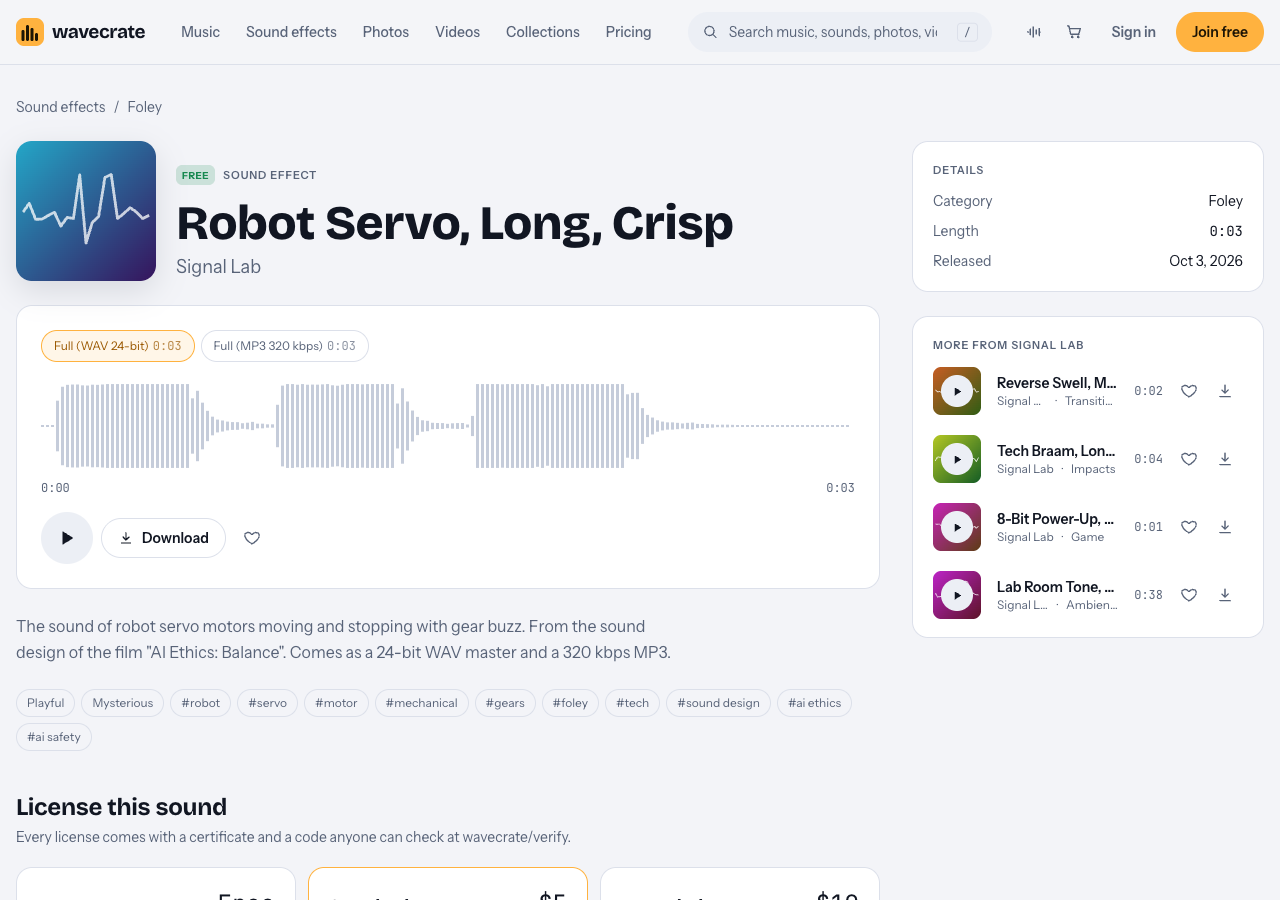
Robot Servo, Long, Crisp, read on 11 October 2026.
- Your own channel. The Free license covers YouTube, TikTok, Instagram, Twitch and podcasts, monetized channels included, with credit text required in your description. A free account gets 3 free downloads a month.
- Your company's own explainer. A product video on your company's channel or site is "your own business and brand content." The Free license does not tick that row, so it needs Standard (listed at $5 on this page), even though the sound is marked Free.
- A client's explainer, an ad or an app. A video a company pays you to make is client work; promoting it is paid advertising; a sound inside software is "apps, games and software." All need Extended (listed at $19 on this page).
Paid licenses are not on sale yet: Wavecrate says purchases open soon, so those are the listed prices for when sales open. Sounds marked Free can already be downloaded with a free account. Listed prices differ by item, so check each page. Pro is listed at $99 a year (or $12 month to month), is not on sale yet, and gives Standard licenses on the whole catalog, never Extended. You do not own the sound: you get a license to use it, and Wavecrate keeps the copyright. Every download comes with a certificate and a code that anyone can enter on the verify page to see the licensee, the item and the license type.
Frequently asked questions
Where can I download royalty-free robot servo sounds?
Wavecrate's Foley category listed two robot servo sounds on 11 October 2026, both marked Free. Free items need a credit line in your description, and a free account gets 3 free downloads a month.
How loud should sound effects be under a voiceover?
Low enough that every word stays clear. Start with the effects well under the voice, raise them until the motion is just noticeable, and duck them under key words.
What is the difference between a servo sound and a stepper motor sound?
A servo moves to a position and stops, so it sounds like a whir with a clear start and end. A stepper moves in tiny fixed steps, so it sounds like a steady hum or buzz with a faint rhythm, common in printers and CNC machines.
Get started
Open the Foley category, press Space to audition the two servo sounds, and pick one short and one long for your next edit. Then add a click from the interface sounds and a quiet room tone underneath. You can join free to start downloading.
Browse Wavecrate: you can join free and download items marked Free now, paid licenses are not on sale yet (purchases open soon), and every download comes with a license certificate and a code anyone can check on its verify page.


Comments
No comments yet.
Sign in or make an account to comment.