Rock riffs for a motocross highlight reel: pick, cut, license
Good riding footage can still fall flat if the music drags. This guide shows you how to pick rock riffs for a motocross highlight reel, cut your jumps on the beat with simple tempo math, mix the guitar with your own engine audio, and choose the license that fits where the reel will run. The worked example uses one real track and walks it through three uses, so you can see where the Free license stops.
Wavecrate licenses royalty-free music, sound effects, photos and videos, and every download comes with a license certificate and a code anyone can check on its verify page.

Choosing rock riffs for a motocross highlight reel
A riff is a short guitar phrase that repeats. In a highlight reel it sets the pace and gives you cut points. Look for these traits when you audition tracks:
- A clear downbeat. You should hear where each bar starts, so you can land cuts on it.
- Room in the mix. A riff with gaps leaves space for your bike audio. A dense wall of guitar buries it.
- One lift. A moment where the energy jumps gives your best clip a home.
- A clean loop. Reels change length. A section that repeats cleanly lets you stretch or trim without a rough edit.
Instrumental tracks are usually easier. A vocal line competes with the engine, and a lyric can land at the wrong moment.
Find rock tracks by tempo and energy
Start on Wavecrate's Rock music page. On 11 October 2026 it listed 10 tracks. You can filter by tempo (Slow under 90 BPM, Mid 90 to 120, Fast over 120), by energy (Calm, Relaxed, Steady, Driving, Intense), and by key, vocals, length and access (All, Free or Premium).
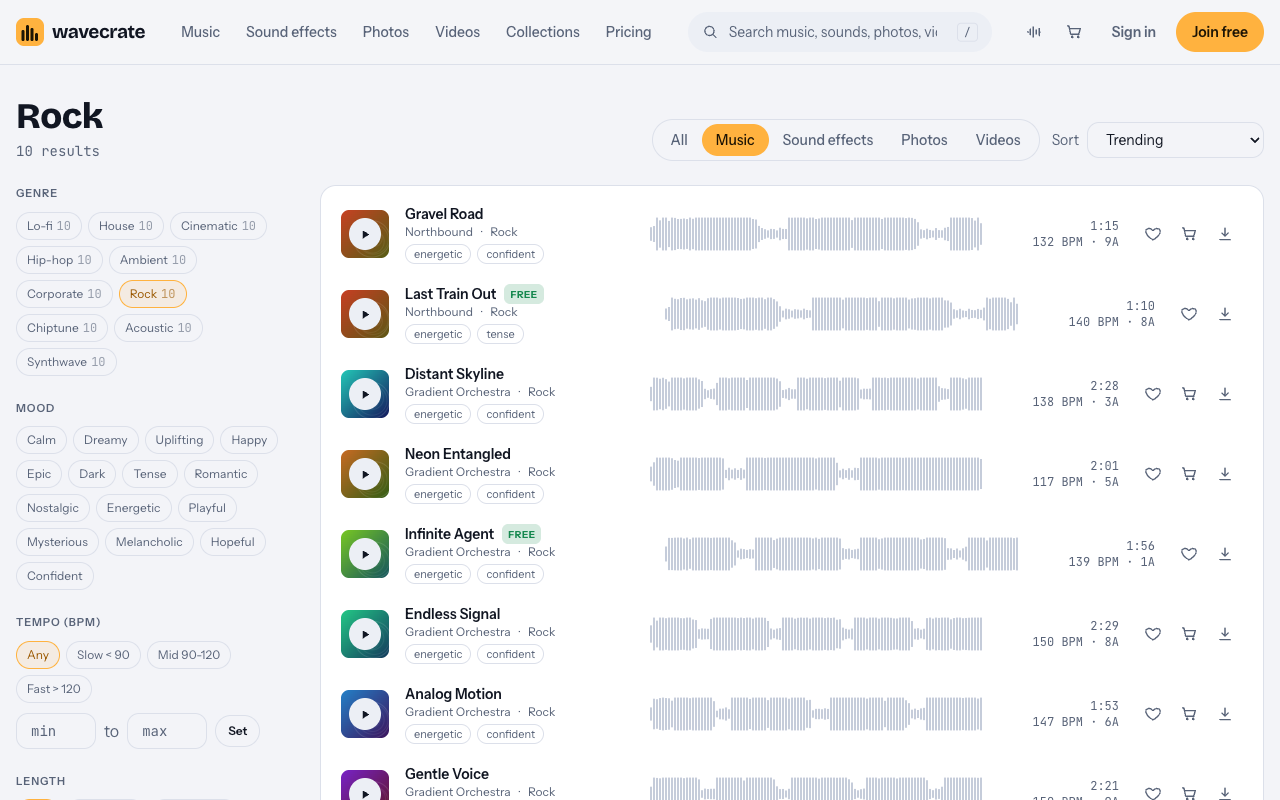
Most of the Rock tracks that day sat in the Fast band. A few examples from the list:
- Gravel Road by Northbound: 1:15, 132 BPM.
- Last Train Out by Northbound: marked Free, 1:10, 140 BPM.
- Infinite Agent by Gradient Orchestra: marked Free, 1:56, 139 BPM.
- Endless Signal: 2:29, 150 BPM.
- Neon Entangled: 2:01, 117 BPM, for a calmer section.
Tempo, in beats per minute (BPM), sets how fast cuts can feel natural. A fast tempo suits quick clips of starts and rhythm sections. A slower track, or a section where the drums go half time, gives a long jump room to hang in the air. Pick the tempo for the feel you want, then cut to it.
Cut jumps on the beat: the math at 140 BPM
You do not need an ear for music to cut on the beat. You need one number. Divide 60 by the BPM to get the length of one beat in seconds.
For a 140 BPM track:
- One beat = 60 / 140, about 0.43 seconds.
- One bar of 4/4 (four beats) = 4 x 0.43, about 1.71 seconds.
- Eight bars = about 13.7 seconds, which matches the 0:14 loop listed for Last Train Out.
Now use those numbers in your editor:
- Place your best clip first. Put your biggest jump or cleanest pass on the lift in the track.
- Mark the downbeats. Drop a marker every 1.71 seconds from the first downbeat, or tap a marker key while the track plays.
- Cut on beat one. A cut on the first beat of a bar feels planned. A cut on a random note feels sloppy.
- Start the takeoff on the beat. Let the bike leave the lip on a downbeat. If the clip is long, let the landing fall one or two bars later (1.71 or 3.43 seconds).
- Use half bars for fast runs. For a quick sequence, cut every two beats, about 0.86 seconds.
- Leave a gap before the hit. If the riff stops for a beat, hold a rider in the air there. The silence makes the next hit bigger.
Track versions help too. Last Train Out comes as a full track (1:10), a 30 second edit (0:31) and an 8 bar loop (0:14). Use the edit for a short vertical reel, the full track for a longer video, and the loop to stretch a section when you have more good footage than music.
Mix the riff with your own bike and crowd audio
Your footage already has a loud soundtrack. Let the bike be heard in the moments that matter.
- Lower the music under key sounds. Pull the music down for a full-throttle pass, then bring it back.
- Cut the low end of your camera audio. A high-pass filter on the clip audio cuts wind rumble and leaves room for the bass.
- Use your own crowd audio as a bridge. Let it swell between sections.
- Stop the music for a crash or near miss. A moment of quiet lands harder than more guitar.
Worked example: Last Train Out through three uses
Last Train Out is a Rock track by Northbound, released Aug 21 2026. Its page lists 140 BPM, A minor (8A), Driving energy and Instrumental, and describes "driving power chords and live-feel drums with crashing accents." It was marked Free on the day of writing. Items can change between Free and Premium, so read the page again on the day you download.
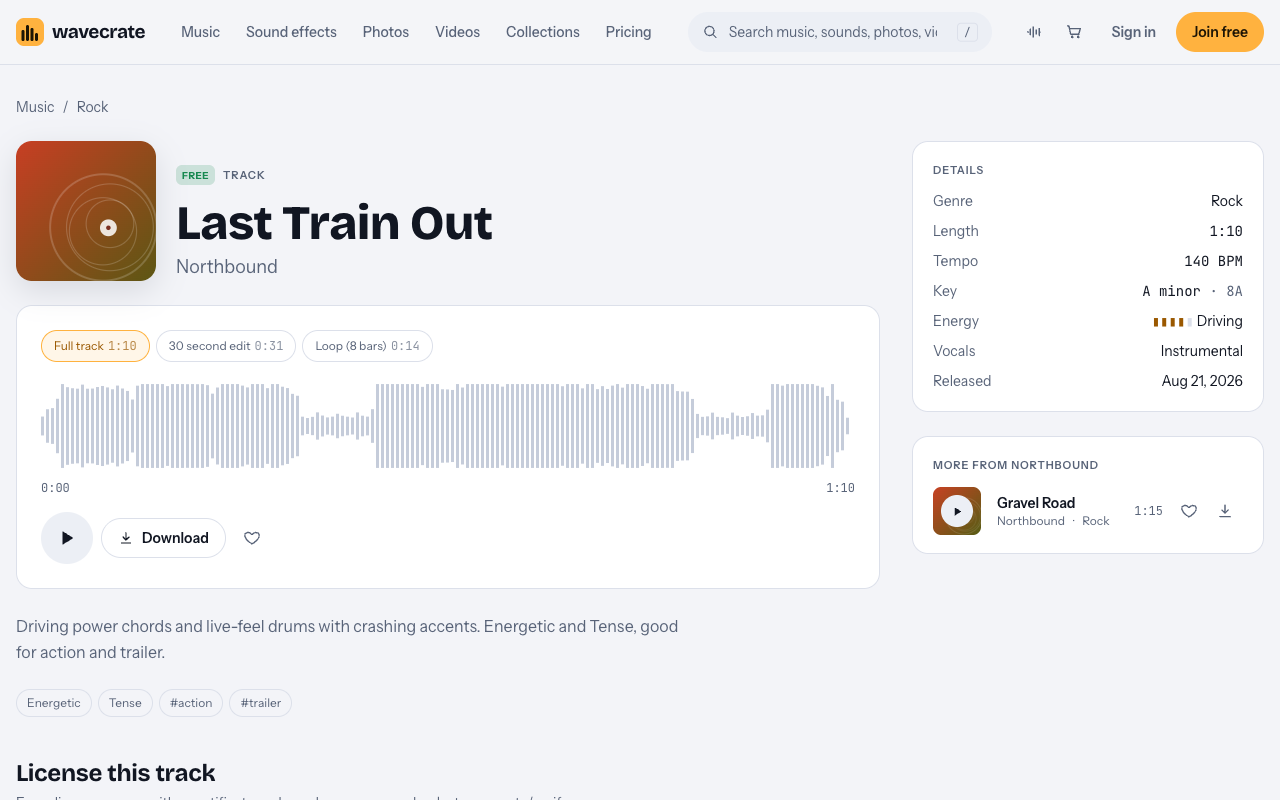
Here is the same track in three reels. Paid licenses are not on sale yet (Wavecrate says purchases open soon), so the prices below are the listed prices for when sales open; items marked Free, like Last Train Out, can already be downloaded with a free account.
- Your own channel, with credit: Free. You post a weekend riding reel on your YouTube or Instagram. The Free license on the track page covers online videos on YouTube, TikTok, Instagram, Twitch and podcasts, including monetized channels. Credit text is required in the description. A free account gets 3 free downloads a month.
- Your own shop or brand, or no credit line: Standard ($15) or Pro. You run a bike shop and cut a reel to promote it. The Free license does not tick "Your own business and brand content", so this needs Standard, even though the track is marked Free. Standard on this track is listed at $15. It covers online content for one creator or business, needs no credit, and prints your registered channels on the certificate. It is also included with Pro.
- A client reel or a paid ad: Extended ($49). You edit a reel for a race team or a dealer, or a sponsor pays to promote your video. Client work and paid advertising are Extended only. Extended on this track is listed at $49, and it also covers TV or radio broadcast, apps, games and software.
Pro, Standard and Extended: which one you need
Wavecrate's pricing page lists Pro at $99 a year (shown as $8.25 a month billed yearly) or $12 month to month, and Pro is not on sale yet. Pro gives a Standard license on everything. It does not include Extended. So a sponsor's paid ad, a broadcast or a reel you edit for a client still needs an Extended license for that track, even on Pro. Content you publish while subscribed stays covered after Pro ends. Something you publish after it ends is not covered by that line.
Every license comes with a certificate and a code. If you get a copyright claim, the pricing page says to send the platform your license code or certificate link. Anyone can check the code on the verify page. That gives a reviewer a way to check your license. It does not stop a claim from being raised, and no platform has promised to accept it.
You get a license to use the track, not ownership. Wavecrate keeps the copyright. That is also why a song from the radio is off limits without permission. The U.S. Copyright Office notes that a recorded song can hold two protected works, the musical work and the sound recording.
Frequently asked questions
What tempo works for a motocross highlight reel?
Pick the tempo for the feel you want. Most Rock tracks on Wavecrate that day were in the Fast band, over 120 BPM. At 140 BPM one beat is about 0.43 seconds and one bar about 1.71 seconds.
Can I use a track marked Free on a monetized channel?
Yes, for your own online videos. The Free license covers monetized channels, with credit text in the description.
Is a Free track fine for my bike shop's promo?
No. The Free license does not tick "Your own business and brand content". It needs Standard, listed at $15 for Last Train Out, or Pro.
Do I need Extended to edit a reel for a race team or sponsor?
Yes. Client work and paid advertising are Extended only, and Pro does not include Extended. For Last Train Out, Extended is listed at $49.
Get started
Open the Rock music page, set the energy to Driving, and audition a few tracks against your best clip. Do the beat math, cut on the downbeats, and note the license that matches where the reel will run. Create a free account to download tracks marked Free.
Browse Wavecrate: you can join free and download items marked Free now, paid licenses are not on sale yet (purchases open soon), and every download comes with a license certificate and a code anyone can check on its verify page.


Comments
No comments yet.
Sign in or make an account to comment.