Rubber duck debugging: write the problem out first
Rubber duck debugging: write the problem out first. That is the whole idea, and it is simpler than it sounds. Before you explain a bug to a person, a duck, or a chat window, you put it into words on a page. Writing often shows you what you have not checked yet.
This post covers why the writing step does the work, how to do it in about ten minutes, and what to do when the page does not give you an answer. It also shows where a problem journal fits in, because a bug you wrote down once is a bug you can find again.
What is rubber duck debugging?
Rubber duck debugging is a habit. You explain your code, line by line, to an object that cannot answer. The object is usually a rubber duck on your desk. You say what the code is supposed to do, then what it actually does. Somewhere in that explanation you hear yourself say something that is not true.
The duck does nothing. You do all of it. The duck is only a reason to slow down and speak in full sentences.
The twist in this post is the order. You can reach for the duck and start talking. That works, but talking is loose: it is easy to skip a step or wave at the hard part. Writing is slower and less forgiving. So write first, then talk if you still need to.
Why writing the problem out first works
When a bug is stuck in your head, it is a feeling more than a statement. "The login is weird" feels like a problem, but you cannot test a feeling. A sentence like "after a successful login, the second request returns 401" can be tested.
Writing pushes you to do three things:
- You pick words. Vague words do not survive on a page. You have to say which request, which user, which value.
- You put things in order. A page has a top and a bottom. Your memory of the bug does not.
- You find the gaps. When you reach a sentence you cannot finish, that is usually where the bug lives.
This is close to the habit in problem solving mindset: ask what is true first. A written problem is a list of claims. You can check each claim one at a time.
How to write the problem out before you explain it
Keep it short. One line is enough to start. Problem Graph is built around this: you write the problem down in one line, and it lands on the graph the moment you press Enter. Then you add detail underneath.
Use this order:
- The one-line problem. What is wrong, in plain words.
- What you expected. What should have happened.
- What actually happened. The exact message, value, or behavior.
- What you tried. Each attempt, and what came of it.
Do not write what you think the cause is yet. Cause comes last. If you start with a theory, you will write only the facts that support it.
A step-by-step rubber duck debugging example
Here is a made-up bug, written the way you might write it.
One line: The nightly report email shows yesterday's totals twice.
Expected: One row per day, with each day counted once.
Actual: The row for the last day appears two times, and the grand total is too high by that amount.
Tried:
- Ran the query by hand. It returned one row for the last day. This is fine.
- Checked the template loop. It looked normal.
- Restarted the job. Same result.
Now try to write the next sentence: "So the duplicate must come from..." You have ruled out the query. You have not ruled out the step between the query and the template. Writing "the data that reaches the template" makes you ask what happens in between. Maybe the job appends a "today so far" row to the list. Maybe it does that after the day rolls over, so the same date is added again.
You did not need anyone to tell you. The gap in the written account pointed at the step you had not looked at.
That is the point of the exercise. You are not hunting for the answer. You are trying to write a complete, true account, and the account breaks where your understanding does.
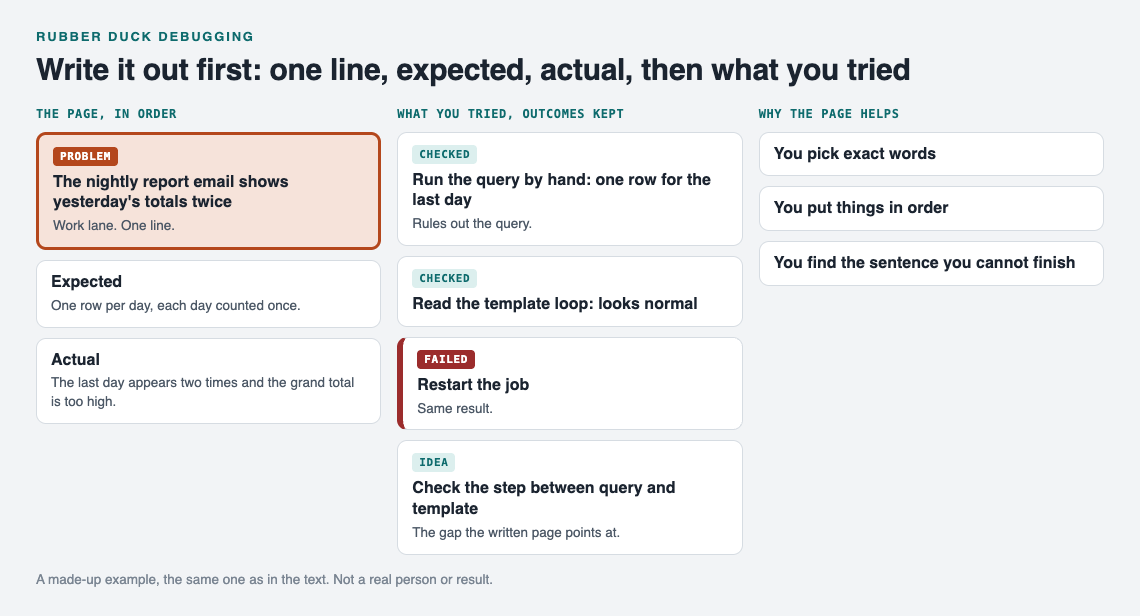
The made-up report bug, written out before anyone is asked.
What to include: expected, actual, and what you tried
These three parts do different jobs.
Expected
This is the part people skip. If you cannot say what should happen, you cannot say what is wrong. Write it as a plain statement you could check.
Actual
Copy the exact thing you saw. Do not paraphrase an error message. "It errors out" hides the one word you needed.
What you tried
List each attempt and its result. In Problem Graph, you attach what you try as a solution, mark the ones you are trying, and record the outcome: worked, partly, or failed. A failed attempt is not wasted. It narrows the search. The app's own page puts it this way: "The graph is honest. A solution that failed three times stays on the map as a failed solution, and that is exactly what the next person needs to know."
That next person may be you in three months. The same bug comes back wearing a different name, and your note says what you already ruled out.
Common mistakes that keep the duck silent
- Starting with the fix. "I think I need to change the loop." That is a solution, not a problem. Write the problem first.
- Skipping the boring parts. A step you think is too obvious to write is a step you have not checked.
- Paraphrasing errors. Paste the real text.
- Writing for someone else. You are not polishing. A messy honest page beats a clean vague one.
- Not recording what failed. If you only note what worked, you will try the dead ends again.
- Stopping at the first theory. Write down at least two possible causes before you test either.
If you keep bug notes already, see debugging journal: how to log the bugs you fix. Recording what happened, and not only what you hoped for, is the same habit.
When to stop writing and ask a human
Writing does not solve everything. Stop and ask someone when:
- You have a complete, honest page and the account has no gaps, but the behavior still makes no sense.
- The next step needs access, context, or knowledge you do not have.
- You have spent a fixed amount of time, say 30 minutes, and you are only repeating attempts.
The page you wrote is not wasted. It is the best question you can send. A person who reads "expected, actual, tried" knows where to start. A person who hears "it's broken, can you look?" has to ask all of that first.
If you want to share a problem, Problem Graph lets you mark one problem as a main node. Only a main node can be shared, and when it is, its solutions, their outcomes, and the requirements they need go along with it. You can keep it private (the default, where only you see it), share it into a private network by giving a few people an invite code, or put it out for everyone. A problem you only link to it stays home, like the rest of your graph.
You can also link problems that belong together, even across lanes. A bug that keeps returning might link to a work problem about unclear ownership of that job. That kind of pattern is hard to see in a flat list. It is easier on a map.
Once other people have shared problems, the app can show you similar ones and which of their solutions worked, and you can borrow one into your own graph with a link back to where it came from. It can also ask the AI for suggestions, which are proposals to test, not answers to trust. Treat them like a second theory on your page, to be checked the same way as your own.
Frequently asked questions
Does rubber duck debugging need an actual duck?
No. Any listener that cannot reply works, including a notes page. The value comes from putting the problem into complete sentences.
Why write before speaking?
Writing is slower, so it exposes gaps that speech skips over. You also end up with a record you can reread or send to someone else.
What should I write first?
A one-line statement of the problem, then what you expected, what happened, and what you tried. Leave your theory about the cause until the end.
Should I record attempts that failed?
Yes. A failed attempt tells you, and anyone you share with, what not to repeat. In Problem Graph you mark each attempt as worked, partly, or failed.
Get started
Try Problem Graph: it is free, and you can look around the public network without an account. Write one problem down in a line and attach the first thing you will try.
To test fixes without guessing, see one change at a time. The skill is the same: say the true thing plainly, in order.
Comments
No comments yet.
Sign in or make an account to comment.