SAML security: check how your app trusts single sign-on
SAML security is about one question: when your app lets someone in because a message says "this person signed in", how sure are you the message is real? SAML is an open standard for sending sign-in information from an identity provider (the system that checks the person) to a service provider (your app). Most teams meet it when a business customer asks for single sign-on. The OWASP SAML Security Cheat Sheet lists what your app must check before it believes the message. This post turns that list into a short review you can run on your own login.
SAML security starts with trusting only what is signed
In the common browser flow, the person's browser carries the message from the identity provider to your app. That means the browser, and anything between, can touch it. Three protections work together.
- TLS protects the message on the wire. OWASP calls TLS 1.2 the most common answer for confidentiality and integrity at the transport layer. Our post on TLS settings shows how to check yours.
- A digital signature tells your app who made the message and that nobody changed it. It stops a forged assertion.
- Encryption of the assertion is optional. Use it when the message must carry sensitive details; the sheet says to avoid those where you can.
Treat the signature as the center of the design. Every other check below is there because a signed message can still be misused if your app reads it carelessly.
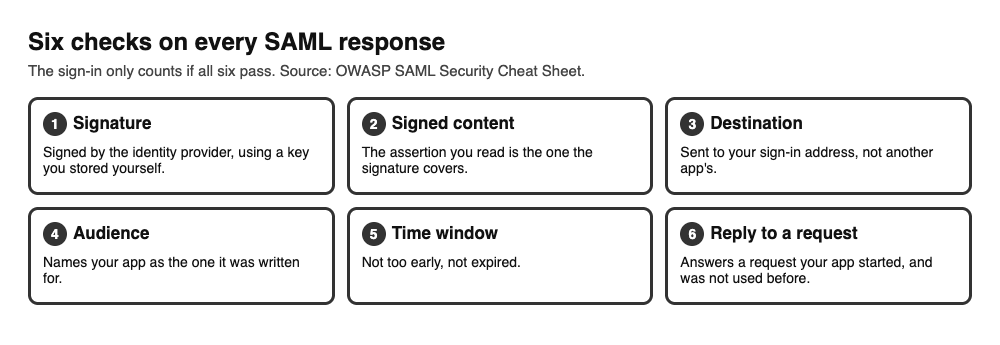
The six checks a SAML login needs to pass, from the OWASP sheet.
Check that the message was meant for your app
A valid signature proves who wrote the message. It does not prove the message was written for you. The sheet lists what your app compares on every response.
- The
Destinationon the response must match your own sign-in address exactly. OWASP says to reject a response where it is missing or does not match, because that blocks one app's assertion being replayed at another. - The
Audiencemust match your app's own identifier. NotBeforeandNotOnOrAfterdefine a time window. Reject anything outside it.- The
Recipientand subject confirmation data must also check out.
InResponseTo matters more than it looks. The sheet describes a flaw in one well-known single sign-on setup: responses did not carry every element needed for a safe exchange, so a malicious partner app could pass on what it received. Your request has an ID, and the response must echo it back. Without that check, your app cannot tell an answer to its own question from a message that came out of nowhere.
The sheet also asks for a short life on the response and one-time use, so the same response cannot be replayed.
Validate the signature the careful way
SAML messages are XML, and XML signatures can be fooled. The sheet points to the 2012 research on XML signature wrapping, where an attacker leaves the signed part in place and adds a second, unsigned part that the app reads instead. The signature still checks out, but the app reads the wrong content.
The sheet's defenses:
- Always check the XML against a schema before you use it for anything security related. Keep a local, trusted copy of the schema, and never let the code download one from a third party.
- Take the signing key straight from the identity provider, store it yourself, and ignore any key information inside the message. If you expect more than one key, store each one locally.
- Never pick security-related elements by tag name before the message is validated. Use absolute XPath expressions instead, unless a hardened schema does the validating.
- Check that the signature's reference points at the assertion or response you actually use to sign the person in. The assertion you authenticate with must sit inside the signed content.
- Require at least RSA-SHA-256. Reject SHA-1 based signature and digest methods.
Most teams do this with a maintained SAML library, not by hand. That is the right call. The review is to read what the library is set to do and confirm each line above is true for your setup. A security protocol does not make its input safe; see our post on XXE prevention for how your XML parser should be set up.
Be careful with sign-in that starts at the identity provider
There are two ways a SAML sign-in can begin. In the first, the person visits your app, your app sends a request, and the identity provider answers it. In the second, the person starts at the identity provider and it sends your app a response nobody asked for. OWASP calls the second one an unsolicited response, or identity provider initiated sign-in.
The sheet says this is less secure by design: your app has no request to compare, so it loses a layer of login CSRF protection and cannot confirm the person meant to start this login. It is still supported for backward compatibility. If you must allow it, the sheet asks you to:
- follow the SAML profile's validation steps for unsolicited responses;
- detect replays, at the response or assertion level;
- validate
RelayStateagainst an allowlist when it is a URL, which stops an open redirect (see open redirect testing).
The simplest rule is to turn it off unless a customer needs it, and to start every flow at your own app.
Look after the certificates and keys
The trust between the identity provider and your app usually rests on one X.509 certificate that you chose to trust. The sheet says that if an attacker can use the identity provider's signing key, they can mint responses saying anything they want. So the key and the way you got the certificate both matter.
- Get the certificate over TLS. If the provider publishes a metadata address, use it, and fetch it over a properly configured connection. Avoid emailing certificates.
- Use sound sizes. The most supported strong choice is RSA 2048-bit keys with SHA-256. No identity provider should use SHA-1 to sign the certificate.
- One use per key. The signing certificate must not be the TLS server certificate, and signing and encryption need separate pairs.
- Plan the rotation. Replace certificates before they expire, and agree on contacts so both sides can swap a key fast after an incident. Revoking a certificate with no coordinated replacement is an outage.
- Protect the private key. If you run the identity provider, the sheet suggests a hardware security module, since a key stored in a file is easy to copy. Our post on key management covers storing and rotating keys.
A one-afternoon review of your SAML login
Here is a worked example for a small team with a customer asking for single sign-on. Use a test identity provider.
- Draw the flow. Write down who starts the sign-in, which address receives the response, and which library parses it.
- Read the settings. Find where the library gets the signing key, the expected destination and the expected audience. Write each value down. An empty value is a finding.
- Try a response for another app. Change the destination or audience on a test response and re-sign it with the test key. Your app should refuse it.
- Try an old response. Replay a response after its time window and replay one a second time. Both should fail.
- Try an unsolicited response. Send one with no request behind it. If your app accepts it by accident, turn it off.
- Try a tampered message. Change the person's name inside a signed assertion, and, if your tools allow, add a second assertion. The login must fail.
- Check the certificate plan. Find the expiry date, who owns the swap, and where the private key lives.
Write each result as pass or fail, with the setting that caused it. The session your app creates after sign-in should follow session management, and define how SAML logout works, as the sheet asks. No review finds every weakness, so keep it as a repeatable list.
Frequently asked questions
What is SAML security?
It is the set of checks that make sure an app only accepts a sign-in message that is genuine, meant for it, fresh and unchanged.
Is SAML the same as OAuth or JWT?
No. SAML is an XML based standard, most often used for single sign-on between a company's identity provider and an app. OAuth and JWT are different standards with their own checks; see OAuth 2.0 security and JWT security.
What is an XML signature wrapping attack?
The attacker keeps the signed part of a message and adds a second, unsigned part. If the app reads the unsigned part, the signature still looks valid. Schema validation, absolute XPath and checking what the signature covers are the sheet's answers.
Should I allow sign-in that starts at the identity provider?
Only if you need it. OWASP says it is less secure by design because your app has no request to compare the response with. If you allow it, detect replays and check RelayState against an allowlist.
Get started
Pick your SAML login and run the afternoon review above: write down the destination, audience and key settings first, then try the bad responses. If you want another pair of eyes on your sign-in, book a call with whitehatstoic. The security testing service covers web app and API review, with a written report and fixes, and a retest after fixes, scoped after a short call. We cannot promise a test finds every weakness, but we can show you where to look first.
Building something that has to be safe? Tell us the product, the deadline and your biggest worry, and we reply with a plan.
Comments
No comments yet.
Sign in or make an account to comment.