Screen Recording File Size: How Much Space It Takes
Screen recording file size depends on your picture size, how much moves on screen, how many sources you save and how long you record, so no single number fits everyone. The reliable way to know is to measure one short test on your own machine and multiply. This post shows how, and what makes the number climb.
If you already want to know where the files end up on your computer, the where recordings are saved guide covers the folder, the file names and what sits inside each recording's folder. Cheap Recorder writes each recording straight to a folder you pick on your own disk as you record, so you can watch the size grow and check it afterwards.
How big is a screen recording? Measure it, then multiply
Tables online promise a fixed number of gigabytes per hour, but your screen, your content and your settings change the answer. This post does not quote one, because we have no honest figure that would hold for your setup. Here is a method that does hold:
- Choose a folder under Where to save.
- Record 30 seconds of the kind of thing you actually record: a slide deck, a code editor, a browser demo.
- Watch the counter next to the timer. It shows how many MB have been written.
- Press Stop and finish, then open the recording's folder and look at the file size.
Now do the arithmetic. Suppose, with made-up numbers purely for the sum, the test file is 60 MB. An hour is 120 times 30 seconds, so that is 7,200 MB, or about 7.2 GB. If you plan ten one-hour sessions, you need roughly 72 GB free. Swap in your real number.
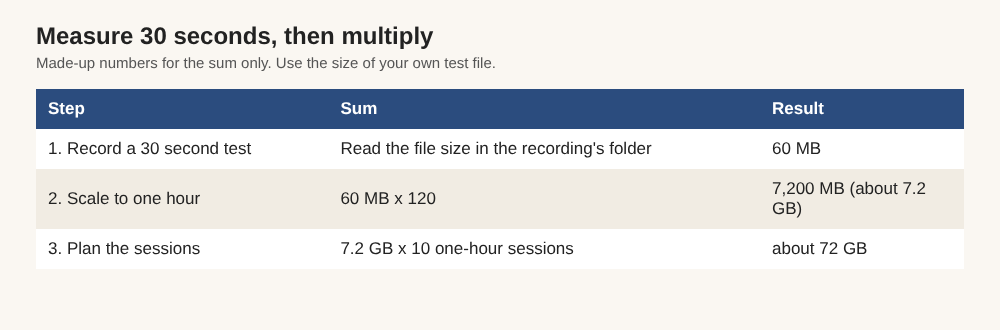
The sum with made-up numbers. Swap in the size of your own test file.
Content matters, so test with the real thing. A screen that barely changes usually needs less room than one full of motion, such as scrolling or video playing in a tab.
What makes a screen recording file size grow
Four things drive it:
- Picture size. More pixels means more data.
- Movement. More change from one moment to the next means more data.
- Extra files. Saving sources separately adds files next to the main one.
- Time. Twice as long is roughly twice as big.
Resolution and frame rate: the two biggest levers
In general, a bigger picture takes more space than a smaller one, and smoother motion takes more than choppy motion. These are the two levers every video tool shares.
On Cheap Recorder, the Creator plan includes 4K (2160p) export. A 4K picture holds many more pixels than a standard one, so expect a larger file than the same session at a lower size. If you do not need 4K for a quick team update, you do not need to pay for it in disk space either.
What you choose under What to capture also shapes the picture. You can record a whole screen, a window or a browser tab, and sharing one window or tab keeps other tabs and private things out of the recording.
Audio, webcam and extra tracks: what they add
Switch Record my webcam off and do not pick a screen, and Cheap Recorder saves an M4A audio file instead of an MP4. That is the smallest option when you only need a voice.
The webcam adds picture data. How much depends on the layout. The Layout menu offers Picture in picture (the default), Side by side, Screen only and Camera only. If you only need the screen, Screen only or a webcam that is switched off keeps the file to one picture. The screen and webcam guide explains each layout.
The biggest extra is the option called Also save every source separately. You still get the usual MP4. On top of it, Cheap Recorder saves each source as its own WebM file in a folder called Separate sources inside the recording's folder:
- one audio file for each ticked microphone, starting with
audio_ audio_meeting_far_end.webmfor the other side of a call, if you picked onewebcam.webmif the camera was onscreen_with_mixed_audio.webmwhen a layout puts the screen and camera together- small helper files such as
manifest.json,markers.mdandfinalise.sh
Those files take more room than a single MP4, so pick a folder with plenty of free space. If a background is on, you also get the plain webcam file and a copy with the background applied. Tick the option before you record, since it cannot be added afterwards. The separate tracks guide shows when it is worth it. For a casual screen share, leave it off.
Why long recordings and retakes pile up fast
Length is the multiplier in your sum, and retakes quietly add to it. A tutorial you record three times to get right is three folders, not one. Each recording gets its own folder, so the cost is easy to see, but it is also easy to forget.
Conversions add copies too. When you use Convert, the new file downloads and is also saved in the recording's folder next to the original. A GIF is silent, loops, runs at 12 frames a second and is 640 pixels wide. It suits a few seconds in a document or chat and gets very large for anything long. Convert a short clip to GIF, not a lesson.
Finally, think about your monthly allowance. The Free plan includes 12 hours of recording a month. Multiply your per-hour measurement by 12 and you have the worst case for a month on that plan. Creator allows 80 hours and Business 250, so heavy users should plan their storage, not just their minutes.
How to find where your recordings are saved
Cheap Recorder keeps no copy of your recordings. They live in the folder you chose under Where to save, so that is the first place to look when your disk fills up. The recorder does not remember the folder between visits, so you choose it again each time. Chrome's picker normally reopens where you were last time.
Each recording gets its own folder named after what you typed in Name this recording, then the date and time the recording began on your clock. For example, Weekly demo - 2026-09-14 10.30. If you leave the name empty, it is called Recording. Inside you will find:
- the recording itself, such as
Weekly demo.mp4(or an M4A for sound only) - a plain-text transcript such as
Weekly demo - transcript.txt, if the live transcript was on and heard speech - any converted copies you asked for afterwards
Caption files are not saved in the folder. Download Captions .srt from the card while the recorder page is open. For a fuller tour, the where recordings are saved guide goes through naming, characters that are dropped from names and the browser case without folder access.
Smaller files without making the video worse
You cannot compress away real content, but you can stop recording things you never use. Try these in order:
- Use sound only when you only need sound. No screen and no webcam gives you an M4A.
- Turn the webcam off when it adds nothing, or use Screen only.
- Skip Also save every source separately unless you will edit tracks or want the publish page.
- Do a 30 second test first. It catches a wrong microphone or a muted tab before you record an hour you have to redo.
- Convert for the job. If you only need the audio from a video, Download MP3 gives you a file at 192 kbps, far smaller than the video. Convert is explained in the convert guide.
- Tidy up after you finish. Recorded files are ordinary files. You can move, rename or delete them. Finish any downloads or conversions from the card first, because the card reads the file from where it was saved.
Moving finished recordings to an external drive is a plain way to free space.
Frequently asked questions
How many GB is an hour of screen recording?
It depends on picture size, how much moves and what you save, so there is no single honest number. Record 30 seconds, read the MB counter by the timer, then multiply by 120 for an hour.
Does 4K make a screen recording much bigger?
In general, more pixels mean a larger file. Cheap Recorder offers 4K (2160p) export on Creator and up, so expect bigger files if you use it.
Does Cheap Recorder upload my recordings?
No. Recordings are written to a folder on your own computer. The exception is Convert or Download MP3, which send the file to the Cheap Recorder server to be converted. It is deleted there as soon as that finishes, and the original in your folder is never changed.
What is the smallest way to record just my voice?
Switch off Record my webcam and do not pick a screen. The recorder then saves an M4A audio file instead of an MP4.
Can I delete or move a recording to free up space?
Yes, they are ordinary files. Finish any downloads or conversions from the card first, since the card reads the file from where it was saved.
Get started with Cheap Recorder
Pick a folder with room to spare, record a 30 second test and read the MB counter. That one number tells you more than any chart. The free plan needs no card. Try Cheap Recorder in Chrome, and your recordings stay on your own disk.
Screen recording that is cheap and easy.
Visit cheaprecorder.com↗
Comments
No comments yet.
Sign in or make an account to comment.