Secrets management: keep API keys out of code and logs
Most API keys do not leak through clever attacks. A key gets pasted into a config file to test something, the file gets committed, and now it lives in your git history. Or a debug line prints a whole request, headers and all, into logs far more people can read. Secrets management is the set of habits that closes those paths. This guide follows the OWASP Secrets Management Cheat Sheet: where keys leak, where to keep them, how to limit the damage, and what to do when one gets out.
How API keys leak into code, git and logs
Check one repository you own against this list. You will probably find at least one open path.
- Hardcoded keys.
const PAYMENTS_KEY = "live-key-123", written to get a feature working and never moved. - Committed config files. A
.envorconfig.jsonthat never made it into.gitignore. - Git history. The key was removed in a later commit, but the old commit still holds it for anyone who clones the repository.
- Logs. Request logging captures the
Authorizationheader, or an error handler dumps the whole config object. - Frontend bundles. A server key ends up in JavaScript sent to every browser; see how to check your bundle before you ship.
- CI/CD settings. OWASP notes that project maintainers can often see or extract the secrets stored in a pipeline.
Secrets management starts with one managed place
The first rule: your code reads secrets, it never contains them. The code knows the secret's name; the running environment supplies the value.
- Replace a hardcoded key with
process.env.PAYMENTS_API_KEY, and fail at startup if it is missing, with an error that names the variable but never prints a value. - Add
.envto.gitignoreand commit a.env.examplewith the names and empty values. - For staging and production, keep secrets in your CI/CD tool's secret store or a secrets manager. OWASP points out that storing a secret in the CI/CD tool is not the same as committing it to code.
OWASP's wider advice is to standardize and centralize. It should always be clear what each secret is for and where to find it, and every extra place you keep secrets needs more documentation.
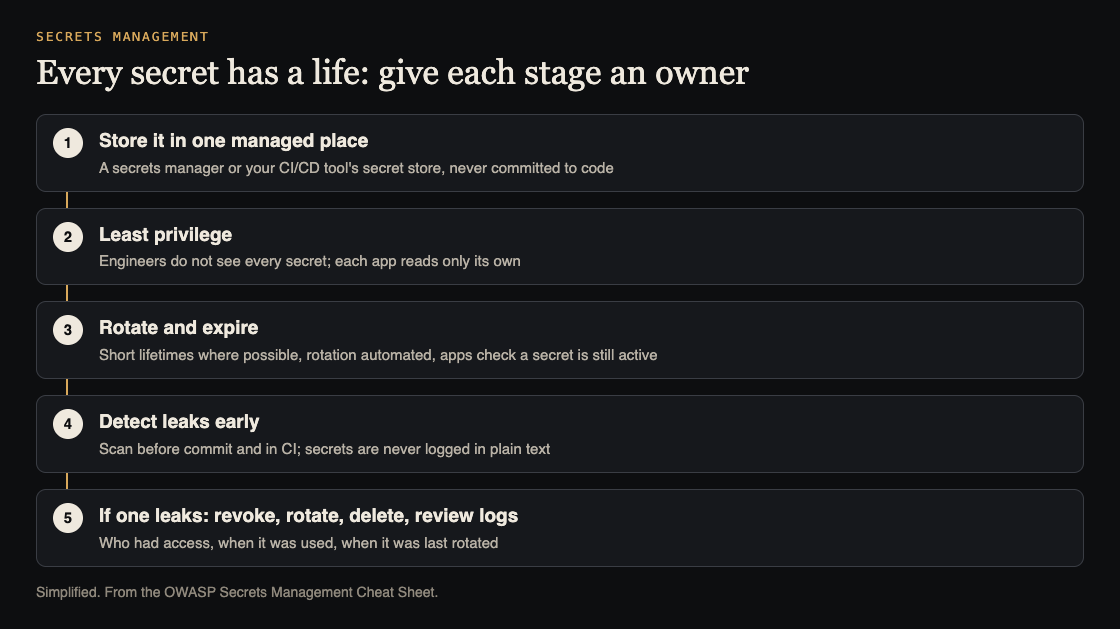
A secret's life, and what to do at each stage. Simplified from the OWASP Secrets Management Cheat Sheet.
Least privilege: who can read which secret
Every person and system that can read a secret is another way it can leak. OWASP says engineers should not have access to all secrets, and the store you use should let you set access per secret. In practice:
- One key per service and environment. When one leaks, you rotate one, and you know where it came from.
- No "big secret". OWASP warns against long-lived, high-value secrets in pipelines, and against shared secrets such as one password for every admin.
- Fewer admins. Reduce the number of people who can manage a project's settings, since they can usually see its secrets.
- Scoped keys. If a service only reads data, give it a key that only reads, where your provider supports that.
Rotate and expire keys
OWASP's reasoning is simple: rotate secrets regularly so a stolen one works only for a short time. Create secrets that expire where you can, and have your app check that a secret is still active before trusting it. User passwords are the exception: following NIST, OWASP says to change those only when there is reason to think they were compromised.
Make rotation boring. If changing a key means a tense late-night deploy, nobody will do it. Support two valid keys during a switch: add the new one, deploy, then revoke the old one.
Worked example: catch leaks before they ship
OWASP recommends finding secrets before they are committed: in the editor, in a pre-commit hook, and as part of threat modeling. Here is a one-afternoon plan for a small team:
- Scan the history. Run an open-source secret scanner across every commit on every branch, not only the current files. For a first look,
git log -p --allsearched for words likekey,secretandtokenshows the worst of it. - Add a pre-commit hook that runs the scanner on staged changes and blocks a commit that holds something like a key. Run the same scan in CI, since local hooks can be skipped.
- Use one standard test secret. OWASP suggests a shared fake value per secret type, which cuts false alarms. Use it for the next step too.
- Test your logs. Set the fake key, for example
TEST_SECRET_DO_NOT_LOG_123, trigger a few requests and errors, then search your logs and error tracker for it. OWASP's rule is that secrets are never logged in plain text, so every hit is a path to close. - Fix the log paths. Mask fields such as
authorization,cookie,passwordandtoken, and log the fields you need instead of whole objects. See error handling for keeping details out of responses.
When a key leaks: OWASP's containment steps
OWASP calls quick response one of the most important parts of secrets management. Its containment steps, in order:
- Revoke the exposed key immediately. Do not wait to finish investigating.
- Rotate: create and deploy a new key quickly, ideally through an automated process.
- Delete the revoked key from where it was exposed, including code and logs. OWASP notes that rewriting git history to remove it can cause other problems, such as breaking links to that history, which is why revoking comes first.
- Review the logs: who had access, when the key was used, and when it was last rotated.
Then close the path it leaked through, and write down what happened so the fix does not get lost.
Frequently asked questions
Is a .env file safe enough for API keys?
For local development with test keys, yes, as long as it is in .gitignore and never shared. For production, use your platform's secret store or a secrets manager, with access set per secret.
Do I need a dedicated secrets manager for a small project?
Not always. One or two services can start with the platform's secret settings, scoped keys and a pre-commit scanner. Move to a dedicated manager when you have several services or people, or need to see who read which secret.
Is deleting the key in a new commit enough?
No. Git keeps every version, so the key is still in history. Revoke and rotate it first, then remove it where you can.
How often should I rotate API keys?
Right away when a key may have leaked. Beyond that, OWASP says the right lifetime depends on what the secret protects, so prefer short-lived keys where your provider supports them, and automate rotation so it actually happens.
Get started
Block out an afternoon this week. Scan your history, add the pre-commit hook, run the fake-key log test, and list who can read each production secret. Fix live keys first.
If you want a second set of eyes, whitehatstoic's security testing covers web app and API review, with a written report, fixes and a retest after fixes. It is scoped after a short call, and no test can promise to find every weakness.

Building something that has to be safe? Book a meeting with whitehatstoic: tell us the product, the deadline and your biggest worry, and we reply with a plan and a price.
Comments
No comments yet.
Sign in or make an account to comment.