Secure cloud architecture: check your cloud setup before launch
Secure cloud architecture is the plan for who can reach what in your cloud account, and what stops them. Most launch-day mistakes are in that plan: a storage bucket anyone can read, a database with a route to the internet, or a service that trusts every request because it sits "inside". This post turns the OWASP Secure Cloud Architecture Cheat Sheet into a review you can run on your own setup in an afternoon.
One note first. The sheet says it is written for a medium to large enterprise system, so some of its parts may be more than a small team needs. Take the checks that fit your risk and skip the rest on purpose.
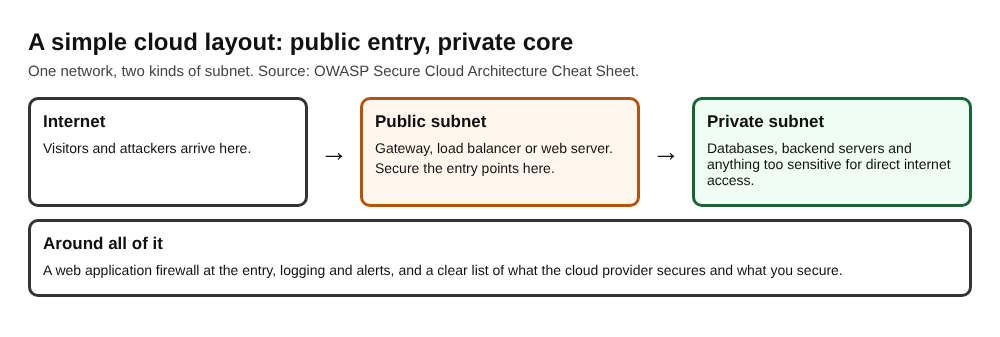
The shape most apps end up with: a small public entry and a private core.
Secure cloud architecture starts with your risks
You cannot spend all your time and budget on security, so the first step is to decide where it goes. OWASP says to run risk assessments, threat modeling and attack surface assessments to learn four things: what threats the application might face, how likely they are, the attack surface they could hit, and the business impact of losing data or functionality.
If you have not done this, our threat modeling post fits in one afternoon.
Choose how code reaches object storage
Object storage, the place for uploads and files, usually offers three ways in. The sheet sets out the trade-offs of each.
- Cloud permissions (IAM). Your service reaches storage through its own identity. OWASP says to use a workload identity or federated role that gets short-lived credentials, not a persistent access key, and to limit the permissions to the storage operations and resources needed. Its risks: a policy that is too broad, stolen credentials, and hardcoded credentials.
- Signed URLs. A link that grants access to one resource and moves files efficiently. Anyone who holds the link can use it, and custom code that builds the links can be injectable. OWASP advises this only for user data that is not very sensitive.
- Public storage. The sheet says this is not advisable, and only for public, non-sensitive, generic resources. Treat anything stored this way as leaked for as long as it sits there.
For each bucket you own, write down which of the three it uses and why. Any bucket holding user data that is on the public option is the first item on your fix list. Credentials are their own topic: see secrets management.
Split the network into public and private subnets
A virtual private cloud (VPC) is a network boundary inside your cloud account, and it is made of subnets. OWASP describes two kinds.
- Public subnets hold what must face the internet: front-end web apps, load balancers and routers, and developer access points such as bastions.
- Private subnets hold databases and data stores, backend servers and their file systems, and anything too sensitive for direct internet access.
In the sheet's simple example, a request comes through a gateway or load balancer in a public subnet, and those components then talk to the database or backend server in a private subnet. The result is that softer backend systems are not exposed to the internet directly, and you can put your security effort into the entry points. For splitting zones further, see network segmentation.
Decide where components trust each other
A trust boundary is a place where two components with different levels of trust meet, and one has to decide whether to believe the other. OWASP's rule is blunt: do not grant access just because a component is internal or owned by your organization.
The sheet describes three levels.
- No trust. Every component checks every other, even next to each other inside the app. It is slow, complicated and likely more expensive, so it suits only the highest-risk systems.
- High trust. Everything is trusted. It is efficient and simple, and it is insecure. The sheet says to avoid it unless there is no sensitive content to protect.
- Some trust. Use risk analysis to decide where to place and tune access controls, not to skip checks on internal requests. A gateway can do shared authentication, while services enforce the permissions that need business context. Block direct access that goes around the gateway, and give each service its own least-privileged identity for storage.
OWASP expects most applications to land on the third level. If you want to go further, read zero trust architecture.
Add a web application firewall, logs and alerts
A web application firewall (WAF) watches or blocks common attack payloads, such as XSS and SQL injection. Attach it to entry points like load balancers or API gateways. The provider's rule sets are generic, so OWASP suggests custom rules for your app: limit routes to the endpoints you want reachable, add protection for your key endpoints, and rate limit sensitive APIs.
For logging, the sheet's advice is to record request outcomes with a fixed list of fields: method, route template, status, a correlation ID and a non-secret identifier for the actor. Leave out credentials, session cookies and access tokens, and keep Social Security numbers, health data and other personal data out of logs. Pass a trace ID through the whole request so you can follow an attacker across services.
For monitoring, alert when these move away from your normal baseline: 4xx and 5xx error rates, resource use, database reads and writes, failed health checks, deployment errors and cost. OWASP says the percentages must come from your own baseline, since normal differs from app to app.
For denial of service, simple protection can often be a WAF with rate limits and blocked routes. Our post on denial of service limits covers the app side.
Know what your cloud provider secures
The shared responsibility model splits the work between the provider and you, and the split depends on the kind of service.
- IaaS: you keep authentication and authorization, data, certain networking tasks and the application software.
- PaaS: you keep application authentication and authorization, the application software and external data storage.
- SaaS: you manage configuration, some user access and the connections to other products. The provider controls the rest of the stack, so fixes are out of your hands.
Even on managed services, OWASP says these are likely yours in part or in full: authentication and authorization, logging and monitoring, code security (the OWASP Top 10) and third-party library patching. For anything you run yourself, use automation to update minor versions and images regularly, and schedule time to refresh stale resources. Templates that build your setup need the same care; see infrastructure as code security.
A worked example: one afternoon before launch
Picture a small team with a web app, an API, a database and a bucket for user uploads. Here is the review as a list, in order.
- List the assets. Write down the bucket, the database, the API and any admin tool.
- Classify each bucket. Mark it as cloud permissions, signed URLs or public. Move any bucket with user data off the public option.
- Draw the network. Mark each component public or private. If the database is in a public subnet, move it before launch.
- Trace one request. Follow a request from the internet to the database. At every hop, ask what the next component does to confirm who is calling.
- Check direct paths. Try to reach the API without going through the gateway. If it works, close that route.
- Check identities. Confirm each service reaches storage with its own short-lived, narrow identity and not a shared key.
- Turn on logs and alerts. Add the WAF, the log fields and an error-rate alert, and set a cost limit.
- Write the responsibility list. For each service you chose, note what the provider secures and what you must do.
Fix the public database and public buckets first, then the direct paths. A review like this lowers the chance of the common mistakes and cannot prove that a setup is safe.
Frequently asked questions
What is secure cloud architecture?
It is the set of design choices that decide who can reach your data and services in the cloud: storage access, network layout, trust between components, monitoring, and a clear split of duties with the provider.
Should my database be in a public or private subnet?
OWASP puts databases and data stores in private subnets, with entry points such as load balancers in public subnets that pass traffic in a controlled way.
Is a signed URL safe for storing files?
It can be secure, but anyone with the link can use it, and custom link-building code can be injectable. The sheet advises it only for user data that is not very sensitive.
Does a managed service mean the provider handles security?
Only part of it. OWASP says authentication and authorization, logging and monitoring, code security and library patching likely stay with you, so read the provider's documentation for each service.
Get started
Start today with the list above: sort your buckets, mark every component public or private, and trace one request from the internet to the database. Fix the public databases and buckets first.
If you want a second pair of eyes, whitehatstoic runs security tests on web apps and APIs, with a written report and fixes. You can book a security testing call, and the work is scoped after a short call. No test can promise to find every weakness, so treat a report as a clear list to work from.
Building something that has to be safe? Book a meeting with whitehatstoic: tell us the product, the deadline and your biggest worry, and we reply with a plan.
Comments
No comments yet.
Sign in or make an account to comment.