Secure product design: build security in before you code
Secure product design means making every security choice on purpose, before the code exists. Most weaknesses people find late did not come from a typo. They came from a product shaped without anyone asking what could go wrong. The OWASP Secure Product Design Cheat Sheet gives a short way to ask. This post turns it into steps a small team can follow, with one worked example.
Secure product design happens twice
OWASP says secure product design comes from two processes. The first is product inception. It happens when a product is conceived, or when an existing product is being re-invented. The second is product design. It is continuous, done in an agile way, close to where the code is being written.
That split is practical. At inception you decide the big shape: what the product is for, which outside services it uses, how people reach it. During design you add security work to each round of delivery, one story at a time. OWASP also notes that adding or removing a connection is probably a sign that inception is happening again. So when you plan a new integration, treat it as a small inception and run the questions below again.
The goal in the sheet's own words is that every security decision is an explicit choice, and that it gives the right level of security for this product.
Start with secure defaults, a small attack surface and safe failure
The sheet's basic start has three habits.
- Secure defaults. A new account, a new setting or a new feature should start in the safe state. People can open things up on purpose. Nobody should have to remember to close them.
- A small attack surface. Every page, endpoint and connection is a place someone can try something. If you do not need it, do not ship it. Our post on attack surface analysis shows how to list what an attacker can reach.
- Fail securely. When something breaks, fall back to the well-defined safe default, not to open access. If the permission service is down, the answer is "no", not "probably fine".
Four principles to design by
The sheet names four principles. Treat them as questions you ask of every feature.
Least privilege and separation of duties. Give each user, service and piece of code the minimum access it needs. Split sensitive jobs so that no single person controls a whole process. Someone who can create a refund should not also be the one who approves it.
Defense in depth. Use several layers of controls, so that if one fails the others still protect the asset. A check in the interface is a convenience. A check on the server is a control. Add one more behind it, such as a database account that cannot do what the app never needs.
Zero trust. Do not trust a user, device or network just because it is "inside". Authenticate and authorize each request, and keep watching and auditing what happens. See zero trust architecture for a longer walk through.
Security in the open. Developers should know the security effect of their code. That means secure coding habits, testing for vulnerabilities, safe tools, and working with security experts instead of leaving them to the end.
Five focus areas: context, components, connections, code, configuration
The sheet organizes the work into five areas. Each one is a question.
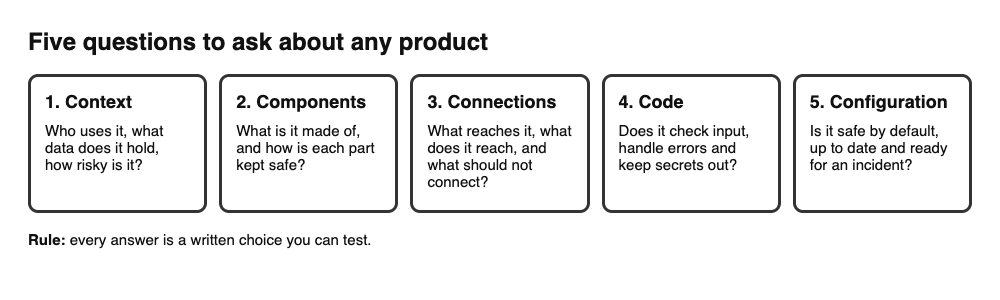
- Context: where does this app fit, who uses it and why, what data does it hold, and what is its risk? OWASP says to build this with threat modeling, which adds security stories at every round of delivery, and with a business impact assessment, which sets the right product security level during inception. The sheet adds that over-engineering security can cost even more than over-engineering for scale, while under-engineering can be devastating. Context is how you find the middle. Start with threat modeling for a small team.
- Components: what is the app made of, from libraries to outside services, and how is each part kept safe? OWASP points to a library of secure design patterns and ready-to-use components, often called a golden path or paved road, and to threat modeling your choices. It also says to weigh licensing, upkeep and usage limits, not only features.
- Connections: how do people and systems reach the app, and how does it reach its components? Where is data stored and who can read it? A connection can also be a deliberate lack of one. Think about splitting tiers, and splitting data or whole environments for different tenants.
- Code: it must work first, and it must work well. The sheet lists the basics: check types, formats, lengths and business limits on input, and use parameterized queries for SQL values; handle errors without telling an attacker anything; strong authentication and authorization; cryptography for data in transit and at rest; least privilege; no hardcoded secrets; security testing during development and just before deployment; code review; and staying up to date. Our posts on input validation and secrets management cover two of these.
- Configuration: a safe build can be undone by a loose setup. Apply least privilege, layers, secure defaults with little manual setup, encryption, backups and the right retention, safe failure, HTTPS, regular updates or maintained images, and a practiced incident response plan.
A worked example: a booking app
Say you plan a small web app where customers book a session and pay online, and one staff member manages the schedule. Here is a pass through the five areas, in about an hour with a pen and a page.
Context. The app holds names, emails, booking history and payment status. Write down who uses it (customers and staff), what a leak would cost, and the level of care that fits. A booking app is not a bank, but a leak of customer contact details still hurts real people, so it is not a toy either.
Components. List what you will use: a web framework, a database, an email service, a payment provider. For each, note who maintains it, its license, and any limit on how much you can use it.
Connections. Draw the lines: browser to your server, server to database, server to payment provider and back, staff to the admin area. Then decide which lines should not exist. In this example, the database accepts connections only from the server, and the admin area is a separate role, not a hidden page.
Code. Write the rules that touch every request. One place decides who may read or change a booking, and it answers "no" by default. Input is checked before use. Errors show a plain message and log the detail privately. No keys live in the code. See authorization checks for the one-place pattern.
Configuration. The database account used by the app can read and write bookings but cannot change the schema. Pages load over HTTPS. Backups exist and old data is deleted on a set schedule. Someone knows what to do if a key leaks, and has rehearsed it.
Turn the design into tests
A design that is never checked is a wish. OWASP asks for three things.
- Plausibility checks at each tier. Do not trust that the front end already checked something. The back end checks again, from front end to back end.
- Tests for every threat you found. Write unit and integration tests that show each threat from your threat model is reduced to a level of risk you accept.
- Use cases and abuse cases for each tier. A use case says what a customer can do. An abuse case says what an attacker must not be able to do, such as reading another customer's booking by changing an ID. Our post on abuse case testing shows how to write them.
Run these before each release. Add a code review for the riskiest changes; secure code review is a good place to start. No test finds every weakness, so use them to lower risk and to catch drift, not as proof that the product is safe.
Frequently asked questions
What is secure product design?
It is the practice of making every security decision about a product an explicit choice, so the product ends up with the right level of security. OWASP describes it as secure defaults, a small attack surface and safe failure, backed by a set of principles and focus areas.
When should I start thinking about security in a new product?
At inception, when the product is conceived or re-invented. After that, add security work to each round of delivery. Adding or removing a connection is a good moment to ask the questions again.
How is secure design different from secure coding?
Design decides what the product should allow and where checks must happen. Coding is one of the five focus areas: it makes sure each piece does that without bugs. You need both, and clean code cannot fix a missing rule.
Do small teams need this?
Yes, in a light form. The five questions fit on one page. The cost of skipping them is that choices get made by accident, which is how products end up with the wrong level of security.
Get started
Pick the next feature you plan to build. Answer the five questions for it on one page, write the abuse cases, and keep the page next to the code. If you want a second pair of eyes on your design or your sign-in and payments, book a call with whitehatstoic. The security testing service covers web app and API review, with a written report, fixes and a retest after fixes, scoped after a short call. We cannot promise a test finds every weakness, but we can show you where to look first.
Building something that has to be safe? Tell us the product, the deadline and your biggest worry, and we reply with a plan.
Comments
No comments yet.
Sign in or make an account to comment.