Session management: IDs, timeouts and logout done right
Session management is how your app remembers who someone is after they sign in. HTTP has no memory, so the app hands the browser a session ID and checks it on every request. OWASP puts the stakes plainly: once someone is signed in, the session ID is temporarily as strong as the password they used. This post walks through the OWASP Session Management Cheat Sheet as a checklist for your own app: the ID, the cookie, renewal, timeouts and logout.
Make the session ID random and meaningless
The ID is a key to a record on your server. Whoever holds the key is treated as that user, so an attacker only needs to guess, steal or plant one.
OWASP sets these rules for the ID itself:
- At least 64 bits of entropy. Entropy means how unpredictable the value is. OWASP's example: at 64 bits, with 10,000 guesses a second and 100,000 live sessions, an attacker should expect about 585 years to hit a valid ID.
- A cryptographically secure random generator. Not a timestamp, a counter, a hash of the email or a general-purpose random function. A weak generator lets an attacker spot patterns and shrink the real entropy.
- Every character random. If half of a 16-character hex ID is fixed, only 32 bits are random, which OWASP calls insufficient.
- No meaning inside the value. No user name, role or email. The ID is only an identifier; what it means lives in the session record on the server.
The sheet also tells you to use your framework's built-in session handling rather than a home-made one, and to keep it updated, because those implementations have been tested by many teams. Check its defaults: PHP, for example, accepts any ID a browser sends unless you turn on strict mode.
Put the ID in a cookie with the right settings
Cookies are the preferred way to carry a session ID, because they support expiry and other limits. An ID in a URL can leak through links, logs, browser history, the Referer header and search engines, so never accept one there.
OWASP's session cookie settings:
Secure: only sent over HTTPS. Closing port 80 is not enough, because a browser can be tricked into sending the cookie over plain HTTP without this flag.HttpOnly: page scripts cannot read it, which blocks the simplest theft after an XSS bug. It does not stop an attacker's script from making requests that carry the cookie.SameSite=Strict(preferred) orLax, set explicitly. Treat it as a second layer behind CSRF tokens, not a replacement.- No
Domainattribute, and the narrowestPathyou can. A wide domain such asexample.comlets a flaw on one subdomain reach sessions on another. - A
__Host-name prefix, which makes the browser insist on Secure, no Domain and Path set to the root.
Together:
Set-Cookie: __Host-SessionID=<value>; Secure; HttpOnly; SameSite=Strict; Path=/
Our session cookie security post goes deeper on each flag. For the forged-request side, see CSRF protection.
Renew the ID when trust changes
In a fixation attack, the attacker gets a valid ID, gets the victim to use it, then waits for the victim to sign in. If the app keeps the same ID through sign-in, the attacker's copy is now signed in too.
Two rules stop it:
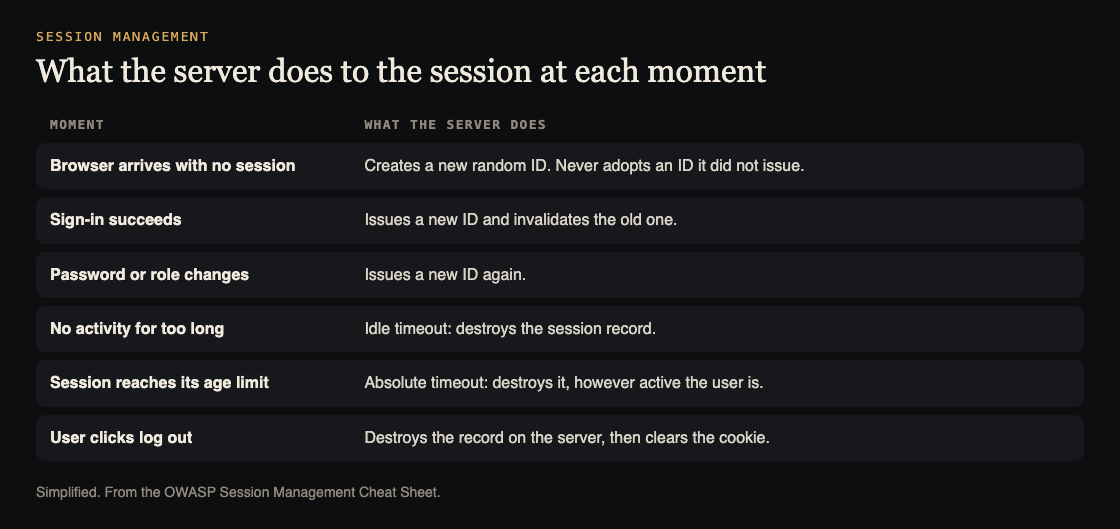
- Issue a new ID after any privilege change. Sign-in is the main one. OWASP also lists password changes, permission changes and switching from a regular role to an admin role. The old ID must stop working.
- Be strict about IDs. Only accept IDs your app issued. If a browser sends one you never made, give it a fresh ID, and treat it as suspicious enough to raise an alert.
The sheet adds two extras: use a different cookie name before and after sign-in, and treat the session ID like any other user input, validating it before use.
For risky moments, ask the user to sign in again. OWASP names password or email changes, sign-in from a new device or address, and account recovery.
Set an idle timeout and an absolute timeout
Every session needs two clocks, and both must run on the server.
- Idle timeout: the session ends after a stretch with no requests. It shrinks the window for guessing an ID or for using a forgotten laptop. It does not stop an attacker who keeps the stolen session busy.
- Absolute timeout: the session ends a fixed time after it was created, whatever the activity. This is what caps a hijacked session.
OWASP's common ranges: idle timeouts of 2 to 5 minutes for high-value apps and 15 to 30 minutes for low-risk apps; for an app someone uses all day at work, an absolute timeout of 4 to 8 hours. The right numbers depend on what a stolen session could do, balanced against users being thrown out mid-task.
Never let the client keep the time. If the cookie or a script holds "minutes since login", an attacker can edit it and live longer. Keep created-at and last-seen times in the session record and check both on each request.
Log out on the server, not only in the browser
Clearing the cookie removes the user's copy of the key. A copy taken earlier still works unless the server destroys the record. OWASP says this directly: deleting a cookie alone does not invalidate a stolen copy of the session ID.
A safe logout:
- Destroy the session on the server, with your framework's own call, such as
session_destroy()in PHP orHttpSession.invalidate()in Java. - Expire the cookie in the browser.
- Send
Clear-Site-Data(for example"cache", "cookies", "storage") so the browser drops stored data. Use it with care:"cache"clears every cached response for the site.
Put a visible logout button in the header or menu, reachable from every page. Do not count on a browser-close event to log people out: OWASP warns it does not fire reliably. The idle and absolute timeouts are the real backstop.
Watch for session attacks
The sheet's last group is about noticing trouble:
- Guessing: many requests with different invalid session IDs from one address is a brute-force pattern. Detect and alert on it. Pair it with rate limiting.
- Anomalies: bind the session to client details such as address and User-Agent, and alert or end the session when they change mid-session. OWASP says an attacker on the same network can bypass them, so they are signals, not a defense.
- Logging: record creation, renewal and destruction of IDs, plus sign-ins, logouts, privilege changes and timeouts, with time, address and result. Never write the raw session ID into a log.
If a cookie is stolen anyway, cookie theft mitigation covers spotting it. Keeping the script side clean is the job of XSS prevention.
A session management check you can run in an hour
Take a small app: a notes site with accounts, built on Express and Postgres. Run this against a test copy, with two browsers.
- Read the cookie. Sign in, open developer tools and find the session cookie. Check Secure, HttpOnly and SameSite are set, and that no Domain is set. Look at the address bar and your network tab: the ID must not appear in any URL.
- Test fixation. Open the sign-in page, note the cookie, sign in. The value should change. Then set a made-up value by hand and reload: the app must not keep it.
- Test renewal on change. Change the password in browser A. The cookie value should change again.
- Test logout. Copy the cookie value, click log out, then send a request with the old value from the other browser. You should land on the sign-in page or get a 401.
- Test the clocks. On the test copy, set the idle timeout to one minute and the absolute timeout to five. Wait out the first without clicking, then keep clicking until the second. Both should end the session, and the record should be gone from the store.
Write down each result, fix the failures, and run it again.
Frequently asked questions
How long should a session ID be?
Length matters less than entropy. OWASP asks for at least 64 bits of entropy, which is 16 hex characters if every character is random. Other encodings need a different length, so use your framework's generator.
How long should a session last?
It depends on what a stolen session could do. OWASP's common ranges are 2 to 5 minutes idle for high-value apps and 15 to 30 minutes for low-risk ones, with an absolute limit of 4 to 8 hours for a working day. Enforce both on the server.
Why is clearing the cookie not enough to log out?
Because the server may still accept the old ID. If someone copied it earlier, it keeps working until the server destroys the session record.
Should I put the session ID in the URL?
No. URLs end up in links, logs, browser history and the Referer header. OWASP prefers cookies, and says to refuse IDs sent by other means as a defense against fixation.
Get started
Start with steps 1, 2 and 4 of the check above: the cookie flags, the ID change at sign-in and a replay after logout. The full source is the OWASP Session Management Cheat Sheet.
whitehatstoic tests web apps for weak spots and gives you a written report with fixes and a retest after fixes. No test can promise it finds every weakness, so treat a report as a strong check, not proof of safety. You pick a time and a topic on the booking page, and it confirms by email.
Building something that has to be safe? Book a meeting with whitehatstoic: tell us the product, the deadline and your biggest worry, and we reply with a plan.
Comments
No comments yet.
Sign in or make an account to comment.