Set-based thinking: keep several fixes open before you commit
A common way to fix a problem is to pick the first idea that sounds right, try it, and only look for another when it fails. That can feel fast without being fast. Set-based thinking means you keep several fixes open before you commit, test them cheaply, and let the evidence cut the list down. This post explains where the idea came from, shows it on a real everyday problem, and walks through how to track a set of open fixes so you don't lose any of them.
What set-based thinking means (and where it came from)
Set-based thinking comes from product development. The Lean Enterprise Institute's page on set-based concurrent engineering describes an approach in which developers consider sets of ideas rather than single ideas, eliminate alternatives only when proven inferior or infeasible, and delay the final choice until the team knows enough to make a good decision. It contrasts this with systems that select a design early, with false starts and rework as the typical result.
The core idea is simple. Instead of choosing one solution early and then reworking it again and again, you:
- Lay out a set of possible solutions.
- Learn about all of them in parallel, using cheap tests.
- Drop the ones the evidence rules out.
- Commit only when the set has narrowed to the option that clearly fits.
You don't need a car factory to use it. It works on a flaky laptop, a slow-paying client, or a study plan that isn't sticking.
Why jumping to one fix too early costs you time
When you lock onto one fix, three things can happen.
First, you test ideas one at a time, in series. If the first fix takes a week to show a result and fails, you have lost a week before you even start the second.
Second, you lose information. You tried the fix, it half worked, and two months later you can't remember what "half" meant. So you try it again.
Third, you get attached. After spending money or effort on one fix, it can be hard to admit it didn't work. You keep patching it instead of stepping back.
Set-based thinking attacks all three. Tests run side by side. Results get written down. And because no option is "the one" yet, letting one go is easy.
Point-based vs set-based: a side-by-side example
Take a common problem: the Wi-Fi drops every evening in the back bedroom.
The point-based approach
You read one forum post, decide the signal is too weak, and order a range extender. It arrives in three days. You set it up. The drops get a little better, then come back. Now you wonder if it was ever about signal at all. You start over.
The set-based approach
You stop and write down every plausible fix before buying anything:
- Move the router to a more central spot.
- Change the Wi-Fi channel.
- Update the router's firmware.
- Add a range extender.
- Run a cable to the bedroom.
Then you ask: which of these can I test tonight for free? Moving the router and changing the channel cost nothing. The firmware update takes ten minutes. The extender and the cable cost money and time, so they wait.
You change the channel on Monday and note the result. You move the router on Wednesday. By Friday you know whether the cheap fixes did anything, and you have not spent a cent. If you do need the extender, you buy it knowing what it has to solve.
The difference isn't cleverness. It's order. You looked at the whole set first, then spent your effort where it was cheapest to learn.
How to keep several fixes open without losing track
The hard part of set-based thinking is memory. Five fixes, each with a status and a result, is a lot to hold in your head. A to-do list doesn't fit either, because a fix isn't "done" when you try it. It worked, partly worked, or failed.
Here is a structure that holds up:
- One line for the problem. Short and specific. "Wi-Fi drops every evening in back bedroom" beats "internet issues."
- Every fix as an idea underneath it. Write them all down, even the ones you doubt.
- A clear "trying now" marker. Usually one or two at a time, so you can tell which change caused which result.
- An outcome on each tried fix. Worked, partly, or failed. Add a short note on why.
- What each fix needs. "Needs a 15 meter cable." "Needs router admin password." This shows you the cost of a fix before you start it.
If you already keep a log of device problems, this slots right in. Our post on a tech problems log for your own devices goes deeper on the device side.
Narrowing the set: cheap tests that rule options out
A set only helps if it shrinks. The trick is to design tests that kill options fast. Good narrowing tests share a few traits:
- They are cheap. Free, reversible, or quick. Changing a setting beats buying hardware.
- They split the set. The best test rules out several fixes at once. If the Wi-Fi drops even with your laptop next to the router, that points away from signal strength, and one evening's test puts the extender, the cable and the router move in doubt.
- They have a clear pass or fail. Decide in advance what "fixed" looks like. "No drops for three evenings in a row" is testable. "Feels better" isn't.
- They change one thing at a time. If you change the channel and update firmware on the same night, you won't know which one helped.
The same logic works far from Wi-Fi. With a client who keeps paying late, your set might be: earlier invoices, a deposit up front, shorter payment terms, or a polite reminder schedule. A reminder costs nothing to test. A deposit changes the relationship, so it comes later. Our freelance client problems log walks through tracking that kind of set.
It also works when several people share a problem, like a car that keeps making a noise. Who tested what, and what happened, matters more than who had the first idea. See shared car problems: who drives, who fixes, and who pays.
Using a problem log to see every fix you tried and what worked
Problem Graph is a personal problem and solution journal drawn as a map. It fits set-based thinking because its shape matches the method: one problem, many fixes, each with an outcome.
Here is the Wi-Fi example as a workflow:
- Open the app and type
Wi-Fi drops every evening in back bedroom. Put it in the personal lane. It lands on the graph when you press Enter. - Add each fix as a solution idea: channel change, router move, firmware update, extender, cable.
- Mark the channel change as the one you are trying.
- After three evenings, record the outcome: worked, partly, or failed.
- Move to the next cheap fix and repeat.
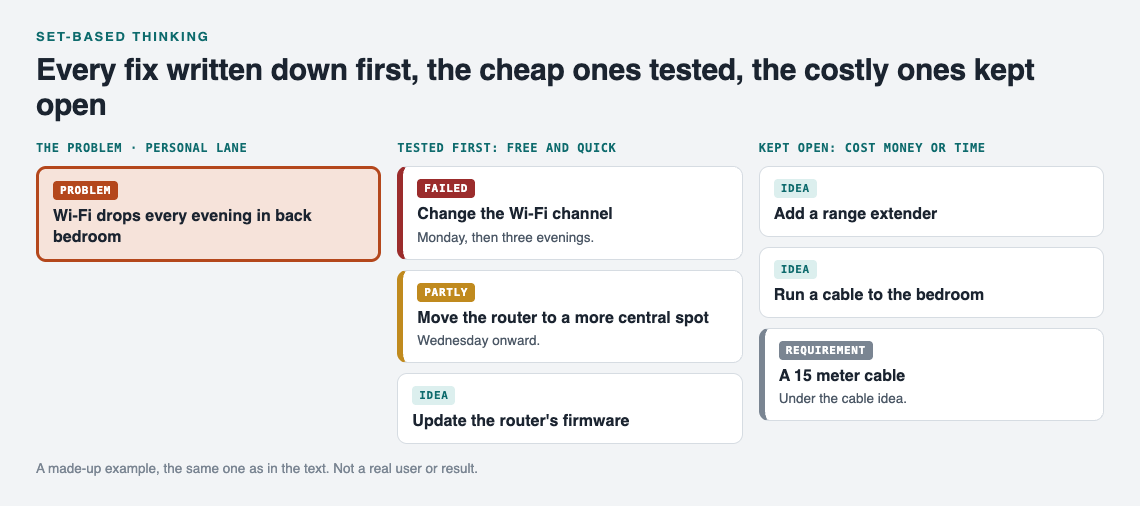
The Wi-Fi example on the graph after the first week. A made-up example, not a real user or result.
The part that matters most for set-based thinking is that failed fixes stay on the map. The home page puts it this way: "The graph is honest. A solution that failed three times stays on the map as a failed solution, and that is exactly what the next person needs to know." When the drops come back in six months, you see at a glance that the channel change failed and the router move partly worked. You don't repeat yourself.
You can also link problems that belong together, even across lanes. If "video calls freeze" and "Wi-Fi drops in the evening" turn out to share a cause, linking them shows the pattern. As the home page says, patterns show up on a map that never show up in a list.
Two more features widen your set before you start testing:
- Similar problems from others. Problem Graph can show you similar problems other people have shared, and which of their solutions worked. You can borrow one into your own graph with one tap, and it keeps a link back to where it came from.
- Suggestions. You can ask the AI to propose new solutions, grounded in what worked for others on similar problems. Treat these as more options for your set, not answers. Test them like any other fix.
Your problems are private by default. Only you see them, and they follow you to any phone or computer you log in on.
Frequently asked questions
What is set-based thinking in simple terms?
It means listing several possible fixes, testing them cheaply side by side, and only committing once the evidence has ruled out the rest. The Lean Enterprise Institute describes it as an approach to designing products and services.
How many fixes should I keep open at once?
List as many as you can think of, but actively try only one or two at a time. That way you know which change caused which result.
Isn't trying several fixes slower than picking one?
Not always. Cheap tests can rule out expensive options early, and you skip the cycle of trying one fix, waiting, failing, and starting over.
Can I share a set of fixes with family or a team?
In Problem Graph you can mark a problem as a main node and share it into a private network using an invite code. Its solutions, their outcomes and their requirements go along with it.
Get started
Pick one problem that has been bugging you. Before you try anything, write down every fix you can think of. Then circle the cheapest one to test first. That's set-based thinking in a single sitting.
If you want somewhere to keep the set, an empty graph in the app has a "Load example set" button so you can see how it looks before adding your own.
Try Problem Graph: it is free, and you can look around the public network without an account. Write one problem down in a line and attach the first thing you will try.
Comments
No comments yet.
Sign in or make an account to comment.