Snake strategy in 2048: keep big tiles in a zigzag line
The snake strategy in 2048 keeps your big tiles in a zigzag line: the largest tile sits in one corner, the next largest beside it, and the chain bends back along the next row, so every tile waits next to the one it will merge into. This guide shows the snake on the front face of 3D 2048, where each face is 3 by 3, with a test you can repeat, and how to repair the line with twists when a tile lands in the wrong place.
What the snake strategy in 2048 is
Most lost games come from big tiles that end up apart. Two 16s with a 4 between them cannot merge, and the board fills while they wait. The snake stops that by giving every tile a fixed place in a chain from large to small.
On a 3 by 3 face, a snake that starts in the top left corner looks like this:
- Top row, left to right: 256, 128, 64
- Middle row, right to left: 32, 16, 8
- Bottom row: kept loose for new tiles
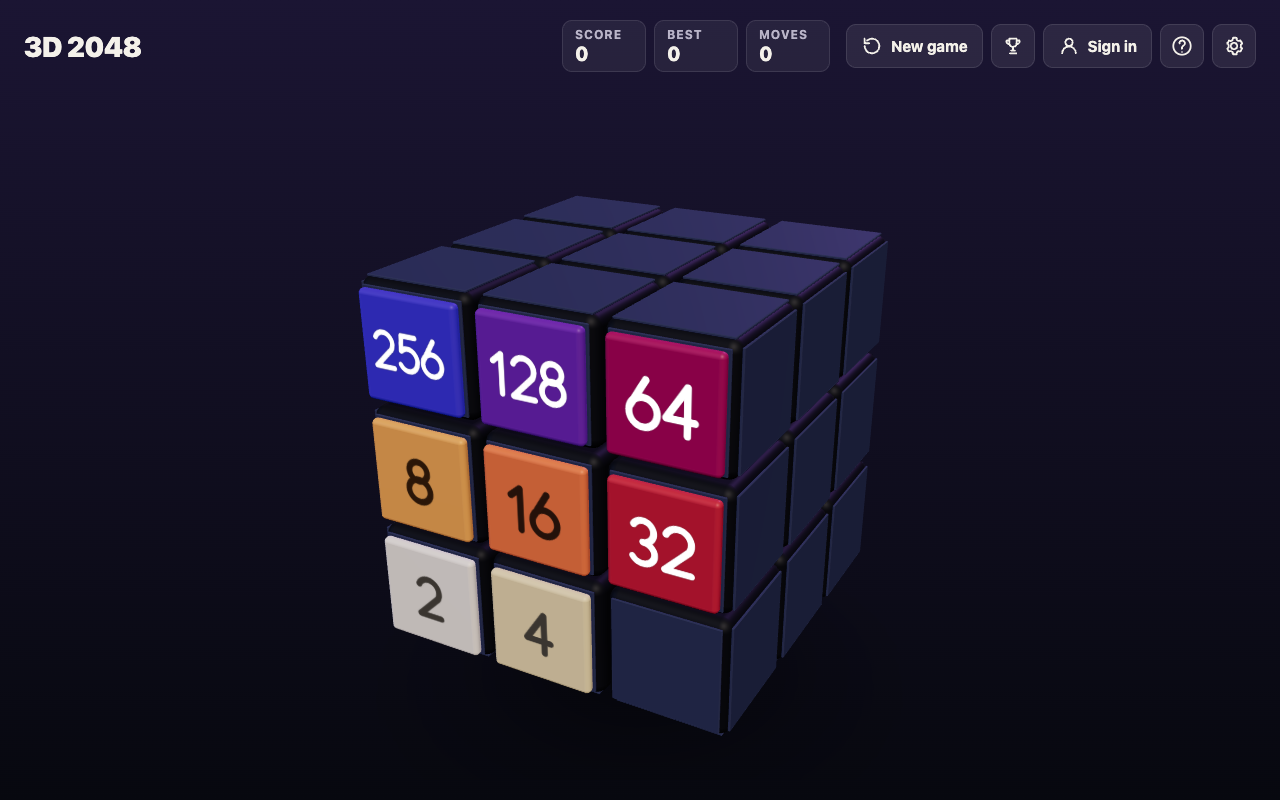
Read it as one line. It runs along the top, turns down at the right edge, and comes back along the middle. When one tile at the tail doubles, it matches the next one up, and one merge sets off the next.
Here is what happens without a chain. One test game on the front face got stuck at Score 148 with this board: 8 4 2 on top, 16 8 4 in the middle, 2 16 8 on the bottom. It held three 8s and two 16s, and none of the equal tiles sat side by side, so nothing could move. That is the board the snake is built to avoid.
A worked example: one chain, three slides
This test was played on the live game, signed out, with the board set up first and the saved game read after every key. Edge merges were on.
The front face started with a short snake in the top left corner: top row 64, 32, 16, middle row 4, 8, 16, bottom row empty. The 16 at the end of the top row sat right above the 16 at the end of the middle row.
- Press Up. The two 16s merge into a 32 at the top right. Score 32, Moves 1.
- Press Left. The 32s merge into a 64 beside the 64. The top row reads 64, 64. Score 96, Moves 2.
- Press Left again. The 64s merge into a 128 in the top left corner. Score 228, Moves 3 (a pair of new 2s on the bottom row also merged into a 4).
Three slides took a 16 at the tail all the way to a 128 in the corner. That only worked because each tile sat next to its match. Notice that each slide made one merge per tile: a tile made in a merge does not merge again in the same slide, so 64, 32, 32 slid left gave 64, 64 and not 128. It took one more slide.
Pick a corner and lock in your biggest tile
Choose one corner and keep your largest tile there for the whole game. Slides in 3D 2048 work as in 2048: swipe the front face, or press the arrow keys or W A S D.
For a top left corner, your safe keys are Up and Left. Down is the key that pulls your corner tile away, so use it last. Every new tile is a 2 or a 4 on a random empty square of the front face, so you cannot choose where it lands; you only choose which way you push.
About one new tile in ten is a 4. When the game's own tile code was run 10,000 times, 1,001 of the new tiles were 4s, so plan for the odd 4 landing in the middle of your chain.
Which corner is best is less clear than it sounds. In the corner test, one start did best in the bottom left and another in the top left, one game each. Pick the corner your hands find easiest and stay with it.
Why one face is not enough
A 3 by 3 face fills fast. In test games played with slides only, the front face got stuck between move 28 and move 72, and the best tile in any of them was 64. The snake makes a face last longer, but nine squares alone will not hold a 2048. You need the rest of the cube.
Each step up the chain needs twice the tiles of the step before, so the snake ends up holding a big tile plus most of a second one at once. Is 2048 hard? counts that work out.
Twists and turns that keep the snake safe
3D 2048 adds two moves on top of the slide, and each one affects the snake differently.
Turns are free. Shift and an arrow key, or dragging the space around the cube, turns the whole cube. A turn adds no points, counts no move and adds no new tile. Use it to look at the other faces before you commit.
Twists move a whole layer. On a keyboard, 1, 2 and 3 twist the top, middle and bottom row right; 4, 5 and 6 twist the left, middle and right column up; Shift twists the other way. A twist counts a move, adds a new tile and needs one empty square for it. The whole layer leaves the front for the next face, so with a top left snake:
- Avoid 1: it carries your top row, corner tile included, off the front.
- Avoid 4, 5 and 6: every column twist takes a square of the top row with it.
- Be careful with 2: it moves the middle row, the second half of your chain.
- Use 3 and Shift and 3: the bottom row is your loose row, so twisting it disturbs nothing you have built.
The twist keys guide shows which key brings a tile in from which face.
Fixing a broken snake
Sooner or later a 2 lands in your top row, or you have to press Down. There is no undo, so recover like this:
- Push the corner tile straight back with the slide toward the corner, then fill behind it. The longer it stays out, the more small tiles take its place.
- Bring a match in from another face. In a separate test, Shift and 1 carried a 16 from the right face onto the front's top left square, above another 16, and Up merged them into a 32 in two moves.
- Use edge merges. They are on unless you switch them off in Settings: a slide toward an edge of the front face also merges the tile at that edge with an equal tile just over the edge. A snake that ends at the right edge can take a match from the right face this way, with no twist.
Frequently asked questions
Is the snake strategy better than the corner strategy?
The snake is the corner strategy with an order added. The corner keeps your biggest tile in place, and the snake also decides where the next biggest tiles go, so merges run down the chain.
Which corner is best for the snake?
Any corner works if you stick with it. In slides-only tests the best corner changed from one start to the next, and those were single games, not averages.
Does the snake work on a 3 by 3 face?
Yes, but the chain is short: three rows of three. On 3D 2048, keep the chain on the front and use the loose row's twist to bring in matching tiles from the other faces.
Get started
Open the game, pick the top left corner, and press Up and Left to build your first row. When you get stuck, turn the cube to look around, then twist the loose row to bring in a match. Your game and best score are saved on your device, so you can stop and come back.
Play 3D 2048: it is free and plays in your browser on a computer or a phone.
Comments
No comments yet.
Sign in or make an account to comment.