Soft jazz tracks for a cafe menu video: what to pick
Wavecrate does not have a jazz genre, so if you came here for soft jazz tracks for a cafe menu video, here is the honest answer first: the site lists ten genres (Lo-fi, House, Cinematic, Hip-hop, Ambient, Corporate, Rock, Chiptune, Acoustic and Synthwave) and none of them is jazz. A search for "jazz" on the site finds nothing. What it does have are slow, warm, instrumental tracks that do the same job behind a menu, and this guide shows how to pick one, mix it and license it.
Wavecrate licenses royalty-free music, sound effects, photos and videos, and every download comes with a license certificate and a code anyone can check on its verify page.

What a menu video needs from its music
A menu video has a quiet job. Dish names and prices have to be readable, and the music only has to make the place feel warm. Soft jazz works for this because it is slow, gentle and built from a few instruments. You can get the same effect from any track that behaves the same way.
Check each track against three questions:
- Does a lead line fight the text? A busy melody pulls the eye away from the price list. Pick tracks where chords and rhythm do the work.
- Does it hold a steady level? A track that builds to a big finish will not fit a short menu clip. One that stays level will.
- Is it instrumental? Words in the music compete with your text and any voiceover. Every track page has a Vocals line, and the browse page can filter to Instrumental.
Soft jazz tracks for a cafe menu video: the closest Wavecrate has
The closest sound is in the Lo-fi genre. Three Lo-fi tracks share one description, "Dusty swung drums under soft electric piano chords and a little vinyl crackle": Tea and Tape (82 BPM, Calm and Happy), Night Bus Home (78 BPM, Calm and Nostalgic) and Rainy Window Notes (72 BPM, Calm and Dreamy). Swung drums and electric piano chords are the nearest thing to a jazz room that the track pages describe. No page calls any of them jazz, so listen before you decide.
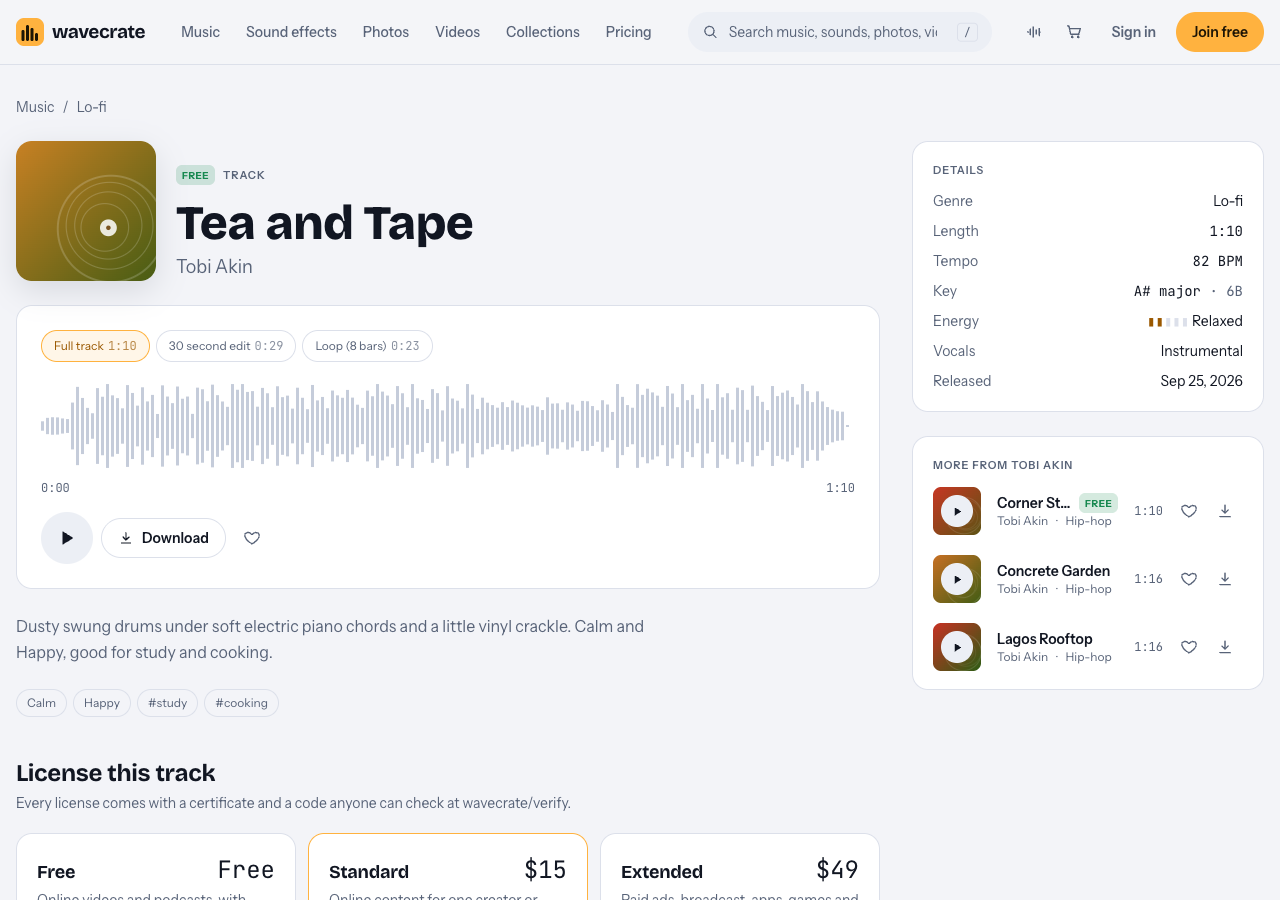
The Tea and Tape page: description, three versions and the license cards.
Tea and Tape and Night Bus Home were marked Free when this post was written on 17 October 2026, and Rainy Window Notes was Premium. Items can change between Free and Premium, so read the page on the day you download.
The Lo-fi list holds 10 tracks between 70 and 87 BPM. One of them, Paper Lanterns, is tagged melancholic and nostalgic and is Premium, so it suits a moodier cafe than the others.
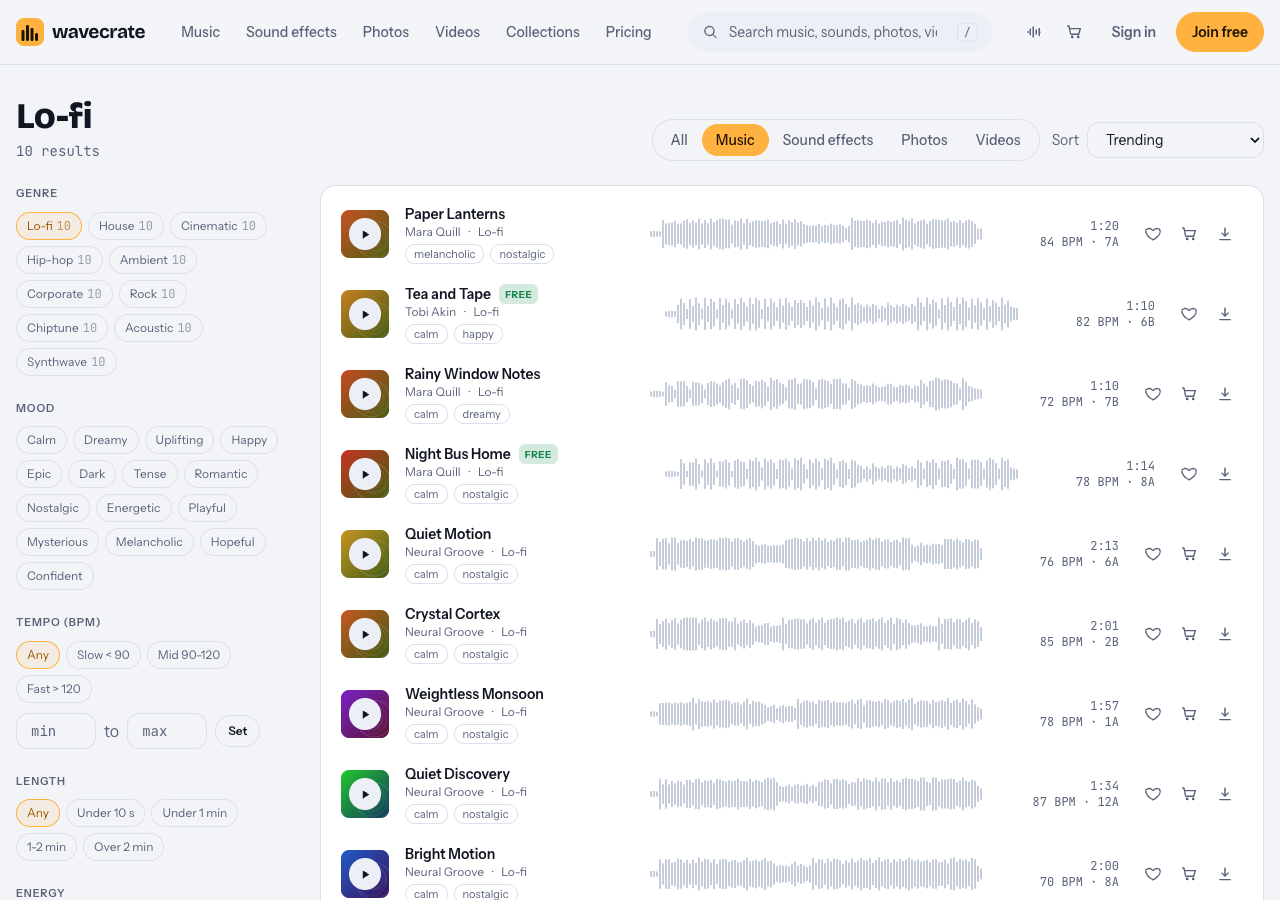
The Lo-fi list, with each track's mood tags and tempo.
Other slow tracks for a different cafe
Not every cafe wants a dusty basement sound. Two other genres give you a lighter or a quieter bed under the text.
- A bright daytime cafe with a patio. Try Acoustic music. Porch Light is described as "Plucked and strummed guitars with a light shaker. Happy and Romantic", at 96 BPM, and was marked Free. It is guitar, so it sounds lighter and less smoky than the Lo-fi tracks.
- A quiet coffee bar with a spoken walk-through. Try Ambient music. Slow Tide (60 BPM, marked Free) is described as "Long evolving pads and a sparse bell melody that leaves plenty of room for voice". That is the right quality if you narrate the menu.
The Study and focus collection groups six low-key tracks in 7 minutes, including Tea and Tape, Night Bus Home, Rainy Window Notes, Slow Tide and Paper Lanterns, so it is a quick way to audition them side by side.
How to search the music page
The music browse page has filters that match the checklist above. A working order for a menu video:
- Set Tempo to Slow, which means under 90 BPM. Widen to Mid (90 to 120) only if nothing fits.
- Set Energy to Calm or Relaxed. Skip Driving and Intense.
- Set Vocals to Instrumental.
- Pick a mood. The list has calm, dreamy, happy, romantic, nostalgic and hopeful, which all suit a cafe. There is no "chill" mood, so use calm.
- Read the description line of each track that is left. It names the instruments, and that is where you find the soft piano or the guitar.
Check the versions
Track pages offer the full track, a 30 second edit and an 8 bar loop. For a short menu clip the 30 second edit is usually enough. The loop helps if your video runs longer than the track. Tea and Tape, for example, has a full track of 1:10, a 30 second edit of 0:29 and a loop of 0:23.
A worked example: a 20 second menu clip
Say a small cafe wants a 20 second video for its own Instagram page, with the day's three specials on screen.
- Pick the track. Filter to Slow, Calm, Instrumental and open Lo-fi. Play Tea and Tape and Night Bus Home under the video and keep the one that does not tug at the eye.
- Pick the version. Use the 30 second edit and cut it to 20 seconds, or use the loop and repeat it.
- Set the levels. Start with the music too quiet, then raise it until you just notice it, then lower it a touch. When a price appears, dip it a little more for a second.
- Check on a phone speaker. Most viewers will watch there, and a track that sounds warm on headphones can turn muddy on a small speaker.
- Fade the end over the last second or two so the cut does not feel abrupt.
- Note the license. The cafe's own page is its own business content, so on the day of writing a Free item is not enough. It points to Standard, or Pro, once purchases open.
Which license a cafe menu video needs
Wavecrate licenses music, it does not hand over ownership. You get a license to use a track and Wavecrate keeps the copyright, so never describe the music as yours. Paid licenses are not on sale yet (Wavecrate says purchases open soon), so the prices below are the listed prices for when sales open; items marked Free, like Tea and Tape, can already be downloaded with a free account. Wavecrate has no separate terms page, so the table on the pricing page and the license cards on each item are all there is to quote.
- Free. Only items marked Free have it. It covers online videos and podcasts, including monetized channels, with a credit line in your description, and a free account gets 3 free downloads a month. It does not tick "Your own business and brand content", so a cafe's own menu video is not a clear fit for a Free item.
- Standard, listed at $15 for a music track. Online content for one creator or business, no credit needed, and your own business and brand videos. This is the card a cafe's own menu video on its own social accounts points to. Registered channels are printed on the certificate.
- Extended, listed at $49 for a music track. Paid advertising, TV, radio and cinema, apps, games and software, and client work. A boosted post or a paid ad needs it, and so does a menu video you make for a cafe that is not yours.
If you make menu videos for several cafes, Pro is listed at $99 a year or $12 month to month and is not on sale yet. It gives Standard licenses across the catalog, never Extended. Client work still needs Extended. Pro also says that content you publish while subscribed stays covered.
The license table does not name a screen inside a shop or a video played on a menu board. Treat that as not covered rather than guessing, and read the pricing table against your own use before you rely on it.
Every download comes with a certificate and a code. Anyone can check the code on the verify page, which shows the licensee, the item, the license type and your registered channels, with no account needed.
Frequently asked questions
Does Wavecrate have a jazz genre?
No. Its genres are Lo-fi, House, Cinematic, Hip-hop, Ambient, Corporate, Rock, Chiptune, Acoustic and Synthwave. For a similar feel, try slow Lo-fi and Acoustic tracks and read each description.
Can I use a free track in a cafe menu video?
Only if the item is marked Free, and you must put the credit text in your description. The Free license covers online videos and podcasts but does not name your own business content, so a cafe's own video needs Standard.
What tempo works best behind a menu?
Slow, under 90 BPM, is a good start. Widen to the Mid band (90 to 120 BPM) if the track still sounds relaxed and leaves room for your text.
Do I need the Extended license for a cafe video?
If you post it on your own channels, the pricing table points to Standard. If you run it as a paid ad or make it for another business, it points to Extended.
Get started
Browse Wavecrate: you can join free and download items marked Free now, paid licenses are not on sale yet (purchases open soon), and every download comes with a license certificate and a code anyone can check on its verify page.
Open the music browse page, set Tempo to Slow and Energy to Calm, and play a few tracks under your menu text. Join Wavecrate free for 3 free downloads a month on items marked Free.


Comments
No comments yet.
Sign in or make an account to comment.