Sound effects for an indie game: which license you need
Sound effects for an indie game need a license that names games, and many licenses do not. A coin chime that is fine in a YouTube video can be off limits once it ships inside your build, because license tables usually treat apps and games as their own use. This guide shows where that line sits, why an item marked Free and a subscription can both fall short of it, and what licensing the sounds for a small platformer looks like in practice.
Why sound effects for an indie game need their own license
A sound effect is a recording, and the U.S. Copyright Office lists sound recordings and computer programs among the works copyright protects. When you put a sound in a game, it is no longer playing once in a video someone watches. It is copied into a program that you hand out, and it plays every time someone presses a button.
That is why sellers write a separate row for games. On Wavecrate's plans and licenses page, the table for music and sound effects has a row called "Apps, games and software", and only one license ticks it.

Find the word "games" in the license table
Here is the license panel on one of Wavecrate's game sounds, Laser Blaster, a one second shot in the Game category.
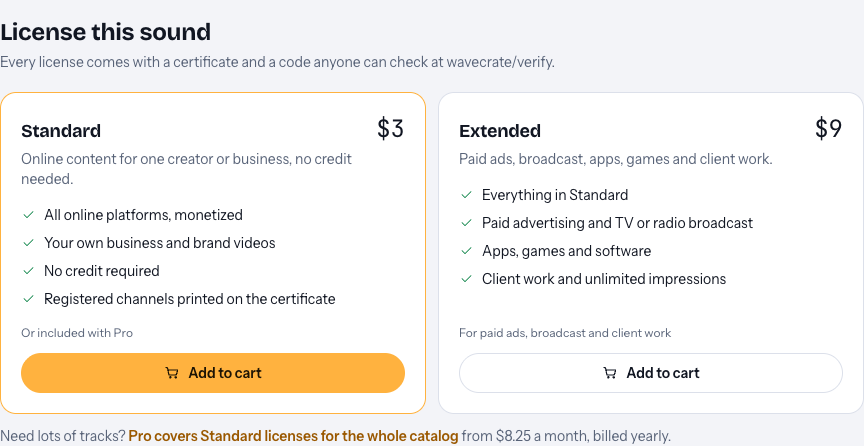
Read the two cards side by side:
- Standard, $3 on this page: online content for one creator or business, no credit needed. All online platforms, monetized, and your own business and brand videos.
- Extended, $9 on this page: paid ads, broadcast, apps, games and client work. It includes everything in Standard, plus apps, games and software, and client work with unlimited impressions.
So for a sound that ships inside your game, the answer on Wavecrate is Extended. The table makes no split between free and paid games: apps, games and software sit under Extended either way.
The prices on those cards are the listed prices for when sales open: paid licenses are not on sale yet, and Wavecrate says purchases open soon. Items marked Free can already be downloaded with a free account.
Free sound effects are not free for games
This is the mistake that catches the most developers. Wavecrate marks some sound effects as Free, such as Coin Pickup in the Game category. But the Free license on its page covers "Online videos and podcasts, with credit": YouTube, TikTok, Instagram, Twitch and podcasts, with credit text in the description. Games are not on that list.
So Coin Pickup is free to use in your devlog with a credit line, and it still needs Extended, listed at $9 on its page, to go inside the game. The same goes for interface sounds like Success Chime, which is marked Free and also lists Extended at $9.
The same habit is worth keeping on any site. Creative Commons sounds are another common source, and its license list shows that NC licenses allow noncommercial use only and that every license asks for credit. Check the letters before a CC sound goes into a game you plan to sell.
Why a subscription may not cover your game build
A subscription feels like it should cover everything, so read what it gives. Wavecrate's Pro plan, listed at $99 a year or $12 month to month and not on sale yet, gives Standard licenses on the whole catalog. It never gives Extended.
That makes Pro useful for the online side of making a game: devlogs, trailers on your own channel, and posts for your studio's accounts, all with no credit line. It does not cover the sounds you ship in the build. Those still need Extended, item by item.
If you hold Standard for a sound and later decide to put it in the game, the pricing page says that, once purchases open, the Extended license will cost only the difference.
A worked example: licensing a small platformer
Say you are making a small retro platformer. The player collects coins and fires a blaster, and you post a devlog on YouTube every two weeks. You open the sound effects, filter by the Game category, and look at the Retro arcade collection, "the sounds of a coin-op cabinet". You pick two sounds.
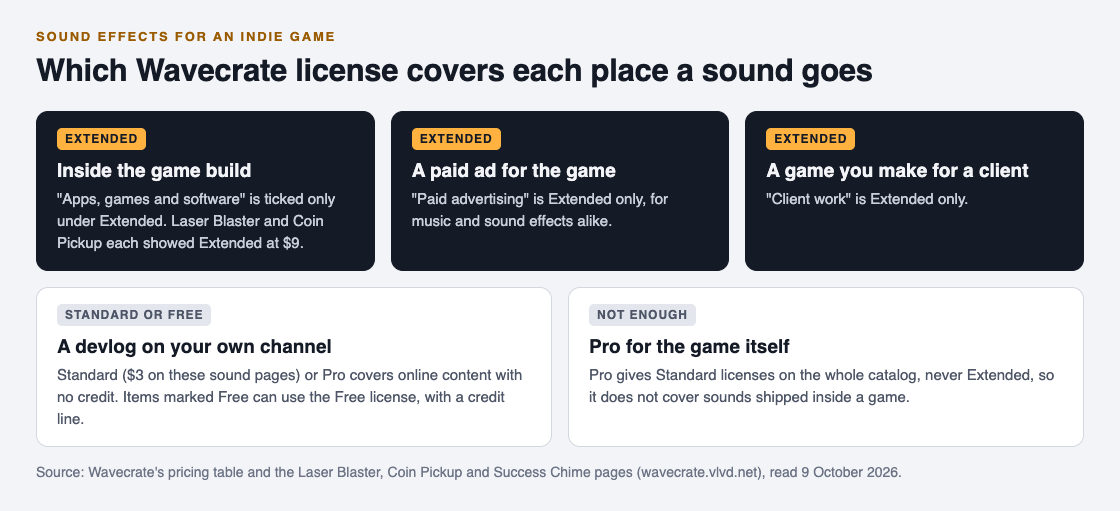
- Coin Pickup, in the game. It is marked Free, but the game build needs Extended, listed at $9 on its page.
- Laser Blaster, in the game. Premium, so there is no Free license. The game build needs Extended, listed at $9 on its page.
- Both sounds in your YouTube devlog. Extended includes everything in Standard, so the Extended licenses for the game also cover the devlog, with no credit line.
- A paid ad for the launch. Paid advertising is an Extended use, so Extended for both sounds covers it as well.
At the listed $9 each, two sounds come to $18 for everything above once sales open, based on the prices those pages showed on 9 October 2026. If the game were for a client instead of your own studio, that is client work, which is also Extended.
A few habits make the search quicker. The sound effects page lists 60 sounds across six categories (Transitions, Impacts, Interface, Game, Ambience and Foley), and you can filter by length and by access. Setting access to Free shows the items you can try in a devlog with a credit line; setting it to Premium shows the rest. Either way, open each sound's page and read its license panel before it goes into the build, because the panel, not the Free tag, says whether games are covered.
Keep a license list next to your project
Games collect sounds over months, and it is easy to forget which ones you licensed and how. Keep a simple list in your project folder with one line per sound: the file name in your build, the sound's name, the license type, and its code.
Every Wavecrate license comes with a certificate and a code, and anyone can check the code on the verify page with no account. If a publisher, a platform or a client asks how a sound is licensed, you can send the code instead of digging through old downloads. Remember that a license is permission, not ownership: Wavecrate keeps the copyright, and you get a license to use the sound in the ways your license lists.
Frequently asked questions
Can I use free sound effects in a commercial game?
Only if the license names games. On Wavecrate, the Free license covers online videos and podcasts with credit, so a sound marked Free still needs Extended to ship in a game.
Does a Wavecrate Pro plan cover sound effects in my game?
No. Pro gives Standard licenses only, and apps, games and software need Extended. Pro does cover online content such as devlogs on your own channel.
Is it different if my game is free to play?
Not on Wavecrate's table. Apps, games and software sit under Extended, with no separate row for free games.
Do I need another license for my game's trailer?
Not if you hold Extended for that sound, since it includes everything in Standard and paid advertising. With only Standard, a trailer on your own channel is covered, but a paid ad is not.
Get started
Browse Wavecrate: you can join free and download items marked Free now, paid licenses are not on sale yet (purchases open soon), and every download comes with a license certificate and a code anyone can check on its verify page. Start in the Game category of the sound effects, and check the license panel on each sound before it goes into your build.


Comments
No comments yet.
Sign in or make an account to comment.