Sound effects for TikTok and Reels: which license?
Sound effects for TikTok and Instagram Reels feel too small to license. A whoosh lasts one second and a pop lasts less. But a short sound is still someone's recording, and the license you need depends on what the post is for: your own account, your shop, a paid ad or a client. This guide explains each case in plain terms and walks one short video from a personal post to a paid ad.
Wavecrate licenses royalty-free sound effects and music for short videos, and every download comes with a license certificate and a code anyone can check on its verify page.

Why a one-second sound still needs permission
The U.S. Copyright Office's page for musicians describes a sound recording as a series of musical, spoken or other sounds fixed in a recording medium, such as a digital file. It also says protection exists from the moment an original work is fixed. Nothing in that description depends on length.
So a whoosh you download is a recording that someone made, and using it in your video is using their work. A license is the permission to do that, and it says where you may use it. That is the part to check before you post.
Sound effects for TikTok: what each license covers
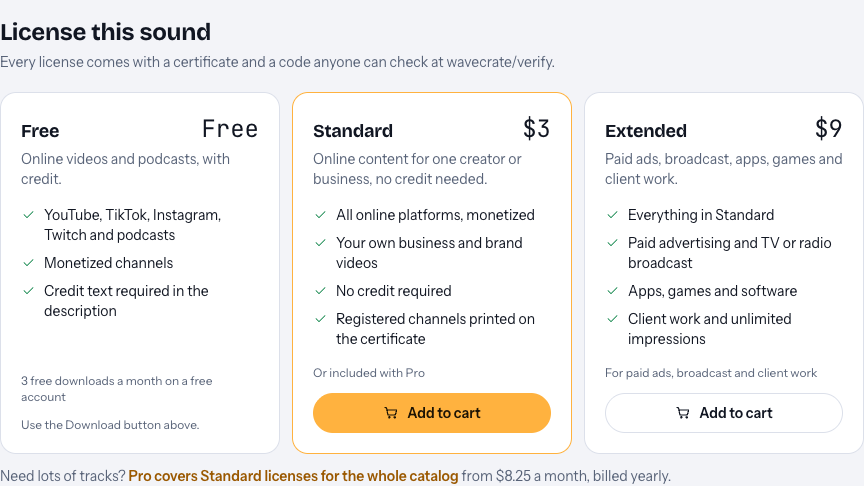
On Wavecrate's plans and licenses page, music and sound effects share one table. Every license on it, Free, Standard and Extended, covers YouTube, TikTok, Instagram, Twitch and podcasts, including monetized channels. The differences are in the other rows:
- Free is only on sounds marked Free, and it needs credit text in the description. A free account gets 3 free downloads a month.
- Standard needs no credit and adds your own business and brand content. On the sound effect pages read for this guide, Standard is listed at $3 for one sound.
- Extended adds paid advertising, TV, radio and cinema, apps, games and software, and client work. It is listed at $9 on the same pages.
Paid licenses are not on sale yet (Wavecrate says purchases open soon), so these are the listed prices for when sales open, while sounds marked Free can already be downloaded with a free account.
Here is the panel on one sound, Air Cut Whoosh, a one-second sound "for transition and swipe moments" in the Transitions category. It is marked Free, so it shows all three licenses.
The credit line on short videos
The Free license says "Credit text required in the description". On TikTok and Instagram, the text under a post is usually called the caption. Wavecrate's pages do not say more than "the description", and they give no fixed wording for the credit.
So if you use the Free license, write the credit in the text that goes with the post and leave it there. If your style is a short caption, or you post the same clip to several accounts and do not want to track credits, Standard removes the question: "No credit required" is on its card.
When a short video becomes an ad
Short videos move between uses easily. A post that does well gets paid to reach more people, or a brand asks you to make one for them. Two rows on the table change the license when that happens:
- Paid advertising. If you pay to run a video as an ad, treat it as paid advertising. That row is ticked only under Extended, even if the same video was fine as a normal post.
- Client work. If you edit a video for a brand or another creator, it is client work. That row is Extended only too.
Pro does not change this. It gives Standard licenses on the whole catalog (it is listed at $99 a year or $12 month to month, and is not on sale yet) and prints your registered channels on every certificate. It never gives Extended, so paid ads and client edits still need an Extended license on each sound. If you hold Standard for a sound, the pricing page says that, once purchases open, it can be upgraded to Extended for the difference.
A worked example: one candle shop, one TikTok
Say you run a small candle shop and post short videos to TikTok and Instagram Reels. This week you film a product reveal: the lid comes off, the camera swipes to the lit candle, and a soft sound lands on the swipe.
- Find the sound. Open Wavecrate's sound effects, pick the Transitions category, use the length filter to keep it short, and set access to Free if you want to try the Free license first. You choose Air Cut Whoosh.
- Decide what the post is. The video shows your own products on your shop's account. That is your own business and brand content, which is ticked under Standard and Extended, not under Free. So the license it needs is Standard, listed at $3 on this page, and with it you need no credit in the caption.
- Keep the code. Every license comes with a certificate and a code. Save it in a note next to the project file, named after the video.
- The video does well. Two weeks later you decide to pay to show it to more people as an ad. That is paid advertising, so the sound needs Extended, listed at $9 on this page, before the ad runs.
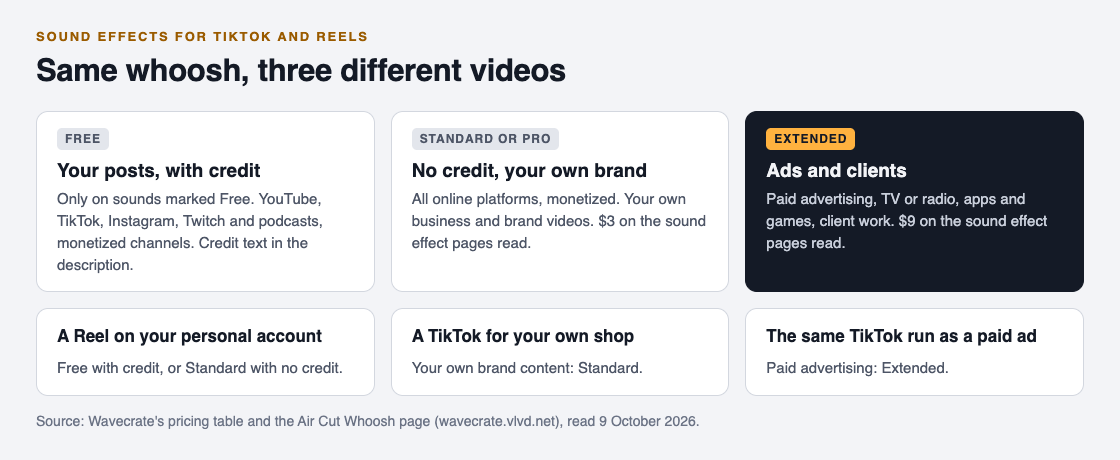
If the same video had been a personal clip on your own account, not for your shop, the Free license would have covered it with a credit line. The sound is the same in all three cases. What changes is the job the video does.
The same logic holds for every other sound in a short edit. Wavecrate's sound effects are sorted into Transitions, Impacts, Interface, Game, Ambience and Foley, so a hit on a reveal, a pop on a caption or a chime on a "done" moment each sit in a category you can filter. Each sound is licensed on its own, so a video with three sounds needs a license on each of the three. Laser Blaster, a Premium sound in the Game category, showed the same $3 Standard and $9 Extended as Air Cut Whoosh. A Premium sound has no Free license, so it starts at Standard even on a personal post. If you post several videos a week with new sounds each time, that is where Pro would make sense once it is on sale, as long as none of them are ads or client edits.
If a claim arrives
Wavecrate's pricing page answers this in its own words: send the platform your license code or certificate link. The verify page shows the licensee, the item, the license type and your registered channels, so a reviewer can confirm it without contacting Wavecrate, and no account is needed to check. The certificate does not decide the claim for you. It gives the reviewer something they can check in a minute.
Frequently asked questions
Do I need a license for a one-second sound effect?
Yes. A short sound is still a recording someone made, so use it under a license that covers your post.
Does the Free license cover TikTok and Reels?
Yes, for sounds marked Free: it covers TikTok, Instagram and monetized channels, with credit text in the description.
Can I use Pro sounds in a paid TikTok ad?
No. Pro gives Standard licenses only, and paid advertising is ticked only under Extended.
Is a video for my own shop client work?
No. Videos for your own shop are your own business and brand content, which Standard covers. Client work means making videos for someone else.
Get started
Browse Wavecrate: you can join free and download items marked Free now, paid licenses are not on sale yet (purchases open soon), and every download comes with a license certificate and a code anyone can check on its verify page.


Open the sound effects, pick a sound, and read its cards against the post you are making.
Comments
No comments yet.
Sign in or make an account to comment.