Sound effects for YouTube videos: what you can use and how
Sound effects for YouTube videos feel too small to need a license. A whoosh lasts a second and a coin ding lasts less. But each one is a recording someone made, and a monetized video puts it in front of an audience. This guide shows what a sound needs on your channel, when a credit line is enough and when it is not, and how to work out the licenses for one real video before you upload it.
A one second sound is still a recording
The U.S. Copyright Office lists sound recordings among the works copyright protects. A short sound is still a recording, so treat it like a song: someone holds the rights, and you use it under a license that covers your video.
YouTube's own help pages make the same point from the creator's side. Its page of common copyright myths says that buying content does not mean you own the rights to upload it, and that some owners let you buy a license, which defines how the content can and cannot be used. A sound pack you paid for years ago is only as good as the license that came with it. On Wavecrate, every sound page shows its license cards, so you can see what a sound covers before it goes into your edit.

What sound effects for YouTube videos need
For a sound in a normal video on your own channel, you need a license that names online video, or YouTube by name, and that allows a monetized channel. Then check two more things: whether it asks for a credit line, and whether it covers the kind of video you are making.
On Wavecrate's plans and licenses page, music and sound effects share one table. All three licenses, Free, Standard and Extended, tick YouTube, TikTok, Instagram, Twitch, podcasts and monetized channels. The differences sit lower down:
- Free needs a credit line, and only items marked Free have it.
- Standard drops the credit line and adds your own business and brand content.
- Extended adds paid advertising, TV, radio and cinema, apps and games, and client work.
Paid licenses are not on sale yet: Wavecrate says purchases open soon, so the prices on its sound pages are the listed prices for when sales open. Items marked Free can already be downloaded with a free account.
Free sounds and the credit line
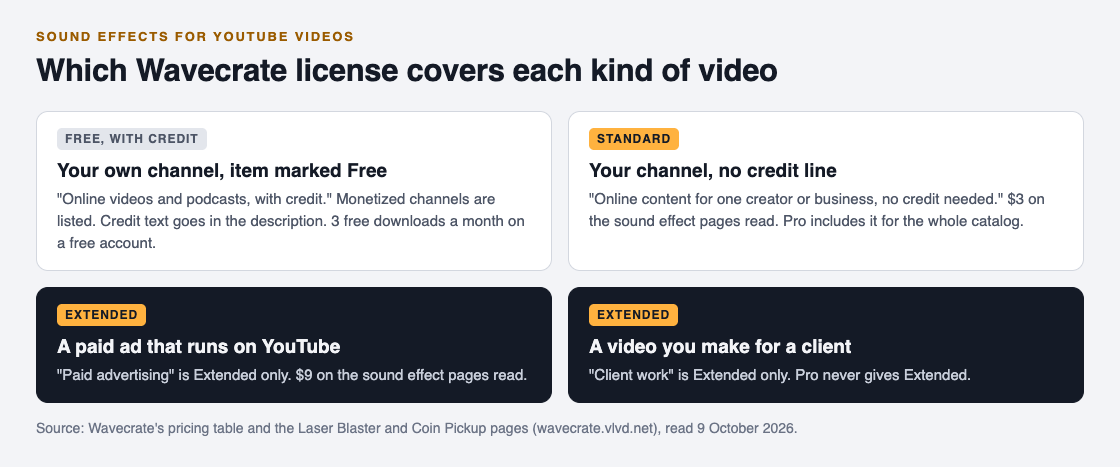
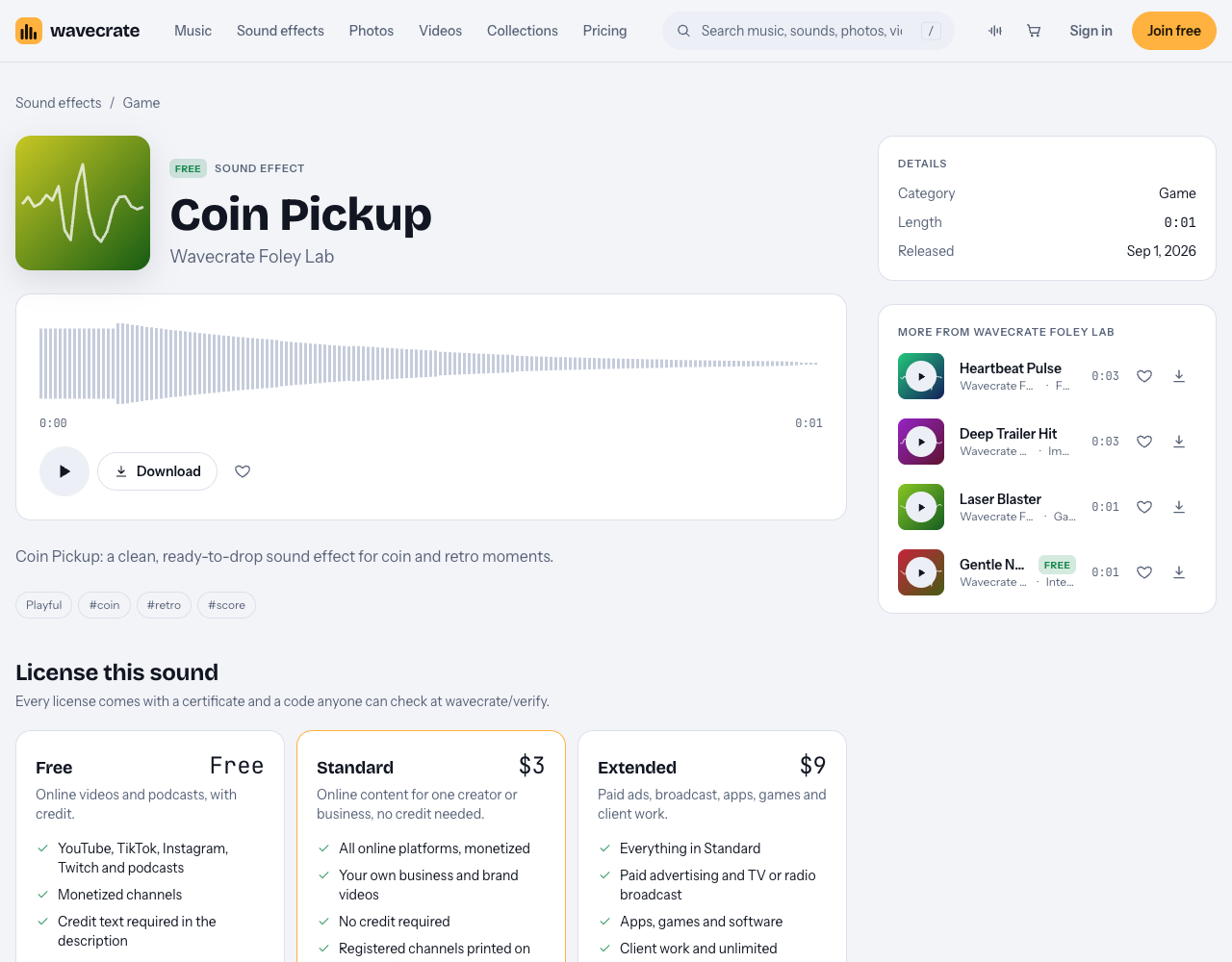
Wavecrate marks some sound effects as Free. On the sound effects page you can set the access filter to Free, and items such as Air Cut Whoosh and Rain on Window carry the Free label. On Coin Pickup, a Free sound in the Game category, the Free license reads "Online videos and podcasts, with credit", lists monetized channels, and says "Credit text required in the description". A free account gets 3 free downloads a month.
The credit is a condition of that license, not a courtesy. Leave it out and you are outside the terms. The reverse is also true: YouTube Help says that giving credit to the owner does not by itself give you the right to use their work. Credit only works when the license you hold asks for it.
When you need more than the Free license
Three cases push you past Free:
- The sound is Premium. Laser Blaster, a one second sound in the Game category, has no Free license at all. Its page lists Standard at $3 and Extended at $9.
- You do not want a credit line. Standard on these sound pages is "Online content for one creator or business, no credit needed", and it prints your registered channels on the certificate.
- The video is an ad or a client's video. Paid advertising and client work are ticked only under Extended, for Free items too.
The ad case catches people out. You make a video for your channel, it does well, and you put money behind it as an ad. The pricing table treats that as paid advertising, so the sounds in it need Extended. The pricing page says that once purchases open, a Standard license can be upgraded to Extended for the difference.
A worked example: the sounds in one gaming video
Say you run a monetized channel and you are editing a ten minute video about retro games. You use three sounds from Wavecrate's Game and Interface categories:
- Coin Pickup (Free) every time you score a point on screen.
- Success Chime (Free, Interface) when you reveal each ranking.
- Laser Blaster (Premium) in the intro.
Now work through it.
Option one, keep the credit lines. Use two of your 3 monthly free downloads on Coin Pickup and Success Chime under the Free license, and add their credit text to the description. Laser Blaster has no Free license, so it needs Standard, which its page lists at $3 for when sales open. At listed prices that puts the video at $3, plus two credit lines.
Option two, no credits. Standard on all three drops the credit lines. Each page lists Standard at $3, so at listed prices the video's sounds would come to $9 once purchases open, and the description would need no credit lines.
Option three, you post every week. Pro is listed at $99 a year or $12 month to month and is not on sale yet; it gives a Standard license on everything. The pricing page says content you publish while subscribed stays covered. It never gives Extended.
Whichever you pick, paste each license code into the description. Then, two weeks later, the sponsor of your next video asks to use this one as a paid ad. Stop there: paid advertising is Extended only, so each sound needs Extended before the ad runs.
Keep the proof where a reviewer will look
Every Wavecrate download comes with a license certificate and a code. The home page suggests pasting the code in your video description, and the verify page lets anyone enter it, with no account, to see who holds the license, for which item, and what it covers.
That matters if a claim arrives. YouTube's page on copyright claims says a video can get claims from different claimants for different parts, and lists your choices: leave the claim, remove the claimed audio by muting or trimming, share revenue in some cases, or dispute it if you are confident you have all the necessary rights. Wavecrate's own answer is to send the platform your license code or certificate link so a reviewer can confirm it without contacting Wavecrate. The decision on a dispute stays with the platform and the claimant; the code just makes your license easy to check.
One more habit helps: keep a short list per video of each sound, where you got it, the license and the code. A year from now you will not remember which ding came from where.
Frequently asked questions
Can I use sound effects in a monetized YouTube video?
Yes, if the license says so. On Wavecrate, Free, Standard and Extended all list monetized channels for music and sound effects, and Free needs a credit line.
Do I need to credit sound effects on YouTube?
Only if the license asks for it. Wavecrate's Free license requires credit text in the description, while Standard and Extended say no credit is required.
Is crediting the creator enough to use any sound?
No. YouTube Help says giving credit does not by itself give you the rights to use someone's work; you need a license that covers your use.
Which license do I need if my video becomes an ad?
Paid advertising is ticked only under Extended on Wavecrate's table, and Pro never includes Extended. Once purchases open, the pricing page says Standard can be upgraded for the difference.
Get started
Browse Wavecrate: you can join free and download items marked Free now, paid licenses are not on sale yet (purchases open soon), and every download comes with a license certificate and a code anyone can check on its verify page.
Open the sound effects page, set the access filter to Free or Premium, and read the license cards on each sound before it goes into your timeline.


Comments
No comments yet.
Sign in or make an account to comment.