Sports team problems: a coach's shared list
Sports team problems are rarely one big thing. They are a dozen small ones that nobody writes down: the missing bibs, the lift rota that fell apart, the back line that keeps getting caught on the counter. This guide shows you how to keep a coach's shared list of them that players, parents and staff can all see, so the same issue does not come back every Saturday. The worked examples use Problem Graph, a free problem and solution journal drawn as a map, but the method works with any honest list.
Why sports team problems get lost between training sessions
A team problem usually shows up at the worst moment. It is mentioned in the car park, at half time, or in a message thread at 10pm. By Tuesday training, everyone half remembers it and nobody owns it.
Three things make it worse:
- The week is short. You have one or two sessions and a match. There is no slot for "the thing we said we would fix."
- Fixes are not recorded. You tried a new warm up for the slow starts. Did it work? Nobody wrote down the result, so in March someone suggests the same warm up again.
- Problems hide in different heads. The coach knows about the tactics issue, a parent knows about the transport issue, and the captain knows the squad is unhappy about the training time. Nobody sees all three together.
A shared list fixes the first two. A list that also shows links between problems fixes the third.
What belongs on a coach's shared problem list
Write each problem as one line, in plain words, as something that is going wrong. Not a task, not a wish. "Only nine players confirmed by Thursday" is a problem. "Sort out availability" is a vague task.
Good candidates for a squad list:
- Performance: "We concede in the last 15 minutes of most games."
- Logistics: "Kit bag comes back short after away games."
- People: "New players do not know the warm up routine."
- Equipment: "Goalkeeper gloves are worn through."
- Club side: "Pitch booking clashes with the under 14s." This one may belong on the club's list too. If you sit on a committee, see how a club committee keeps one list.
Some problems do not belong on the shared list at all. A note about one player's confidence, a family situation, or a selection call you have not made yet stays with you. More on how to keep those private below.
How to set up one shared list for players, parents and staff
In Problem Graph, you write a problem in one line and press Enter. It lands on your graph straight away. You put it in a lane: personal, work, expert or scientific. A volunteer coach might use personal. A paid coach might use work. The lane is just a filter, so pick one and stay consistent.
Everything you write is private by default. Only you see it, and it follows you to any phone or computer you log in on. To share with the squad, you use two pieces:
- A private network. You create a network for the team and give out the invite code. Members see what you share into it, and nobody else does. Be aware that the app says anyone with the invite code can join, so treat the code like a gate key. Send it to the parent group and staff directly, not on a public page.
- Main nodes. Only a problem marked as a main node can be shared. When you share it, its solutions, their outcomes and the requirements those solutions need go along with it. A problem that is only linked to it stays at home in your private graph.
That second rule is what makes a coach's list safe. You can link a private note like "One player is nervous about starting in goal" to the shared problem "We concede in the last 15 minutes," and the squad will only see the shared one. Your notes stay yours.
The app runs in the web browser and works on a phone, so parents can open it from the touchline. In the app you can filter by Mine, Network and All shared, and switch from the map to a List view if a plain list is easier to read on a small screen.
Sorting team problems: urgent, important and the few that matter most
Once the list has ten or fifteen problems, you need to choose. Two simple tools help.
The first is the urgent versus important split. "Only nine players for Saturday" is urgent. "Our passing out from the back is weak" is important but not urgent. If you only ever fix the urgent ones, the squad never improves. The Eisenhower matrix guide walks through the four boxes.
The second is looking for the few problems that cause most of the pain. In the example below, availability sits behind the late goals: no subs means tired legs, and tired legs mean late goals. Fix availability and both problems shrink. The Pareto principle for everyday problems covers how to spot those.
Linking helps here. When you link problems that belong together, patterns show up on the map that you would miss in a list. If five problems all connect to "only nine players confirmed," that node is your starting point.
Running a quick weekly review after the match
The list only works if you look at it. Ten minutes on Sunday evening or Monday morning is enough. Go through it in this order:
- Record outcomes. For each solution you tried this week, mark it as worked, partly or failed. Be honest. A failed solution stays on the map, and that is what saves you from trying it again in two months. The shared map then shows the squad which fixes held.
- Add what the match showed you. One line each. Do not solve them yet.
- Pick one or two for the week. Mark the solutions you will try at training.
For a fuller routine, read this guide to a weekly review.
Example: a youth football coach's shared list in practice
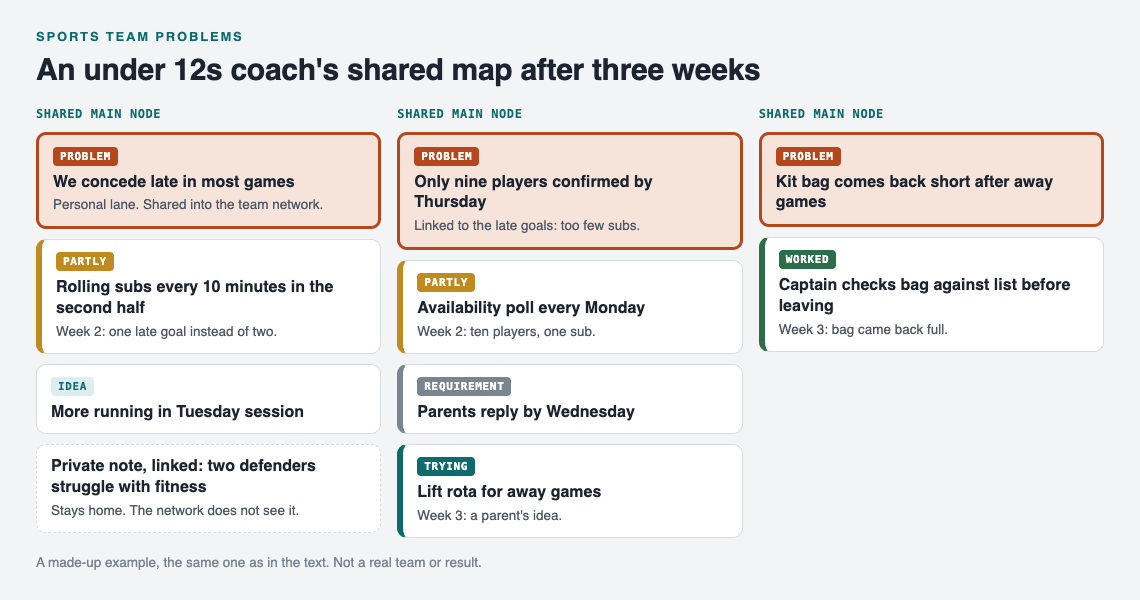
The worked example after week 3: what the squad network sees, and the note that stays with the coach.
Here is how an under 12s coach might use it over three weeks. The names and results are an illustration.
Week 1. After a 3 to 2 loss, the coach writes three problems:
- "We concede late in most games."
- "Only nine players confirmed by Thursday."
- "Kit bag comes back short after away games."
Each one is marked as a main node and shared into the team network. Under "concede late," the coach adds two solution ideas: "More running in Tuesday session" and "Rolling subs every 10 minutes in the second half." Rolling subs is marked as trying. Under the same problem, the coach links a private note: "Two defenders struggle with fitness." That note stays home.
Under "only nine players," the coach adds a solution, "Availability poll every Monday," marks it as trying, and gives it a requirement: "Parents reply by Wednesday." A shared main node carries its solutions and the requirements they need, so parents see exactly what is being asked of them.
Week 2. Rolling subs: marked partly. They conceded once late instead of twice. The availability poll: partly. Ten players replied for a nine-a-side game, so there is one sub, not the three that rolling subs need. The coach links "only nine players" to "concede late," because rolling subs only work with players to rotate. The map now shows the real order of work: availability first.
Week 3. A parent suggests a lift rota for away games. The coach adds it as a solution under availability and marks it as trying. The kit bag problem gets a solution too: "Captain checks bag against list before leaving." After the match, that solution is marked worked, so anyone in the network can see which fix held for the kit bag.
If you get stuck, you can ask the app for suggestions: its AI proposes new solutions grounded in what worked for others on problems like yours. Treat each proposal as an idea to test, not an answer. You can also browse problems other people have shared publicly and borrow a solution into your own graph with one tap. It keeps a link back to where it came from.
Frequently asked questions
Who should be able to add problems to the team list?
Keep one person responsible for the shared problems, usually the coach or an assistant, so the list stays clean. Players and parents can raise issues with you, and you write them down as one line each.
How is a shared problem list different from a team group chat?
A chat scrolls away, so last month's fix is buried. A problem list keeps each problem, what you tried and whether it worked, failed or partly worked, in one place you can come back to.
Should players see problems about selection or playing time?
Usually not about named individuals. Keep those as private problems linked to a shared one, since only the main node you share goes out, and linked problems stay in your own graph.
How often should a coach review the team list?
Once a week, after the match, is enough for most squads. Record the outcome of each solution you tried, and pick one or two problems for the next training session.
Get started
Open Problem Graph and look around first: the public network can be browsed with no account, and the app has a "Load example set" button so you can see how a graph looks before you build one. When you are ready, create an account with a username and password, write the first problem from your last match, and share it into a network for your squad.
Try Problem Graph: it is free, and you can look around the public network without an account. Write one problem down in a line and attach the first thing you will try.
Comments
No comments yet.
Sign in or make an account to comment.