SSRF testing: stop your app fetching internal URLs
Server-side request forgery (SSRF) happens when your app fetches a URL that someone else chose. That one feature can turn your server into a doorway to your private network. SSRF testing means finding every place your app makes those requests, checking whether they can be pointed inward, and fixing them so they cannot. This guide walks through all three, using the OWASP prevention advice.
What SSRF is, and why internal addresses are the target
Your server sits inside a network that trusts it. It can reach internal dashboards, database ports and, in the cloud, a metadata address that hands out credentials. None of that is reachable from the internet. All of it is reachable from your server.
The OWASP Server Side Request Forgery Prevention Cheat Sheet describes SSRF as abusing an application to reach the internal or external network, or the machine itself. It notes that in cloud environments SSRF is often used to steal credentials and access tokens from metadata services. The public address is never the goal. The internal one is.
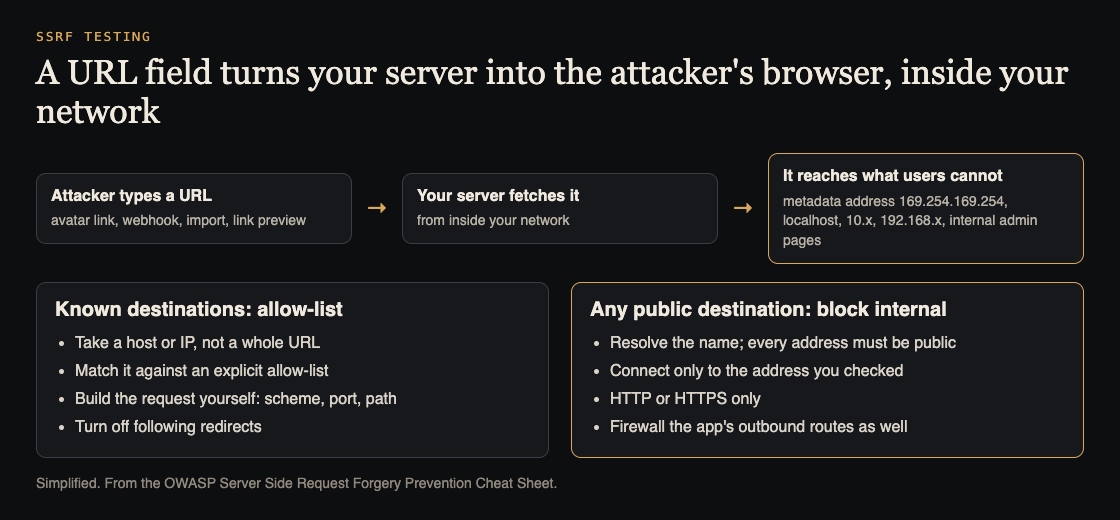
How SSRF reaches inward, and OWASP's two kinds of defence. Simplified from the OWASP SSRF Prevention Cheat Sheet.
Map every place your app fetches a URL
You cannot test what you have not found. Search your code for HTTP client calls and trace each one back to its input. OWASP's own examples are an avatar image the app downloads from a URL, and webhooks or callback URLs the user sets. Add the rest:
- Webhooks: you send requests to a URL the customer saved, so the destination is user controlled by design.
- Link previews: someone pastes a link and your server fetches it for a title and image.
- Imports: "fetch from URL" for files, feeds or data sync.
- PDF and screenshot makers: a headless browser that loads a page you supply.
- AI agent tools: any tool that lets a model fetch a page or follow a link in content it was given. Here the model picks the URL, which is why AI agent sandboxing blocks private addresses too.
Write each one down with its input field and where the result goes. That list is your test plan.
SSRF testing on staging: a worked example
Test on staging, with targets you own. You want a yes or no: does the fetch reach somewhere it never should? Take a link preview field and try one target per request:
- Your own listener. A small server you control, on a unique name, that logs every request and DNS lookup. A hit proves the server fetches what you type.
- Loopback.
http://127.0.0.1/andhttp://[::1]/. Does a service on the server itself answer? - Private ranges. An address in
10.0.0.0/8,172.16.0.0/12or192.168.0.0/16that you know exists on staging. - The metadata address.
http://169.254.169.254/. - Other schemes. OWASP notes SSRF is not limited to HTTP: try
file://,gopher://anddict://to see what your client accepts. - A redirect. A page on your listener that redirects to
127.0.0.1. Does your client follow it?
For each, record the status code, the response size and the time taken. A 200 with content is obvious; a long pause then an error can also mean the request reached something inside.
Blind SSRF: confirm requests you cannot see
Many fetch points never show the response. A webhook fires and drops the body; an import job says only "done". That is blind SSRF, and the listener from step 1 is how you confirm it. Give each field its own name on the listener, so a hit tells you exactly which input reached the network. Even a DNS lookup alone proves the server parsed the address and tried to reach it.
Why block-lists fail
The common first fix is to reject URLs whose host looks internal. OWASP calls deny-lists bypass-prone and a last resort, for reasons worth testing:
- Redirects: a public URL passes your check, then redirects inward, and your client follows it.
- Address encodings: OWASP lists hex, octal, dword, URL and mixed encodings of the same IP address. A string match on the usual form misses them.
- Parser disagreement: two URL parsers can read different hosts from the same string, so the host you approved is not the one contacted.
- DNS rebinding: a name resolves to a public address when checked, then to an internal one when fetched.
SSRF fixes that hold, from OWASP
OWASP splits the fix by case. When your app only needs to reach known destinations, such as a fixed set of partner APIs:
- Do not accept a whole URL from the user. Accept only a valid IP address or domain name.
- Match it against an explicit allow-list, then build the request yourself, with your own scheme, port and path.
- Turn off following redirects in your HTTP client.
When users may name any public destination, as with webhooks:
- Resolve the name, and check that every address behind it is public.
- Connect only to the address you checked, so DNS cannot change between check and fetch.
- Allow only HTTP or HTTPS, and keep redirects off.
- If you must keep a deny-list, OWASP's minimum includes
169.254.169.254,127.0.0.0/8,0.0.0.0/8,::1/128, the three private IPv4 ranges,fc00::/7andfe80::/10.
In both cases, add the network layer: a firewall or network segregation that only allows the app's legitimate routes. Code checks get bypassed; a route that does not exist cannot be reached.
Keep it fixed: tests in CI
Turn each finding into an automated test: for every fetch point, submit an internal address and assert it is refused, and submit a redirect toward one and assert it is not followed. Put these next to your other security tests in CI, so a later change that turns redirects back on fails the build.
Frequently asked questions
How do I test for SSRF without harming production?
Test on staging and aim at targets you own, such as your own listener. You are proving whether the fetch reaches an internal destination, so a logged connection or DNS lookup is enough.
Is blocking 169.254.169.254 enough?
No. Encodings, redirects and DNS rebinding get around a simple block. Use an allow-list where you can, check resolved addresses, and block the routes at the network.
Can AI agents with fetch tools cause SSRF?
Yes. If an agent can fetch a URL that came from untrusted content, it can be steered toward internal addresses. Apply the same checks to the tool, and watch for repeated blocked attempts.
Get started
Pick one fetch point today. Point it at your own listener, then at a redirect toward 127.0.0.1, and see what happens. If either surprises you, you have found the work worth doing first.
If you want a second pair of eyes, whitehatstoic runs security tests on web apps and AI systems, including web app and API review, with a written report, fixes and a retest after fixes. Testing finds weak spots; it cannot promise to find every one. Testing is scoped after a short call: book a meeting about security testing.
Building something that has to be safe? Book a meeting with whitehatstoic: tell us the product, the deadline and your biggest worry, and we reply with a plan and a price.
Comments
No comments yet.
Sign in or make an account to comment.