Stock photos for client work: which license covers it?
Using stock photos for client work is where many freelancers get caught out. The photo that is fine on your own website is often not licensed for the homepage you build for a client, even though it is the same file and the same kind of page. This guide explains why work for a client is treated as its own use, what each license on Wavecrate covers, whose name goes on the license, and how to cover one client job from start to finish.
Why a client job is a different use
Photographs are protected by copyright from the moment they are taken. The U.S. Copyright Office's "What is copyright?" page says the owner has the exclusive right to reproduce the work in copies and to distribute them, and also the right to authorize others to do those things.
A license is that authorization, and it is written for a purpose. Showing a picture on your own page is one purpose. Putting it into something you are paid to make for someone else is another: the picture ends up working for a business that never agreed to anything with the owner. That is why stock licenses usually list client work on its own line, and why it is worth reading that line before you start a project.
Wavecrate, the stock library used as the example here, prints that line on every photo page, so you can see which license a client job needs before you pick a picture.

Stock photos for client work: the row that decides it
On Wavecrate's plans and licenses page, the table for photos and videos has a row called "Client work". It is ticked only under Extended. Here is how the three licenses line up:
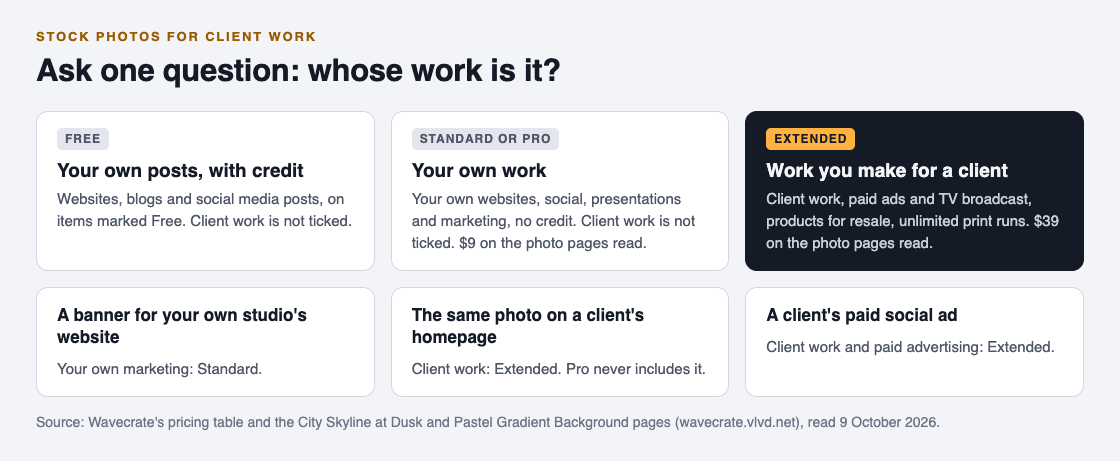
- Free is only on items marked Free. It covers websites, blogs and social media posts, with a credit line. Client work is not ticked.
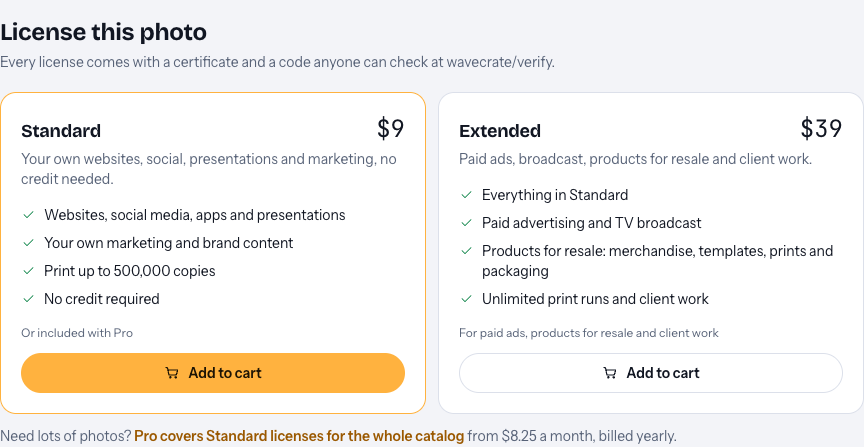
- Standard covers "your own websites, social, presentations and marketing" with no credit. The word that matters is "own". Client work is not ticked.
- Extended adds paid advertising and TV broadcast, products for resale, unlimited print runs and client work.
So the question that settles most cases is short: whose work is it? If the picture promotes you, Standard can cover it. If you are making it for a client, it is Extended.
One thing to know before you plan a job around it: paid licenses are not on sale yet, and Wavecrate says purchases open soon. The prices on each card are the listed prices for when sales open, and items marked Free can already be downloaded with a free account.
Why Pro does not cover client jobs
Pro is the subscription. It is listed at $99 a year or $12 month to month and is not on sale yet, and it gives Standard licenses on the whole catalog, with no credit needed. That makes it handy for your own channel, blog and marketing.
But Pro gives Standard licenses only, never Extended. A freelancer on Pro can use any photo on their own portfolio site and still needs Extended for the same photo on a client's site. If you hold a Standard license for an item, the pricing page says that, once purchases open, the upgrade to Extended will cost only the difference.
Whose name goes on the license
When you join Wavecrate, the sign-up page asks for a name that is "printed on your licenses". Each license comes with a certificate and a code, and the verify page shows who holds the license, for which item and what it covers, with no account needed. The home page says anyone, including your client, can check it.
Wavecrate's pages do not describe moving a license from one person to another. So settle this with your client before you license anything. Two common setups:
- You license it. The Extended license is in your name, as part of the job, and you hand the client the certificate link with the files.
- The client licenses it. The client makes their own account and licenses the photo under their name, and you work with the file they give you.
Either way, write down in your project notes which item was licensed, by whom, and the code. If a question comes up a year later, that note and the verify page answer it in a minute.
A worked example: one client, three uses
Say you are a freelance designer. A property agency hires you to refresh its website, make a set of social posts and design one paid social ad, all with a city look. You open Wavecrate's photos, choose the City and architecture category, and filter for landscape pictures. You pick City Skyline at Dusk, skyscrapers with lit windows against an orange and violet sky.
Now take each use in turn:
- The homepage banner. You are making it for a client, so it is client work. Extended, listed at $39 on this page.
- The social posts. Social posts are covered by every license on the table, but these are still made for a client. Extended again.
- The paid ad. This is both client work and paid advertising, and both are Extended only.
One Extended license on the item covers all three uses on its card: "Paid ads, broadcast, products for resale and client work." Now compare your own marketing. If you post the finished banner in your portfolio to show your work, that promotes you, which is the Standard line. The Extended license already includes everything in Standard.
Two practical checks before you hand over files. First, never deliver the preview: the page says previews carry a small watermark, while licensed files are clean and full size. Second, pick the right size. This photo comes as an original of 4000 by 2667 pixels, plus medium and small copies, so use the original for a wide banner and a smaller copy where page speed matters.
The same steps work for backgrounds. Pastel Gradient Background, in the Textures and backgrounds category, shows the same cards: Standard listed at $9 for your own work and Extended listed at $39 for client work. A gradient behind a client's headline is still the picture doing a job for that client.
What the license does not give you or your client
A license is permission, not ownership. Wavecrate's pricing page says you get a license to use an item and it keeps the copyright. That matters if a client asks you to "hand over the rights" to their new site: you can hand over the design you made, but the photo inside it stays licensed, not owned.
Wavecrate has no separate license agreement page today. The pricing table and the item pages are the full description of each license, so if a use is not clearly on them, treat it as not covered and do not promise it to the client.
Frequently asked questions
Can I use a stock photo from my Pro plan in a client's project?
No. Pro gives Standard licenses only, and client work is ticked only under Extended on Wavecrate.
Is a photo in my own portfolio client work?
No. Your portfolio promotes your own business, which is the Standard line: your own websites, social, presentations and marketing.
Can I use a free photo for a client?
Not with the Free license. It covers websites, blogs and social posts with credit, and client work is not ticked, so a Free item still needs Extended for a client job.
How does my client check the license?
Give them the code or the certificate link. The verify page shows who holds the license, for which item and what it covers, with no account needed.
Get started
Browse Wavecrate: you can join free and download items marked Free now, paid licenses are not on sale yet (purchases open soon), and every download comes with a license certificate and a code anyone can check on its verify page. Open the photo you want and read its Standard and Extended cards against the job you have been hired for.


Comments
No comments yet.
Sign in or make an account to comment.