Stop doing list: drop fixes that never worked
A stop doing list is a simple way to stop paying for the same mistake twice. You write down each problem that keeps coming back, every fix you tried, and what actually happened. When a fix has failed often enough, it goes on the list, and you stop reaching for it. This post shows you how to build one, gives you a copy-ready template, and walks through examples for work, home and teams.
What a stop doing list is and why failed fixes keep coming back
A to-do list tells you what to do next. A stop doing list tells you what to skip. It is a record of fixes you have already tried on a specific problem that did not solve it.
Failed fixes come back because the problem comes back. The printer jams again, the weekly report is late again, the kid refuses breakfast again. Under pressure, you may grab the first fix you remember, which can be the one you used last time, whether or not it worked.
Without a written record, "I tried that" fades into "maybe I should try that." The list closes that gap.
Why a fix that never worked comes back
Three things can pull you back toward a fix you already know is weak.
- Memory. You may remember that you tried something, but not how it turned out.
- Hope. A fix that partly worked can feel close. You tell yourself the next attempt will finish the job.
- Sunk cost. If you bought the tool, set up the system or argued for the approach, dropping it can feel like admitting a loss.
None of these is about the fix itself. They are about you. A written outcome, made at the time, is the counterweight.
How to spot a fix that never worked: evidence, not feelings
"It felt like it helped" is not a result. Before you judge a fix, decide what success looks like for that problem. Make it something you can check.
- The report goes out by Friday at noon.
- The drain runs clear for two weeks.
- The car starts on the first try every morning for a week.
Then record one of three outcomes: worked, partly or failed. Partly matters. It stops you from rounding a weak result up to a win or down to a loss.
A fix belongs on your stop doing list when it has failed more than once under fair conditions, or when it failed once at a high cost. One failure on a bad day is a data point. Three failures in a row is a pattern.
Build your stop doing list in 5 steps: problem, fix tried, result, verdict, date
- Problem. Write it in one line. "Team standup runs over 30 minutes" beats "meetings are bad." One line forces you to be specific.
- Fix tried. Name exactly what you did. "Used a timer" is better than "tried to keep it short."
- Result. Worked, partly or failed, plus the evidence. "Failed: ran 41 minutes, timer ignored after day two."
- Verdict. Keep, retry with a change, or retire. Retire means it goes on the stop doing list.
- Date. When you tried it. Dates show you whether a fix failed last week or three years ago, under different conditions.
Do this right after the attempt, while the result is fresh. A few minutes then saves guessing later.
Stop doing list template: copy this format for any recurring problem
Copy this block into a note, a document or a notebook. Make one block per fix you try.
- Problem (one line):
- What success looks like:
- Fix tried:
- Date tried:
- Result: worked / partly / failed
- Evidence:
- Verdict: keep / retry with a change / retire
- If retry, what changes:
- Related problems:
Your stop doing list is every block marked "retire." Pull those into a short list at the top so you see them first next time the problem shows up.
The last field, related problems, is easy to skip. Do not skip it. A fix that fails for one problem can fail because of a second problem you have not written down yet.
Example stop doing lists for work, home, and teams
These are made-up examples to show the format in use. Swap in your own problems.
Work: the weekly report is always late
- Fix: Blocked Friday morning for the report. Result: failed, three weeks running. Meetings got booked over the block. Verdict: retire.
- Fix: Started a draft on Wednesday. Result: partly. Sent on time twice, late once when data arrived Thursday night. Verdict: retry with a change.
- Related problem: "Sales data arrives late." That turned out to be the real cause.
Stop doing: blocking Friday morning. It has failed three times and nothing about the calendar has changed.
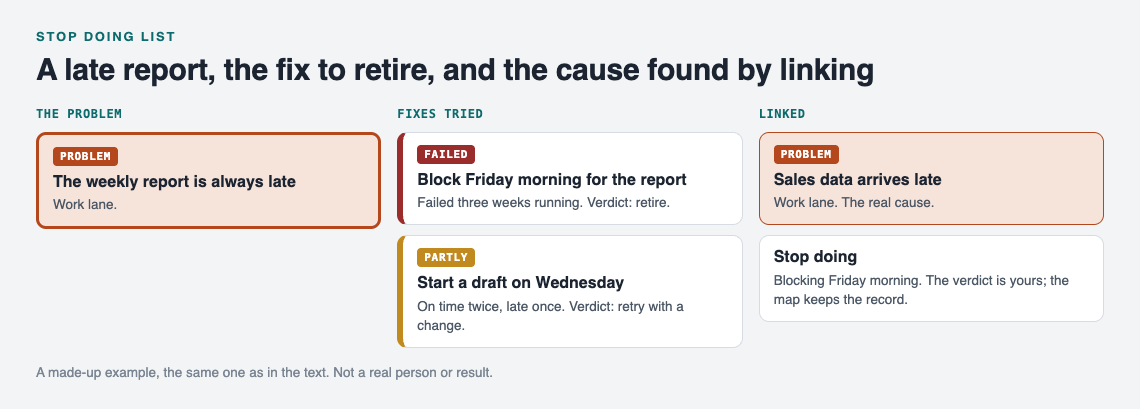
A made-up example: the work entry from this post, drawn as a map.
Home: the kitchen drain keeps clogging
- Fix: Boiling water once a week. Result: failed, clogged again within ten days. Verdict: retire.
- Fix: Sink strainer. Result: worked, clear for a month. Verdict: keep.
If you are in the middle of a bigger household project, the same approach helps. See how it applies to moving house problems, where the same issues repeat across every room.
Teams: rehearsals start late
Picture a band that tries a group text the night before. Failed. People read it and still arrive late. Next they try a fixed start time with the first song locked in. Partly worked. With a shared record that one keeper updates and the band can see, nobody has to argue for the group text again. The same pattern shows up in band rehearsal problems and in carpool problems shared by the drivers. When everyone can see what failed, the loudest person does not get to restart it.
Keep the list honest: when to review, retry, or permanently retire a fix
A stop doing list is not a graveyard you never visit. Conditions change. A fix that failed with one manager or one schedule might work with another.
- Review the list each time the problem comes back. That is when the list earns its place.
- Retry a retired fix only if you can name what is different now. Write that difference into the new entry.
- Retire permanently when a fix has failed under several different conditions. At that point it is not the conditions.
Keep failed fixes visible. Do not delete them. A deleted failure gets tried again, by you or by someone else. If you like this kind of honest record, a pre-mortem list works well alongside it: one looks forward at what could fail, the other looks back at what did. A job search journal uses the same idea for applications and follow-ups.
Frequently asked questions
What is the difference between a stop doing list and a to-do list?
A to-do list holds actions you plan to take. A stop doing list holds fixes you have tested and decided to drop, so you do not waste time on them again.
How do I know a fix has truly failed and not just been tried badly?
Write down what success looks like before you try the fix, then check the result against it. If it failed more than once under fair conditions, it failed. If you skipped steps, mark it "partly" and retry with that change noted.
Should a team share one stop doing list?
Yes, if the team shares the problem. A shared list stops people from proposing a fix the group already tested, and it shows new members what not to repeat.
How often should I review my stop doing list?
Review it every time the problem comes back, before you pick a fix. For problems that come back less often, a quick look once a month keeps it current.
Get started
The template above works on paper. If you want part of the record to build itself as you go, Problem Graph covers the first three steps. You write the problem in one line and put it in a lane: personal, work, expert or scientific. You attach each fix you try and mark the outcome as worked, partly or failed. Failed fixes stay on the map, marked as failed. As the home page puts it: "The graph is honest. A solution that failed three times stays on the map as a failed solution, and that is exactly what the next person needs to know."
The keep, retry or retire verdict is still your call. A fix that sits on the map marked failed again and again is your cue to retire it.
You can link problems that belong together, even across lanes, which covers the "related problems" field without extra work. Your problems are private by default, so only you see them. For a team, family or band, you can mark one problem as a main node and share it into a private network that people join with an invite code. Its fixes and their outcomes go along with it, so the whole group sees what already failed.
If the graph is empty when you open the app, the "Load example set" button shows you how a filled-in map looks before you add your own.
Try Problem Graph: it is free, and you can look around the public network without an account. Write one problem down in a line and attach the first thing you will try.
Comments
No comments yet.
Sign in or make an account to comment.