Stop Saying Um in Interviews: Find Your Fillers on Tape
If you want to stop saying um in interviews, start by hearing how often you say it. Most people can't, because you don't notice your own fillers while you talk. A recording makes them visible. Our post on job interview practice on webcam shows how to record your answers in Chrome, read the timed transcript and score each take on the first sentence, length, filler words and ending. It helps anyone with an interview coming up. One thing worth taking from it: score a take on several points, not just one. This post goes narrower and covers only fillers.
Cheap Recorder records your webcam and voice in Chrome as one MP4 on your own computer, and it can write a transcript while you speak. That transcript is what lets you see every um on the page.
Why you say um in interviews (and why you can't hear it)
A filler is what your mouth does while your brain looks for the next sentence. Interviews raise the pressure, so the gaps feel longer and you fill them faster. You also hear yourself from the inside, and your attention is on what to say next, not on how it sounds.
That is why "just be aware of it" rarely works. You need evidence. A recording gives you a count, a place in the answer and a before and after.
Record one answer and read the transcript
Pick one question, such as "Tell me about yourself", and answer it out loud for about a minute and a half. Do not rehearse the wording first. You want your normal speech.
Here is a simple setup in Cheap Recorder:
- Open the recorder in Chrome and press Choose folder.... Start recording stays greyed out until you do, and the words next to the button say so.
- Under What to capture, pick Webcam only. It records just your camera and microphone, with no screen shared.
- Type a name in Name this recording, for example
Answer 01 tell me about yourself. The name goes on the file and its folder, so numbered names keep your takes in order. - Check that Live transcript is ticked under Options. It is on by default. Pick your language from the menu beside it before you start, because Chrome listens for one language per recording.
- Record a 30-second test first and play it back, so you catch a wrong microphone before the real take. If the level bar stays still, see our fix for a Chrome microphone that is not working.
Press Stop and finish when you are done. The recording is already saved in your folder. If the transcript caught speech, a plain-text file such as Answer 01 tell me about yourself - transcript.txt sits next to the MP4, with the time of each line. You can read how the transcript works in our live transcript guide.
One note on privacy. While the live transcript is on, Chrome sends your microphone audio to Google to turn it into text. If you would rather not, untick Live transcript before you start. You can still watch the video and count by ear.
Count your fillers: um, uh, like, you know, so
Open the transcript file in any text editor and use its search to count each filler. Do five words: um, uh, like, you know and so. Write the counts on paper with the length of the answer.
Two cautions. First, speech recognition does not always write down a mumble, so the transcript can undercount. Play the video once with your eyes closed and tap a pen for each filler you hear. Second, like and so are normal words in many sentences. Count only the ones that carry no meaning, such as "it was, like, a big project".
If your plan includes it, the Remove filler words button helps here. It marks um, uh, erm, hmm, like, you know, basically, sort of and kind of in red in the Transcript fold, so you can spot them at a glance. The button does not appear on other plans, so check What you can do on this plan in the menu under your name. You are using it as a highlighter, not an editor. In a normal one-file recording, cuts change the transcript and captions, not the MP4. More detail is in the filler words guide.
An example tally for a 90-second answer might read: um 7, uh 3, like 5, you know 2, so 6. That is 23 fillers. It is only an example, but a number like that is far more useful than a feeling.
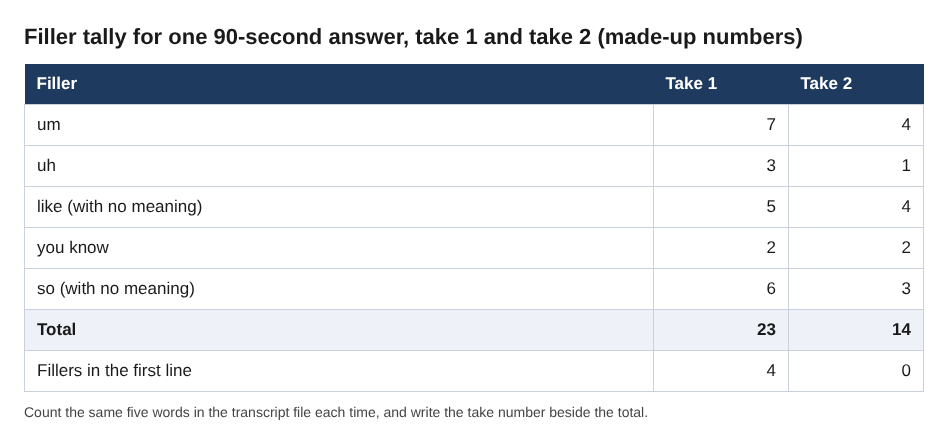
The same tally for take 1 and take 2, with made-up numbers.
Find where the fillers cluster: openings, transitions and endings
The count tells you how much. The times tell you where. Each transcript line has a time, so mark which lines hold the most fillers. For most people they cluster in three places:
- Openings. The first line, while you search for a start.
- Transitions. The jump from the situation to what you did, or from what you did to the result.
- Endings. The trailing "so, yeah, that's kind of it".
An invented example of an opening line: "So, um, I think I'd start by, like, saying I've worked in operations for six years." Four fillers before the first real fact. Now you know the problem is not your whole answer. It is the first five seconds.
Timing note: Chrome gives a time for each line, not each word. So read the times as "around here", not as exact positions.
How to stop saying um in interviews: replace each filler with a short pause
You cannot simply delete a filler. If you try, you leave a hole and panic fills it. Give the gap a job instead. A short pause feels longer to you than it does to the person listening.
Work on the three hot spots from your tally:
- Opening. Write your first sentence word for word and memorize only that sentence. A strong, rehearsed start removes most opening fillers.
- Transitions. Use a short bridge phrase such as "The result was" or "Here is what I did", then stop and breathe. A planned phrase beats an um.
- Endings. Finish on your result and stop talking. Do not add "so, yeah".
When you feel an um coming, close your mouth and breathe in. A short silence feels awkward to you, but it is usually just a breath to the person across the table.
Re-record the same answer and compare the two takes
Answer the same question again, with the same setup. Name it Answer 01 take 2. Sort the folders by name and your takes sit together. Each folder is named with the name you typed plus the date and time, so you can also sort by date to see them in the order you made them.
Count the same five fillers and compare. Here is what to look at:
- Total fillers, and fillers in the first line.
- How the answer's length changed. Pauses often add a few seconds.
- Whether the ending is clean.
Keep the count on paper next to the take number. A drop from 23 to 14 shows the method works for you, and the remaining fillers show where to aim next. Because recordings are ordinary files on your disk, you can keep every take and look back at the first one a week later.
A 10-minute daily routine for the week before the interview
Short and daily beats long and once. Try this:
- Minutes 1 to 2. Choose one question and say your first sentence out loud three times.
- Minutes 3 to 5. Record the answer. Do not stop to fix mistakes.
- Minutes 6 to 8. Read the transcript, count the five fillers and note which line has the most.
- Minutes 9 to 10. Record the answer again with pauses in the hot spots. Compare the counts.
Rotate questions across the week: about you, a strength, a mistake, a conflict, why this role. By the last day you will have several numbered takes per question and a clear trend.
Frequently asked questions
Is it bad to say um in an interview?
A few are normal and nobody counts them. A habit of several in every sentence pulls attention away from your content, which is why it is worth measuring.
Does Cheap Recorder cut the ums out of my MP4?
In a normal one-file recording, cuts made in the transcript change the transcript and captions, not the MP4. For interview practice you only need to see the fillers, not remove them.
Do I need a paid plan to practice this way?
No. The Free plan includes recording, live transcript and captions, and 12 hours of recording a month, with no card needed. The red filler marking depends on your plan, so check What you can do on this plan.
Why is my transcript missing some fillers?
Chrome's speech recognition does not write down every mumble, so a mumbled um may never reach the page. The transcript is made from what Chrome hears on your microphone, so a headset or a desk microphone close to your mouth beats a laptop's built-in one in a noisy room. Listen to the video as well as reading the text.
Get started
Record one answer today, read the transcript and count your five fillers. That one number is the start. For the full practice method, with scoring for the first sentence, length, fillers and ending, read our job interview practice post.
The free plan needs no card. Try Cheap Recorder in Chrome, and your recordings stay on your own disk.
Screen recording that is cheap and easy.
Visit cheaprecorder.com↗
Comments
No comments yet.
Sign in or make an account to comment.