Synthwave beats for a retro gaming channel: pick, license, mix
Picking synthwave beats for a retro gaming channel sounds easy until you sit down to edit. The track that felt great on its own fights your voice. The loop runs out mid-boss fight. Then you are not sure what your license covers. This guide walks you through picking the right track, reading what a license covers on Wavecrate, and mixing music so viewers still hear you and the game.
Why synthwave beats for a retro gaming channel make sense
Synthwave borrows the sound of 1980s synthesizers, drum machines and neon film scores. Your audience already links that sound to cabinets, cartridges and CRT glow. When a viewer hears a gated snare and a warm pad over pixel art, the setting clicks before you say a word.
It also leaves room. Most synthwave runs on steady patterns rather than busy melodies, so it can sit under commentary without pulling focus. That is why it works better than many genres for long gameplay videos.
On Wavecrate, Synthwave and Chiptune are separate genres on the music browse page. There is also a collection called Retro arcade, described as "Chiptune, synthwave and the sounds of a coin-op cabinet." When read on 11 October 2026 it held six items: the tracks Level Select (marked Free), Boss Rush, Neon Freeway and Save Point, and the sound effects Coin Pickup and Laser Blaster.

What makes a good synthwave beat for gameplay videos
Before you fall for a track, check four things.
- A quiet middle. Your voice lives in the middle frequencies. A track with a loud lead synth there will fight you. Pads, bass and drums are friendlier.
- Instrumental. Lyrics compete with commentary. Wavecrate track pages list vocals, so you can see "Instrumental" before you download.
- Versions. Track pages on Wavecrate show a full track, a 30 second edit and a loop. The edit suits intros. The loop lets you cover a long segment without an obvious restart.
- Known tempo and key. Each track page lists BPM and key, for example "G major · 9B." That second code helps you chain tracks that sound good back to back.
Use the keyboard to audition quickly. On every page, Space plays or pauses, Left and Right skip 5 seconds, Shift with Left or Right jumps to the previous or next item, and / opens search. You can run through a dozen tracks in a few minutes.
Matching tempo and mood to your video type: speedruns, reviews, let's plays
The music browse page lets you filter by mood, tempo, length and energy. Tempo has Slow (under 90 BPM), Mid (90 to 120), Fast (over 120) and a custom range. Energy runs from Calm and Relaxed up to Steady and Driving. Here is how to set them for three common formats.
Speedruns
Speedruns are about momentum. Pick the Synthwave genre, set tempo to Fast, energy to Driving, and try the moods energetic, tense or confident. Cut the edit so big splits land on a downbeat. A fast track makes a clean run feel faster.
Reviews and retrospectives
A review is mostly talking. Go Mid tempo, energy Steady or Relaxed, and moods like nostalgic, dreamy or mysterious. If you are breaking down how a game ramps up its challenge, a steady bed lets the explanation lead.
Let's plays
Let's plays run long, and game audio matters more. Choose Slow or Mid tempo with Calm or Relaxed energy, and use the loop version so it can repeat for twenty minutes without a jarring restart. Drop the music out entirely during story scenes.
A quick worked example: you are editing a 12 minute review of an old racing game. Filter Synthwave, Mid tempo, Steady energy, mood nostalgic. Grab the 30 second edit for your cold open, the loop for the main body, and a second track in a neighboring key for the verdict section so the change feels intentional.
Licensing synthwave beats for a retro gaming channel
The trap is a track marked Free in a business video. Take Chrome Horizon, a Synthwave track marked Free when read on 11 October 2026 ("Nostalgic and Dreamy, good for retro and tech", 96 BPM, Steady energy, instrumental), through three uses, using its page and the license table on the pricing page:
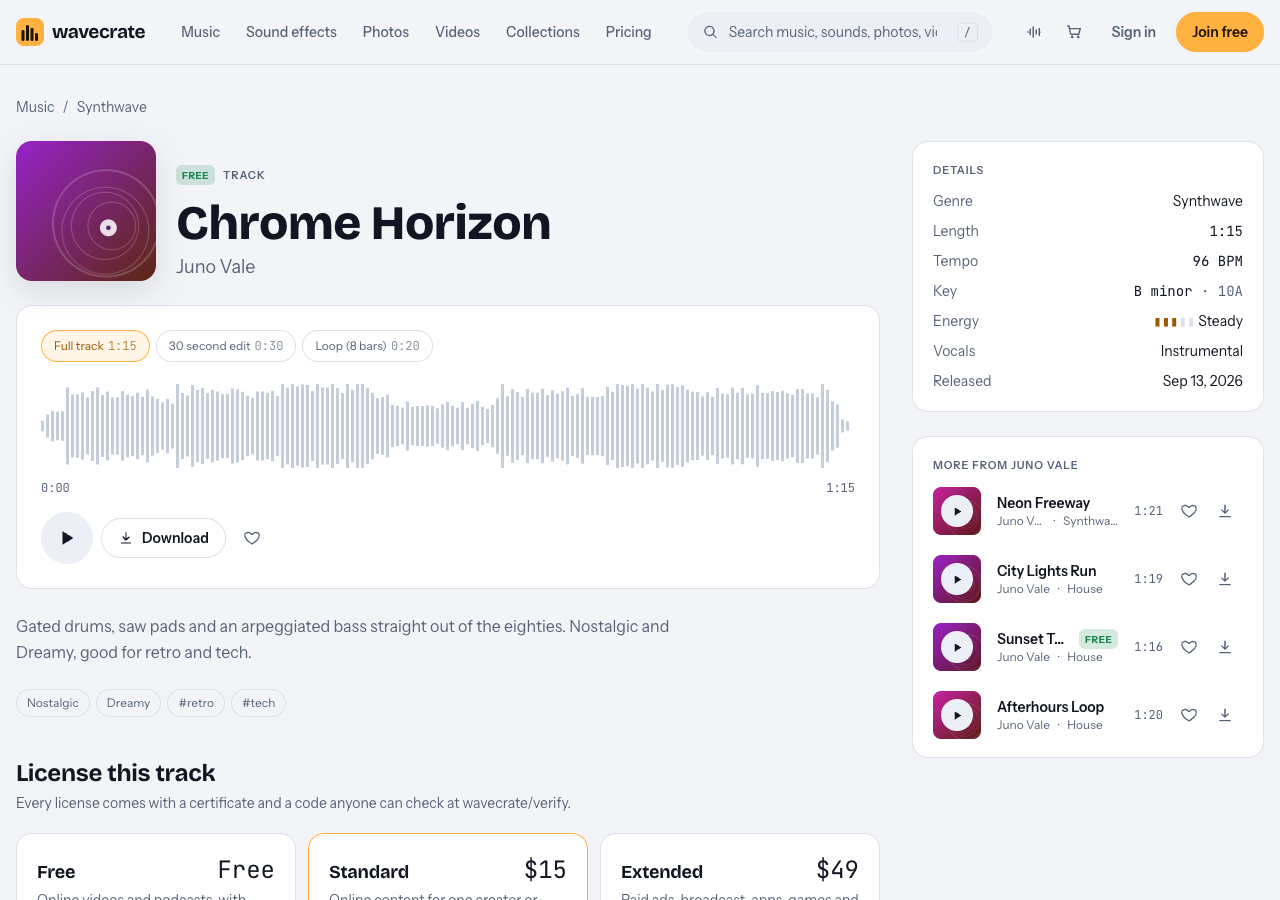
Chrome Horizon, read on 11 October 2026.
- Your own gaming channel. The Free license covers YouTube, TikTok, Instagram, Twitch and podcasts, monetized channels included, with credit text required in your description. A free account gets 3 free downloads a month.
- Your own indie studio's channel. A devlog or trailer posted to promote your own game is "your own business and brand content." The Free license does not tick that row, so it needs Standard (listed at $15 on this page), even though the track is marked Free. Music inside the game itself is "apps, games and software", which is Extended only.
- Editing for another creator, or a paid ad. A video someone pays you to edit is client work, and boosting a video is paid advertising. Both need Extended (listed at $49 on this page).
Pro is listed at $8.25 a month billed yearly ($99 a year) or $12 month to month, and gives Standard licenses on the whole catalog with every version of each track. Videos you publish while subscribed stay covered after it ends. Pro does not include Extended. Pro and the paid licenses are not on sale yet (Wavecrate says purchases open soon), so these are the listed prices for when sales open, while tracks marked Free, like Chrome Horizon, can already be downloaded with a free account.
Now the honest part about claims. No license stops a platform's automated system from flagging a video. What Wavecrate gives you is proof. Every download comes with a license certificate and a code. If you get a claim, the site says to send the platform your license code or certificate link. Anyone can paste it into the verify page and see the licensee, the item, the license type and your registered channels. A reviewer can confirm it without contacting Wavecrate.
So put the code in every video description, even when credit is not required. It costs you one line.
One more thing: you do not own the music. In Wavecrate's words, "You get a license to use it. We keep the copyright."
Mixing synthwave under voiceover and game audio
A good track can still sound bad if the mix is off. These habits fix most problems.
- Set your voice first. Get commentary clear and consistent, then bring music up until you just notice it, then pull it back a little.
- Duck under speech. Most editors can lower music automatically when your voice track is active. Keep the dip gentle so the beat does not pump in and out.
- Cut a notch for your voice. A small EQ dip in the music where your voice is strongest makes room without turning the track down further.
- Respect the game. Classic games have iconic sound. When a jingle, a boss roar or a menu sound is part of the moment, drop the music under it or cut it.
- Edit on the bar. With the BPM from the track page, set your timeline grid to match. Cuts that land on the beat feel deliberate.
- Use loops for length. Stack the 8 bar loop instead of stretching the full track. It keeps the energy flat under long talking sections.
Building a consistent sonic brand for your channel
Viewers recognize channels by ear as much as by thumbnail. Pick a small kit and reuse it.
- One intro track. Use its 30 second edit every time. Same tempo, same key, same feel.
- Two or three beds. One for reviews, one for speedruns, one for chill let's plays. Keep their keys close so you can move between them.
- A sting. Logo Sting, Long, Warm is a 5 second sound effect described as "a short boom with a bright synth chord and bell shimmer for a logo reveal." Its page listed Standard at $5 and Extended at $19.
- A visual match. The video Retro Neon Grid shows "an endless neon grid rolling toward a striped retro sun under the stars." It is 10 seconds, Full HD, with no sound, so you can lay your intro track over it. Its page listed Standard at $29 and Extended at $99.
Save these items as favorites on your account so you can find them fast. And keep every certificate in one folder, named by video. When you need a code months later, you will thank yourself.
Frequently asked questions
Can I use synthwave music on YouTube without getting copyright strikes?
A Wavecrate license covers YouTube use, but no license can stop a platform from flagging a video. If you get a claim, send the platform your license code or certificate link, which a reviewer can check on the verify page without contacting Wavecrate.
What BPM works best for retro gaming videos?
Match tempo to format. Fast tracks over 120 BPM suit speedruns, Mid tracks from 90 to 120 suit reviews, and Slow tracks under 90 suit long, relaxed let's plays.
Is synthwave the same as chiptune?
They are different styles, and Wavecrate lists them as separate genres on its music browse page. Its Retro arcade collection mixes both, so it is a quick place to hear the difference.
Can I monetize videos that use royalty-free synthwave beats?
Yes. On Wavecrate, the Free, Standard and Extended licenses for music all cover monetized channels. The Free license needs credit text in your description; Standard and Extended do not.
Get started
Start small. Open the music page, filter by Synthwave, set a tempo for your next video, and audition with the Space and Shift keys. Download one track marked Free, put its license code in your description, and build from there.
Browse Wavecrate: you can join free and download items marked Free now, paid licenses are not on sale yet (purchases open soon), and every download comes with a license certificate and a code anyone can check on its verify page.


Comments
No comments yet.
Sign in or make an account to comment.