Taking Photos of the Whiteboard: Does It Help You Learn?
The bell rings, the board is full, and twenty phones go up at once. Taking photos of the whiteboard feels like the smart move: you get every word, and you can stop writing and listen. But does the photo help you learn what is on the board? The research says a photo on its own does very little. This guide sets out what the studies found, then gives you a routine that turns the same photo into something that works.
What happens to memory when you take a photo
Psychologists call it the photo-taking impairment effect. In a 2014 museum study, people on a guided tour photographed some objects and only looked at others. They remembered fewer of the photographed objects, and fewer details about them. One twist matters for students: when people zoomed in to photograph one part of an object, the cost went away. Choosing what to capture made them look harder.
A 2025 study found the same pattern for photos and for screenshots of images, and screenshots did the most harm. The authors also found the cost was not just about being busy with the camera, because it did not grow when the saving task got harder. The result keeps showing up across very different tasks.
Taking photos of the whiteboard versus taking notes
Museum objects are not lessons, so the lecture studies matter more. In two experiments with 200 people, learners watched a recorded lecture and either wrote notes by hand, photographed the slides, or did neither. On a later recall test, the note-takers did best. The photo-takers did about as well as people who took no notes at all, even though they could look through their photos of the slides right before the test. Note-takers also let their minds wander less.
The most useful line in that study: learners thought all three methods worked equally well. A photo feels like learning. It is not the same thing.
The picture is not one-sided. A 2025 set of three studies found that photos hurt memory for what was on the slides in person, but in an online lecture, photos helped. Taking notes helped in both settings in two of the three studies. So the fair summary is this: in a classroom, a photo is no replacement for writing, and online it may do no harm. Either way, what you do with the photo afterwards is what counts.
Take a whiteboard photo you can use
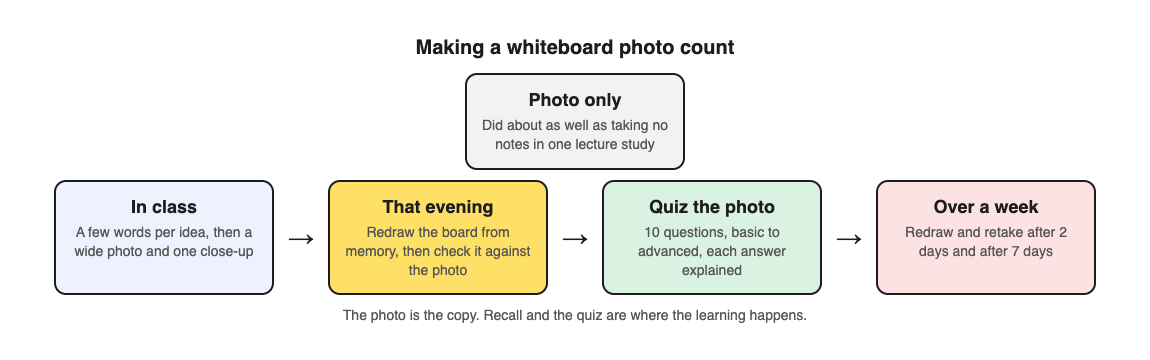
A photo is still worth taking. It is a perfect copy, and it can become your quiz later. A few habits make it usable:
- Stand square to the board so small writing is not squashed on one side.
- Fill the frame with the board, not the wall around it.
- Move off the glare until the shiny patch is off the writing.
- One topic per photo. A board with two topics gives you a scattered quiz, so take two photos.
- Zoom in on purpose. In the museum study, choosing a detail removed the memory cost. Take one wide photo, then one close-up of the part your teacher stressed.
Keep writing, too. Even three words per idea helps: in the recorded-lecture study, the note-takers' minds wandered less than the photo-takers'.
A worked example: one chemistry board, one week
Say your teacher filled the board with the three types of chemical bonds, a diagram of each, and one example molecule for each type. Here is how to make that photo work with Study Shot, which turns a photo of a page into a multiple-choice practice quiz.
- In class: write a few words for each bond type as your teacher talks. At the end, take the wide photo and one close-up of the diagrams.
- That evening, before you open the photo: take a blank page and redraw the board from memory. List the three bond types, sketch each diagram, and write the example molecules. Then open the photo and mark what you missed in a different colour.
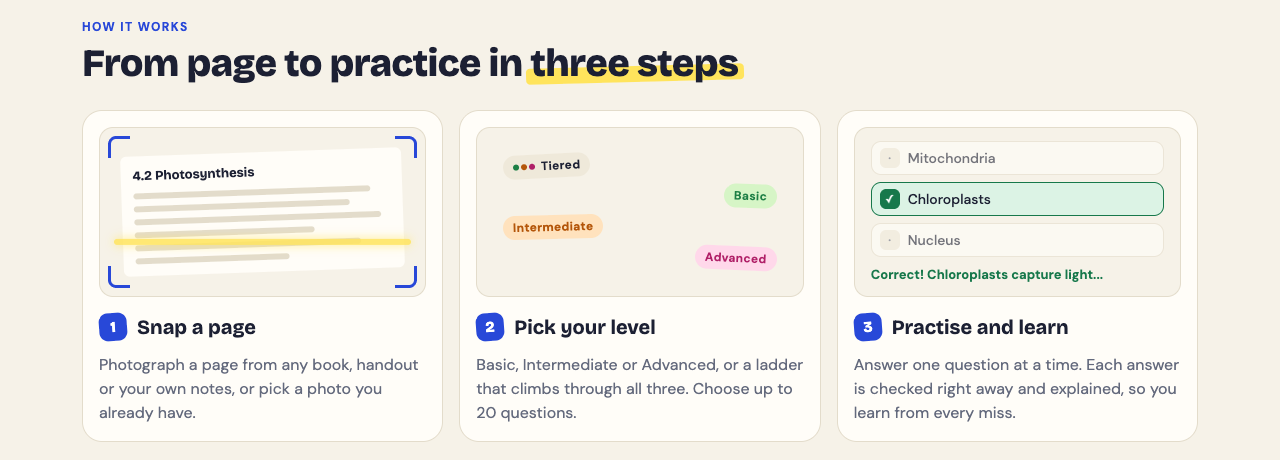
- Make the quiz: sign in, choose Make a new quiz, then Choose photo and pick the board. Leave it at 10 questions and the Tiered level, which climbs from basic to intermediate to advanced.
- Answer one question at a time. Each has four choices. Press Check answer to see Correct! or Not quite., the right answer and a short explanation. If you need the board, press Show page.
- Read the results. You get a percentage, a grade, a score for each level, and Look at these again with every question you missed.
- Two days later: redraw the board again, then press Retake quiz from your library.
- A week later: one more redraw and retake. If you reach Mastered (90% and up), move on to the next board.
The redraw step does what the photo cannot: it makes you produce the board from your own head. The quiz then checks the details and explains each answer. For more on why spacing the retakes helps, see spaced repetition for exams.
Limits to keep in mind
- The questions are written by an AI model and can contain mistakes. Check each explanation against your photo. If one is wrong, use Report a problem with this question.
- A multiple-choice quiz cannot check a worked solution. If the board had a calculation, redo it on paper with new numbers. The quiz tests the ideas behind it.
- Your photo stays with you. It is sent to the AI model to write the questions, but it is not stored on Study Shot's server.
- A messy board can fail. If the app cannot write questions for a photo, it says so, and a sharper shot usually fixes it.
If your class uses slides instead of a board, the same routine works; see how to make a quiz from lecture slides. For notes and boards together, see how to turn notes into a quiz.
Frequently asked questions
Is taking photos of the whiteboard bad for learning?
On its own, it did about as well as taking no notes in one lecture study, and in-person photos hurt memory in another. The photo is fine as a copy; the learning comes from what you do with it afterwards.
Should I take notes or a photo of the board?
Both. Write a few words per idea during class to keep your attention, and take the photo as an exact copy you can quiz yourself on later.
Do photos of slides work better in online classes?
One 2025 study found a benefit online and a cost in person, so the setting seems to matter. Note taking helped in both settings in two of its three studies.
How do I make a quiz from a whiteboard photo?
In Study Shot, choose Make a new quiz, then Take photo or Choose photo, pick the number of questions and a level, and press Create questions. You then answer one question at a time, with an explanation after each.
Get started
Try Study Shot: it is free to start. Photograph the page you are studying tonight and get 10 practice questions on it, from basic to advanced.
Comments
No comments yet.
Sign in or make an account to comment.