Tank game tips for beginners: what to learn first
Most new players try to learn everything at once and end up learning nothing well. The tank game tips for beginners that matter most are about order: what to learn first, what to leave for later, and how each skill sets up the next. This guide uses the two free browser games at Tank City Reboot as the worked example, so every tip points at something you can practice in your next run.
Tank game tips for beginners: why order matters
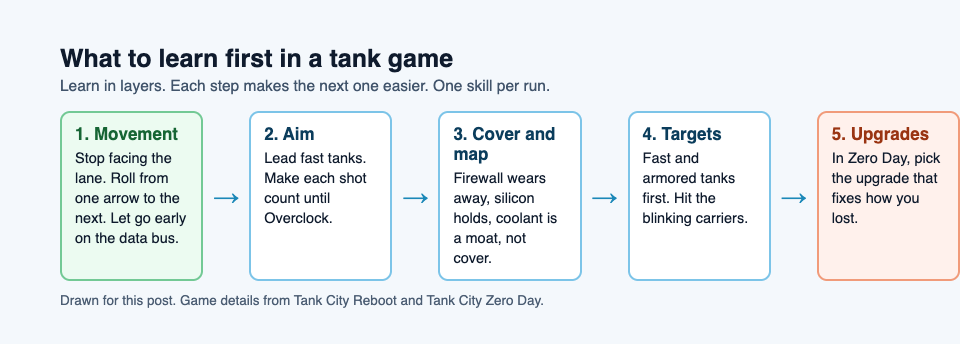
Tank games stack skills. You cannot aim well if your tank is in the wrong spot. You cannot use cover if you do not know which walls stop shots. You cannot pick good upgrades if you do not know what keeps killing you.
So learn in layers. Movement first, then aim, then the map, then target choice, then upgrades. Each layer makes the next one easier. Skip a layer and the gaps show up as cheap deaths you cannot explain.
A simple rule: work on one skill per run. Play a run where you think only about movement, then one where you think only about aim.
Step 1: Master movement and hull positioning before shooting
Start with the first game, at the home page. Your tank moves in four directions. That limit is the lesson. You can only shoot the way you face, so where you park your tank decides what you can hit.
Learn the controls until you stop thinking about them. You move with the arrow keys or WASD, a gamepad, or the direction pad on a touch screen. You fire with Space, J or Z. One detail helps a lot: when you hold two direction keys, the one you pressed last wins. That means you can roll from one arrow to the next and the tank turns at once. Practice that roll. It is the difference between turning to face a threat and getting hit while you fumble. If you want a deeper look, read our guide to tank game controls on keyboard, gamepad and touch.
Here is a drill for your first run. Ignore score. On stage 1, FIREWALL, the lineup is 18 worms and 2 trojans, and worms are slow. Spend the stage doing three things:
- Stay in lanes that line up with the enemy entry points at the top left, top middle and top right.
- Stop with your tank already facing up, so you are ready to fire.
- Never leave the area around the CPU core for long. Malware heads mostly for the core.
Also learn how terrain moves you. Coolant blocks tanks completely. Data bus tiles are slippery: your tank slides about three quarters of a tile after you let go. On stage 5, DATA BUS, that slide will carry you into fire if you have not planned for it. Let go early.
Step 2: Aim smarter with leading shots, reload timing and range
Once your tank is in the right place, work on aim. Three ideas cover most of it.
Lead your shots. Enemies move while your shot travels. A worm is slow, so you can fire right at it. A trojan moves about twice as fast as a worm, so fire at where it will be, not where it is. Practice on stage 2, CACHE, which has 4 trojans, twice as many as stage 1. It also brings your first 2 rootkits, so you get armored targets to practice on as well.
Respect your reload. In the first game, before you upgrade, you get one shot on the field at a time. A missed shot means a wait. The Overclock power-up fixes this in steps: faster shots, then two shots on the field at once, then shots that break silicon. Until then, make each shot count. In Zero Day, at tankcityreboot.vlvd.net/zero-day, you can hold Fire and the tank shoots again as soon as the wait is over.
Know your range. In the first game, only firewall, silicon, the CPU core and the map edge stop a shot. So your shots keep going across open ground and through encrypted zones. You can hit an enemy from far away if the lane is clear. Use long, straight lanes.
One more aim habit: your shots cancel enemy shots in Zero Day. If a shot is coming at you, firing back at it is a real defense.
Step 3: Use cover, angles and the map to stay alive
Now learn what each wall does. This is where most beginners get surprised.
- Firewall breaks under fire, a block at a time. Good cover, but it wears away.
- Silicon stops every shot until your cannon is fully overclocked. Strong cover.
- Coolant stops tanks, but shots fly over it. It is not cover at all. It is a moat.
- Encrypted zones hide any tank inside. Shots still pass through.
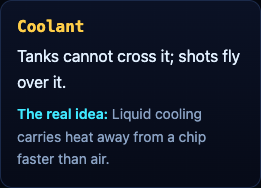
That coolant rule is worth a drill. On stage 3, COOLANT, two rivers cross the map, each with one gap on the left and one on the right. Enemies have to funnel through those gaps. Park where you can shoot across the river into a gap. They cannot reach you, but your shots reach them.
Encrypted zones cut both ways. On stage 4, ENCRYPTION, there is one right above the core. An enemy can hide there. Fire into it anyway, since shots pass through.
In Zero Day, the map changes every wave. Each arena is freshly generated and mirrored left to right, and the game checks that every enemy gate and your start can reach the core. So instead of memorizing maps, read each one in the first seconds. Find the silicon. Find the coolant. Note which lanes lead to the core.
Step 4: Read enemy waves and pick your targets
Not all enemies are equal. Learn them and you will know who to shoot first.
In the first game:
- Worm: slow, one hit. Low threat.
- Trojan: fast. Shoot it before it reaches the core.
- Spyware: fires fast shots. Dangerous to you.
- Rootkit: armored, takes four hits. Start shooting early.
Watch for blinking tanks. The 4th, 11th and 18th tank of each stage carry a power-up. The first hit makes it drop, even if the tank survives. Pick it up within 20 seconds. Breakpoint is the one to look for in a tight spot: every enemy stops moving and firing for eight seconds.
In Zero Day, the targets change. Botnet drones come in threes and hunt you, not the core. Worms take two hits and split in two. Ransomware is armored and its shots turn firewall into silicon. Cryptominers are turrets that fire rings of shots. A good order for beginners: clear drones that are on you, then anything near the core, then turrets.
Speed matters too. Every kill within 2.5 seconds of the last one adds to your chain, and the multiplier climbs to x8. Losing a life resets it. But as a beginner, survive first and chain second.
Step 5: Choose upgrades that fix your weakest skill
Upgrades come last because you need the first four steps to know what you are bad at. In Zero Day, after each wave, Patch Tuesday offers three upgrades and you pick one.
Match the upgrade to how you died:
- Shots keep landing on you? Sandbox gives a shield that stops one hit and recharges.
- Enemies reach the core? RAID raises core integrity by 1 and repairs it fully. Hot patch makes the core wall silicon every wave.
- Too slow to kill packs? Multithreading adds shots in a spread. Cache fires 30% faster.
- Getting cornered? Overclock makes you move faster and dash more often.
There is a scoring reason to protect the core too. The bonus for clearing a wave grows with how much core integrity is left. For a full breakdown, see tank game upgrades: what to pick after each wave.
Common beginner mistakes and how to avoid them
- Chasing enemies across the map. The core is the goal. Stay close and let enemies come to you.
- Hiding behind coolant. It stops tanks, not shots. Use silicon or firewall for cover.
- Holding the arrow on a data bus. You slide. Let go early.
- Wasting the dash. In Zero Day, a dash lasts a fifth of a second and you cannot be hit during it. It recharges in 1.5 seconds. Save it for shots you cannot dodge.
- Forgetting Overclock resets. In the first game, your Overclock level goes back to 0 when you lose a life. One careless death costs you your best cannon.
- Not tracking why you lose. Jot down the cause of each death in one line, spot the pattern, and fix the top one first.
Frequently asked questions
How long does it take to get good at tank games?
It depends on how you practice more than how long. Focus on one skill per run, in the order above, and watch your best score to see whether it is working.
Should beginners use keyboard, gamepad or touch controls?
Use whatever you have. Both games support keyboard, gamepad and a touch pad on phones. A keyboard makes the quick arrow roll easy, and a gamepad works too.
Is it better to upgrade armor or firepower first?
Pick based on how you died. If hits on you end your runs, take Sandbox or Two-factor; if enemies survive too long, take Multithreading or Cache.
How do I stop dying in the first few waves?
Stay near the core, face the entry lanes, and fire at fast enemies first. In Zero Day, waves 1 and 2 send only drones and worms, so use them to practice dashing through shots.
Get started
Open the first game and play stage 1 with one goal: clean movement. Then try Zero Day and practice the dash. Each game remembers your best score in that browser, so you can see yourself improve.
Play Tank City Reboot: it is free, plays in your browser on a computer or a phone, and needs no account.
Comments
No comments yet.
Sign in or make an account to comment.