Tasks to Automate With AI: How to Pick the First One
The best tasks to automate with AI are the ones you repeat often, that have a clear input and a clear output, where a mistake is cheap and you can check the result in seconds. Pick a task like that and a first version can work in an afternoon. Pick a vague, high-stakes task and you will spend weeks arguing with a model. If you already have a task in mind, this post on automating a boring workflow with AI walks through six steps for building it. It helps anyone with one annoying chore and no team. One thing worth knowing from it: you run the process by hand before you let a model do any of it. This post covers the step before that one: choosing which task to start with.
If you want guided practice, Your First Builds: Simple Projects in Age of AI Entrepreneur ends with a project on automating one boring workflow, and you sign in with your email and an emailed code to open it.
Why the first task you automate matters most
Your first automation teaches you how models behave on your own material. If it goes well, you get time back and a pattern you can copy. If it goes badly, you may decide AI "does not work" when the real problem was the task.
A good first task also gives you fast feedback. You see the output, you compare it with what you would have done, and you fix the prompt. A bad first task hides its errors for days. Speed of feedback matters more than size of payoff on a first try.
What makes a task a good fit for AI
Look for five traits. Most good first tasks have all of them.
- It repeats. You do it weekly or daily. A task you do twice a year will not repay the setup.
- The input is text, or can become text. Emails, notes, form answers, transcripts, rows in a sheet.
- The output has a known shape. A category label, a three-line summary, a drafted reply, a filled-in template.
- A wrong answer is cheap. Someone sees it before it matters, or it is easy to undo.
- You can check it fast. You know what "right" looks like, so a glance tells you.
The last one is the most overlooked. If you cannot tell a good output from a bad one, you cannot improve the automation.
Tasks that are usually a bad first choice
Some work looks automatable but punishes beginners.
- High-stakes decisions. Hiring, legal advice, medical questions, refunds above a limit. A confident wrong answer costs too much.
- Rare tasks. You will never collect enough examples to test against.
- Fuzzy goals. "Make our marketing better" has no output you can check.
- Tasks that touch many systems. Each connection is another place to fail. Start with one input and one output.
- Open-ended jobs where the AI picks its own steps. That is an agent, and agents are harder to get right than a fixed sequence of steps.
That last point is worth taking seriously. The Agents and Automation course opens with a lesson on workflows versus agents, then one on why agents fail. A fixed workflow, where you decide the steps and the model fills in one of them, is the safer place to begin. You need to sign in to open the course.
Score your candidate tasks in five minutes
Write down every chore you can think of that eats time. Aim for eight to ten. Then score each one from 0 to 2 on these five questions.
- How often does it happen? (0 = rarely, 1 = monthly, 2 = weekly or more)
- Is the output a known shape? (0 = no, 1 = roughly, 2 = yes)
- How bad is a wrong answer? (0 = costly, 1 = annoying, 2 = harmless or easy to undo)
- Can you check a result in under a minute? (0 = no, 1 = sometimes, 2 = yes)
- Do you already have 20 past examples? (0 = none, 1 = a few, 2 = plenty)
Add up the five scores. Anything at 8 or more is a strong candidate. Anything under 5, leave for later.
Here is a worked example. Say you run a small shop and you have three candidates:
- Sorting incoming customer emails into "order status", "returns" and "other". Weekly or more (2), known shape (2), a mislabel is easy to fix (2), checkable at a glance (2), plenty of old emails (2). Total: 10.
- Deciding which refund requests to approve. Frequent (2), shape is yes or no (2), wrong answer costs money (0), needs the order history to check (1), some examples (1). Total: 6.
- Writing a yearly strategy plan. Rare (0), no known shape (0), hard to judge (0), nothing to check it against (0), no examples (0). Total: 0.
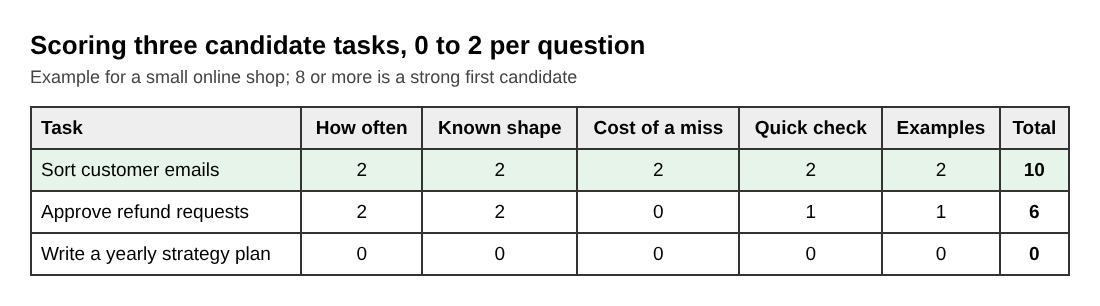
The email sorter wins by a wide margin. It is also dull, which is a good sign for a first project.
Examples of good first tasks to automate with AI
These tend to score well because they are text in, text out, and easy to review.
- Sorting incoming messages into a few labels, as in the shop example.
- Turning meeting notes or a call transcript into action items with a name and a due date for each.
- Drafting replies to common questions. You read and send. The model never sends on its own.
- Pulling fields out of messy text, such as a date, an amount and a vendor name from an invoice email into a sheet row.
- Summarizing a long document or thread into a fixed three-part format.
- Cleaning up and standardizing text, like fixing capitalization or turning free-form addresses into a set layout.
Here is what a first prompt for the email sorter could look like:
You sort customer emails for a small online shop. Read the email below and reply with exactly one label: ORDER_STATUS, RETURNS, or OTHER. If you are unsure, reply OTHER. Reply with the label only.
Notice the three choices. The prompt gives the model a limited set of answers, a safe fallback for doubt, and a reply format you can check by eye. Those three habits carry over to almost every first automation.
How to check that the automation actually works
Do not trust a few lucky outputs. Take the 20 past examples from your scoring step and write down the answer you would have given for each. Run them through the prompt. Count how many match.
Then read the misses. Often they point to one fix: a missing instruction, a label that needs a definition, an edge case to name. Change the prompt, run all 20 again, and see whether the count goes up without breaking earlier wins.
Keep the human in the loop at first. Let the model draft or label, and have a person approve until the match rate is one you accept. This checklist for testing LLM prompts before release covers the habit in more detail. The Evals: Shipping AI That Works course also has a lesson called Building an Eval Set and Judging Outputs, which is the same idea at larger scale.
Frequently asked questions
What tasks can AI automate right now?
AI handles text tasks well: sorting, summarizing, drafting, extracting fields and reformatting. It is weaker where a wrong answer is costly or where the goal is vague, so keep a person in the loop for those.
How do I know if a task is worth automating?
Check how often it happens, whether the output has a known shape, how costly a mistake is, and whether you can verify a result in under a minute. Tasks that score well on all four are worth a first try.
Do I need to code to automate a task with AI?
Not to prove the idea. You can paste examples into a chat assistant and test your prompt by hand first. Code or a connector tool only becomes necessary when you want the task to run without you.
How much does it cost to automate a task with an AI model?
It depends on how much text goes in and out of the model, counted in tokens, and how often you run it. The lesson Model APIs, Tokens and What a Request Costs in the AI Product Stack course shows how to work out the cost of a request.
Get started: turn your pick into a working workflow
Do this today. List your chores, score them with the five questions, and pick the winner. Write down 20 real examples with the answers you would give. Then follow the six steps in how to automate a boring workflow with AI to build the first version.
Your First Builds course ends with a project on automating one boring workflow, and Age of AI Entrepreneur lets you sign in with your email and an emailed code.
Start Age of AI Entrepreneur: short hands-on lessons on how to build a business in the age of AI, with every side of the debate and the sources to read next.
Building a business in the age of AI, from a first project to a company.
Visit aientrepreneur.vlvd.net↗
Comments
No comments yet.
Sign in or make an account to comment.