Template injection: test pages built from user input
Template injection happens when an application builds a page or a message out of user input by feeding that input straight into a template engine. To test pages built from user input for template injection, you need to know the difference between code that renders as text and code that the server actually executes. That difference is the whole game. A name like {{7*7}} stored in a profile field is harmless if it stays as five characters. It is a serious problem if the page comes back showing 49, because that means the server evaluated your input as template code.
This post walks through where to look, how to confirm the bug safely, and how to fix it, following the OWASP Server Side Template Injection Prevention Cheat Sheet. The worked examples use simple, non destructive probes so you can practice on systems you own or are allowed to test.
What template injection is and why it differs from XSS
Cross site scripting runs your input as code in the victim's browser. Template injection, specifically server side template injection or SSTI, runs your input as code on the server, inside the templating layer that assembles HTML, emails, or PDFs. The payloads look similar, but the blast radius is different. XSS steals sessions and rewrites pages for one user. Server side template injection can read files, reach internal services, and in many engines lead to remote code execution on the host.
The confusion is common because both show up in the same input fields. A field that reflects <script> and runs it is XSS. A field that reflects {{7*7}} and turns it into 49 is SSTI. You can have one, the other, both, or neither in the same spot. If you already test for the browser side problem, our walkthrough on finding where user input runs as code pairs well with this one, because the mindset is the same: find the places where text becomes execution.
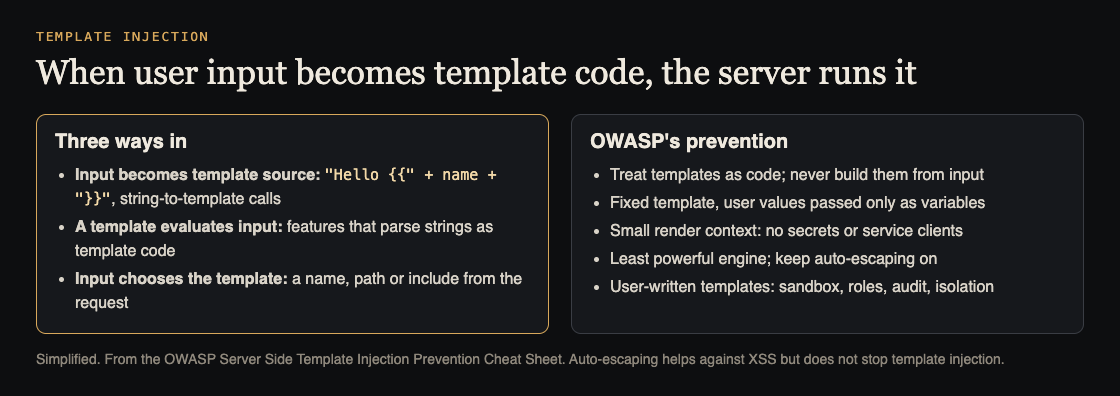
How input becomes template code, and what prevents it. Simplified from the OWASP Server Side Template Injection Prevention Cheat Sheet.
Where to look: pages and features that build output from user input
Template injection hides anywhere the application generates text from a template and mixes your data into it. OWASP's inventory list is the place to start: email and notification bodies, PDF and report generation, prompts for large language models, and every feature that lets users create or edit templates. In practice:
- Personalized emails. Password reset, welcome, and notification emails often use templates with a user supplied name or company.
- Custom reports and exports. PDF or HTML generators that let users set titles, headers, or labels.
- Profile and display name fields. Anything echoed back on a dashboard or in a greeting.
- Error and message pages. Apps that build a message like
No results for {query}by concatenating input into a template string. - Admin configurable templates. Any feature where staff can edit the template itself is the highest risk area. If staff accounts can be phished, that template becomes an injection path.
Make a list of every field that ends up in generated output. For each one, treat it as a suspect until a probe tells you otherwise.
Safe probes to confirm server-side template injection
The classic first probe is a math expression, because arithmetic is harmless and the result is obvious. Submit this as the field value:
{{7*7}}
Then read the response. Three outcomes matter:
- You see
{{7*7}}unchanged. The input was treated as text. No template injection in this syntax. - You see
49. The server evaluated the expression. You have confirmed template injection. - You get an error. The engine tried to parse your input and failed. That is still a signal that input reaches the template.
Different engines use different delimiters, so run a small set rather than one probe. Try ${7*7}, #{7*7}, {7*7}, and <%= 7*7 %> as well. Keep each probe to pure arithmetic. The point at this stage is only to answer one question: does the server compute, or does it print? Do not jump to file reads or command execution. You are confirming the bug exists, not exploiting it, and staying with math keeps your test safe and your intent clear.
When you find a 49, stop and record exactly which field, which delimiter, and which page returned it. That single confirmed finding is worth more than a pile of guesses.
Client-side template injection in JavaScript frameworks
Not all template injection lives on the server. Some JavaScript frameworks bind data into the page on the client using their own template syntax. If user input lands in a part of the page the framework later scans and evaluates, your {{ }} expression can run in the browser instead of on the server. The result looks like XSS but the entry point is the framework's binding, not a raw <script> tag.
To test for this, submit the same arithmetic probe and watch the rendered DOM, not just the raw HTML source. If the page source shows {{7*7}} but the displayed element shows 49, the framework evaluated it on the client. That distinction matters because standard HTML encoding does not stop it. The input was already escaped as text; the framework un escaped it by treating the element as a template.
How to fix template injection at the source
The root cause is always the same: user input is being used as part of the template, not as a value passed into the template. The fix follows from that sentence.
- Never build a template from user input. Keep templates with your source and review them like code. Do not filter template syntax out of input instead: OWASP warns a denylist will miss payloads. Map any user choice of template to a fixed list.
- Pass input as data, not code. Use the engine's variable binding so input fills a slot and is treated as a plain value. The engine should render
{{7*7}}as the literal text, never as math. - Keep the render context small. OWASP: pass only the values a template needs, never secrets, configuration or service clients.
- Prefer the least powerful engine. A logic-less engine limits what an injected expression can do. Keep auto-escaping on, but know it does not stop SSTI.
- Treat user-written templates as code. If your product lets users write templates, OWASP says limit editing to authorized roles, log changes, use the engine's sandbox, and render in an isolated process, since a sandbox does not limit CPU, memory or the output.
- Retest after the change. Run the same probes again and confirm
{{7*7}}now comes back as text. A fix you have not re probed is a hope, not a result.
This OWASP style approach, treat input as data and keep it out of the interpreter, is the same principle behind defenses against injection generally, from SQL to mass assignment to forged requests. The attack surface changes; the discipline does not.
Frequently asked questions
Is template injection the same as XSS?
No. XSS runs your input as code in the browser, while server side template injection runs it inside the server's template engine, which can lead to file access or remote code execution. The payloads overlap, but the impact and the fix differ.
Which template engines are vulnerable to SSTI?
Any engine can be misused if you build the template from user input instead of passing input as data. The risk is in how the application uses the engine, not a single named library, so audit how your templates are assembled rather than trusting a safe list.
Is it legal to test a site for template injection?
Only test systems you own or have written permission to test. Running these probes against someone else's site without authorization can be a crime, so keep your testing to your own apps or a scoped engagement.
Get started
The habit worth building is small and repeatable: list every field that ends up in generated output, send a math probe to each, confirm whether the server computes or prints, and retest after every fix. Add the probes to your security tests in CI so every release reruns them.
whitehatstoic builds web and mobile apps from database to deploy and runs security tests on web apps and AI systems, with a written report, the fixes, and a retest after those fixes. The cybersecurity work is scoped after a short call.
Testing is scoped after a short call: book a meeting about security testing.
Building something that has to be safe? Book a meeting with whitehatstoic: tell us the product, the deadline and your biggest worry, and we reply with a plan and a price.
Comments
No comments yet.
Sign in or make an account to comment.