Tenant association problems: one shared list
Tenant association problems have a way of disappearing. A leak gets mentioned in a hallway, a broken buzzer comes up in the group chat, someone emails the property manager, and three weeks later nobody can say what was reported, when, or what the landlord said back. The fix is simple: one shared list that the whole association can see, where every issue is written down once, every attempt to fix it is recorded, and the outcome stays on the record. This post shows you how to set that up and run it, using Problem Graph as the example.
Why tenant association problems keep getting lost
A building issue can get lost when it lives in too many places at once.
- The group chat scrolls. A report from Tuesday is buried by Friday.
- Emails to management sit in one person's inbox. When that person moves out, the history leaves with them.
- Meeting notes record what was said, not what happened next.
- The same problem gets reported by five units as five separate complaints, so nobody sees that it is one building wide issue.
A list fixes the first three. A map fixes the fourth. When you can link the mold in 2A to the leak in 3A to the roof drain nobody has cleared, the pattern becomes obvious. Problem Graph puts it this way: patterns show up on the map that never show up in a list.
What belongs on one shared problem list for the building
Keep the bar low. If it affects someone's home and it needs action, it goes on the list. Typical entries:
- Repairs: no heat, leaks, broken locks, dead elevator, pests.
- Common areas: lobby lights out, trash room overflowing, laundry machines broken.
- Safety: front door not latching, smoke detectors missing, blocked fire exits.
- Management issues: rent notices with errors, slow responses, unannounced entries.
- Association business: getting a meeting room, recruiting floor reps, printing flyers.
In Problem Graph, each of these is a problem node. You write it in one line, put it in a lane (for an association, personal or work both make sense; pick one and stick to it), and press Enter. It lands on the graph right away.
Then link problems that belong together. "No heat in 4B", "No heat in 4D" and "Boiler making noise" are three nodes linked to each other. Once they are linked, the map shows one heating problem affecting a floor, not three scattered complaints.
How to log a building issue: unit, date, evidence, owner
A one line entry is enough, as long as it carries four things. Use the same pattern every time so the list reads cleanly:
Unit 4B: no heat since Oct 3. Photos + thermostat log in shared folder. Owner: Dana
- Unit: where the problem is. Use "Building" or "Lobby" for common areas.
- Date: when it started. Write it into the line yourself so it is always visible.
- Evidence: a short pointer to where the photos, letters or readings are kept. The list holds the record of what happened; your files live wherever your association already keeps them.
- Owner: the one person responsible for following up. Not "everyone". One name.
Problem Graph also has a third kind of node besides problem and solution: the requirement. Use it for what a solution needs before it can work, such as "written request on file" under a repair request, or "access to 4B on a weekday" under a technician visit.
Tracking landlord responses and repair requests over time
This is where a graph beats a spreadsheet. Every step you take on a problem is a solution node attached to it, and each one gets an outcome: worked, partly, or failed.
Here is how the building's heating problem might look a week after "Unit 4B: no heat since Oct 3" was logged. The steps sit on one main node, "Heating failures, winter 2026", so they can be shared later:
- Solution: "Oct 3: Dana texted super." Outcome: failed (no reply).
- Solution: "Oct 5: written repair request emailed to management." Outcome: partly (technician came, heat back for two days).
- Solution: "Oct 10: association letter signed by 4B, 4D, 4F." Marked as trying, outcome not recorded yet.
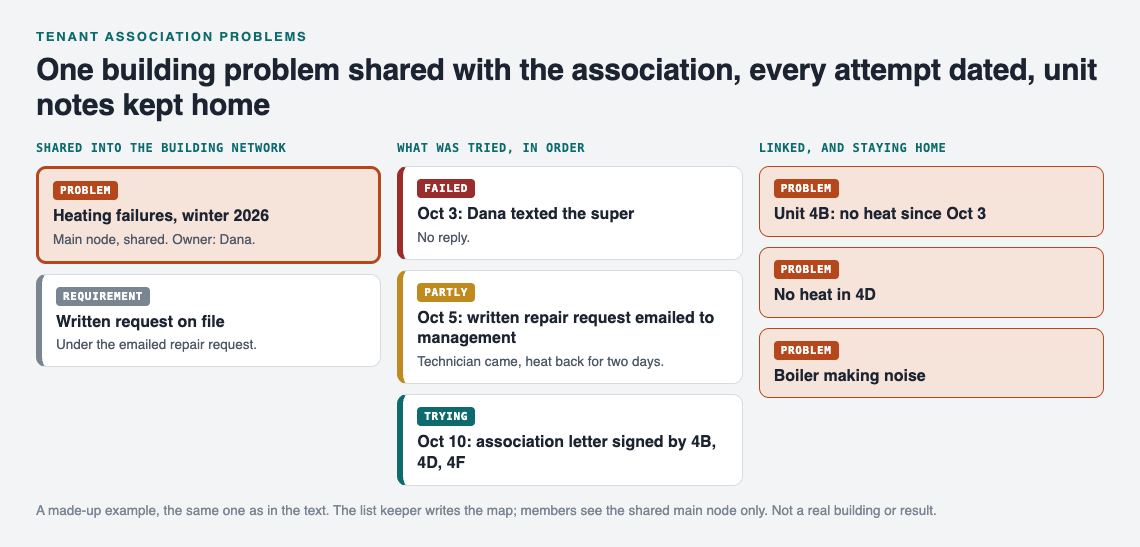
The worked example on the graph. A made-up building, not a real association or result.
You can add solutions as ideas before you try them, mark the ones you are trying, and record the outcome when you know it. Anyone reading the node sees the whole sequence in order. You do not have to remember who called whom. The graph remembers so you do not have to.
If you have run a shared list for something smaller, like a carpool with several drivers or a whole house move, the habit is the same. A building just has more units and a landlord on the other side.
Running tenant meetings from the list instead of the group chat
Meetings go faster when the agenda is the list. Here is a simple workflow.
Set up the network once
In Problem Graph, create a private network for the building and give the invite code to your members. Members see what is shared into it; nobody else does. Keep in mind that anyone with the invite code can join, so share it the way you would share a key: in person, or directly with tenants you know.
Share main nodes, not everything
Only a main node can be shared. Mark the big building problems as main nodes, like "Heating failures, winter 2026" or "Front door does not latch". When you share a main node into the network, its solutions, their outcomes and the requirements they need go along with it. A problem you only link to it stays home in your own graph, private like the rest.
That gives you a clean split. The association sees the building level problem and its full history. The detailed unit notes the list keeper links to it stay private.
Walk the list at the meeting
- Open the app and switch to the List view beside the map.
- Filter to Network so you only see what the association has shared.
- For each main node, read the last solution and its outcome. Ask the owner one question: what is next?
- Agree on the next step, then whoever keeps the list adds it as a solution marked as trying.
- Switch to the map at the end. Look for problems that are linked to many others. Those are your priorities for the next letter to management.
The group chat can still be for "the elevator is out again right now". The list is for anything that needs a record.
Recording fixes that worked and the ones that never did
The most useful part of the list can be the failures.
Problem Graph's home page says it plainly: "The graph is honest. A solution that failed three times stays on the map as a failed solution, and that is exactly what the next person needs to know." For a tenant association that matters a lot. If calling the super has failed four times, a new board member should see that before they try it a fifth time. If a petition with ten signatures got the laundry room fixed, that is worth repeating.
Over a year, this turns into a short playbook for your building. Which approaches got a response, which got ignored, and which needed more people behind them. It is the same idea as keeping a stop doing list of fixes that never worked, applied to a whole building.
If your association decides a main node is useful beyond your building, you can make it public. Others in the app can then link their own problems to it and borrow the solutions that worked, and a borrowed solution keeps a link back to where it came from. You can do the reverse too: Problem Graph shows you similar problems other people have shared and which of their solutions worked, and you can borrow one with one tap. You can also ask the AI for suggestions, which proposes new solutions based on what worked for others on similar problems. Treat those as ideas to discuss at the meeting, not answers.
Frequently asked questions
How do tenants keep track of repair requests?
Write each repair as one line with unit, start date, where the evidence is kept, and an owner. Then add every action you take as a solution and record whether it worked, partly worked, or failed, so the history stays in one place.
Who should own the shared problem list in a tenant association?
Pick one person to keep the list tidy and share main nodes into the network, often the secretary. Each individual problem still gets its own owner, the person who follows up with management.
Can a shared problem log help in a dispute with the landlord?
A dated record of what was reported and what happened next makes your side of the story clear and easy to summarize. Problem Graph is a journal, not legal advice, so talk to a local tenant organization or a lawyer about what a dispute actually requires.
How do we keep private tenant information safe on a shared list?
Problems are private by default and only you see them. Only main nodes you choose to share go into the network, and problems you only link to them stay private, so keep names and personal details off shared main nodes and give the invite code only to people you trust, since anyone with it can join.
Get started
Start small. Open the app, write down the one building problem everyone is already talking about, and attach the last thing someone tried with its outcome. If the graph is empty and you want to see how it looks filled in, use the Load example network button first. Then create a private network, share that problem as a main node, and hand the invite code to two or three neighbors. It runs in your phone's browser, so you can log an issue standing in the hallway.
Try Problem Graph: it is free, and you can look around the public network without an account. Write one problem down in a line and attach the first thing you will try.
Comments
No comments yet.
Sign in or make an account to comment.