Third-party JavaScript: limit what outside scripts can do
Every analytics tag, chat widget and ad script you add to a page runs with the same power as your own code. If the vendor's server is compromised, the attacker's code runs in your users' browsers, on your domain. Third-party JavaScript is easy to add and easy to forget. This guide follows the OWASP Third Party JavaScript Management Cheat Sheet: the three risks, and the controls that limit what outside scripts can do.
Why third-party JavaScript is a security risk
The OWASP Third Party JavaScript Management Cheat Sheet names the single greatest risk directly: the vendor's JavaScript server is compromised and malicious code is injected into the tag you load. You did nothing wrong, and your users still run it.
OWASP then lists three risks to weigh for every outside script:
- Loss of control. The vendor can change its code at any time. What your testers saw may not be what users get tomorrow, and a change can break your pages or data flows.
- Arbitrary code in users' browsers. Third-party code is rarely reviewed before it goes in, and once loaded it has the same privileges as the user, much like an XSS attack. OWASP adds that testing done before production loses some of its value, since the code can change after.
- Data leaking to the vendor. The browser contacts the vendor directly, sending the user's IP address, the vendor's own cookies and, in some cases, the page they came from.
OWASP also notes a quieter case: if a vendor goes out of business and its script domain expires, someone else can register it and serve code to every site that still loads it.
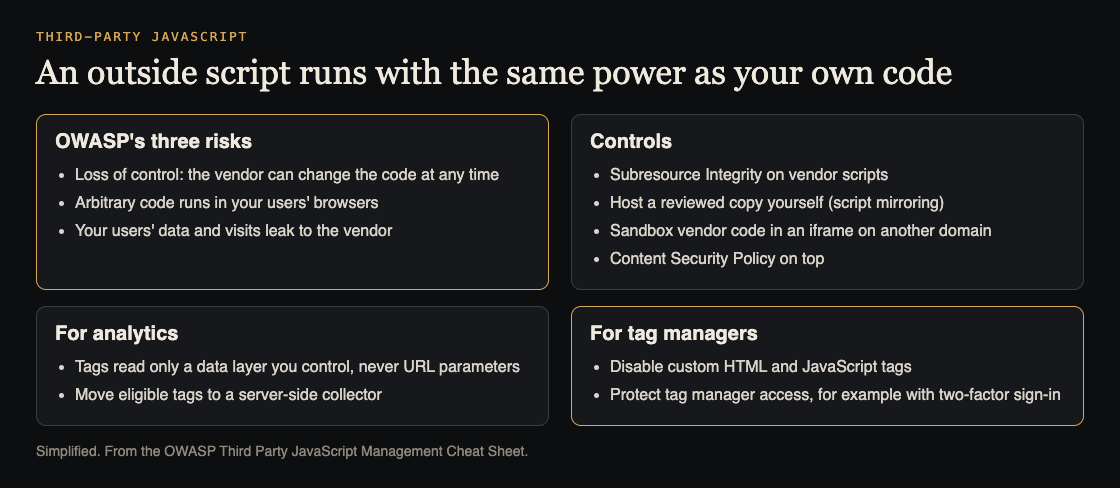
The three risks, and the controls OWASP lists. Simplified from the OWASP Third Party JavaScript Management Cheat Sheet.
Start with an inventory of outside scripts
You cannot control scripts you do not know about. Open your main pages in the browser's developer tools, go to the network tab, filter by script, and list every host that is not yours. Include pages behind sign-in, checkout and admin. For each script, write down:
- Who the vendor is, and who on your team asked for it.
- Whether it changes the page (a chat box, a dialog) or only sends data (analytics).
- Which pages load it, and whether those pages show sensitive data.
- Whether you still use it. Removing a script is the cheapest control there is.
Pin what you load: Subresource Integrity and mirroring
OWASP's typical defences against the first two risks start with making sure the code that runs is the code you reviewed:
- Subresource Integrity (SRI). You add a hash of the reviewed file to the script tag, and the browser refuses to run a file that does not match. OWASP notes the vendor's host must allow cross-origin requests for SRI to work, and that you should watch for vendor updates, since a pinned file can stop working when the vendor changes its side.
- Mirroring. Host a reviewed copy of the script on your own server, so the vendor cannot change it under you. This also stops some data going to the vendor on every page view.
- Secure transmission. Load scripts only over HTTPS, so they cannot be changed in transit.
OWASP also reminds you to keep JavaScript libraries up to date, since old versions can carry known flaws; see dependency updates.
Sandbox vendor code you cannot pin
Some scripts change constantly, so pinning them is not practical. For those, OWASP suggests a jail: load the vendor script inside an iframe served from a different domain, such as a separate static host. The script then has no direct access to your page or its cookies. Your page and the iframe talk through postMessage, and the iframe can be locked down further with its sandbox attribute.
For high-risk apps, OWASP recommends adding a Content Security Policy on top of iframe sandboxing.
Worked example: lock down analytics tags
Say your marketing team runs several analytics tags through a tag manager. OWASP's advice for analytics gives you a plan:
- Build a data layer. Your own code puts the values marketing needs into one object. OWASP's sample rule for a company standard: tags may read only values in the data layer, and never a URL parameter.
- Validate what goes in. Values that come from the page, such as URL parameters or form fields, are checked before they enter the data layer. OWASP warns that letting marketing pull data straight from a URL parameter into a scriptable spot can create XSS.
- Restrict the tag manager. Turn off custom HTML and custom JavaScript tags, limit tags to the data layer, and protect the tag manager account with strong access controls such as two-factor sign-in.
- Move what you can to the server. A server-side collector you control can filter what each vendor receives and take eligible tags out of the browser. OWASP notes it does not isolate scripts still on the page, so audit what actually loads.
Tags that change the interface, like a chat widget, cannot be made safe with a data layer, because their job is to change the page. Those need SRI, mirroring or the iframe jail.
Put it in the vendor agreement
OWASP points out that contracts are a control too. Your agreement with a script vendor can require evidence of secure coding and of monitoring for changes to their JavaScript, and can set out what happens if they serve malicious code. When you are choosing between vendors, an outside view helps; whitehatstoic's independent reviews include a vendor review.
Frequently asked questions
Is a script from a big, well-known vendor safe to load?
Not automatically. OWASP's main risk is the vendor's own server being compromised, which can happen to anyone, so apply the same controls to every outside script.
Does Subresource Integrity work with every vendor script?
Only when the vendor's host allows cross-origin requests and the file stays the same. Scripts the vendor changes often are better mirrored or sandboxed.
Does a server-side collector remove the risk?
It reduces it by moving eligible tags out of the browser and filtering data, but OWASP notes it does not isolate scripts that still run in the page.
What should I do first?
List every outside script and remove the ones you no longer use. Then add SRI or sandboxing to the ones on your most sensitive pages.
Get started
This week, list every third-party script on your sign-in, checkout and admin pages. Remove what you do not need, pin or mirror what you keep, and turn off custom code in your tag manager.
If you want a second pair of eyes, whitehatstoic's security testing covers web app and API review, with a written report, fixes and a retest after fixes. It is scoped after a short call, and no test can promise to find every weakness.

Building something that has to be safe? Book a meeting with whitehatstoic: tell us the product, the deadline and your biggest worry, and we reply with a plan and a price.
Comments
No comments yet.
Sign in or make an account to comment.