Timeboxing a Fix: Set a Limit Before You Start
Timeboxing a fix means setting a limit before you start. That is the whole idea, and it is harder than it sounds. When something breaks, you reach for the fix and tell yourself it will only take a minute. An hour later you are still in it, and you cannot say whether you are close or lost. A limit set in advance gives you a point where you must stop and look up.
This post shows how to set that limit, how to run a fix inside it, and what to do when the clock runs out. It also shows how to keep a record of what happened, so the next attempt starts smarter.
What timeboxing a fix actually means
Timeboxing a fix means you decide how long you will spend on one attempt before you begin. You write down a number, such as 30 minutes or two hours. When that time is up, you stop and make a choice. You do not keep going by default.
A timebox is not a deadline for solving the problem. It is a deadline for one attempt. The problem may take five attempts. The box only makes sure each attempt is short enough to judge.
The box also covers one idea at a time. "Try restarting the service" gets a box. "Rewrite the config" gets its own box. Mixing them makes it impossible to tell which one helped.
Why you should set the limit before you start
Once you are deep in a fix, stopping can feel like throwing away the time you already spent. That feeling is not a reason to continue. The time is gone either way.
Setting the limit first takes that pressure away. You made the call before you started, not in the middle of the work. When the box ends, you are not deciding whether to quit. You are checking a rule you already agreed to.
There is a second reason. A fix without a limit teaches you nothing. If you spent an unknown amount of time and it failed, you cannot say if the idea was bad or you just ran out of patience. A fix with a limit gives you a clean result: this idea, this much time, this outcome.
How to choose a time limit for a fix
Pick a number you can defend with one sentence. Here are three questions that help.
- How long would it take if everything goes right? Take that guess and add half again. If you think 20 minutes, set 30.
- What does it cost to be wrong? A small annoyance gets a short box. A problem that blocks your week can earn a longer one.
- How many other ideas do you have? If you have four more to try, keep each box short. If this is the only idea, a longer box is fair.
When you are unsure, choose the shorter number. You can always extend a box on purpose. It is much harder to cut one short once you are absorbed.
A simple step-by-step timeboxing routine
- Write the problem in one line. "Invoices go out late every month." If you cannot say it in a line, you are not ready to fix it.
- Write the idea you will try. One idea only.
- Write the limit. "40 minutes."
- Write what done looks like. How will you know it worked? A test passes, a number drops, a message stops appearing.
- Work until the limit. Set a timer you can hear.
- Record the outcome. Worked, partly worked, or failed. Add one line on what you learned.
Step four matters most. Without a finish line, "partly" turns into "maybe" and you drift past your own limit.
What to do when the timebox runs out
When the timer goes off, you have three honest choices.
- Stop and mark it failed. The idea did not work in the time you gave it. Move to the next idea.
- Extend once, on purpose. You can see the end. Say how much more time you are giving it and why. Make the extension smaller than the original box.
- Step back. If two boxes in a row have run out, the problem may be bigger than you thought. Look at it again from above.
Do not extend twice without writing something down. A second extension with no new evidence is just the old habit coming back.
The three choices above are a working tool, not a formal method. Having a backup helps here. If you plan what to do when a fix fails before you start, the stop feels less like defeat. This is covered in a contingency plan example for when a fix fails.
Timeboxing example: a bug that keeps growing
Say a report page loads slowly. You write the problem: "Monthly report takes a minute to load." You pick the first idea: check whether one database query is the cause. You set 30 minutes, and done means the page loads in under ten seconds.
At 30 minutes you found the query, but fixing it exposed a second slow step. The page now loads in 40 seconds. That is a partial result. You record it as partly, with the note "query was one cause, not the only one."
Now you decide. You can see a clear next step, so you extend once by 15 minutes. At 45 minutes total, the second step is still unclear. You stop. You mark that idea as partly worked, and you write a new idea: cache the report so it does not rebuild each time. That gets its own 30 minute box.
This example is made up. Without the boxes, it could have been a whole afternoon of "just one more thing." With them, you have two recorded attempts and a clear reason for the third.
Keeping the trail in Problem Graph
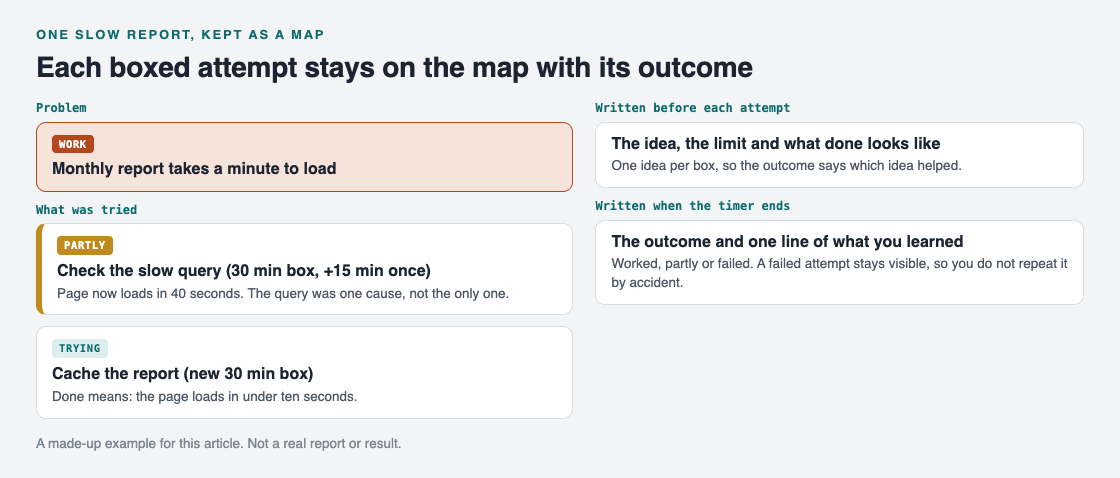
The made-up example as a map: one problem, two boxed attempts.
This is where a map helps more than a list. In Problem Graph you write the problem in one line, then attach each solution you try and mark the result as worked, partly, or failed. The example above becomes one problem with two solution nodes: the query check marked partly, and the cache marked as the one you are trying. The two solutions hang under the same problem, so the trail reads left to right.
The app's page puts it this way: "The graph remembers so you do not have to." That is useful for timeboxing because a failed attempt stays visible. You will not repeat it a week later by accident. The graph also lets you link problems that belong together, so a slow report and a slow export can sit side by side if they share a cause.
Writing the outcome down is the "check" part of a familiar cycle. The Lean Enterprise Institute describes Plan, Do, Check, Act as an improvement cycle based on the scientific method of proposing a change, implementing it, measuring the results and taking appropriate action. A timebox keeps the "do" step short enough that the "check" step actually happens.
Common timeboxing mistakes to avoid
- Setting the box after you start. A limit chosen mid-fix is just a guess shaped by sunk cost.
- Boxing several ideas together. You learn nothing about which one mattered.
- Skipping the finish line. "Make it better" never ends. "Under ten seconds" does.
- Extending without a reason. If you cannot say why more time will help, stop.
- Not recording failures. A failed attempt is useful only if you can find it later.
- Setting boxes so short they cannot work. If a fix needs an hour to even load the tools, a ten minute box is a trap.
Frequently asked questions
How long should a timebox for a fix be?
Estimate the time if everything goes right, then add half again. For small problems that often lands between 20 and 60 minutes. When unsure, pick the shorter number and extend on purpose if you need to.
What if I cannot fix it within the timebox?
Stop and record the outcome as partly worked or failed, with one line on what you learned. Then pick the next idea and give it its own box. If two boxes in a row run out, step back and look at the problem again.
Can I extend a timebox?
Yes, once, and only if you can name the next step and see the end. Make the extension shorter than the original box. A second extension with no new evidence usually means it is time to stop.
Is timeboxing only for software bugs?
No. It works for any fix with a clear attempt: a process at work, a household problem, or a habit you want to change. Problem Graph has lanes for personal, work, expert and scientific problems, so the same routine fits all of them.
Get started
Pick one problem that has been bothering you. Write it in one line, choose one fix, set the limit, and write down what done looks like. When the timer ends, record whether it worked, partly worked, or failed.
Try Problem Graph: it is free, and you can look around the public network without an account. Write one problem down in a line and attach the first thing you will try.
Comments
No comments yet.
Sign in or make an account to comment.