TLS settings: check your HTTPS configuration
Your TLS settings decide how well HTTPS actually protects your users. A padlock in the browser only says that some encryption is in place. It does not say which protocol versions your server still accepts, which cipher suites it offers, or whether every page and cookie stays on HTTPS. This guide walks through the checks in the OWASP Transport Layer Security Cheat Sheet, in the order you would run them on your own app, with a worked example at the end.
TLS settings: what they control and why they drift
TLS is the layer that turns HTTP into HTTPS. Set up well, it gives you three things, according to OWASP:
- Confidentiality. An attacker on the network cannot read the traffic.
- Integrity. An attacker cannot change the traffic or replay requests.
- Authentication. The client can confirm it reached the real server. The client itself is not verified unless you use client certificates.
You will still see the word "SSL" everywhere. SSL versions 2 and 3 were the original protocols, and both have serious weaknesses. The next version was renamed TLS 1.0, and TLS 1.1, 1.2 and 1.3 followed. When a dashboard says "SSL", it almost always means TLS.
Settings drift for ordinary reasons. A config block is copied from an old guide, a load balancer keeps an old policy after an upgrade, or a staging setting reaches production. Browsers pick the strongest option your server offers, so daily use looks fine. A weak option only shows up when someone tests for it.
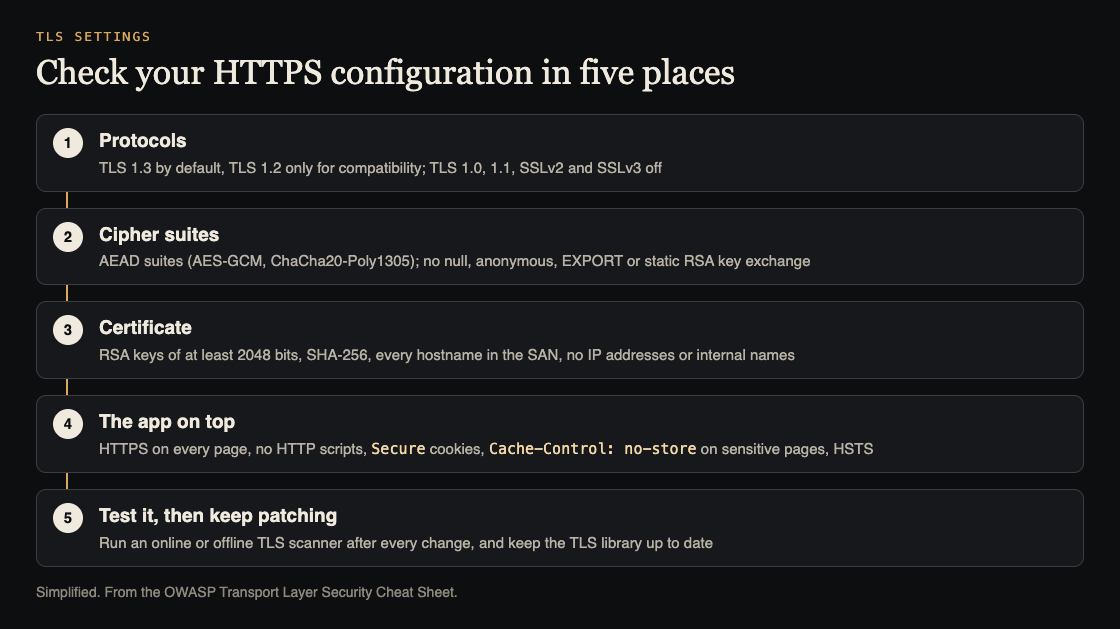
Five places to check. Simplified from the OWASP Transport Layer Security Cheat Sheet.
Protocol versions: TLS 1.3 first, nothing older than 1.2
OWASP's rule is short. Web apps must default to TLS 1.3 and may support TLS 1.2 for compatibility. TLS 1.0 and 1.1 were formally deprecated by RFC 8996 in March 2021, have been removed from mainstream browsers, and must be disabled. SSLv2 and SSLv3 must always be off.
Two details are easy to miss:
- Old clients get their own door. If a business partner truly needs an old protocol, OWASP says to put those clients on a separate endpoint with no access to sensitive data. Do not weaken the main endpoint for them.
- Block downgrades. Enable the
TLS_FALLBACK_SCSVextension so an attacker cannot push a connection down to an older version.
Cipher suites and key exchange
A cipher suite sets how the two sides agree on keys and how the data is encrypted and checked. For TLS 1.3, OWASP says to use the standard AEAD suites, meaning AES-GCM or ChaCha20-Poly1305. AEAD stands for authenticated encryption: the data is encrypted and checked for changes in one step.
TLS 1.2 is where weak options hide. Prefer ECDHE suites with authenticated encryption, avoid CBC-mode suites, and at a minimum disable:
- null ciphers, which do not encrypt at all;
- anonymous ciphers (
TLS_*_anon_*), which skip server authentication; - EXPORT ciphers (
TLS_*_EXPORT_*); - static RSA key transport (
TLS_RSA_*) and static Diffie-Hellman (TLS_DH_*,TLS_ECDH_*), which give no forward secrecy.
Forward secrecy means a stolen private key cannot decrypt traffic someone recorded earlier. OWASP also discourages the finite-field DHE suites in TLS 1.2, pointing to RFC 9325. Two more server rules sit beside the cipher list: turn TLS compression off, because the CRIME attack can recover session cookies through it, and keep your TLS library patched, since bugs like Heartbleed lived in the libraries, not the protocol. If you do not want to build a cipher list by hand, OWASP points to Mozilla's configuration generator for web, database and mail servers.
The certificate: key, hash, names and issuers
The certificate is what proves your server is the one the browser asked for. Check these points from the cheat sheet:
- Key. RSA keys of at least 2048 bits, and the private key locked down with file permissions.
- Hash. SHA-256, not MD5 or SHA-1, which modern browsers do not trust.
- Names. Modern Chrome ignores the old Common Name field and needs every hostname in the Subject Alternative Name list. Decide whether
wwwbelongs there. Leave out unqualified hostnames, IP addresses and internal names on a public certificate. - Wildcards. One wildcard key copied to many systems is more likely to leak and is worth more when it does. Never share one across trust levels, such as a public web server and an internal server, and keep a list of every system that holds it. OWASP suggests ACME, the protocol behind automatic certificate requests, so each system can get its own certificate.
- Issuers. A CAA record in DNS lists the certificate authorities allowed to issue for your domain; the others should refuse.
Paying for a higher validation level does not buy security. OWASP notes that browsers treat DV, OV and EV certificates the same, so an attacker only needs control of the domain to get a rogue one.
The app on top of TLS
Strong server settings do not help if a user can still land on plain HTTP. These are application rules, and they are where many apps slip:
- HTTPS on every page, not only the login page. Port 80 may answer with a permanent
301redirect to HTTPS, backed by HSTS, which makes browsers always use HTTPS. - APIs refuse plain HTTP. API-only endpoints should disable HTTP or fail plain requests, not redirect them.
- No mixed content. An HTTPS page must not load scripts or styles over HTTP.
- Secure cookies. Every cookie gets the
Secureattribute, even if the site never listens on port 80, because an attacker in the middle can fake one. The rest of the cookie settings are in the session cookie settings every web app needs. - No caching of sensitive pages. TLS protects data in transit, not once it is stored. Send
Cache-Control: no-storeon sensitive responses, andClear-Site-Dataat sign-out if you need to clear what is already cached.
Worked example: checking one app's HTTPS configuration
Say your app runs at app.example.com with an API at api.example.com. Here is a check you can finish in an afternoon. Keep the output of each step, so the next check can be compared with this one.
- Scan both hosts. Run an offline scanner such as
testssl.sh, SSLyze or SSLScan against each host. All three are on OWASP's list, and they also work on internal hosts that online scanners cannot reach. Note every protocol and cipher suite the scan says is accepted. - Confirm the old protocols are refused. Try a TLS 1.1 handshake by hand:
openssl s_client -connect app.example.com:443 -servername app.example.com -tls1_1. A handshake failure is the result you want. If your own openssl refuses to try TLS 1.1, rely on the scanner result. - Compare suites with the list above. Any null, anonymous, EXPORT, static RSA or CBC suite in the TLS 1.2 list goes on the fix list.
- Read the certificate. Run
openssl s_client -connect app.example.com:443 -servername app.example.com </dev/null | openssl x509 -noout -text, then check the key size, the signature algorithm and that both hostnames you serve are in the Subject Alternative Name list. - Check the app rules. Run
curl -sI http://app.example.com/and expect a301to HTTPS. Runcurl -sI http://api.example.com/and expect a refusal, not a redirect. On HTTPS, read everySet-Cookieline forSecure, and check a page with personal data forCache-Control: no-store. - Look at DNS. Ask your DNS provider's panel whether the domain has a CAA record.
Fix the findings, then run step 1 again. OWASP's advice is to test after hardening, so make the scan part of every server, proxy or certificate change. If an old client breaks, give it its own endpoint rather than turning old protocols back on.
Frequently asked questions
Is TLS 1.2 still acceptable?
Yes, as a compatibility option. OWASP says to default to TLS 1.3 and allow TLS 1.2 only with strong suites, preferring ECDHE with authenticated encryption and avoiding CBC.
Do I need an EV or OV certificate?
Not for security. The OWASP cheat sheet says browsers treat DV, OV and EV certificates the same, so the extra validation does not make the connection safer.
Should my API redirect HTTP to HTTPS?
No. OWASP says API-only endpoints should disable HTTP or fail plain HTTP requests instead of redirecting them. A redirect still lets the first request travel over plain HTTP.
How often should I scan my TLS settings?
After every change to a server, proxy, load balancer or certificate, and on a regular schedule in between. Keep each report so you can spot settings that changed without anyone saying so.
Get started
You can run every check above yourself today. If you want a second pair of eyes, whitehatstoic's cybersecurity and AI safety testing covers web app and API review, with a written report, fixes and a retest after fixes. No test can promise to find every weakness. The work is scoped after a short call.

Building something that has to be safe? Book a meeting with whitehatstoic: tell us the product, the deadline and your biggest worry, and we reply with a plan and a price.
Comments
No comments yet.
Sign in or make an account to comment.