Transaction authorization: confirm what users approve
Signing in proves who your user is. It does not prove they agreed to send this payment, to this account, for this amount. Transaction authorization is the extra check that does. This guide walks through the rules in the OWASP Transaction Authorization Cheat Sheet, a flow you can build, and the tests that show whether it holds.
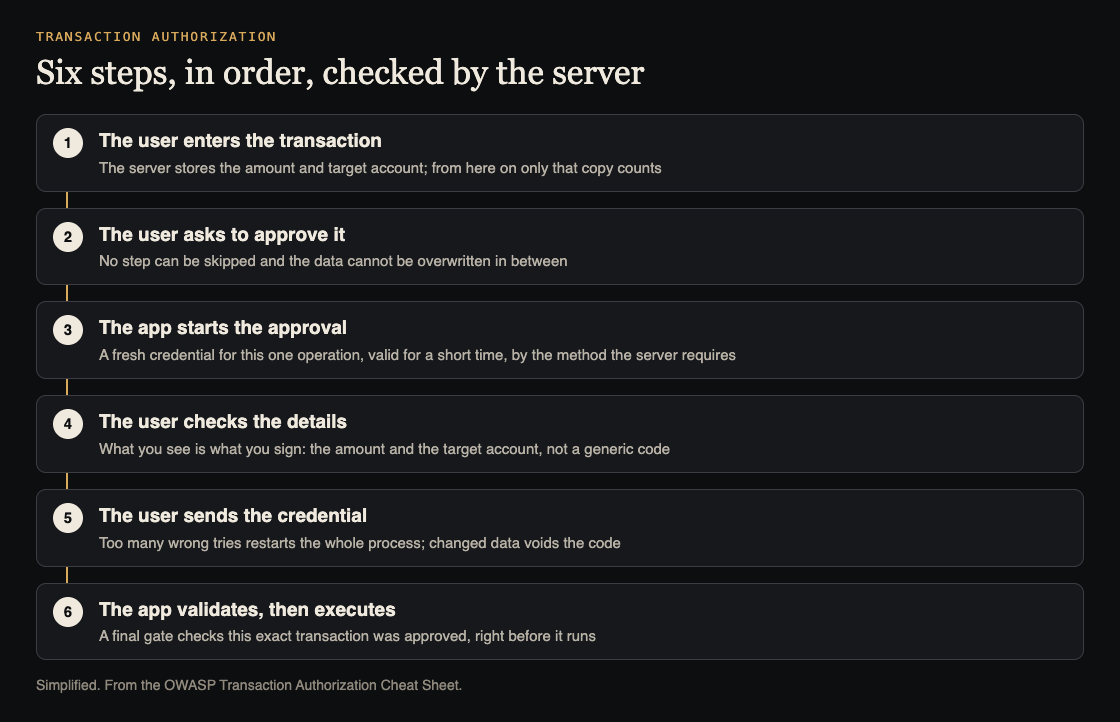
Six steps, in order, enforced by the server. Simplified from the OWASP Transaction Authorization Cheat Sheet.
What transaction authorization is
OWASP describes it as asking the user for a second factor so the system can check they are allowed to perform one sensitive operation, such as a wire transfer. It started in banking but now shows up everywhere. An email with a code or a token link that unlocks an account is also a transaction authorization.
Common methods, from the cheat sheet:
- A card of transaction authorization numbers
- A time-based one-time password, such as OATH TOTP
- A one-time password sent by SMS or given by phone
- A digital signature from a smart card or a smartphone
- A challenge-response token
Some of these live on a physical device, some in a mobile app. Which actions need one is the app owner's call, based on risk. Good candidates are anything an attacker would want after stealing a session: sending money, adding a payee, changing the phone number that receives codes.
Show what the user is approving
The first rule is called What You See Is What You Sign. The user must be able to see and confirm the details that matter for this transaction. For a wire transfer, that is the target account and the amount.
OWASP says to choose those details by the real risk, by what the method can show, and by what users can bear. An SMS can carry the target account, amount and type of transfer. A small card reader where the user types data in may only manage part of the account number and the amount.
Why it matters: a generic prompt such as "your code is 481920" approves whatever an attacker attaches it to. A prompt that names the account and amount gives the user a chance to notice a swap.
Keep sign-in and approval apart
If signing in and approving a payment look the same, malware can exploit it. OWASP describes the attack. The user types a code to sign in. Malware shows a fake error. The user types a second code. The first code signs the attacker in, and the second approves a fraudulent transaction.
The defenses:
- Use different methods for sign-in and for approval, or different modes on the same device.
- Show a clear message of what the user is signing.
- Ask for fresh credentials for every transaction. A code asked once per session lets malware approve anything for the rest of that session.
- Protect the method itself. Changing the phone number for codes needs a code sent to the current number. Changing the approval method needs the current method, so malware cannot switch the user to the weakest one.
Enforce every check on the server
This is where most broken flows fail. OWASP is direct: the result of an authorization must never change because someone tampered with the transaction data, added or removed a parameter, or caused an error. Start from default deny, and keep debug features out of production.
- The data comes from the server. The details the user confirms are generated and stored on the server, then passed to the approval step without the client being able to change them.
- The method comes from the server. If users can choose a method, the server checks the transaction used the chosen one. OWASP warns about a new, stronger method built on top of old code: an attacker sends the old method's parameters and the old path still approves.
- The steps run in order. Enter data, request approval, start the mechanism, confirm the data, send the credentials, validate and execute. Nobody may skip a step or overwrite the data between steps.
- A final gate checks before execution. Right before the money moves, check this transaction was properly approved. That stops time-of-check to time-of-use tricks, where the approved version and the executed version differ.
The same habit runs through broken access control: what the browser sends is a request, never a decision.
Worked example: a pending transaction you can build
Here is one way to put those rules into a transfer flow. It is a sketch, not the only design.
- Create a pending record. The user submits a transfer. The server checks it and stores
{ id, amount, target_account, status: "pending", created_at }. From here on, the server only uses this stored copy. - Send a challenge that names the details. The message says the amount and the last digits of the target account. The code is unique to this transaction, for example tied to its ID with a random value, and stored against it.
- Confirm by ID only. The client sends the transaction ID and the code, nothing else. If a request carries an amount or account, ignore it.
- Check, in this order. The status is still
pending. The code matches this transaction. The time window has not closed. The failed attempts are under your limit. - Execute once. Move the status from
pendingtoapprovedin a single conditional update, then execute. If no row changed, it was already used. Stop. - Treat edits as new transactions. If the details change, the old code and challenge are void and the process starts again. OWASP adds that a change to the data after the user entered it is an attack: log it, watch for it and look into it.
Two settings need care. The time window should be short enough to frustrate an attacker who passes a stolen code along by hand, and long enough not to block a real user. After a set number of failed attempts, restart the whole process, as you would for login rate limiting.
Test your transaction authorization
Run these against a test account before launch, and after every change to the flow:
- Approve a transfer, then send the confirm request again with a different amount or account. It must fail.
- Use a code from one transaction on another. It must fail.
- Confirm after the time window. It must fail.
- Skip a step: call the confirm or execute endpoint without requesting approval first. It must fail.
- Remove the method parameter, or send an old method's parameters. The server must still demand the right method.
- Send wrong codes until the limit. The process must restart.
- Send the confirm request several times at once. Exactly one execution should happen.
- Change the phone number for codes. The code must go to the old number.
- Check your logs show attempts to change data mid-flow. Our guide to password reset security tests a similar token flow.
When to bring in an outside test
Payment and approval flows are easy to get almost right. whitehatstoic lists "audit sign-in and payments" among what it does, and its cybersecurity and AI safety testing covers a web app and API review, a written report with fixes, and a retest after you apply them. It is scoped after a short call. No test finds every weakness, so keep the checks above in your own test suite too.

Frequently asked questions
Is transaction authorization the same as authentication?
No. Authentication confirms who the user is. Transaction authorization confirms the user approved one specific operation with its details, such as an amount and a target account.
Is an SMS code enough?
It can be one of the methods, if the message shows the details that matter and the code works only for that one transaction, for a short time. A generic code proves the user got a message, not what they agreed to.
Which actions need transaction authorization?
OWASP leaves that to the app owner, based on risk. Payments, new payees and changes to how codes are delivered are the usual starting points.
Can anti-malware software replace these checks?
No. OWASP notes those tools cannot be fully effective and should only be an extra layer on top of server-side checks.
Get started
Pick your riskiest action, write down its six steps, and run the test list above against it this week.
Building something that has to be safe? Book a meeting with whitehatstoic: tell us the product, the deadline and your biggest worry, and we reply with a plan and a price.
Comments
No comments yet.
Sign in or make an account to comment.