Trial and error: learn something from every attempt
Trial and error can feel like wasted effort when the attempts blur together. You try something, it fails, you try something else, and a week later you cannot remember what you did or why. Done well, trial and error means you learn something from every attempt, including the ones that fail. This guide shows you how: start with a clear problem, make a guess you can test, change one thing at a time, and write every attempt down so the next try is smarter than the last.
How trial and error works, and why blind guessing fails
Trial and error is a loop. You make a guess, you test it, you look at the result, and you use that result to make a better guess. The learning happens in the third step. If you skip it, you are not doing trial and error. You are guessing. The loop is close to the one in this PDCA example: plan, do, check, act.
Blind guessing fails for three reasons:
- You change too much at once. When something finally works, you do not know which change did it.
- You forget what you tried. So you try the same failed fix twice, or you abandon something that almost worked.
- You treat failure as noise. A failed attempt tells you something real. Guessing throws that away.
The fix for all three is the same. Slow down just enough to be deliberate, and keep a record.
Start with a clear problem and a guess you can test
A vague problem gives you vague attempts. "My bread is bad" is hard to test against. "My bread comes out dense in the middle" is a problem you can work on.
Write the problem in one line. If you cannot fit it in one line, you probably have two problems. Split them.
Then write a guess. A good guess has a cause and a test built into it:
- Weak: "Maybe it's the flour."
- Testable: "The dough is under-proofed. If I let it rise two hours longer, the middle will be lighter."
The second version tells you exactly what to do and what result to look for. If the middle is still dense after a longer rise, you have ruled something out.
Change one thing at a time so you know what worked
This rule is easy to break, because it feels slow. You want the problem gone, so you change the flour, the water, the oven temperature and the rise time all in one go. If the next loaf is good, great. But you do not know why, and you cannot repeat it on purpose.
Change one variable per attempt. Keep everything else the same. If an attempt costs very little (a few minutes, a cheap ingredient), you can run more attempts quickly. If it costs a lot, take more care choosing which single change to test first. Pick the one you think is most likely, or the one that is cheapest to rule out.
There is one exception. If you are completely stuck and nothing is moving, a big change can tell you whether you are even in the right area. Just be honest in your notes that it was a big change, so you do not read too much into the result.
Write down every attempt: what you tried, what happened, what you learned
Memory is a poor lab notebook. After three or four attempts, details blur. Was it the wetter dough that helped a bit, or the warmer kitchen? Writing it down fixes that.
For each attempt, record three things:
- What you tried. The one change, stated plainly.
- What happened. Not "better" but specific: "middle still dense, crust browner."
- The outcome. Did it work, partly work, or fail?
That three-way outcome matters. "Partly" is where a lot of the useful learning sits. A partial fix tells you that you are near the cause, even if you have not hit it yet.
This is the job Problem Graph was built for. It is a personal problem and solution journal drawn as a map. Here is how the bread example looks in it:
- Type the problem in one line:
Bread comes out dense in the middle. Put it in the Personal lane and press Enter. It appears on the graph right away. - Add your guesses as solutions, written as ideas: "Longer rise," "Higher hydration," "Check oven temperature with a thermometer."
- Mark the one you are trying now.
- When the loaf comes out, record the outcome: worked, partly, or failed.
Say the longer rise fails (middle still dense, crust browner), so you mark it failed. Higher hydration partly helps: a little lighter, still dense at the very centre. Then the thermometer shows the oven runs cooler than its dial, and baking at the real temperature works. Three attempts, three results, and the failed one is the reason you stopped blaming the rise.
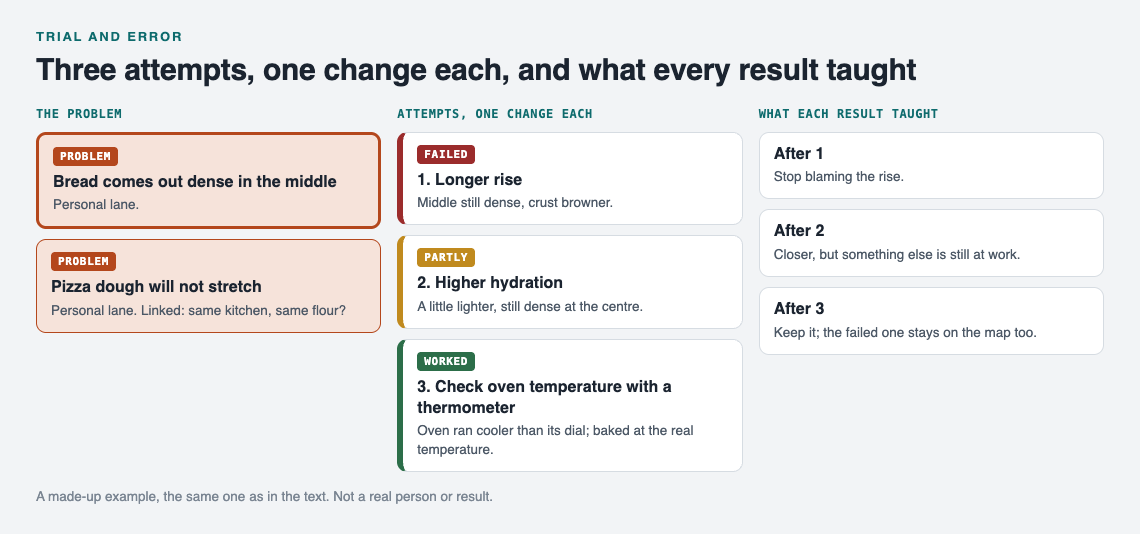
A made-up example: one change per attempt, and every result kept.
After a few weeks you can see every attempt hanging off the problem, each with its result. As the app puts it, the graph remembers so you do not have to. Seeing it laid out works on the same idea as visual management at home: you notice things at a glance that you would miss in a pile of notes.
Turn failed attempts into clues, not setbacks
A failed attempt is a result. It narrows the search. If a longer rise did not help, under-proofing is less likely to be the cause, and your next guess should move elsewhere.
The temptation is to delete failures, or never write them down, because they feel like wasted effort. Do the opposite. Keep them where you can see them. The Problem Graph home page says it well: "The graph is honest. A solution that failed three times stays on the map as a failed solution, and that is exactly what the next person needs to know." Often that next person is you, six months from now, about to try the same fix again.
Failures also become clues when you connect problems. Say your bread is dense and, separately, your pizza dough will not stretch. In a list, those look like two unrelated notes. On a map, you can link them. In Problem Graph you can link problems that belong together, even across lanes. Once they sit next to each other, a shared cause (the same bag of flour, the same cold kitchen) becomes easier to spot. Patterns show up on a map that never show up in a list.
Know when to keep trying, switch approach or ask for help
Trial and error is not about trying forever. You need points where you stop and decide.
Keep trying when
- Your attempts are getting "partly" results, and they are getting closer.
- Each attempt is cheap and you still have untested guesses that make sense.
Switch approach when
- Several attempts in a row have failed and you are no longer learning anything new from them.
- You realise your guesses all rest on one assumption. Test the assumption itself.
Ask for help when
- You have run out of guesses that make sense.
- Someone else has likely faced the same problem already.
A clean record makes asking easier. "I tried these four things, here is what happened with each" gives the person helping you far more to work with than "it doesn't work."
Problem Graph gives you a few ways to do this. You can mark a problem as a main node and share it into a private network, such as your family or a study group, by giving them an invite code. Its solutions, their outcomes and the requirements they need go along with it. Anything you only linked to it stays private. You can also put a main node out publicly so others can link their own problems to it and borrow what worked.
Going the other way, Problem Graph shows you similar problems other people have shared and which of their solutions worked. You can borrow one into your graph with one tap, and it keeps a link back to where it came from. You can also ask for suggestions: the AI proposes new solutions grounded in what worked for others on similar problems. Treat those as fresh guesses to test, not as answers.
Frequently asked questions
Is trial and error a good way to learn?
Yes, when you do it deliberately. Testing one clear guess at a time and recording each result turns every attempt into information, including the failures.
What is the difference between trial and error and guessing?
Guessing is trying things without tracking or using the results. Trial and error uses each result to shape the next attempt, so you get closer over time.
How many attempts should I make before changing approach?
There is no fixed number. Change approach when several attempts in a row fail and stop teaching you anything new, or when you notice all your guesses depend on one untested assumption.
How do I keep track of what I have already tried?
Write down each attempt with what you changed, what happened, and whether it worked, partly worked or failed. A tool like Problem Graph keeps each attempt attached to its problem, so you can see your whole history on one map. There is more on this in how to keep track of the solutions you tried.
Get started
Pick one problem you keep coming back to. Write it in one line. Write your first testable guess under it. Change one thing, record what happened, and mark the outcome. Then do it again.
If you want to see how it looks before adding your own, the app has a "Load example set" button on an empty graph, plus a List view beside the map. Your problems are private by default, and it runs in your phone's browser.
Try Problem Graph: it is free, and you can look around the public network without an account. Write one problem down in a line and attach the first thing you will try.
Comments
No comments yet.
Sign in or make an account to comment.