Turn the whole cube in 2048: Shift and arrow keys
To turn the whole cube in 2048, hold Shift and press an arrow key. A different face comes round to the front, and it costs you nothing: no move, no points, no new tile. This guide shows what each key does, how I tested it on the live game, and how to use turns to plan your merges. The game is Evolved 2048, the 2048 puzzle on a cube with six faces of nine squares.
Turn the whole cube in 2048: the quick answer
Hold Shift and press an arrow key. Shift with W, A, S or D does the same, so Shift and A turns the cube like Shift and Left. With a mouse or on a touch screen, drag the empty space around the cube instead. The game's How to play box says it in one line: "Drag the space around the cube, or press Shift and an arrow key. The whole cube turns. Turning is free."
The cube you see is always the same cube. A turn only changes which of its six faces you are looking at and working on.
What each Shift and arrow key does
I tested the keys on the live game, signed out, on a set-up cube with a different tile on the centre of every face, so I could see where each face went.
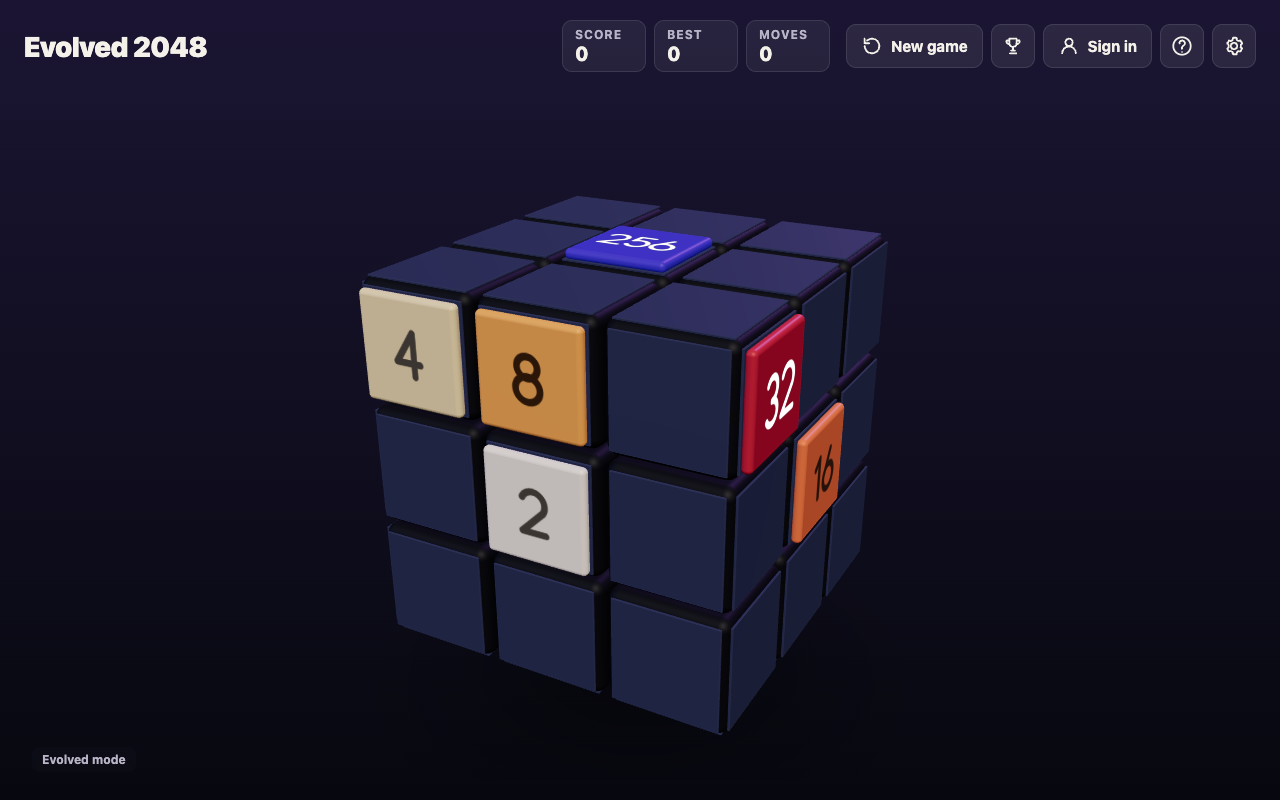
- Shift and Left brings the right face to the front. The front goes to the left, the left goes to the back and the back goes to the right. The top and bottom faces stay put.
- Shift and Right does the opposite and brings the left face to the front.
- Shift and Up brings the bottom face to the front. The front goes to the top, the top goes to the back and the back goes to the bottom.
- Shift and Down does the opposite and brings the top face to the front.
Here is the same cube after Shift and Left. The 32 and the 16 that sat on the right face are now on the front, and the Moves box still reads 0.
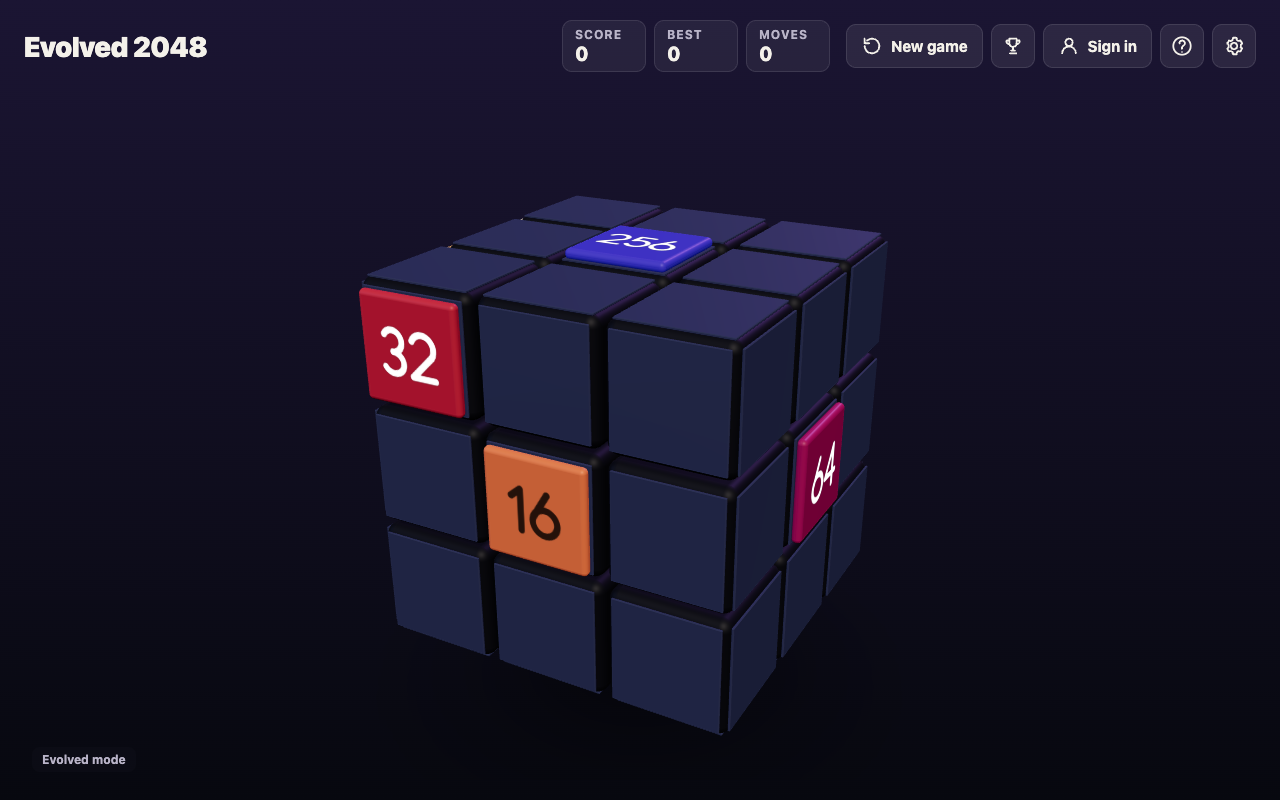
Four turns the same way bring the cube back to where it started. If you lose track, press Shift and Left four times and you are home. I did not test a turn about the front face itself, like spinning a clock face, because no key or tip in the game names one.
Slide, twist and turn: three different actions
The game has three kinds of action, and it helps to keep them apart.
- Slide uses the plain arrow keys or
W A S D. In Evolved mode the tiles on the front face slide and equal numbers merge. A slide counts as a move. - Twist turns one row or column a quarter and carries its tiles to the next face. On a keyboard,
1 2 3twist the top, middle and bottom row right and4 5 6twist the left, middle and right column up. Shift twists the other way. A twist counts as a move. - Turn uses Shift and an arrow key. The whole cube moves, and nothing is counted.
The game's own rule is that every slide or twist adds a 2 or a 4, on the front face when it has room. A turn adds nothing, which is why you can turn as often as you like. For the twist keys in detail, read 3D 2048 twist keys: when to press 1 to 6.
Why a free turn helps you plan
In Evolved mode a slide only acts on the front face. If the two tiles you want to merge sit on the right face, sliding does nothing for them until you bring that face to the front.
So a turn gives you two free things: a clear look at a side you could only see at an angle, and a free choice of which face to work on. Compare two ways to use a face that holds a pair of equal tiles.
- Twist a row so the pair's tiles move onto the front. This counts as a move and adds a new tile, and it needs an empty square for that tile.
- Press Shift and Left. The face is now the front, and you can slide its pair together with no twist at all.
The turn does not merge anything by itself. It saves you a twist when the pair is already side by side on a face. For choosing between the two, see when to twist a row in 3D 2048 instead of sliding.
A five minute practice routine
Many players keep their biggest tile in one corner of the front face. A turn moves that corner to another face, so build a habit for getting back.
- Play a few slides and note where your biggest tile sits.
- Press Shift and Left. Your old front is now the left face.
- Press Shift and Right and check the tile is exactly where you left it.
- Repeat with Shift and Up, then Shift and Down.
- Press Shift and Left four times and check the cube looks the same as when you began.
Before every turn, say which key undoes it: Shift and Left is undone by Shift and Right, and Shift and Up by Shift and Down. Turns are the one action you can reverse for free.
Turning in Fun mode
The game opens a "Pick a mode" box with Evolved, Edge and Fun. In Fun mode a slide runs each row or column all the way round the cube: up or down over the front, top, back and bottom, left or right over the front, the sides and the back. Equal tiles along it merge, and the tiles pile up on the front.
Turns work the same way in every mode. Since a turn changes which face is the front, it also changes which faces an up or down slide runs over. I did not run a Fun mode slide after a turn, so treat that as something to try, free of cost, before you commit a slide. The 2048 Fun mode tips post has my tested Fun mode slides.
Common mistakes when turning
- Waiting for the numbers to change. A turn leaves Moves and Score as they were, and adds no tile. That is correct.
- Sliding on an empty face. I turned to a face with no tiles and pressed Left. Nothing moved, Moves stayed at 0 and the game said "Nothing moves that way. Try another way, or twist a row." Turn again, or twist.
- Mixing up Shift and plain arrows. A plain arrow slides the front. If tiles moved when you meant to turn, you let go of Shift.
- Using Shift with the number keys. Shift and 1 or Shift and 4 twist a layer the other way. That counts as a move and adds a tile, so it is a twist, not a turn.
- Looking for an undo. There is none: Control+Z and other undo keys did nothing in my test. A twist can be twisted back with Shift and its key, but that counts as a second move and adds a second new tile.
Frequently asked questions
How do I turn the whole cube with the keyboard?
Hold Shift and press an arrow key, or Shift and W, A, S or D. The cube turns and a different face comes to the front.
Does turning the cube cost a move?
No. In my test Moves and Score stayed at 0 after every turn, and no new tile appeared. The game says "Turning is free."
How do I turn the cube with a mouse or touch screen?
Drag the empty space around the cube. A drag that starts on the front face is read as a slide, and a drag on a row of the right face or a column of the top face is a twist.
Can I turn back if I turn the wrong way?
Yes. Shift and Left is undone by Shift and Right, and Shift and Up by Shift and Down. Four turns the same way also bring the cube back to the start.
Why did nothing happen when I slid after a turn?
The face now in front may have no tile that can move that way. The game shows "Nothing moves that way. Try another way, or twist a row."
Get started
Open a new game and press Shift and Left four times, then try Shift and Up and Shift and Down. It takes under a minute and makes every later game easier to read. Play Evolved 2048: it is free and plays in your browser on a computer or a phone. For the full list of keys, see 2048 keyboard controls.
Comments
No comments yet.
Sign in or make an account to comment.