Upbeat corporate tracks for a SaaS onboarding video
You want upbeat corporate tracks for a SaaS onboarding video that lift the mood without fighting the voice-over. Picking the sound is the easy part. The harder part is the license, because the same video can need a different one depending on where it plays. This guide walks through one track, Bright Ideas, in three real situations so you can see where each license starts and stops.
What makes a track work under an onboarding video
An onboarding video is mostly talking and screen recording. The music sits underneath. It should feel positive, keep a steady pulse, and leave space in the middle of the mix for a voice.
Look for these things when you listen:
- Steady energy. Big builds and drops pull attention away from the screen.
- A clear tempo. Something between 100 and 118 BPM moves along without rushing.
- Instrumental. Lyrics compete with the person explaining the product.
- Short versions. A 30 second edit and a loop save you a lot of cutting.
Wavecrate, the music library used as the example in this guide, shows each track's mood, tempo and versions, and every download comes with a license certificate and a code.

Finding upbeat corporate tracks for a SaaS onboarding video on Wavecrate
Start in the Corporate music genre on Wavecrate. On 11 October 2026 it listed ten tracks, all between 100 and 118 BPM. Each row shows the mood, tempo and key, so you can shortlist by feel before you press play.
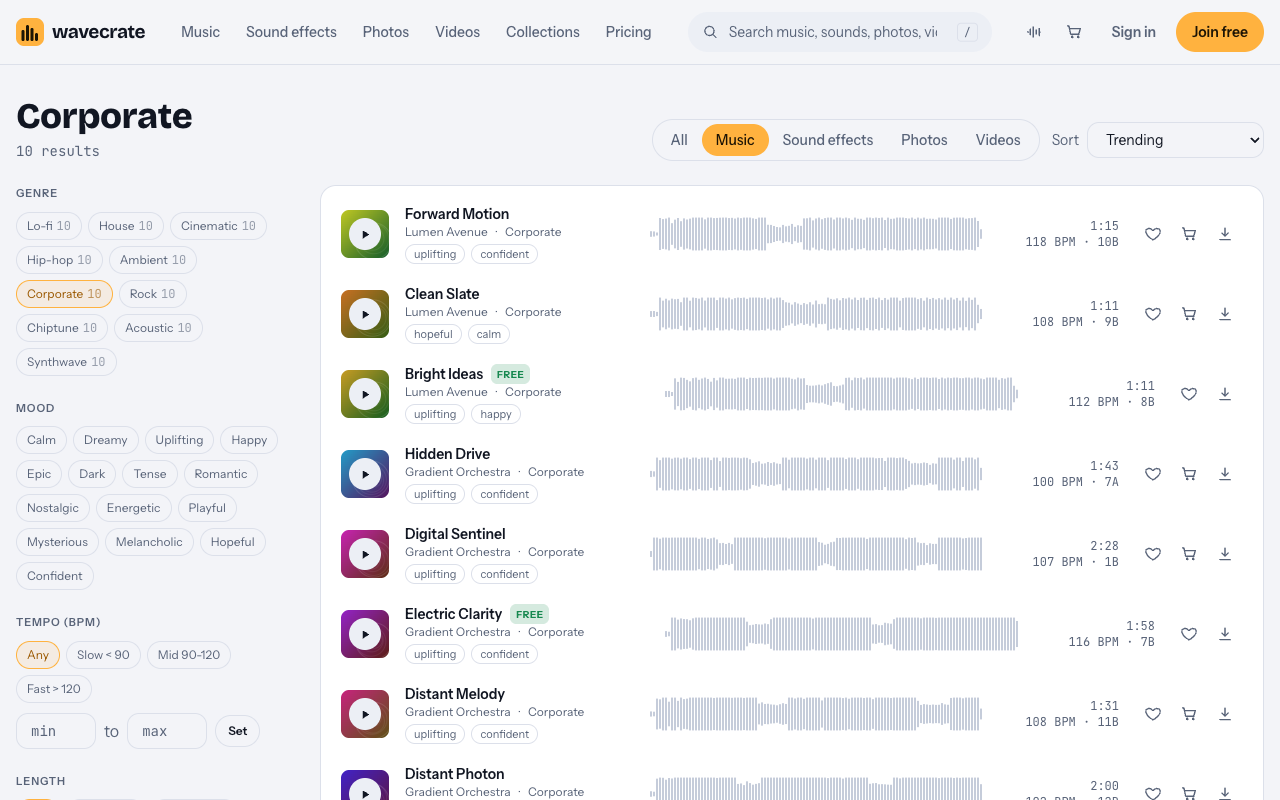
A few stand out for onboarding work:
- Bright Ideas by Lumen Avenue, uplifting and happy, 112 BPM.
- Electric Clarity by Gradient Orchestra, uplifting and confident, 116 BPM, 1:58 long.
- Forward Motion by Lumen Avenue, uplifting and confident, 118 BPM.
- Clean Slate by Lumen Avenue, hopeful and calm, 108 BPM. This is the calm one if your voice-over needs more room.
- Northern Trust by Gradient Orchestra, 116 BPM. It comes as a 24-bit WAV master and a 320 kbps MP3.
Two of the ten were marked Free on that day: Bright Ideas and Electric Clarity. Items switch between Free and Premium over time. Read the track page on the day you download.
Meet the example track: Bright Ideas
The Bright Ideas track page describes it as "Bright plucks and claps over a feel-good major progression. Uplifting and Happy, good for ads and tech." Its tags include ads, tech and tutorial.
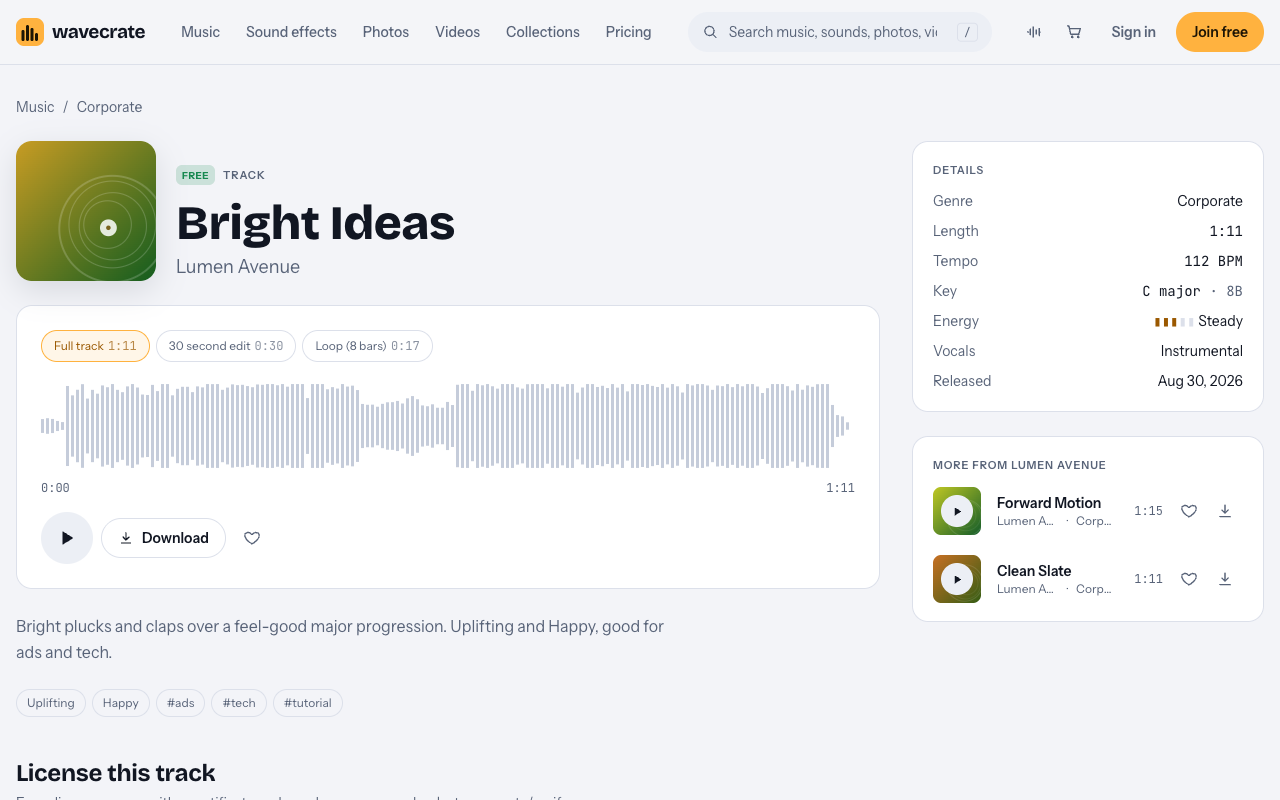
Here is what the page lists:
- Full track 1:11, a 30 second edit at 0:30, and an 8 bar loop at 0:17.
- 112 BPM, C major (8B), steady energy, instrumental.
- Released Aug 30, 2026.
- Marked Free on 11 October 2026.
One thing to watch. "Good for ads" describes the sound. It does not mean the Free card covers ads. The license cards on the same page decide that.
The three license cards in plain words
The track page shows three cards. Each one says who it is for.
- Free: "Online videos and podcasts, with credit." YouTube, TikTok, Instagram, Twitch and podcasts, including monetized channels. Credit text is required in the description. A free account gets 3 free downloads a month.
- Standard, listed at $15: "Online content for one creator or business, no credit needed." All online platforms, monetized. Your own business and brand videos. Registered channels are printed on the certificate. Standard is also included with Pro.
- Extended, listed at $49: "Paid ads, broadcast, apps, games and client work." Everything in Standard, plus paid advertising, TV or radio broadcast, apps, games and software, and client work with unlimited impressions.
Paid licenses are not on sale yet: Wavecrate says purchases open soon, so these are the listed prices for when sales open. Tracks marked Free can already be downloaded with a free account.
Pro is listed at $99 a year or $12 month to month, and is not on sale yet. It gives Standard on the whole catalog. It never gives Extended. Content you publish while subscribed stays covered.
Worked example: one track, three onboarding videos
The music does not change across these three cases. Only the place the video lives changes. That is what moves you from one card to the next.
1. A creator's YouTube tutorial reviewing SaaS tools
You run a YouTube channel. You record a tutorial that walks viewers through signing up for a few tools and finishing setup. Bright Ideas plays under your voice.
This is an online video on your own channel. The Free card covers it, even if the channel is monetized. You must put the credit text in the description. Wavecrate's pages give no fixed credit wording. If you are given credit text, paste it exactly as written.
2. The SaaS company's own onboarding video
Now you work at the software company. You make a welcome video for new customers. It goes on the company website, in the help center, and on the company YouTube channel.
This is your own business and brand content. The Free card does not tick "Your own business and brand content", so Free is not enough here. It needs Standard, listed at $15 for Bright Ideas, or Pro, which includes Standard on every track. No credit is needed on Standard.
3. Inside the product, as a paid ad, or made by an agency
Here is the trap. Say the same onboarding video plays inside the product itself, in the welcome screen a new user sees after signing up. The music is now part of the software. "Apps, games and software" sits on the Extended card, not on Standard.
That means Pro never covers it. Pro gives Standard on the whole catalog, and Standard does not include apps or software. It needs Extended, listed at $49.
The same applies in two other cases:
- You run the onboarding video as a paid ad. Paid advertising is on the Extended card.
- An agency makes the video for the software company. That is client work, which is also on the Extended card.
A simple test: if the video lives in your own channel or site, look at Free or Standard. If it lives inside the software, is paid to be shown, or is made for a client, look at Extended.
Editing tips for a smooth onboarding cut
Bright Ideas comes in three versions, so pick the one that fits the length of your video.
- Use the 30 second edit for a short welcome clip. It is already cut to about half a minute, so you do less trimming.
- Use the loop for a long walkthrough. The 8 bar loop runs 0:17. Repeat it under a longer screen recording and fade out at the end.
- Fade the music under the voice. Drop the level while someone is talking, and bring it back up in the gaps.
- Cut screen changes on the beat. At 112 BPM, a beat lands a little more than every half second. Moving to a new screen on a beat makes the video feel tidy.
If the plucks feel too busy under a dense explanation, try Clean Slate at 108 BPM instead. It leaves more room for the voice.
Keep your proof of license
Every license comes with a certificate and a code. Anyone can check that code at wavecrate.vlvd.net/verify without contacting Wavecrate. Save the certificate with your project files. Note the date you downloaded the track and which card you used, so you can match it to where the video ended up.
Frequently asked questions
Can I use Bright Ideas for free in a SaaS onboarding video?
Only in some cases. On 11 October 2026 it was marked Free, and the Free card covers online videos like a creator's own YouTube tutorial, with credit in the description. A company's own brand video needs Standard or Pro.
Does Pro cover an onboarding video that plays inside the product?
No. Pro gives Standard on the whole catalog and never Extended. Music played inside software needs the Extended card, listed at $49.
Which Bright Ideas version should I use for a short welcome clip?
Use the 30 second edit. For a longer walkthrough, repeat the 8 bar loop under the recording.
Do I need to credit the track on Standard?
No. Standard says no credit is required. The Free card is the one that asks for credit text in the description.
Get started
Browse Wavecrate: you can join free and download items marked Free now, paid licenses are not on sale yet (purchases open soon), and every download comes with a license certificate and a code anyone can check on its verify page. Listen to Bright Ideas and the other Corporate tracks, then match the card to where your onboarding video will play. Create a Wavecrate account to start downloading.


Comments
No comments yet.
Sign in or make an account to comment.