Upbeat music for a real estate listing video: how to pick it
Picking upbeat music for a real estate listing video comes down to three choices: the right energy for the home, a tempo you can cut to, and a license that covers where the video will run. This guide walks through each, with a worked example of cutting a 30 second room tour to the beat, and a plain look at an agent's own listing against a videographer's client job.
Wavecrate licenses royalty-free music, sound effects, photos and videos, and every download comes with a license certificate and a code anyone can check on its verify page.

Why upbeat music helps a listing video
A listing video is a short tour of rooms. Without music it feels like security footage; with the wrong music it feels like a car ad. An upbeat track gives a sense of moving from room to room and sets a mood before anyone counts the bedrooms. A steady beat also hides small jumps between clips and tells the viewer a new room is coming.
"Upbeat" does not mean loud or fast. It means the track feels positive and moves forward. A gentle guitar at a walking pace can be upbeat; so can a bright track with claps.
Choosing upbeat music for a real estate listing video
Start with who will buy the place, not with what you like.
- Starter or family home: warm and friendly. Acoustic guitar fits.
- City condo or loft: cleaner and more modern. Light electronic or house fits glass and concrete.
- Holiday or beach property: relaxed and sunny, like a travel video.
- Luxury home: confident and polished, often slower, with a simple arrangement.
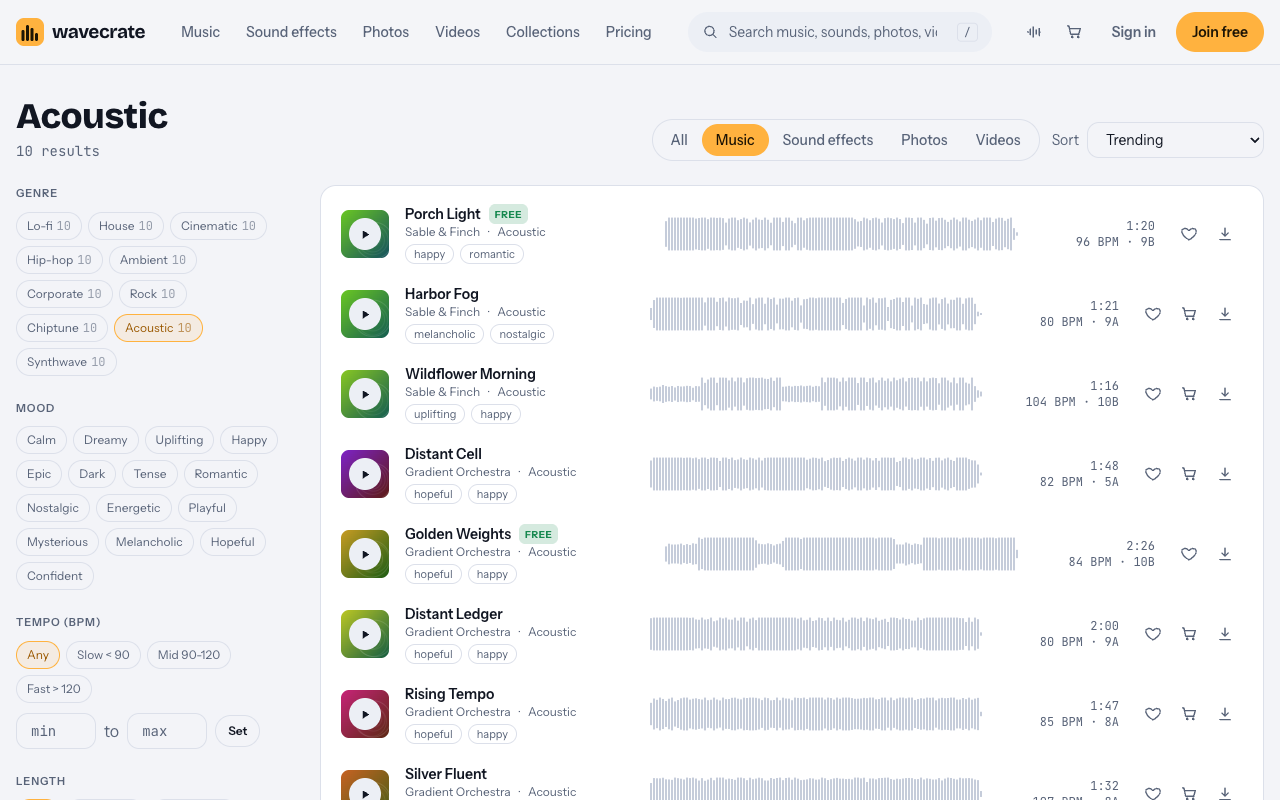
On Wavecrate's music page you can filter by mood instead of guessing from titles: uplifting and happy for a family home, confident for a condo. Then read the description. Porch Light says "Plucked and strummed guitars with a light shaker. Happy and Romantic, good for travel and wedding", at 96 BPM. Forward Motion says "Bright plucks and claps over a feel-good major progression. Uplifting and Confident, good for ads and presentation", at 118 BPM. The first suits a cottage with a porch; the second suits a new build with a home office. For a modern loft, City Lights Run is a house track at 124 BPM.
Tempo, energy and cutting to the beat
Tempo is beats per minute (BPM); energy is how busy the track feels. Wavecrate's filters give you both: tempo as Slow (under 90), Mid (90 to 120), Fast (over 120) or a custom range, and energy levels such as Relaxed, Steady and Driving. For most home tours, Mid tempo with Steady energy is a good start.
Check the vocals line on each track page. Wildflower Morning, an upbeat acoustic track at 104 BPM, is listed "With vocals"; Porch Light and Forward Motion are instrumental. If you or the agent will talk, pick instrumental.
To audition quickly, press Space to play or pause, Left and Right to skip 5 seconds, and Shift with Right for the next track.
Worked example: a 30 second room tour
Say you have six rooms and want a 30 second cut for social posts, and you pick a track at 120 BPM.
- At 120 BPM a beat lasts half a second, so a bar of four beats lasts 2 seconds.
- Thirty seconds is 15 bars. Give each room 2 bars (4 seconds): six rooms use 12 bars.
- Use the first bar for the outside shot and title, and the last 2 bars for the agent's name and contact details.
- Add markers every 2 seconds in your editor and snap each cut to the first beat of a bar.
At 96 BPM, like Porch Light, a beat is 0.625 seconds and a bar is 2.5 seconds, so 30 seconds holds 12 bars. Do this sum before you cut, not after. Porch Light also comes as a 30 second edit, which is built for a cut this length, and an 8 bar loop for a longer walkthrough.
Mixing music under the agent
- Lower the music when someone talks, then bring it back between lines. Most editors have an automatic setting.
- Let it rise on the reveal shots: the outside, the kitchen, the view.
- Avoid a busy tune under speech. Chords and rhythm sit better under words than a strong lead melody.
- End cleanly, on a version that ends naturally, so the contact card does not cut off mid phrase.
- Check on a phone speaker. If the voice is hard to hear there, the music is too loud.
A useful trick: start the agent's voice on a downbeat, two bars into the track, so the music sets the mood first.
Which license a listing video needs
You get a license to use a track; Wavecrate keeps the copyright. The license cards on a track page say:
- Free, only on tracks marked Free: online videos and podcasts (YouTube, TikTok, Instagram, Twitch, podcasts, monetized channels), with credit text in the description.
- Standard: no credit, and it adds your own business and brand videos. Track pages list it at $15.
- Extended: paid ads, broadcast, apps, games and client work. Track pages list it at $49.
Pro (listed at $99 a year, or $12 month to month, and not on sale yet) gives Standard on the whole catalog, never Extended, and videos you publish while subscribed stay covered after it ends. Paid licenses are not on sale yet (Wavecrate says purchases open soon), so these are the listed prices for when sales open; items marked Free can already be downloaded with a free account.
Porch Light was marked Free on the day this was written (read the page on the day you download, because items change). Follow it through three listing videos:
- An agent's own listing video, on their channels: that is their own business content, which starts at Standard ($15 listed) or Pro, even though the track is marked Free.
- A videographer hired by the agent: client work, so Extended ($49 listed). Pro does not cover it.
- The same video boosted as a paid ad: Extended as well.
The license cards do not name property listing sites, so if your video will live on one, read the item page and treat any use the cards do not list as not covered. Every download comes with a certificate and a code; paste the code in the description, and anyone, including your client, can check it on the verify page to see who holds the license, for which track and what it covers.
Frequently asked questions
What tempo suits a listing video?
A middle tempo usually works for a home tour, with slower tracks for luxury homes. Start with Wavecrate's Mid filter (90 to 120 BPM) and adjust by ear.
Is a track marked Free enough for an agent's listing video?
Usually not. An agent's own listing is business content, which starts at Standard, and a videographer's job or a paid ad needs Extended.
How long should the track be?
Match your edit. Many tracks come as a full version, a 30 second edit for social cuts and an 8 bar loop for longer walkthroughs.
Should a luxury listing use upbeat music?
Often something calmer works better: try confident or hopeful moods with Relaxed or Steady energy, and keep it simple so the home does the talking.
Get started
Set the mood to uplifting or confident and the tempo to Mid, audition with the keyboard, pick an instrumental track, cut to the bars, and match the license to whose video it is.
Browse Wavecrate: you can join free and download items marked Free now, paid licenses are not on sale yet (purchases open soon), and every download comes with a license certificate and a code anyone can check on its verify page.


Comments
No comments yet.
Sign in or make an account to comment.