Uplifting music for a nonprofit fundraising video: pick and license
A fundraising video asks people to care, then to act. The music carries that shift from problem to hope. This guide shows you how to choose uplifting music for a nonprofit fundraising video, shape it around your story, and pick the license that fits who is making the video and where it runs.
Wavecrate licenses royalty-free music, sound effects, photos and videos, and every download comes with a license certificate and a code anyone can check on its verify page.

What uplifting music for a nonprofit fundraising video should do
Most fundraising videos follow the same arc. They show a need, show the people meeting it, and end with a clear ask. The music should follow that arc, not fight it.
- Leave room for voices. The people in your video are the story. An instrumental track keeps the focus on them.
- Build, do not shout. A track that starts gently and lifts toward the end matches a video that moves from need to hope.
- Stay sincere. Music that is too bright can make a serious story feel like an ad. Hopeful and warm often works better than loud and happy.
- Land the ask. The strongest moment of the music should arrive with your call to give.
Where to look on Wavecrate
Use the mood filter on the music pages. Uplifting and hopeful are both moods you can pick. The Corporate music category is a good start, because most of its tracks are tagged uplifting. On 11 October 2026 it listed 10 tracks between 100 and 118 BPM (beats per minute). A few examples:
- Clean Slate by Lumen Avenue: 108 BPM, hopeful and calm. A good fit for the opening, while you describe the need.
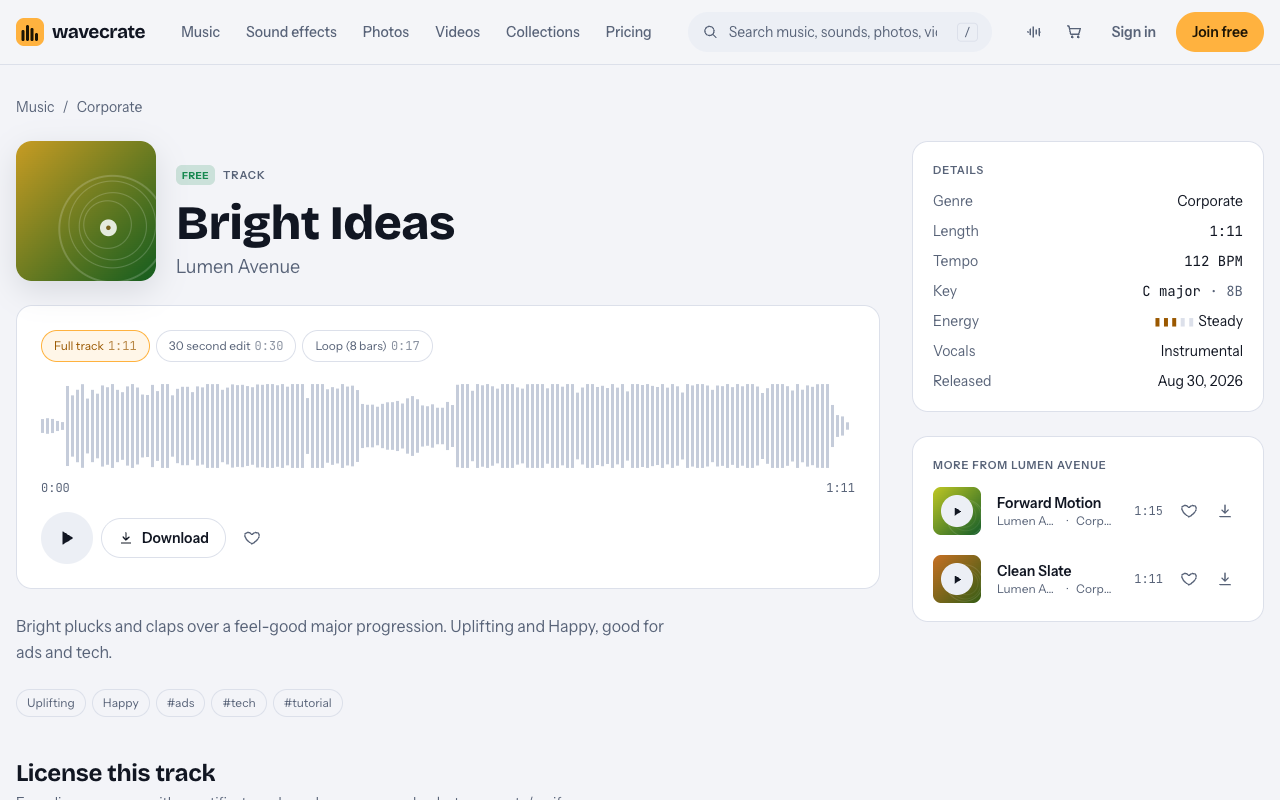
- Bright Ideas by Lumen Avenue: marked Free, 112 BPM, uplifting and happy.
- Forward Motion by Lumen Avenue: 118 BPM, uplifting and confident, for a strong close.
- Electric Clarity by Gradient Orchestra: marked Free that day, 116 BPM.
Use the vocals filter to show instrumental tracks only, and the access filter to see which are marked Free or Premium.
Shape the music around your story
A short fundraising video often runs one to two minutes. Here is a simple plan you can follow in any editor.
- Open quietly. Start the music low, or start with a calmer track such as Clean Slate, under your first shots of the need.
- Lift with the turn. When the story turns to what your team does, raise the music or cut to a brighter track.
- Drop out for the key line. Let the music dip or pause under the most important sentence someone says. Silence makes people listen.
- Peak on the ask. Bring the music to its fullest point as your call to give and your link appear on screen.
- End cleanly. Let the track finish on a bar line, or fade over the last few seconds, rather than cutting mid-phrase.
If you make a series, such as a monthly update to donors or a thank-you video after a campaign, reuse the same track or the same mood each time. Supporters start to link that sound with your organization, and each new video feels like part of one story.
Bright Ideas comes as a full track (1:11), a 30 second edit (0:30) and an 8 bar loop (0:17). The 30 second edit suits a short social appeal. The loop helps when your story runs longer than the track.
Mix the music under voices
Interviews and voiceover carry a fundraising video. Keep them clear.
- Turn the music down under speech. Lower it while people talk, then let it rise between lines.
- Keep the room sound. A little natural sound from your footage makes the story feel real. Keep it under the voice.
- Add captions. Many people watch with the sound off, so put the key lines and the ask on screen too.
- Check on a phone. Listen on a phone speaker before you publish.
Which license a fundraising video needs
The license depends on who makes the video and where it runs, not on the cause. On the pricing page, the music table starts "Your own business and brand content" at Standard, and puts paid advertising and client work in Extended only. Wavecrate's pages do not name charities or nonprofits, so the cautious reading is that a charity's own appeal is its own brand content.
The Free license covers online videos with credit, including monetized channels, but it does not tick "Your own business and brand content". Pro, listed at $99 a year or $12 month to month, gives Standard licenses on everything. It never includes Extended. Like the paid licenses, Pro is not on sale yet: Wavecrate says purchases open soon, so the prices below are the listed prices for when sales open, and items marked Free can already be downloaded with a free account.
Worked example: Bright Ideas through three uses
Bright Ideas was marked Free on the day of writing. Items can change between Free and Premium, so read the track page again on the day you download.
- A personal fundraiser on your own channel: Free. You post a video on your own YouTube or Instagram asking friends to back a charity run. The Free license covers online videos on YouTube, TikTok, Instagram, Twitch and podcasts, with credit text required in the description. A free account gets 3 free downloads a month.
- The nonprofit's own appeal video: Standard ($15) or Pro. The organization posts the video on its own website and channels. Treat that as its own brand content, which needs Standard, listed at $15 on this track, even though the track is marked Free. Standard needs no credit and prints your registered channels on the certificate.
- A video an agency or freelancer makes for the nonprofit, or one that runs as a paid ad: Extended ($49). Client work and paid advertising are Extended only, listed at $49 on this track. If the appeal will be broadcast on TV or radio, that is Extended too.
Every license comes with a certificate and a code anyone can check on the verify page. Keep the code with the project, so whoever runs your channels later can find it. With Pro, content you publish while subscribed stays covered after it ends.
Frequently asked questions
Is a Free track fine for a charity's own video?
Not on the Free license. It does not tick "Your own business and brand content", so a charity's own appeal needs Standard or Pro.
Does being a nonprofit change the price?
Wavecrate's pages do not mention nonprofit pricing. The prices on the track page are the listed prices for when sales open.
What if we pay to promote the video?
A promoted video is a paid ad, and paid advertising is Extended only. Pro does not cover it.
Do we need to credit the track?
Only on the Free license, which requires credit text in the description. Standard and Pro need no credit.
Get started
Browse Wavecrate: you can join free and download items marked Free now, paid licenses are not on sale yet (purchases open soon), and every download comes with a license certificate and a code anyone can check on its verify page.
Filter the music by the hopeful or uplifting mood, plan the lift around your ask, and note the license for who is making the video and where it will run. Join Wavecrate free to audition tracks and keep every certificate in one place.


Comments
No comments yet.
Sign in or make an account to comment.