User privacy protection: shield your users from spying and leaks
User privacy protection is about what your app does for the people who use it, not only for the company that runs it. OWASP's User Privacy Protection Cheat Sheet is aimed at apps where users may face real threats to their privacy and anonymity, such as social networks and communication tools. It lists eight protections. This post turns them into a checklist a small team can run in a week, with one worked example at the end.
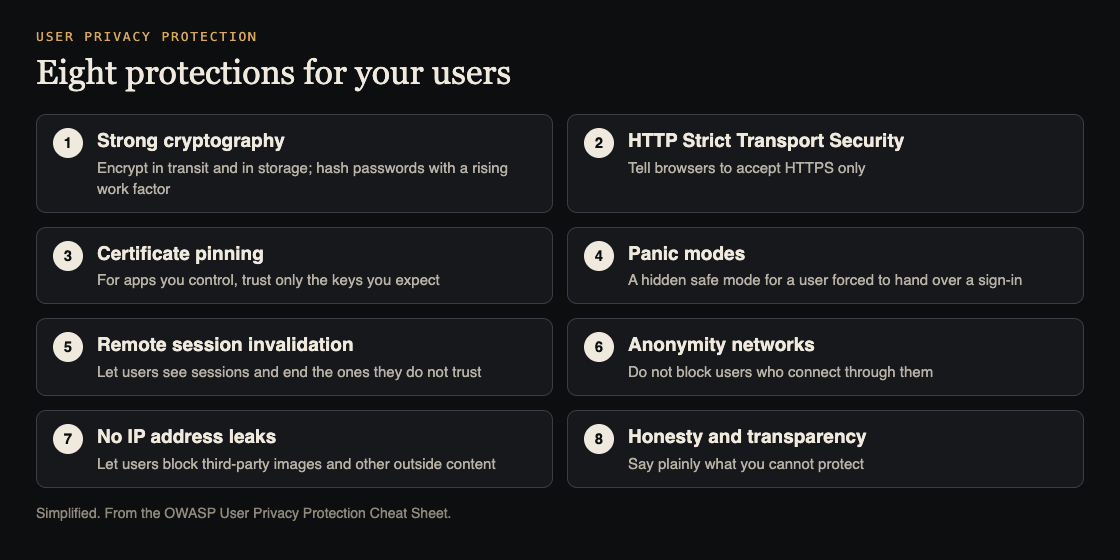
What user privacy protection covers
Most security work asks "how do we keep attackers out of our system?" This sheet asks a second question: "how do we keep our users safe from people who want to watch them, trace them or pressure them?" The sheet says its focus is the privacy and anonymity threats users face when they use online services, especially social networking and communication platforms.
That includes ordinary users on a bad network, users whose phone was stolen, and users in places where handing over a password can be forced. You do not have to know which of your users are in danger. You build so that the answer does not matter.
The eight protections are: strong cryptography, HTTP Strict Transport Security, certificate pinning, panic modes, remote session invalidation, support for anonymity networks, no IP address leaks, and honesty. Each section below says what to check.
Strong cryptography for everything users share
The sheet says any platform that handles user identities, private information or communications must use strong cryptography. Two parts to check:
- Encrypt in transit and in storage. User communications are encrypted on the wire and at rest. In transit, the sheet names TLS best practices: verified certificates, protected private keys, strong ciphers only, clear warnings to users and long enough keys. Our post on checking your HTTPS configuration walks through that check.
- Hash passwords, always. Use a strong hashing method that resists collisions and has a work factor you can raise over time. The sheet adds that credentials must be hashed even if they are also encrypted in storage.
For data at rest, the sheet asks for long enough keys under strict conditions, both technical and procedural. Who can reach the keys matters as much as the cipher. See encrypting sensitive data at rest and protecting and rotating encryption keys for the details.
HSTS and certificate pinning
HTTP Strict Transport Security, or HSTS, is a response header. It tells the browser to accept only HTTPS connections to your site and to refuse any TLS connection it cannot trust. That removes the easy downgrade attacks on users who type a plain address or follow an old link. The sheet says that if forcing it on every user is impractical, you should at least let users choose to turn it on. Our post on HSTS for your app covers the header step by step.
Certificate pinning is stricter. The app stores a fixed set of certificate or public key details, usually hashes, and accepts only those, even if the device trusts other certificates. The sheet gives three cases where that helps:
- A certificate authority that the user trusts has been compromised and can issue certificates for any domain.
- Users are forced to accept a root authority that may be hostile, such as in some company networks.
- Your users may not understand certificate warnings and will click through them.
Pinning applies to a client you control, such as a mobile app. Plan how you will change the pinned values, so a normal certificate renewal does not lock your own users out.
Panic modes and remote session invalidation
These two protections deal with the moment something goes wrong for one user.
A panic mode is for a user who is under direct threat to give up their sign-in. They enter a different password or trigger a different action, and the app shows a safe version: it can delete data, open a fake account or inbox, or start a hidden backup. The sheet's examples are VeraCrypt starting a fake system partition and an email service hiding the contacts and messages the user marked as sensitive.
The sheet is firm on how to build one:
- It must not be easy to discover. An attacker inside the safe view must not be able to tell.
- Normal, non-sensitive actions keep working inside it, such as sending and receiving mail.
- Further panic modes must be possible from inside it. If the attacker tries to make one and fails, they learn what they are in. The other option is to make panic modes only out of band, so nobody can tell whether one exists.
Remote session invalidation is the simpler one. If a phone is lost, stolen or taken, or the user thinks a cookie was stolen or traffic was intercepted, they need a page that lists their current sessions and lets them end any of them. Build that list from your session store and make "end this session" take effect on the next request. Our posts on session cookie settings and detecting stolen session cookies help here.
Anonymity networks and IP address leaks
The sheet asks developers and network administrators to let users reach services from behind anonymity networks such as Tor. It says people in difficult regions use them to avoid surveillance, reach information and report on injustice. If you block them by default, check what that policy costs your users. If you can, make your app easy to couple with them, for example by supporting SOCKS proxies.
The other half is not giving users away. If your app shows third-party content, such as avatars, signatures or photo attachments, an attacker can host an image on their own server and post it where the target will see it. When the target's browser fetches the image, the attacker sees the request and learns the real IP address. The fix the sheet suggests is to let users block external content, as most email clients already do by default. It matters most for social networks, forums and web email.
Honesty and transparency
The last protection is a promise, not a setting. If your app cannot give users enough legal or political protection, or cannot stop sensitive information such as logs from being misused or disclosed, tell them in clear words. Where the law allows it, tell users when an outside party asks to remove or investigate their information.
Logs are where this breaks most often. Decide what you log and who can read it, as in our post on naming security events so you can search them, and write down what you can and cannot promise about it.
A worked example: a small forum app
Say you run a forum for a local community with accounts, profile pictures and private messages. Here is one week of work, in order.
- Monday: transport. Run a TLS check on the site, turn on HSTS, and confirm that every page loads over HTTPS only.
- Tuesday: storage. Check that passwords use a slow, salted hash and that private messages are encrypted at rest. Write down who can reach the keys.
- Wednesday: sessions. Add a "Your sessions" page. It lists each device with its last use and has an "End session" button. Test it: sign in on two browsers, end one, and confirm it is signed out on its next request.
- Thursday: leaks. Avatars in posts can point at any address. Add a setting, "Hide pictures from other sites", and test it with an image on a server you control, watching whether your server sees a request.
- Friday: words. Open your privacy page. Does it say what your logs hold and who can see them? Does it say what you cannot protect? Fix what it leaves out.
You may decide a panic mode is too much for this forum. That is a fair call, but make it on purpose, and write it down. If your users could face pressure to hand over their accounts, put it on the list.
None of this makes an app safe on its own. It lowers risk, and you still need access control, patching and testing for the rest.
Frequently asked questions
What is user privacy protection in web development?
It is building an app so its users stay safe from surveillance, tracing and pressure. OWASP's sheet lists eight protections, from strong cryptography to honesty about what the app cannot protect.
Is a panic mode always needed?
No. It fits apps where users may be forced to hand over their sign-in. If your users are unlikely to face that, a good sessions page may be enough, but decide on purpose.
Why would an attacker want a user's IP address?
It can show where the user really is. If your app loads outside images, an attacker can host one on their own server and watch the requests it receives.
Should I block Tor and other anonymity networks?
OWASP's sheet says to pursue every avenue to let users connect from behind them, and to re-check any policy against them. If you must limit them for abuse reasons, weigh what that costs users who depend on them.
Get started
Pick the three protections your app lacks, and fix them in order: transport, sessions, then leaks. Test each one the way an attacker would.
whitehatstoic builds web and mobile apps and tests web apps and AI systems for weak spots, with a written report and fixes. We can review how your app handles sign-in, sessions and outside content, and retest after fixes. No test finds every weakness.
Building something that has to be safe? Book a meeting with whitehatstoic: tell us the product, the deadline and your biggest worry, and we reply with a plan and a price.
Comments
No comments yet.
Sign in or make an account to comment.